Smart Trader, Concentric Candles & Aristotelian Cycloids
Smart Trader, Episode 05
Concentric Candles & Aristotelian Cycloids
by Ata Sabanci
The Spark — How a 2,000-Year-Old Paradox Found the Charts
━━━━━━━━━━━━━━━━━━━━━━━━━━━━━━━━━━━━━━
It started with a film about Aristotle's Wheel
Paradox — a problem that puzzled mathematicians
for two millennia. The setup is deceptively
simple: two circles, one inside the other, share
the same center and roll together along a
straight line. The outer circle traces a distance
equal to its circumference. But the inner circle,
attached rigidly to the outer, also travels the
same distance — yet its circumference is smaller.
How?
The answer lies in slipping . The inner circle
doesn't truly roll — it is dragged . And as it
moves, a point on its rim traces a beautiful
curve called a curtate cycloid — a compressed
wave that never reaches the full height of the
outer wheel's standard cycloid.
The moment I saw those curves being drawn in the
film — the elegant, rhythmic arches of the
cycloid — a thought struck me: what if this
geometry lives inside price charts too? What if
each candle, with its High, Low, Open, and Close,
could be mapped onto a rolling circle — and the
resulting cycloid curves could reveal hidden
structure in market behavior?
That question became this indicator.
The Problem — Why Raw Charts Break Geometry
━━━━━━━━━━━━━━━━━━━━━━━━━━━━━━━━━━━━━
A financial chart has two axes that measure
completely different things : the horizontal
axis counts bars (time) , the vertical axis
measures price (currency) . Drawing a circle on
such a chart is meaningless — it stretches and
distorts with every zoom or rescale. A "circle"
on a 1-minute chart looks nothing like the same
"circle" on a daily chart.
To draw real geometry on a price chart, both
axes must speak the same language . I needed a
scientifically rigorous way to convert between
time and price — not an arbitrary ratio, but one
derived from the market itself.
The Bridge — Volatility-Diffusion Normalization (σ√t)
━━━━━━━━━━━━━━━━━━━━━━━━━━━━━━━━━━━━━
The answer comes from the σ√t scaling law in
financial mathematics. Under Geometric Brownian
Motion, the standard deviation of log-returns
scales as the square root of time:
std(Δ ln P) = σ × √Δt
This means 1 bar of time is equivalent to
σ_bar units of log-price . Once you know σ_bar,
both axes measure the same thing. Geometry
becomes invariant — it doesn't distort with
zoom, timeframe, or instrument.
For σ_bar, I use the Yang-Zhang volatility
estimator — the most statistically efficient
single-bar estimator in the literature. It uses
all four OHLC prices plus the overnight gap
between consecutive bars, combining three variance
components into one optimal estimate. After
extensive testing, a lookback of 20 bars proved
to be the best balance between responsiveness and
stability for geometric calibration.
Candle Selection — Finding the Dominant Voices
━━━━━━━━━━━━━━━━━━━━━━━━━━━━━━━━━━━━━
Not every candle deserves a rolling wheel. The
indicator selects maxima candles — candles whose
H−L range is strictly larger than their immediate
chronological predecessor. These represent
volatility expansion events — moments when the
market spoke louder than the bar before it.
Two selection methods work in parallel:
1. Predecessor-Comparison (M0, M1): The scanner
walks backward from the basis candle. At each
step, it compares a candle's range to its
predecessor. When it finds one that is strictly
larger, that candle becomes a maxima. Two are
found this way.
2. Period Largest (M2): A separate scan finds
the single biggest candle (by H−L range) within
the last N bars (default 20). If it differs from
M0 and M1, it's appended as a third maxima — the
"biggest voice in the room."
Live vs. Closed Basis: The user can choose
whether the scanner starts from the live candle
(real-time, updates every tick) or the last closed
candle (stable, confirmed data). This affects both
the backward scan starting point and the CVCA
contact detection basis.
The Geometry — Three Concentric Circles per Candle
━━━━━━━━━━━━━━━━━━━━━━━━━━━━━━━━━━━━━
Each selected maxima candle defines three
concentric circles in the normalized space — all
sharing the same center (the geometric midpoint
of the candle):
Outer Circle — diameter = H − L (full candle
range). This is the primary rolling wheel. A point
at its apex (the High) traces a standard cycloid .
Upper Wick Circle — diameter = H − max(O, C)
(upper wick). This inner wheel is dragged by the
outer — it slips along the baseline (Aristotle's
paradox). Traces a curtate cycloid with reduced
amplitude.
Lower Wick Circle — diameter = min(O, C) − L
(lower wick). Also dragged. Also traces a curtate
cycloid.
How the candle maps to circles:
⊚ Outer circle: diameter = H − L (full range)
→ traces a standard cycloid
▲ Upper wick circle: diameter = H − max(O,C)
→ traces a curtate cycloid
▼ Lower wick circle: diameter = min(O,C) − L
→ traces a curtate cycloid
All three share the same center (candle midpoint).
The outer circle is the driving wheel. The two
inner circles are dragged — they slip along the
rolling surface (Aristotle's paradox in action).
Drawing these curves in Pine Script was itself a
challenge — there's no native circle or parametric
curve function. By defining the normalized
coordinate space (where 1 bar = σ_bar units of
log-price) and using polylines with a hybrid
Newton-Bisection root solver to invert x(θ) → θ
at each bar index, I was able to render the
cycloid curves directly on the price chart with
high fidelity.
The parametric equations for each curve follow the
two-radius Aristotle's Wheel formulation:
x(θ) = R·θ − r·sin(θ+φ₀) + r·sin(φ₀)
y(θ) = R − r·cos(θ+φ₀)
Where R = outer rolling radius, r = traced
point's circle radius, and φ₀ = π (apex start,
clockwise rolling). The inverse transform
price = exp(lnLow + y_norm × σ_bar) maps the
normalized cycloid back to the price chart —
geometry anchored at the candle's Low.
On the chart, the curves appear as follows:
⊚ Outer Apex (y = 2R): highest cycloid point
▲ Upper Pin Apex (y = R + r_up): curtate peak
▲ Upper Pin Trough (y = R − r_up): curtate min
⊚ Outer Trough (y = 0): the rolling surface
= candle's Low price
The outer cycloid arches from Low up to 2R and
back. The pin cycloids oscillate within the outer
envelope with reduced amplitude — visible as
nested waves inside the main curve.
The Signal — Cycloid-Volume Contact Analysis (CVCA)
━━━━━━━━━━━━━━━━━━━━━━━━━━━━━━━━━━━━━
Drawing beautiful curves is one thing. The real
question is: what happens when price touches a
cycloid curve?
The CVCA engine detects real-time intersections
between the live candle and all active cycloid
curves. When contact is detected, it runs a
7-axis prediction matrix that combines geometry
with volume analysis:
Axis 1 — Contact Direction: Did the body cross
the curve? Did a wick test it? Five states: Passed
Up, Passed Down, Stopped, Wick Bounce, Wick
Reject.
Axis 2 — Curve Type: Which circle generated
this curve? Outer (strongest), Upper Pin, or Lower
Pin.
Axis 3 — Curve Zone: Is the contact near the
Apex (peak), Trough (bottom), or Mid-range of the
cycloid?
Axis 4 — Volume Magnitude: How does current
volume at the contact price compare to the maxima
candle's volume at the same price? Amplified,
Proportional, or Depleted.
Axis 5 — Delta Character: How has the buy/sell
imbalance changed since the maxima candle?
Continued, Weakened, or Flipped.
Axis 6 — Absorption Detection: Is heavy
opposing volume being absorbed while price holds?
Buy Absorption, Sell Absorption, or None.
Axis 7 — Multi-Cycloid Confluence: How many
other cycloid curves pass through the same price
level? Single, Double, or Triple+ confluence.
All seven axes feed into a continuous scoring
engine using logistic-sigmoid soft-clamping — no
hard thresholds, no cliff-edge label flips. The
output is a directional probability P(↑), a
conviction score, and a behavior classification
(Strong Bounce, Breakout, Exhaustion, Absorption,
Battle Zone, Delta Flip, Confluence Wall, and
more).
When footprint data is available (TradingView
Premium/Ultimate), CVCA operates at tick-level
precision — comparing buy and sell volume at the
exact contact price row between the maxima candle
and the current candle. Without footprint, it
falls back to geometry-only analysis using the
first three axes.
Scientific Foundations
━━━━━━━━━━━━━━━━━━━━━━━━━━━━━━━━━━━━━
This indicator draws on the following mathematical
and statistical frameworks:
• Geometric Brownian Motion — dS/S = μdt + σdW
— the σ√t diffusion scaling law that bridges
time and price axes.
• Yang-Zhang Volatility Estimator — Uses
O/H/L/C + overnight gaps; the most statistically
efficient single-bar σ estimator in the
literature.
• Rogers-Satchell Volatility — Drift-independent
variance component inside the Yang-Zhang
estimator.
• Aristotle's Wheel Paradox — Concentric circles
rolling together — the inner circle slips,
creating curtate cycloids.
• Cycloid Curves — Standard (outer) + curtate
(inner pin circles) — called the "Helen of
Geometry" by Galileo.
• Parametric Phase-Anchored Equations —
Two-radius cycloid:
x(θ)=Rθ−r·sin(θ+φ₀), y(θ)=R−r·cos(θ+φ₀).
• Hybrid Newton-Bisection Root Solver —
Numerical inversion of x(θ)→θ at each bar for
accurate curve rendering.
• Kyle-Obizhaeva Impact Law — σ√(Q/V) —
volume magnitude analysis for CVCA Axis 4.
• Easley-O'Hara PIN/VPIN — Delta as informed
trading proxy — CVCA Axis 5.
• Cont et al. (2014) OFI — Order Flow Imbalance
linear impact model — absorption detection in
CVCA Axis 6.
• Xu et al. (2019) MLOFI — Multi-Level Order
Flow Imbalance — confluence scoring for CVCA
Axis 7.
• Logistic Sigmoid Soft-Clamping — Continuous
scoring without cliff-edge thresholds — used
across all CVCA axes.
Architecture — How It All Connects
━━━━━━━━━━━━━━━━━━━━━━━━━━━━━━━━━━━━━
The indicator processes data in the following
pipeline:
Stage 1: Raw Input
OHLC price data + volume arrive per bar.
Stage 2: Two Parallel Engines
→ Yang-Zhang σ_bar Estimator (Lookback = N):
Computes overnight variance, close-open
variance, and Rogers-Satchell variance.
Combines them into σ_bar.
→ Volume Engine (Geometric or Intrabar):
Splits total volume into buy/sell.
Stores per-bar for historical comparison.
Stage 3: Normalization
Converts axes: 1 bar = σ_bar, Y = ln(P) / σ.
Both axes now measure the same units.
Stage 4: Candle Selection
→ Predecessor-Comparison scan → M0, M1
→ Period-Largest scan → M2 (if unique)
Stage 5: Concentric Circles
Per maxima candle, 3 circles are defined:
⊚ Outer (H−L)
▲ Upper (H−max(O,C))
▼ Lower (min(O,C)−L)
Stage 6: Cycloid Math
Parametric equations + Newton-Bisection solver.
Phase φ₀ = π. Auto-revolutions extend curves
to the live bar.
Stage 7: Two Outputs
→ Polyline Render: 3 curves per Mi, bowl fill,
reference lines, geometric markers.
→ CVCA Engine: Contact detection, 7-axis
matrix, P(↑), conviction, behavior label.
Stage 8: Dashboard Table
Title + σ_bar info
Mi blocks (Offset, Length, Mid, Levels)
S/R Detection (Nearest Above/Below)
CVCA Contact Analysis (3-row layout)
Volume Engine (Buy/Sell/Delta/FP Status)
Settings Guide
━━━━━━━━━━━━━━━━━━━━━━━━━━━━━━━━━━━━━
Core Settings
σ_bar Lookback Period: Rolling window for the
Yang-Zhang volatility estimator. Controls how many
bars are used to compute σ_bar — the bridge
between time and price axes. Larger values produce
more robust geometric calibration but respond
slower to regime changes. Default: 20.
Range: 1–2500.
Cycloid Display
Show Outer/Upper/Lower Traces: Toggle
visibility of each of the three concentric cycloid
curves. The Outer (H−L) is the primary rolling
wheel — the strongest geometric curve. Upper and
Lower Pin curves trace the wick circles and show
internal candle structure.
Show Period Largest Candle: Enables the
period-based maxima scanner (M2). Scans the last N
bars for the single biggest candle. If it already
matches M0 or M1, no duplicate is drawn.
Period Lookback Length: Number of bars to scan
for the period-based largest candle. Default: 20.
Range: 5–200.
Show Reference Lines: Draws horizontal dashed
lines at cycloid apex and trough levels — the
geometric S/R framework. Six individual toggles
control which levels are drawn: Outer Apex (2R),
Outer Trough (0), Upper Pin Apex/Trough, Lower
Pin Apex/Trough.
Curve Color — Above/Below Price: When the
Outer Apex level is above current close, all
curves for that maxima use the "Above" color
(default: orange). When below, they use the
"Below" color (default: cyan). This gives an
instant visual read of the curve's S/R context.
Volume Engine
Calculation Method: Two engines — Geometric
(estimates buy/sell from OHLC price action) and
Intrabar (uses lower timeframe tick data via
TradingView's ta library for precise
decomposition).
Intrabar Timeframe: Lower timeframe for
precise volume calculation. Only active in Intrabar
mode. 15S (15-second) recommended for most
instruments.
Calculation Basis: Current Candle uses live bar
data. Closed Candle uses only the last confirmed
bar — more stable, avoids intrabar noise.
Footprint & Contact Analysis
Show Contact Analysis (CVCA): Enables the
7-axis prediction engine in the dashboard. Detects
cycloid curve intersections and outputs directional
probability, conviction score, and behavior
classification. Requires TradingView
Premium or Ultimate for full footprint data; falls
back to Volume Engine data when footprint is
unavailable.
Dashboard Settings
Show Dashboard: Projects the full data
dashboard onto the main price chart. Shows σ_bar
info, all Mi blocks with reference levels, S/R
detection, CVCA contact analysis, and volume
metrics.
Dashboard Position: Four corners: Top Right
(default), Top Left, Bottom Right, Bottom Left.
Dashboard Language: English, Türkçe, or
العربية. Full localization of all labels,
tooltips, and natural-language sentences.
Show Mi Reference Prices: Expands each Mi
block in the dashboard to show all 6 reference
price levels (3 apex + 3 trough). Default: OFF to
keep the dashboard compact.
A Theory, Not a System — An Invitation to Explore
━━━━━━━━━━━━━━━━━━━━━━━━━━━━━━━━━━━━━━
This indicator is a theoretical exploration ,
not a proven trading system. The idea that
Aristotle's Wheel geometry maps meaningfully onto
price structure is a hypothesis — one that I
find compelling enough to build, share, and test
publicly, but one that requires far more data,
analysis, and community scrutiny to validate or
refute.
I chose to publish it on TradingView precisely
because this platform is a living laboratory —
constantly moderated, reviewed, and challenged by
a global community of traders, developers, and
analysts. If the cycloid geometry holds predictive
value, this community will find it. If it doesn't,
this community will expose it.
Use this indicator as a research tool, not as a
signal generator. Combine it with your own
analysis. Question its assumptions. Test it across
instruments and timeframes. And if you discover
something — share it.
The mathematics is beautiful. Whether the market
agrees is an open question.
Chartpattren
Filter Volume1. Indicator Name
Filter Volume
2. One-line Introduction
A regression-based trend filter that quantifies and visualizes market direction and strength using price behavior.
3. Overall Description
Filter Volume+ is a trend-detection indicator that uses linear regression to evaluate the dominant direction of price movement over a given period.
It compares historical regression values to determine whether the market is in a bullish, bearish, or neutral state.
The indicator applies a percentage threshold to filter out weak or indecisive trends, highlighting only significant movements.
Each trend state is visualized through distinct colors: bullish (greenish), bearish (reddish), and neutral (gray), with intensity reflecting trend strength.
To reduce noise and create smooth visual signals, a three-step smoothing process is applied to the raw trend intensity.
Users can customize the regression source, lookback period, and sensitivity, allowing the indicator to adapt to various assets and timeframes.
This tool is especially useful in filtering entry signals based on clear directional bias, making it suitable for trend-following or confirmation strategies.
4. Key Benefits (Title + Description)
✅ Quantified Trend Strength
Only displays trend signals when a statistically significant direction is detected using linear regression comparisons.
✅ Visual Clarity with Color Coding
Each market state (bullish, bearish, neutral) is represented with distinct colors and transparency, enabling fast interpretation.
✅ Custom Regression Source
Users can define the data input (e.g., close, open, indicator output) for regression calculation, increasing strategic flexibility.
✅ Multi-Level Smoothing
Applies three layers of smoothing (via moving averages) to eliminate noise and produce a stable, flowing trend curve.
✅ Area Fill Visualization
Plots a colored band between the trend value and zero-line, helping users quickly gauge the market's dominant force.
✅ Adjustable Sensitivity Settings
Includes tolerance and lookback controls, allowing traders to fine-tune how reactive or conservative the trend detection should be.
5. Indicator User Guide
📌 Basic Concept
Filter Volume+ assesses the direction of price by comparing regression values over a selected period.
If the percentage of upward comparisons exceeds a threshold, a bullish state is shown; if downward comparisons dominate, it shows a bearish state.
⚙️ Settings Overview
Lookback Period (n): The number of bars to compare for trend analysis
Range Tolerance (%): Minimum threshold for declaring a strong trend
Regression Source: The data used for regression (e.g., close, open)
Linear Regression Length: Number of bars used to compute each regression value
Bull/Bear Color: Custom colors for bullish and bearish trends
📈 Example Timing
When the trend line stays above zero and the green color intensity increases → trend gaining strength
After a neutral phase (gray), the color shifts quickly to greenish → early trend reversal
📉 Example Timing
When the trend line stays below zero with deepening red color → strong bearish continuation
Sudden change from bullish to bearish color with rising intensity
🧪 Recommended Use
Use as a trend confirmation filter alongside entry/exit strategies
Ideal for swing or position trades in trending markets
Combine with oscillators like RSI or MACD for improved signal validation
🔒 Cautions
In ranging (sideways) markets, the color may change frequently – avoid relying solely on this indicator in those zones.
Low-intensity colors (faded) suggest weak trends – better to stay on the sidelines.
A short lookback period may cause over-sensitivity and false signals.
When using non-price regression sources, expect the indicator to behave differently – test before deploying.
+++
Индикатор Pine Script®
Markov 3D Trend AnalyzerMarkov 3D Trend Analyzer
🔹 What Is a Markov State?
A Markov chain models systems as states with probabilities of transitioning from one state to another. The key property is memorylessness: the next state depends only on the current state, not the full past history. In financial markets, this allows us to study how conditions tend to persist or flip — for example, whether a green candle is more likely to be followed by another green or by a red.
🔹 How This Indicator Uses It
The Markov 3D Trend Analyzer tracks three independent Markov chains:
Direction Chain (short-term): Probability that a green/red candle continues or reverses.
Volatility Chain (mid-term): Probability of volatility staying Low/Medium/High or transitioning between them.
Momentum Chain (structural): Probability of momentum (Bullish, Neutral, Bearish) persisting or flipping.
Each chain is updated dynamically using exponentially weighted probabilities (EMA), which balance the law of large numbers (stability) with adaptivity to new market conditions.
The indicator then classifies each chain’s dominant state and combines them into an actionable summary at the bottom of the table (e.g. “📈 Bullish breakout,” “⚠️ Choppy bearish fakeouts,” “⏳ Trend squeeze / possible reversal”).
🔹 Settings
Direction Lookback / Volatility Lookback / Momentum Lookback
Control the rolling window length (sample size) for each chain. Larger = smoother but slower to adapt.
EMA Weight
Adjusts how much weight is given to recent transitions vs. older history. Lower values adapt faster, higher values stabilize.
Table Position
Choose where the table is displayed on your chart.
Table Size
Adjust the font size for readability.
🔹 How To Consider Using
Contextual tool: Use the summary row to understand the current market condition (trending, mean-reverting, expanding, compressing, continuation, fakeout risk).
Complementary filter: Combine with your existing strategies to confirm or filter signals. For example:
📈 If your breakout strategy fires and the summary says Bullish breakout, that’s confirmation.
⚠️ If it says Choppy fakeouts, be cautious of traps.
Visualization aid: The table lets you see how probabilities shift across direction, volatility, and momentum simultaneously.
⚠️ This indicator is not a signal generator. It is designed to help interpret market states probabilistically. Always use in conjunction with broader analysis and risk management.
🔹 Disclaimer
This script is for educational and informational purposes only. It does not constitute financial advice or a recommendation to buy or sell any security, cryptocurrency, or instrument. Trading involves risk, and past probabilities or behaviors do not guarantee future outcomes. Always conduct your own research and use proper risk management.
Индикатор Pine Script®
Elliott Wave [BigBeluga]🔵 OVERVIEW
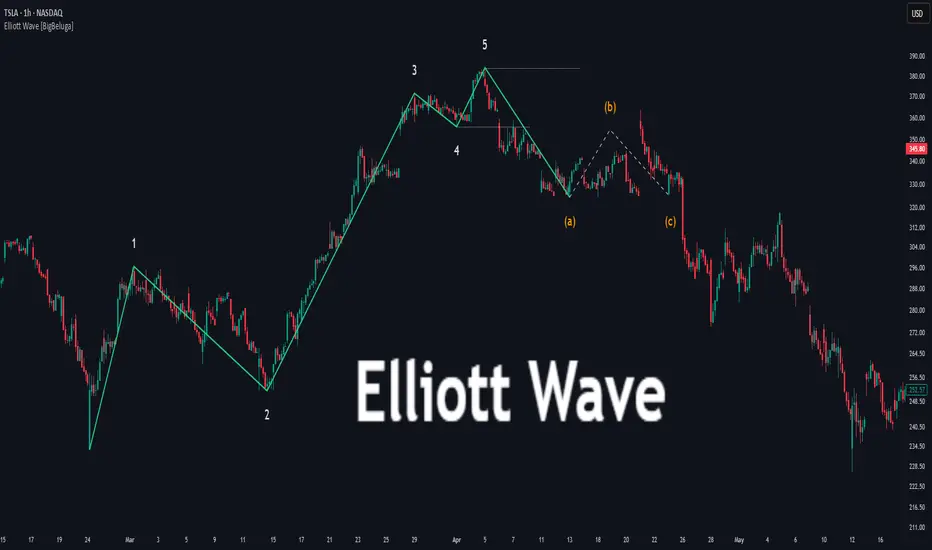
Elliott Wave automatically finds and draws an Elliott-style 5-wave impulse and a dashed projection for a potential -(a)→(b)→(c) correction. It detects six sequential reversal points from rolling highs/lows — 1, 2, 3, 4, 5, (a) — validates their relative placement, and then renders the wave with labels and horizontal reference lines. If price invalidates the structure by closing back through the Wave-5 level inside a 100-bar window, the pattern is cleared (optionally kept as “broken”) while key dotted levels remain for context.
🔵 CONCEPTS
Reversal harvesting from extremes : The script scans highest/lowest values over a user-set Length and stores swing points with their bar indices.
Six-point validation : A pattern requires six pivots (1…5 and (a)). Their vertical/temporal order must satisfy Elliott-style constraints before drawing.
Impulse + projection : After confirming 1→5, the tool plots a curved polyline through the pivots and a dashed forward path from (a) toward (b) (midpoint of 5 and (a)) and back to (c).
Risk line (invalidator) : The Wave-5 price is tracked; a close back through it within 100 bars marks the structure as broken.
Minimal persistence : When broken, the wave drawing is removed to avoid noise, while dotted horizontals for waves 5 and 4 remain as reference.
🔵 FEATURES
Automatic pivot collection from rolling highs/lows (user-controlled Length ).
Wave labeling : Points 1–5 are printed; the last collected swing is marked b
. Projected i
& i
are shown with a dashed polyline.
Breaker line & cleanup : If price closes above Wave-5 (opposite for bears) within 100 bars, the pattern is removed; only dotted levels of 5 and 4 stay.
Styling controls :
Length (pivot sensitivity)
Text Size for labels (tiny/small/normal/large)
Wave color input
Show Broken toggle to keep invalidated patterns visible
Lightweight memory : Keeps a compact buffer of recent pivots/draws to stay responsive.
🔵 HOW TO USE
Set sensitivity : Increase Length on noisy charts for cleaner pivots; decrease to catch earlier/shorter structures.
Wait for confirmation : Once 1→5 is printed and (a) appears, use the Wave-5 line as your invalidation. A close back through it within ~100 bars removes the active wave (unless Show Broken is on).
Plan with the dashed path : The (a)→(b)→(c) projection offers a scenario for potential corrective movement and risk placement.
Work MTF : Identify cleaner waves on higher TFs; refine execution on lower TFs near the breaker or during the move toward (b).
Seek confluence : Align with structure (S/R), volume/Delta, or your trend filter to avoid counter-context trades.
🔵 CONCLUSION
Elliott Wave systematizes discretionary wave analysis: it detects and labels the 5-wave impulse, projects a plausible (a)-(b)-(c) path, and self-cleans on invalidation. With clear labels, dotted reference levels, and a practical breaker rule, it gives traders an objective framework for scenario planning, invalidation, and timing.
Индикатор Pine Script®
Follow-up Buy / Sell Volume Pressure at Supply / Demand Zones█ Overview:
BE-Volume Footprint & Pressure Candles, is an indicator which is preliminarily designed to analyze the supply and demand patterns based on Rally Base Rally (RBR), Drop Base Drop (DBD), Drop Base Rally (DBR) & Rally Base Drop (RBD) concepts in conjunction to volume pressure. Understanding these concepts are crucial. Let's break down why the "Base" is you Best friend in this context.
Commonness in RBR, DBD, DBR, RBD patterns ?
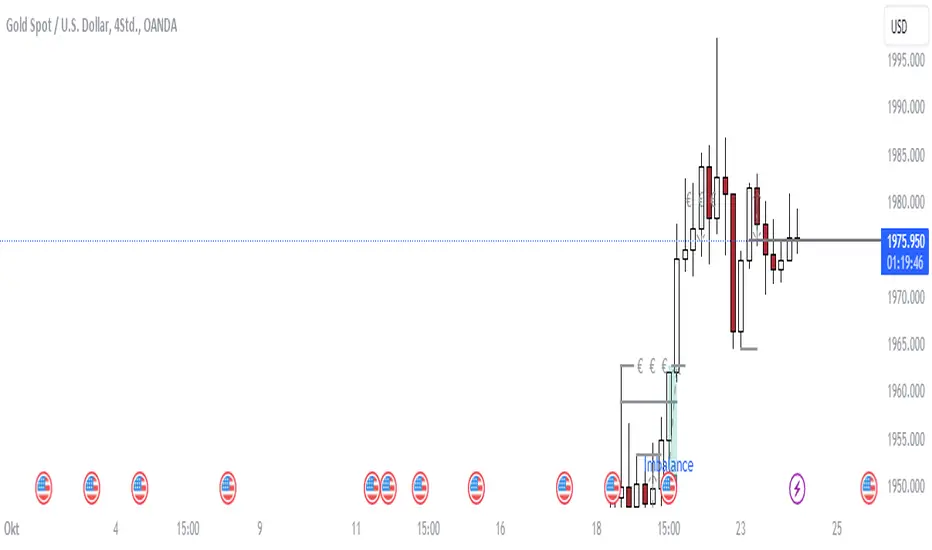
There is an impulse price movement at first, be it rally (price moving up) or the Drop (price moving down), followed by a period of consolidation which is referred as "BASE" and later with another impulse move of price (Rally or Drop).
Why is the Base Important
1. Market Balance: Base represents a balance between buyers and sellers. This is where decisions are made.
2. Confirmation: It confirms the strength of previous impulse move which has happened.
Base & the Liquidity Play:
Supply & Demand Zone predict the presence of all large orders within the limits of the Base Zone. Price is expected to return to the zone to fill the unfilled orders placed by large players.
For the price to move in the intended direction Liquidity plays the major role. hence indicator aims to help traders in identifying those zones where liquidity exists and the volume pressure helps in confirming that liquidity is making its play.
Bottom pane in the below snapshots is a visual representation of Buyers volume pressure (Green Line & the Green filled area) making the price move upwards vs Sellers volume pressure (Red Line & the Red filled area) making the price move downwards.
Top pane in the below snapshots is a visual representation on the pattern identification (Blue marked zone & the Blue line referred as Liquidity level)
Bullish Pressure On Buy Liquidity:
Bearish Pressure On Sell Liquidity:
█ How It Works:
1. Indicator computes technical & mathematical operations such as ATR, delta of Highs & Lows of the candle and Candle ranges to identify the patterns and marks the liquidity lines accordingly.
2. Indicator then waits for price to return to the liquidity levels and checks if Directional volume pressure to flow-in while the prices hover near the Liquidity zones.
3. Once the Volume pressure is evident, loop in to the ride.
█ When It wont Work:
When there no sufficient Liquidity or sustained Opposite volume pressure, trades are expected to fail.
█ Limitations:
Works only on the scripts which has volume info. Relays on LTF candles to determine intra-bar volumes. Hence, Use on TF greater than 1 min and lesser than 15 min.
█ Indicator Features:
1. StrictEntries: employs' tighter rules (rather most significant setups) on the directional volume pressure applied for the price to move. If unchecked, liberal rules applied on the directional volume pressure leading to more setups being identified.
2. Setup Confirmation period: Indicates Waiting period to analyze the directional volume pressure. Early (lesser wait period) is Risky and Late (longer wait period) is too late for the
ride. Find the quant based on the accuracy of the setup provided in the bottom right table.
3. Algo Enabled with Place Holders:
Indicator is equipped with algo alerts, supported with necessary placeholders to trade any instrument like stock, options etc.
Accepted PlaceHolders (Case Sensitive!!)
1. {{ticker}}-->InstrumentName
2. {{datetime}}-->Date & Time Of Order Placement
3. {{close}}-->LTP Price of Script
4. {{TD}}-->Current Level:
Note: Negative Numbers for Short Setup
5. {{EN}} {{SL}} {{TGT}} {{T1}} {{T2}} --> Trade Levels
6. {{Qty}} {{Qty*x}} --> Qty -> Trade Qty mapped in Settings. Replace x with actual number of your choice for the multiplier
7. {{BS}}-->Based on the Direction of Trade Output shall be with B or S (B == Long Trade & S == Short Trade)
8. {{BUYSELL}}-->Based on the Direction of Trade Output shall be with BUY or SELL (BUY == Long Trade & SELL == Short Trade)
9. {{IBUYSELL}}-->Based on the Direction of Trade Output shall be with BUY or SELL (BUY == SHORT Trade & SELL == LONG Trade)
Dynamic Alerts:
10. { {100R0} }-->Dynamic Place Holder 100 Refers to Strike Difference and Zero refers to ATM
11. { {100R-1} }-->Dynamic Place Holder 100 Refers to Strike Difference and -1 refers to
ATM - 100 strike
12. { {50R2} }-->Dynamic Place Holder 50 Refers to Strike Difference and 2 refers to
ATM + (2 * 50 = 100) strike
13. { {"ddMMyy", 0} }-->Dynamically Picks today date in the specified format.
14. { {"ddMMyy", n} }-->replace n with actual number of your choice to Pick date post today date in the specified format.
15. { {"ddMMyy", "MON"} }-->dynamically pick Monday date (coming Monday, if today is not Monday)
Note. for the 2nd Param-->you can choose to specify either Number OR any letter from =>
16. {{CEPE}} {{ICEPE}} {{CP}} {{ICP}} -> Dynamic Option Side CE or C refers to Calls and PE or P refers to Puts. If "I" is used in PlaceHolder text, On long entries PUTs shall be used
Indicator is equipped with customizable Trade & Risk management settings like multiple Take profit levels, Trailing SL.
Индикатор Pine Script®
N-Pattern Detector (Advanced Logic)Introduction
The N-Pattern Detector (Advanced Logic) is a powerful Pine Script-based tool designed to identify a specific price structure known as the "N-pattern", which often indicates trend continuation or potential breakout points in the market. This pattern combines zigzag pivot logic, retracement filters, volume confirmation, and trend alignment, offering high-probability trading signals.
It is ideal for traders who want to automate pattern detection while applying smart filters to reduce false signals in various markets — including stocks, forex, crypto, and indices.
What is the N-Pattern?
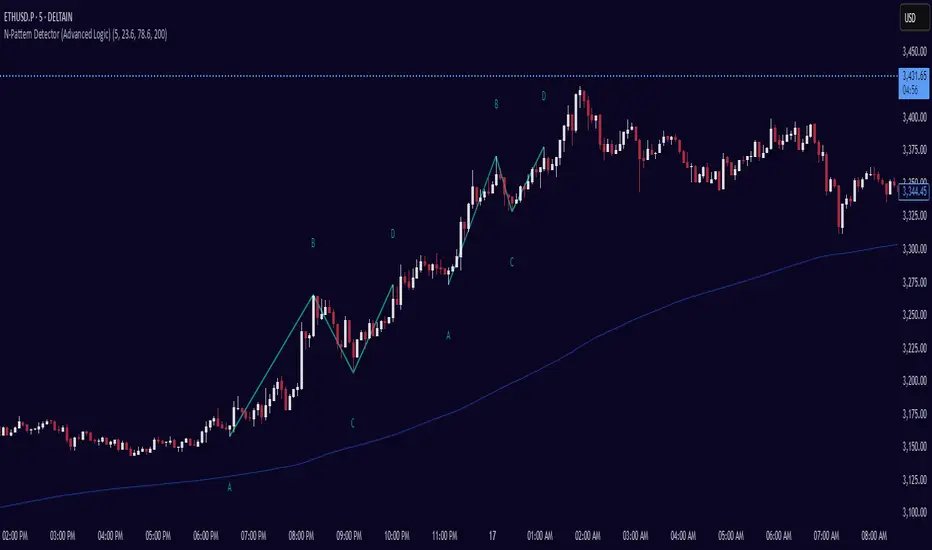
The N-pattern is a 3-leg price formation consisting of points A-B-C-D. It typically follows this structure:
Bullish N-Pattern:
A → Low Pivot
B → Higher High (Impulse)
C → Higher Low (Retracement)
D → Breakout above B (Confirmation)
Bearish N-Pattern:
A → High Pivot
B → Lower Low (Impulse)
C → Lower High (Retracement)
D → Breakdown below B (Confirmation)
The pattern essentially reflects a trend–pullback–breakout structure, making it suitable for continuation trades.
Key Features
1. Intelligent ZigZag Pivot Detection
Uses pivot highs/lows to define key swing points (A, B, C).
Adjustable ZigZag depth to control pattern sensitivity.
Filters noise and avoids false signals in volatile markets.
2. Retracement Validation
Validates the B→C leg as a proper pullback using Fibonacci-based thresholds.
User-defined min and max retracement settings (e.g., 38.2% to 78.6% of A→B leg).
3. Trend Filter via EMA
Filters patterns based on trend direction using a customizable EMA (e.g., 200 EMA).
Only detects bullish patterns above EMA and bearish patterns below EMA (optional).
4. Volume Confirmation
Ensures that impulse legs (A→B, C→D) are supported by stronger volume than the correction leg (B→C).
Adds another layer of confirmation and reliability to detected patterns.
5. Target Projections
Automatically draws 100% A→B projected target from point C.
Optional Fibonacci extensions at 1.272 and 1.618 levels for take-profit planning.
Visually plotted on the chart with colored dashed/dotted lines.
6. Clear Visuals & Labels
Connects all pattern points with colored lines.
Clearly labels points A, B, C, D on the chart.
Uses customizable colors for bullish and bearish patterns.
Includes real-time alerts when a valid pattern is detected.
How to Use It
Add to Chart
Apply the indicator to any chart and time frame. It works across all asset classes.
Adjust Inputs (Optional)
Set ZigZag Depth to control pivot detection sensitivity.
Define Min/Max Retracement levels to match your trading style.
Enable or disable Trend and Volume filters for cleaner signals.
Customize EMA length (default: 200) for trend validation.
Wait for Pattern Confirmation
The indicator constantly scans for valid N-patterns.
A pattern is confirmed only after point D forms (breakout or breakdown).
You’ll see the full pattern drawn with target levels.
Set Alerts
Alerts trigger automatically on confirmation of a bullish or bearish pattern.
You can customize these in TradingView’s alerts panel.
Индикатор Pine Script®
Breaks and Retests - Free990Strategy Description: "Breaks and Retests - Free990"
The "Breaks and Retests - Free990" strategy is based on identifying breakout and retest opportunities for potential entries in both long and short trades. The idea is to detect price breakouts above resistance levels or below support levels, and subsequently identify retests that confirm the breakout levels. The strategy offers an automated approach to enter trades after a breakout followed by a retest, which serves as a confirmation of trend continuation.
Key Components:
Support and Resistance Detection:
The strategy calculates pivot levels based on historical price movements to define support and resistance areas. A lookback range is used to determine these key levels.
Breakouts and Retests:
The system identifies when a breakout occurs above a resistance level or below a support level.
It then waits for a retest of the previously broken level as confirmation, which is often a better entry opportunity.
Trade Direction Selection:
Users can choose between "Long Only," "Short Only," or "Both" directions for trading based on their market view.
Stop Loss and Trailing Stop:
An initial stop loss is placed at a defined percentage away from the entry.
The trailing stop loss is activated after the position gains a specified percentage in profit.
Long Entry:
A long entry is triggered if the price breaks above a resistance level and subsequently retests that level successfully.
The entry condition checks if the breakout was confirmed and if a retest was valid.
The long entry is only executed if the user-selected direction is either "Long Only" or "Both."
Short Entry:
A short entry is triggered if the price breaks below a support level and subsequently retests that level.
The short entry is only executed if the user-selected direction is either "Short Only" or "Both."
sell_condition checks whether the support has been broken and whether the retest condition is valid.
An initial stop loss is placed when the trade is opened to limit the risk if the trade moves against the position.
The stop loss is calculated based on a user-defined percentage (stop_loss_percent) of the entry price.
pinescript
Copy code
stop_loss_price := strategy.position_avg_price * (1 - stop_loss_percent / 100)
For long positions, the stop loss is placed below the entry price.
For short positions, the stop loss is placed above the entry price.
Trailing Stop:
When a position achieves a certain profit threshold (profit_threshold_percent), the trailing stop mechanism is activated.
For long positions, the trailing stop follows the highest price reached, ensuring that some profit is locked in if the price reverses.
For short positions, the trailing stop follows the lowest price reached.
Code Logic for Trailing Stop:
Exit Execution:
The strategy exits the position when the price hits the calculated stop loss level.
This includes both the initial stop loss and the trailing stop that adjusts as the trade progresses.
Code Logic for Exit:
Summary:
Breaks and Retests - Free990 uses support and resistance levels to identify breakouts, followed by retests for confirmation.
Entry Points: Triggered when a breakout is confirmed and a retest occurs, for both long and short trades.
Exit Points:
Initial Stop Loss: Limits risk for both long and short trades.
Trailing Stop Loss: Locks in profits as the price moves in favor of the position.
This strategy aims to capture the momentum after breakouts and minimize losses through effective use of stop loss and trailing stops. It gives the flexibility of selecting trade direction and ensures trades are taken with confirmation through the retest, which helps to reduce false breakouts.
Original Code by @HoanGhetti
Стратегия Pine Script®
5-0 Harmonic Pattern [TradingFinder] 0XABCD 50 Harmonic Detector🔵 Introduction
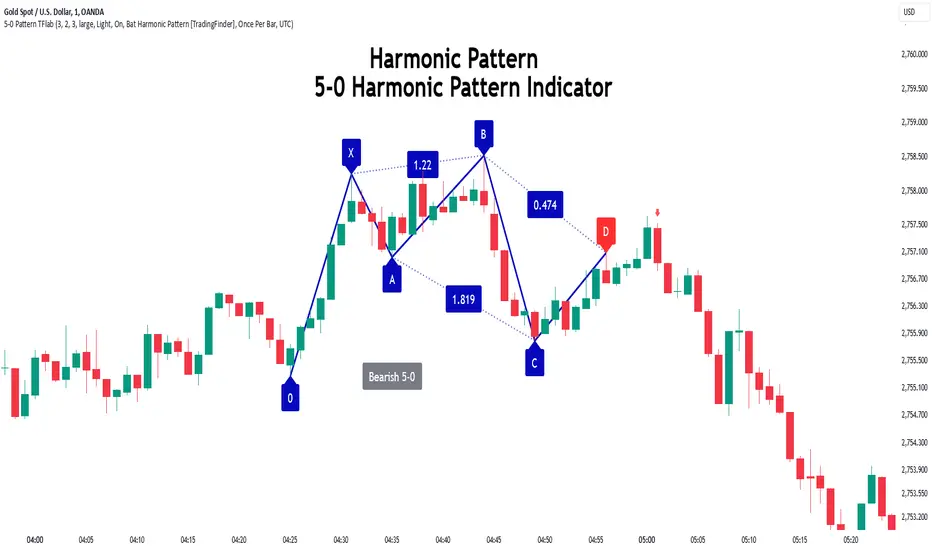
Harmonic patterns are a powerful tool in technical analysis, widely used to detect reversal points and trend changes. Among these, the 5-0 Harmonic Pattern stands out due to its reliance on specific Fibonacci ratios—1.13, 1.618, 2.24, and 0.45 to 0.55—anchored at points 0, X, A, B, C, and D. This pattern provides a structured approach for identifying critical buy and sell points, helping traders achieve optimal entry and exit levels in volatile markets.
This 5-0 Harmonic Pattern indicator automatically detects and marks bullish and bearish formations on the chart, offering precise trading signals based on established harmonic ratios. With its dynamic signals, the 5-0 pattern enables traders to anticipate market movements and capitalize on favorable price trends.
Especially in fast-moving markets, harmonic patterns, particularly the 5-0 Harmonic Pattern, equip traders with an essential framework for identifying reversal opportunities and refining their trading strategies.
Bullish 5-0 Pattern :
Bearish 5-0 Pattern :
🔵 How to Use
The 5-0 Harmonic Pattern indicator is designed to automatically mark the key levels of the harmonic structure: 0, X, A, B, C, and D. By doing so, it detects both bullish and bearish patterns and helps traders recognize optimal entry and exit points.
Formed through specific Fibonacci levels, this pattern signals potential shifts in trend direction, giving traders critical insights for managing entries and exits effectively. The tool proves valuable in high-volatility settings, enabling traders to leverage these signals for refined decision-making.
🟣 Bullish 5-0 Pattern
A bullish 5-0 pattern materializes when Fibonacci levels indicate a potential price reversal to the upside. With points 0, X, A, B, C, and D in alignment, the indicator highlights this upward momentum by displaying a green arrow as a buy signal on the chart. This marking provides a clear entry point, indicating that prices are likely to rise, making it a prime moment for traders to enter long positions.
Additionally, the bullish 5-0 pattern is equipped with tools for traders to set stop-loss and take-profit points based on harmonic lines within the pattern, which represent support and resistance levels. Using these dynamic points, traders can create a more effective risk-reward setup while following the bullish signals in a standalone harmonic strategy.
🟣 Bearish 5-0 Pattern
The bearish 5-0 pattern functions similarly but signals a likely downturn. This pattern emerges when Fibonacci ratios align at points 0, X, A, B, C, and D, predicting a reversal downward. The indicator generates a sell signal, marked by a red arrow, prompting traders to exit long positions or initiate short trades to capitalize on falling prices.
Traders can utilize this bearish pattern for defining exit strategies and setting key levels for stop-loss and take-profit orders. The bearish 5-0 pattern enhances traders’ abilities to gauge critical price levels and manage trade risk effectively, especially in volatile markets. For traders focused on profiting from downward trends, this indicator serves as a powerful tool for timely entries and exits.
🔵 Setting
🟣 Logical Setting
ZigZag Pivot Period : You can adjust the period so that the harmonic patterns are adjusted according to the pivot period you want. This factor is the most important parameter in pattern recognition.
Show Valid Forma t: If this parameter is on "On" mode, only patterns will be displayed that they have exact format and no noise can be seen in them. If "Off" is, the patterns displayed that maybe are noisy and do not exactly correspond to the original pattern.
Show Formation Last Pivot Confirm : if Turned on, you can see this ability of patterns when their last pivot is formed. If this feature is off, it will see the patterns as soon as they are formed. The advantage of this option being clear is less formation of fielded patterns, and it is accompanied by the latest pattern seeing and a sharp reduction in reward to risk.
Period of Formation Last Pivot : Using this parameter you can determine that the last pivot is based on Pivot period.
🟣 Genaral Setting
Show : Enter "On" to display the template and "Off" to not display the template.
Color : Enter the desired color to draw the pattern in this parameter.
LineWidth : You can enter the number 1 or numbers higher than one to adjust the thickness of the drawing lines. This number must be an integer and increases with increasing thickness.
LabelSize : You can adjust the size of the labels by using the "size.auto", "size.tiny", "size.smal", "size.normal", "size.large" or "size.huge" entries.
🟣 Alert Setting
Alert : On / Off
Message Frequency : This string parameter defines the announcement frequency. Choices include: "All" (activates the alert every time the function is called), "Once Per Bar" (activates the alert only on the first call within the bar), and "Once Per Bar Close" (the alert is activated only by a call at the last script execution of the real-time bar upon closing). The default setting is "Once per Bar".
Show Alert Time by Time Zone : The date, hour, and minute you receive in alert messages can be based on any time zone you choose. For example, if you want New York time, you should enter "UTC-4". This input is set to the time zone "UTC" by default.
Conclusion
The 5-0 Harmonic Pattern indicator serves as a robust solution for technical analysts and traders looking to pinpoint market reversal points. By automatically recognizing 5-0 patterns and generating buy and sell signals based on Fibonacci ratios, this tool supports precise trend analysis and entry/exit timing. The indicator’s adjustable alerts, color themes, and pattern toggles allow for comprehensive customization, ensuring alignment with individual trading strategies.
Harmonic patterns, especially the 5-0 Harmonic Pattern, guide traders in identifying high-accuracy entry and exit points, thus aiding in more informed trading decisions. By combining Fibonacci ratio analysis with real-time signal updates, this indicator provides a well-rounded approach for risk management and capitalizing on trading opportunities. Professional traders can harness this tool to enhance technical analysis precision and capitalize on price trends effectively, maximizing profitability in both bullish and bearish markets.
Индикатор Pine Script®
Flat Combo DetectorFlat Combo Detector (FCD)
Introduction:
The Flat Combo Detector is a unique tool crafted to aid traders in identifying potential trend reversals. Unlike standard indicators that primarily focus on moving averages or oscillators, the FCD bases its signals on specific candlestick patterns that manifest at crucial trend pivot points.
I use it mostly on OANDA:XAUUSD Gold
How It Works:
The logic of the Flat Combo Detector revolves around the formation of consecutive bearish and bullish candles with particular attributes:
Bearish to Bullish Transition:
Primary Candle : A bearish candle where the close is lower than the open and its close is equal to its low.
Following Candle: A bullish candle where the close is higher than the open, and the open approximates its low (within a user-defined tolerance).
Signal : A green triangle plotted below the price bar, indicating a potential shift from a bearish to bullish trend.
Bullish to Bearish Transition:
Primary Candle: A bullish candle where the close is higher than the open and equals its high.
Following Candle : A bearish candle where the close is lower than the open, and the open approximates its high (within a user-defined tolerance).
Signal : A red triangle plotted above the price bar, indicating a potential transition from a bullish to bearish trend.
Usage Guidance:
For traders unfamiliar with Pine Script, using this indicator is straightforward. Once added to the chart, look for the green and red triangle signals. A green triangle below a price bar suggests a possible bullish reversal, while a red triangle above a price bar hints at a potential bearish reversal. Always consider these signals in conjunction with other technical analysis tools and the broader market context to optimize decision-making.
Associated Strategy:
I've also developed a trading strategy that utilizes these specific entry points identified by the FCD. If you find the signals from this indicator helpful, you might also be interested in exploring the strategy for a comprehensive trading approach. Always remember to backtest and validate any strategy before live trading.
Chart Presentation:
The published chart associated with this script has been kept clean to ensure clarity. Users will only observe the main price bars/candles along with the green and red triangle signals generated by the FCD.
Conclusion:
The Flat Combo Detector provides traders with a fresh perspective on trend reversal points. Its focus on specific candlestick patterns makes it a valuable tool, especially when used in combination with other technical indicators. Always ensure to practice prudent risk management and consult multiple analysis methods before making trading decisions.
Индикатор Pine Script®