ATLAS_COREShared utility library for the ATLAS Trading Intelligence Suite. Provides brand colors, math utilities, candle analysis, grading system, visual helpers, and more. Библиотека Pine Script®от Interakktive1
RSMPatternLibLibrary "RSMPatternLib" RSM Pattern Library - All chart patterns from PATTERNS.md Implements: Candlestick patterns, Support/Resistance, Gaps, Triangles, Volume Divergence, and more ALL PATTERNS ARE OWN IMPLEMENTATION - No external dependencies EDGE CASES HANDLED: - Zero/tiny candle bodies - Missing volume data - Low bar count scenarios - Integer division issues - Price normalization for different instruments bullishEngulfing(minBodyRatio, minPrevBodyRatio) Detects Bullish Engulfing pattern Parameters: minBodyRatio (float) : Minimum body size as ratio of total range (default 0.3) minPrevBodyRatio (float) : Minimum previous candle body ratio to filter dojis (default 0.1) Returns: bool True when bullish engulfing detected EDGE CASES: Handles doji previous candle, zero range, tiny bodies bearishEngulfing(minBodyRatio, minPrevBodyRatio) Detects Bearish Engulfing pattern Parameters: minBodyRatio (float) : Minimum body size as ratio of total range (default 0.3) minPrevBodyRatio (float) : Minimum previous candle body ratio to filter dojis (default 0.1) Returns: bool True when bearish engulfing detected EDGE CASES: Handles doji previous candle, zero range, tiny bodies doji(maxBodyRatio, minRangeAtr) Detects Doji candle (indecision) Parameters: maxBodyRatio (float) : Maximum body size as ratio of total range (default 0.1) minRangeAtr (float) : Minimum range as multiple of ATR to filter flat candles (default 0.3) Returns: bool True when doji detected EDGE CASES: Filters out no-movement bars, handles zero range shootingStar(wickMultiplier, maxLowerWickRatio, minBodyAtrRatio) Detects Shooting Star (bearish reversal) Parameters: wickMultiplier (float) : Upper wick must be at least this times the body (default 2.0) maxLowerWickRatio (float) : Lower wick max as ratio of body (default 0.5) minBodyAtrRatio (float) : Minimum body size as ratio of ATR (default 0.1) Returns: bool True when shooting star detected EDGE CASES: Handles zero body (uses range-based check), tiny bodies hammer(wickMultiplier, maxUpperWickRatio, minBodyAtrRatio) Detects Hammer (bullish reversal) Parameters: wickMultiplier (float) : Lower wick must be at least this times the body (default 2.0) maxUpperWickRatio (float) : Upper wick max as ratio of body (default 0.5) minBodyAtrRatio (float) : Minimum body size as ratio of ATR (default 0.1) Returns: bool True when hammer detected EDGE CASES: Handles zero body (uses range-based check), tiny bodies invertedHammer(wickMultiplier, maxLowerWickRatio) Detects Inverted Hammer (bullish reversal after downtrend) Parameters: wickMultiplier (float) : Upper wick must be at least this times the body (default 2.0) maxLowerWickRatio (float) : Lower wick max as ratio of body (default 0.5) Returns: bool True when inverted hammer detected EDGE CASES: Same as shootingStar but requires bullish close hangingMan(wickMultiplier, maxUpperWickRatio) Detects Hanging Man (bearish reversal after uptrend) Parameters: wickMultiplier (float) : Lower wick must be at least this times the body (default 2.0) maxUpperWickRatio (float) : Upper wick max as ratio of body (default 0.5) Returns: bool True when hanging man detected NOTE: Identical to hammer - context (uptrend) determines meaning morningStar(requireGap, minAvgBars) Detects Morning Star (3-candle bullish reversal) Parameters: requireGap (bool) : Whether to require gap between candles (default false for crypto/forex) minAvgBars (int) : Minimum bars for average body calculation (default 14) Returns: bool True when morning star pattern detected EDGE CASES: Gap is optional, handles low bar count, uses shifted average eveningStar(requireGap, minAvgBars) Detects Evening Star (3-candle bearish reversal) Parameters: requireGap (bool) : Whether to require gap between candles (default false for crypto/forex) minAvgBars (int) : Minimum bars for average body calculation (default 14) Returns: bool True when evening star pattern detected EDGE CASES: Gap is optional, handles low bar count gapUp() Detects Gap Up Returns: bool True when current bar opens above previous bar's high gapDown() Detects Gap Down Returns: bool True when current bar opens below previous bar's low gapSize() Returns gap size in price Returns: float Gap size (positive for gap up, negative for gap down, 0 for no gap) gapPercent() Returns gap size as percentage Returns: float Gap size as percentage of previous close gapType(volAvgLen, breakawayMinPct, highVolMult) Classifies gap type based on volume Parameters: volAvgLen (int) : Length for volume average (default 20) breakawayMinPct (float) : Minimum gap % for breakaway (default 1.0) highVolMult (float) : Volume multiplier for high volume (default 1.5) Returns: string Gap type: "Breakaway", "Common", "Continuation", or "None" EDGE CASES: Handles missing volume data, low bar count swingHigh(leftBars, rightBars) Detects swing high using pivot Parameters: leftBars (int) : Bars to left for pivot (default 5) rightBars (int) : Bars to right for pivot (default 5) Returns: float Swing high price or na swingLow(leftBars, rightBars) Detects swing low using pivot Parameters: leftBars (int) : Bars to left for pivot (default 5) rightBars (int) : Bars to right for pivot (default 5) Returns: float Swing low price or na higherHigh(leftBars, rightBars, lookback) Checks if current swing high is higher than previous swing high Parameters: leftBars (int) : Bars to left for pivot (default 5) rightBars (int) : Bars to right for pivot (default 5) lookback (int) : How many bars back to search for previous pivot (default 50) Returns: bool True when higher high pattern detected EDGE CASES: Searches backwards for pivots instead of using var (library-safe) higherLow(leftBars, rightBars, lookback) Checks if current swing low is higher than previous swing low Parameters: leftBars (int) : Bars to left for pivot (default 5) rightBars (int) : Bars to right for pivot (default 5) lookback (int) : How many bars back to search for previous pivot (default 50) Returns: bool True when higher low pattern detected lowerHigh(leftBars, rightBars, lookback) Checks if current swing high is lower than previous swing high Parameters: leftBars (int) : Bars to left for pivot (default 5) rightBars (int) : Bars to right for pivot (default 5) lookback (int) : How many bars back to search for previous pivot (default 50) Returns: bool True when lower high pattern detected lowerLow(leftBars, rightBars, lookback) Checks if current swing low is lower than previous swing low Parameters: leftBars (int) : Bars to left for pivot (default 5) rightBars (int) : Bars to right for pivot (default 5) lookback (int) : How many bars back to search for previous pivot (default 50) Returns: bool True when lower low pattern detected bullishTrend(leftBars, rightBars, lookback) Detects Bullish Trend (HH + HL within lookback) Parameters: leftBars (int) : Bars to left for pivot (default 5) rightBars (int) : Bars to right for pivot (default 5) lookback (int) : Lookback period (default 50) Returns: bool True when making higher highs AND higher lows bearishTrend(leftBars, rightBars, lookback) Detects Bearish Trend (LH + LL within lookback) Parameters: leftBars (int) : Bars to left for pivot (default 5) rightBars (int) : Bars to right for pivot (default 5) lookback (int) : Lookback period (default 50) Returns: bool True when making lower highs AND lower lows nearestResistance(lookback, leftBars, rightBars) Finds nearest resistance level above current price Parameters: lookback (int) : Number of bars to look back (default 50) leftBars (int) : Pivot left bars (default 5) rightBars (int) : Pivot right bars (default 5) Returns: float Nearest resistance level or na EDGE CASES: Pre-computes pivots, handles bounds properly nearestSupport(lookback, leftBars, rightBars) Finds nearest support level below current price Parameters: lookback (int) : Number of bars to look back (default 50) leftBars (int) : Pivot left bars (default 5) rightBars (int) : Pivot right bars (default 5) Returns: float Nearest support level or na resistanceBreakout(lookback, leftBars, rightBars) Detects resistance breakout Parameters: lookback (int) : Number of bars to look back (default 50) leftBars (int) : Pivot left bars (default 5) rightBars (int) : Pivot right bars (default 5) Returns: bool True when price breaks above resistance EDGE CASES: Uses previous bar's resistance to avoid lookahead supportBreakdown(lookback, leftBars, rightBars) Detects support breakdown Parameters: lookback (int) : Number of bars to look back (default 50) leftBars (int) : Pivot left bars (default 5) rightBars (int) : Pivot right bars (default 5) Returns: bool True when price breaks below support bullishVolumeDivergence(leftBars, rightBars, lookback) Detects Bullish Volume Divergence (price makes lower low, volume decreases) Parameters: leftBars (int) : Pivot left bars (default 5) rightBars (int) : Pivot right bars (default 5) lookback (int) : Bars to search for previous pivot (default 50) Returns: bool True when bullish volume divergence detected EDGE CASES: Library-safe (no var), searches for previous pivot bearishVolumeDivergence(leftBars, rightBars, lookback) Detects Bearish Volume Divergence (price makes higher high, volume decreases) Parameters: leftBars (int) : Pivot left bars (default 5) rightBars (int) : Pivot right bars (default 5) lookback (int) : Bars to search for previous pivot (default 50) Returns: bool True when bearish volume divergence detected rangeContracting(lookback) Detects if price is in a contracting range (triangle formation) Parameters: lookback (int) : Bars to analyze (default 20) Returns: bool True when range is contracting EDGE CASES: Uses safe integer division, checks minimum lookback ascendingTriangle(lookback, flatTolerance) Detects Ascending Triangle (flat top, rising bottom) Parameters: lookback (int) : Bars to analyze (default 20) flatTolerance (float) : Max normalized slope for "flat" line (default 0.002) Returns: bool True when ascending triangle detected EDGE CASES: Safe division, normalized slope, minimum lookback descendingTriangle(lookback, flatTolerance) Detects Descending Triangle (falling top, flat bottom) Parameters: lookback (int) : Bars to analyze (default 20) flatTolerance (float) : Max normalized slope for "flat" line (default 0.002) Returns: bool True when descending triangle detected symmetricalTriangle(lookback, minSlope) Detects Symmetrical Triangle (converging trend lines) Parameters: lookback (int) : Bars to analyze (default 20) minSlope (float) : Minimum normalized slope magnitude (default 0.0005) Returns: bool True when symmetrical triangle detected doubleBottom(tolerance, minSpanBars, lookback) Detects Double Bottom (W pattern) - OWN IMPLEMENTATION Two swing lows at similar price levels with a swing high between them Parameters: tolerance (float) : Max price difference between lows as % (default 3) minSpanBars (int) : Minimum bars between the two lows (default 5) lookback (int) : Max bars to search for pattern (default 100) Returns: bool True when double bottom detected doubleTop(tolerance, minSpanBars, lookback) Detects Double Top (M pattern) - OWN IMPLEMENTATION Two swing highs at similar price levels with a swing low between them Parameters: tolerance (float) : Max price difference between highs as % (default 3) minSpanBars (int) : Minimum bars between the two highs (default 5) lookback (int) : Max bars to search for pattern (default 100) Returns: bool True when double top detected tripleBottom(tolerance, minSpanBars, lookback) Detects Triple Bottom - OWN IMPLEMENTATION Three swing lows at similar price levels Parameters: tolerance (float) : Max price difference between lows as % (default 3) minSpanBars (int) : Minimum total bars for pattern (default 10) lookback (int) : Max bars to search for pattern (default 150) Returns: bool True when triple bottom detected tripleTop(tolerance, minSpanBars, lookback) Detects Triple Top - OWN IMPLEMENTATION Three swing highs at similar price levels Parameters: tolerance (float) : Max price difference between highs as % (default 3) minSpanBars (int) : Minimum total bars for pattern (default 10) lookback (int) : Max bars to search for pattern (default 150) Returns: bool True when triple top detected bearHeadShoulders() Detects Bearish Head and Shoulders (OWN IMPLEMENTATION) Head is higher than both shoulders, shoulders roughly equal, with valid neckline STRICT VERSION - requires proper structure, neckline, and minimum span Returns: bool True when bearish H&S detected bullHeadShoulders() Detects Bullish (Inverse) Head and Shoulders (OWN IMPLEMENTATION) Head is lower than both shoulders, shoulders roughly equal, with valid neckline STRICT VERSION - requires proper structure, neckline, and minimum span Returns: bool True when bullish H&S detected bearAscHeadShoulders() Detects Bearish Ascending Head and Shoulders (variant) Returns: bool True when pattern detected bullAscHeadShoulders() Detects Bullish Ascending Head and Shoulders (variant) Returns: bool True when pattern detected bearDescHeadShoulders() Detects Bearish Descending Head and Shoulders (variant) Returns: bool True when pattern detected bullDescHeadShoulders() Detects Bullish Descending Head and Shoulders (variant) Returns: bool True when pattern detected isSwingLow() Re-export: Detects swing low Returns: bool True when swing low detected isSwingHigh() Re-export: Detects swing high Returns: bool True when swing high detected swingHighPrice(idx) Re-export: Gets swing high price at index Parameters: idx (int) : Index (0 = most recent) Returns: float Swing high price swingLowPrice(idx) Re-export: Gets swing low price at index Parameters: idx (int) : Index (0 = most recent) Returns: float Swing low price swingHighBarIndex(idx) Re-export: Gets swing high bar index Parameters: idx (int) : Index (0 = most recent) Returns: int Bar index of swing high swingLowBarIndex(idx) Re-export: Gets swing low bar index Parameters: idx (int) : Index (0 = most recent) Returns: int Bar index of swing low cupBottom(smoothLen, minDepthAtr, maxDepthAtr) Detects Cup and Handle pattern formation Uses price acceleration and depth analysis Parameters: smoothLen (int) : Smoothing length for price (default 10) minDepthAtr (float) : Minimum cup depth as ATR multiple (default 1.0) maxDepthAtr (float) : Maximum cup depth as ATR multiple (default 5.0) Returns: bool True when potential cup bottom detected EDGE CASES: Added depth filter, ATR validation cupHandle(lookback, maxHandleRetraceRatio) Detects potential handle formation after cup Parameters: lookback (int) : Bars to look back for cup (default 30) maxHandleRetraceRatio (float) : Maximum handle retracement of cup depth (default 0.5) Returns: bool True when handle pattern detected bullishPatternCount() Returns count of bullish patterns detected Returns: int Number of bullish patterns currently active bearishPatternCount() Returns count of bearish patterns detected Returns: int Number of bearish patterns currently active detectedPatterns() Returns string description of detected patterns Returns: string Comma-separated list of detected patternsБиблиотека Pine Script®от azgronОбновлено 0
NateraCoreLibrary "NateraCore" z_score(src, length) Parameters: src (float) length (int)Библиотека Pine Script®от ohana21160
colors_library# ColorsLibrary - PineScript v6 A comprehensive PineScript v6 library containing **10 color themes** and utility functions for TradingView. --- ## 📦 Installation ```pinescript import TheTradingSpiderMan/colors_library/1 as CLR ``` --- ## 🎨 All Available Color Themes (10) ### Default Theme (Green/Red - Classic Trading) | Function | Description | | ------------------ | --------------- | | `defaultBull()` | Green (#26A69A) | | `defaultBear()` | Red (#EF5350) | | `defaultNeutral()` | Grey (#787B86) | ### Monochrome Theme (White/Grey/Black) | Function | Description | | --------------- | -------------------- | | `monoBull()` | White (#FFFFFF) | | `monoBear()` | Black (#000000) | | `monoNeutral()` | Grey (#808080) | | `monoLight()` | Light Grey (#C0C0C0) | | `monoDark()` | Dark Grey (#404040) | ### Vaporwave Theme (Purple/Pink, Blue/Cyan) | Function | Description | | ---------------- | ----------------------- | | `vaporBull()` | Cyan (#00FFFF) | | `vaporBear()` | Magenta (#FF00FF) | | `vaporNeutral()` | Grey (#787B86) | | `vaporPurple()` | Purple (#9B59B6) | | `vaporPink()` | Hot Pink (#FF6EC7) | | `vaporBlue()` | Electric Blue (#0080FF) | ### Neon Theme (Bright Fluorescent Colors) | Function | Description | | --------------- | --------------------- | | `neonBull()` | Neon Green (#39FF14) | | `neonBear()` | Neon Red (#FF073A) | | `neonNeutral()` | Grey (#787B86) | | `neonYellow()` | Neon Yellow (#FFFF00) | | `neonOrange()` | Neon Orange (#FF6600) | | `neonBlue()` | Neon Blue (#00BFFF) | ### Ocean Theme (Blues and Teals) | Function | Description | | ---------------- | ------------------- | | `oceanBull()` | Teal (#20B2AA) | | `oceanBear()` | Deep Blue (#1E3A5F) | | `oceanNeutral()` | Grey (#787B86) | | `oceanAqua()` | Aqua (#00CED1) | | `oceanNavy()` | Navy (#000080) | | `oceanSeafoam()` | Seafoam (#3EB489) | ### Sunset Theme (Oranges, Yellows, Reds) | Function | Description | | ----------------- | ----------------------- | | `sunsetBull()` | Golden Yellow (#FFD700) | | `sunsetBear()` | Crimson (#DC143C) | | `sunsetNeutral()` | Grey (#787B86) | | `sunsetOrange()` | Orange (#FF8C00) | | `sunsetCoral()` | Coral (#FF7F50) | | `sunsetPurple()` | Twilight (#8B008B) | ### Forest Theme (Greens and Browns) | Function | Description | | ----------------- | ---------------------- | | `forestBull()` | Forest Green (#228B22) | | `forestBear()` | Brown (#8B4513) | | `forestNeutral()` | Grey (#787B86) | | `forestLime()` | Lime Green (#32CD32) | | `forestOlive()` | Olive (#6B8E23) | | `forestEarth()` | Earth Brown (#704214) | ### Candy Theme (Pastel/Soft Colors) | Function | Description | | ----------------- | -------------------- | | `candyBull()` | Mint Green (#98FB98) | | `candyBear()` | Soft Pink (#FFB6C1) | | `candyNeutral()` | Grey (#787B86) | | `candyLavender()` | Lavender (#E6E6FA) | | `candyPeach()` | Peach (#FFDAB9) | | `candySky()` | Sky Blue (#87CEEB) | ### Fire Theme (Reds, Oranges, Yellows) | Function | Description | | --------------- | ---------------------- | | `fireBull()` | Flame Orange (#FF5722) | | `fireBear()` | Dark Red (#B71C1C) | | `fireNeutral()` | Grey (#787B86) | | `fireYellow()` | Flame Yellow (#FFC107) | | `fireEmber()` | Ember (#FF6F00) | | `fireAsh()` | Ash Grey (#424242) | ### Ice Theme (Cool Blues and Whites) | Function | Description | | -------------- | ---------------------- | | `iceBull()` | Ice Blue (#B3E5FC) | | `iceBear()` | Frost Blue (#0277BD) | | `iceNeutral()` | Grey (#787B86) | | `iceWhite()` | Snow White (#F5F5F5) | | `iceCrystal()` | Crystal Blue (#81D4FA) | | `iceFrost()` | Frost (#4FC3F7) | --- ## 🔧 Selector & Utility Functions | Function | Description | | -------------------- | --------------------------------------------------- | | `bullColor()` | Get bullish color by theme name | | `bearColor()` | Get bearish color by theme name | | `trendColor()` | Returns bull/bear color based on boolean condition | | `gradientColor()` | Creates gradient between bull/bear (0-100 value) | | `rsiGradient()` | RSI-style coloring (oversold=bull, overbought=bear) | | `candleColor()` | Returns color based on candle direction | | `volumeColor()` | Returns color based on close vs previous close | | `withTransparency()` | Applies transparency to any color | | `getAllThemes()` | Returns comma-separated list of all theme names | | `getThemeOptions()` | Returns array of theme names for input options | --- ## 🔧 Usage Examples ### Basic Usage ```pinescript //@version=6 indicator("Color Example") import quantablex/colors_library/1 as CLR // Direct color usage plot(close, "Close", CLR.defaultBull()) plot(open, "Open", CLR.defaultBear()) // With transparency plot(high, "High", CLR.vaporPurple(50)) ``` ### Using Theme Selector ```pinescript //@version=6 indicator("Theme Selector") import quantablex/colors_library/1 as CLR theme = input.string("DEFAULT", "Color Theme", options= ) bullCol = CLR.bullColor(theme) bearCol = CLR.bearColor(theme) plot(close, "Close", close >= open ? bullCol : bearCol) ``` ### Trend Coloring ```pinescript //@version=6 indicator("Trend Colors") import quantablex/colors_library/1 as CLR theme = input.string("VAPOR", "Theme") ma = ta.ema(close, 20) // Auto trend color based on condition trendCol = CLR.trendColor(close > ma, theme) plot(ma, "EMA", trendCol, 2) ``` ### Gradient & RSI Coloring ```pinescript //@version=6 indicator("Gradient Example") import quantablex/colors_library/1 as CLR rsi = ta.rsi(close, 14) // Gradient based on RSI value gradCol = CLR.gradientColor(rsi, "NEON") plot(rsi, "RSI", gradCol) // Or use built-in RSI gradient rsiCol = CLR.rsiGradient(rsi, "DEFAULT") bgcolor(rsiCol, transp=90) ``` ### Candle & Volume Coloring ```pinescript //@version=6 indicator("Candle Colors", overlay=true) import quantablex/colors_library/1 as CLR theme = input.string("FIRE", "Theme") // Auto candle coloring barcolor(CLR.candleColor(theme)) // Volume bars colored by direction plotshape(volume, style=shape.circle, color=CLR.volumeColor(theme, 30)) ``` --- ## 🎨 Theme Selection Guide | Use Case | Recommended Themes | | --------------------- | --------------------- | | **Classic Trading** | DEFAULT, MONO | | **Dark Mode Charts** | NEON, VAPOR, ICE | | **Light Mode Charts** | CANDY, SUNSET, FOREST | | **High Visibility** | NEON, FIRE | | **Low Eye Strain** | OCEAN, CANDY, ICE | | **Professional Look** | MONO, DEFAULT, OCEAN | | **Aesthetic/Stylish** | VAPOR, SUNSET, CANDY | --- ## ⚙️ Parameters Reference ### Common Parameters - `transparency` - Transparency level (0-100, where 0=opaque, 100=invisible) ### Selector Parameters - `theme` - Theme name string: `DEFAULT`, `MONO`, `VAPOR`, `NEON`, `OCEAN`, `SUNSET`, `FOREST`, `CANDY`, `FIRE`, `ICE` --- ## 📝 Notes - All functions accept optional `transparency` parameter (default 0) - Theme selector functions default to `DEFAULT` theme if invalid name provided - Use `getAllThemes()` to get comma-separated list of all theme names - Use `getThemeOptions()` to get array for `input.string` options - All 50+ color functions are exported for direct use --- **Author:** thetradingspiderman **Version:** 1.0 **PineScript Version:** 6 **Total Themes:** 10 **Total Color Functions:** 50+ Библиотека Pine Script®от TheTradingSpiderManОбновлено 0
Table_UtilsLibrary "Table_Utils" Enhanced Table Utilities for Professional Dashboards V2.0 get_position(posStr) Convert string to position constant Parameters: posStr (string) : User-selected position string Returns: Pine Script position constant get_size(sizeStr) Convert string to size constant Parameters: sizeStr (string) : User-selected size string Returns: Pine Script size constant get_theme_color(scheme, colorType) Get color from predefined palette Parameters: scheme (string) : Palette name: "Cyberpunk", "Professional", "Pastel", "Dark" colorType (string) : Color role: "bull", "bear", "neutral", "bg", "border" Returns: Color value create_dashboard(posStr, cols, rows, scheme) Create standard dashboard table with preset styling Parameters: posStr (string) : Position string cols (int) : Number of columns rows (int) : Number of rows scheme (string) : Color scheme name Returns: Configured table object add_header_cell(tbl, col, row, text_, scheme) Add header cell with preset styling Parameters: tbl (table) : Table object col (int) : Column index row (int) : Row index text_ (string) scheme (string) : Color scheme add_data_cell(tbl, col, row, text_, value, scheme) Add data cell with conditional coloring Parameters: tbl (table) : Table object col (int) : Column index row (int) : Row index text_ (string) value (float) : Numeric value for color coding scheme (string) : Color scheme format_number(value, decimals) Format number with appropriate suffix (K, M, B) Parameters: value (float) : Number to format decimals (int) : Number of decimal places Returns: Formatted string format_percentage(value) Format percentage with sign Parameters: value (float) : Percentage value (as decimal, e.g., 0.05 = 5%) Returns: Formatted string with % symbolБиблиотека Pine Script®от HorazioОбновлено 0
News2026H2Library "News2026H2" - 2026 News Events Support Lib f_loadNewsRows() f_loadExcSevByTypeId() f_loadExcTagByTypeId() f_loadExcDelayAfterNewsMins()Библиотека Pine Script®от pking99990
SPX_0DTE_EngineLibrary "SPX_0DTE_Engine" getATM(price) Parameters: price (float) getCallStrikes(atmStrike, count) Parameters: atmStrike (int) count (int) getPutStrikes(atmStrike, count) Parameters: atmStrike (int) count (int) generateOCCSymbol(underlying, year, month, day, optionType, strike) Parameters: underlying (string) year (int) month (int) day (int) optionType (string) strike (int) getAdaptiveReference(src, lookback) Parameters: src (float) lookback (int) detectLiquidityGrabHigh(high, low, close, volume, lookback) Parameters: high (float) low (float) close (float) volume (float) lookback (int) detectLiquidityGrabLow(high, low, close, volume, lookback) Parameters: high (float) low (float) close (float) volume (float) lookback (int) getVolatilityRegime(src, bbLength, bbMult) Parameters: src (float) bbLength (int) bbMult (float) getESConfirmation(spxClose, esClose, spxHigh, esHigh, spxLow, esLow, lookback) Parameters: spxClose (float) esClose (float) spxHigh (float) esHigh (float) spxLow (float) esLow (float) lookback (int) getDeltaBias(src, adaptiveRef, esClose, spxClose) Parameters: src (float) adaptiveRef (float) esClose (float) spxClose (float) getGammaZone(src, atmStrike) Parameters: src (float) atmStrike (int) getVegaRegime(vixSymbol) Parameters: vixSymbol (simple string) isFailState(volRegime, hour, minute, vix, atr) Parameters: volRegime (int) hour (int) minute (int) vix (float) atr (float) checkCallConfluence(liquidityGrabLow, volRegime, esConfirmation, failState, deltaBias, lowGamma) Parameters: liquidityGrabLow (bool) volRegime (int) esConfirmation (int) failState (bool) deltaBias (int) lowGamma (bool) checkPutConfluence(liquidityGrabHigh, volRegime, esConfirmation, failState, deltaBias, lowGamma) Parameters: liquidityGrabHigh (bool) volRegime (int) esConfirmation (int) failState (bool) deltaBias (int) lowGamma (bool) checkProfitTarget(entryPrice, currentPrice, targetPercent, isCall) Parameters: entryPrice (float) currentPrice (float) targetPercent (float) isCall (bool) checkStopLoss(entryPrice, currentPrice, stopPercent, isCall) Parameters: entryPrice (float) currentPrice (float) stopPercent (float) isCall (bool) checkTimeExit(hour, minute) Parameters: hour (int) minute (int) checkInvalidation(esConfirmation, isCallPosition) Parameters: esConfirmation (int) isCallPosition (bool)Библиотека Pine Script®от albarqi5140
NexusLibsDisplayNexusLibsDisplay provides lightweight, reusable UI helpers for Pine Script indicators. It is designed to simplify the creation of display elements on the chart—such as info tables, headers, and custom text overlays—without forcing users to rebuild UI components in every script. This library follows a minimal, dependency-free design so it can be imported safely into protected or invite-only indicators. Functions createInfoTable(showPair, showTF, txtColor, bgColor) Creates a compact top-center table displaying the current symbol and timeframe. Useful for dashboards, algo-overviews, and clean chart annotations. showText(txt, posX, posY, txtColor) Displays custom text at a specific chart location. Ideal for labels, markers, or highlighting model states.Библиотека Pine Script®от jqcfm_lab0
ColorGradientLibrary "ColorGradient" Library for creating color gradients and palettes with hex colors hexToColor(hexStr) hexToColor Parameters: hexStr (string) : Hex color string (e.g., "#FF0000" or "FF0000") Returns: color value gradientStep(color1, color2, steps, step) gradientStep Parameters: color1 (string) : Starting color (hex string) color2 (string) : Ending color (hex string) steps (int) : Number of steps including start and end step (int) : Current step (0 to steps-1) Returns: Interpolated color multiGradientStep(colors, totalSteps, step) multiGradientStep Parameters: colors (array) : Array of hex color strings totalSteps (int) : Total number of steps across all colors step (int) : Current step (0 to totalSteps-1) Returns: Interpolated color applyPaletteStyle(hexStr, style) applyPaletteStyle Parameters: hexStr (string) : Hex color string style (string) : "normal", "pale", "pastel", "bright", "matte" Returns: Adjusted color getStyledGradient(colors, totalSteps, step, style) getStyledGradient Parameters: colors (array) : Array of hex color strings totalSteps (int) : Total number of steps step (int) : Current step style (string) : Palette style ("normal", "pale", "pastel", "bright", "matte") Returns: Styled colorБиблиотека Pine Script®от dnatradez0
clrsLibrary "clrs" Helpers for color manipulations opacify(oldColor, opacity) Applies opacity to color Parameters: oldColor (color) : color opacity (float) : opacity Returns: color with opacity getColorsRange(topColor, bottomColor, numColors) Gets two colors as parameters and number of colors you need. Returns range of colors between them Parameters: topColor (color) : color color bottomColor (color) : color numColors (int) : number of colors in rangeБиблиотека Pine Script®от dnatradez0
smaemarvwapClaireLibrary "smaemarvwapClaire" repeat_character(count) Parameters: count (int) f_1_k_line_width() is_price_in_merge_range(p1, p2, label_merge_range) Parameters: p1 (float) p2 (float) label_merge_range (float) get_pre_label_string(kc, t, is_every) Parameters: kc (VWAP_key_levels_draw_settings) t (int) is_every (bool) f_is_new_period_from_str(str) Parameters: str (string) total_for_time_when(source, days, ma_set) Parameters: source (float) days (int) ma_set (ma_setting) f_calculate_sma_ema_rolling_vwap(src, length, ma_settings) Parameters: src (float) length (simple int) ma_settings (ma_setting) f_calculate_sma_ema_rvwap(ma_settings) Parameters: ma_settings (ma_setting) f_get_ma_pre_label(ma_settings, sma, ema, rolling_vwap) Parameters: ma_settings (ma_setting) sma (float) ema (float) rolling_vwap (float) f_smart_ma_calculation(ma_settings2) Parameters: ma_settings2 (ma_setting) f_calculate_endpoint(start_time, kc, is_every, endp, extend1, extend2, line_label_extend_length) Parameters: start_time (int) kc (VWAP_key_levels_draw_settings) is_every (bool) endp (int) extend1 (bool) extend2 (bool) line_label_extend_length (int) f_single_line_label_fatory(left_point, right_point, line_col, line_width, lines_style_select, labeltext_col, label_text_size, label_array, line_array, label_col, label_text, l1, label1) 根据两个点创建线段和/或标签,并将其添加到对应的数组中 Parameters: left_point (chart.point) : 左侧起点坐标 right_point (chart.point) : 右侧终点坐标 line_col (color) : 线段颜色 line_width (int) : 线段宽度 lines_style_select (string) : 线段样式(实线、虚线等) labeltext_col (color) : 标签文字颜色 label_text_size (string) : 标签文字大小 label_array (array) : 存储标签对象的数组 line_array (array) : 存储线段对象的数组 label_col (color) : 标签背景颜色(默认:半透明色) label_text (string) : 标签文字内容(默认:空字符串) l1 (bool) : 是否创建线段(默认:false) label1 (bool) : 是否创建标签(默认:false) Returns: void f_line_and_label_merge_func(t, data, l_text, kc, is_every, endp, merge_str_map, label_array, line_array, extend1, extend2, line_label_extend_length, label_merge_control, line_width, lines_style_select, label_text_size) Parameters: t (int) data (float) l_text (string) kc (VWAP_key_levels_draw_settings) is_every (bool) endp (int) merge_str_map (map) label_array (array) line_array (array) extend1 (bool) extend2 (bool) line_label_extend_length (int) label_merge_control (bool) line_width (int) lines_style_select (string) label_text_size (string) plot_ohlc(kc, ohlc_data, extend1, extend2, merge_str_map, label_array, line_array, is_every, line_label_extend_length, label_merge_control, line_width, lines_style_select, label_text_size) Parameters: kc (VWAP_key_levels_draw_settings) ohlc_data (bardata) extend1 (bool) extend2 (bool) merge_str_map (map) label_array (array) line_array (array) is_every (bool) line_label_extend_length (int) label_merge_control (bool) line_width (int) lines_style_select (string) label_text_size (string) plot_vwap_keylevels(kc, vwap_data, extend1, extend2, merge_str_map, label_array, line_array, is_every, line_label_extend_length, label_merge_control, line_width, lines_style_select, label_text_size) Parameters: kc (VWAP_key_levels_draw_settings) vwap_data (vwap_snapshot) extend1 (bool) extend2 (bool) merge_str_map (map) label_array (array) line_array (array) is_every (bool) line_label_extend_length (int) label_merge_control (bool) line_width (int) lines_style_select (string) label_text_size (string) plot_vwap_bardata(kc, ohlc_data, vwap_data, extend1, extend2, merge_str_map, label_array, line_array, is_every, line_label_extend_length, label_merge_control, line_width, lines_style_select, label_text_size) Parameters: kc (VWAP_key_levels_draw_settings) ohlc_data (bardata) vwap_data (vwap_snapshot) extend1 (bool) extend2 (bool) merge_str_map (map) label_array (array) line_array (array) is_every (bool) line_label_extend_length (int) label_merge_control (bool) line_width (int) lines_style_select (string) label_text_size (string) f_start_end_total_min(session) Parameters: session (string) f_get_vwap_array(anchor1, data_manager, is_historical) Parameters: anchor1 (string) data_manager (data_manager) is_historical (bool) f_get_bardata_array(anchorh, data_manager, is_historical) Parameters: anchorh (string) data_manager (data_manager) is_historical (bool) vwap_snapshot Fields: t (series int) vwap (series float) upper1 (series float) lower1 (series float) upper2 (series float) lower2 (series float) upper3 (series float) lower3 (series float) VWAP_key_levels_draw_settings Fields: enable (series bool) index (series int) anchor (series string) session (series string) vwap_col (series color) bands_col (series color) bg_color (series color) text_color (series color) val (series bool) poc (series bool) vah (series bool) enable2x (series bool) enable3x (series bool) o_control (series bool) h_control (series bool) l_control (series bool) c_control (series bool) extend_control (series bool) only_show_the_lastone_control (series bool) bg_control (series bool) line_col_labeltext_col (series color) bardata Fields: o (series float) h (series float) l (series float) c (series float) v (series float) start_time (series int) end_time (series int) ma_setting Fields: day_control (series bool) kline_numbers (series int) ma_color (series color) ema_color (series color) rvwap_color (series color) ma_control (series bool) ema_control (series bool) rvwap_control (series bool) session (series string) merge_label_template Fields: left_point (chart.point) right_point (chart.point) label_text (series string) p (series float) label_color (series color) merge_init_false (series bool) anchor_snapshots Fields: vwap_current (array) vwap_historical (array) bardata_current (array) bardata_historical (array) data_manager Fields: snapshots_map (map) draw_settings_map (map)Библиотека Pine Script®от Richochet950273
GBTimes2Library "GBTimes2" Library containing all GB (Gartley Butterfly) time values for trading indicators getTimes() Returns array of all GB time values in packed format (HHMM) Returns: Array of integers representing GB times throughout the dayБиблиотека Pine Script®от biggenn0
BossExoticMAs A next-generation moving average and smoothing library by TheStopLossBoss, featuring premium adaptive, exotic, and DSP-inspired filters — optimized for Pine Script® v6 and designed for Traders who demand precision and beauty. > BossExoticMAs is a complete moving average and signal-processing toolkit built for Pine Script v6. It combines the essential trend filters (SMA, EMA, WMA, etc.) with advanced, high-performance exotic types used by quants, algo designers, and adaptive systems. Each function is precision-tuned for stability, speed, and visual clarity — perfect for building custom baselines, volatility filters, dynamic ribbons, or hybrid signal engines. Includes built-in color gradient theming powered by the exclusive BossGradient — //Key Features ✅ Full Moving Average Set SMA, EMA, ZEMA, WMA, HMA, WWMA, SMMA DEMA, TEMA, T3 (Tillson) ALMA, KAMA, LSMA VMA, VAMA, FRAMA ✅ Signal Filters One-Euro Filter (Crispin/Casiez implementation) ATR-bounded Range Filter ✅ Color Engine lerpColor() safe blending using color.from_gradient Thematic gradient palettes: STOPLOSS, VAPORWAVE, ROYAL FLAME, MATRIX FLOW Exclusive: BOSS GRADIENT ✅ Helper Functions Clamping, normalization, slope detection, tick delta Slope-based dynamic color control via slopeThemeColor() 🧠 Usage Example //@version=6 indicator("Boss Exotic MA Demo", overlay=true) import TheStopLossBoss/BossExoticMAs/1 as boss len = input.int(50, "Length") atype = input.string("T3", "MA Type", options= ) t3factor = input.float(0.7, "T3 β", step=0.05) smoothColor = boss.slopeThemeColor(close, "BOSS GRADIENT", 0.001)ma = boss.maSelect(close, len, atype, t3factor, 0.85, 14) plot(ma, "Boss Exotic MA", color=smoothColor, linewidth=2) --- 🔑 Notes Built exclusively for Pine Script® v6 Library designed for import use — all exports are prefixed cleanly (boss.functionName()) Some functions maintain internal state (var-based). Warnings are safe to ignore — adaptive design choice. Each MA output is non-repainting and mathematically stable. --- 📜 Author TheStopLossBoss Designer of precision trading systems and custom adaptive algorithms. Follow for exclusive releases, educational material, and full-stack trend solutions. movingaverage, trend, adaptive, filter, volatility, smoothing, quant, technicalanalysis, bossgradient, t3, alma, frama, vma Библиотека Pine Script®от TheStopLossBossОбновлено 2
phx_liq_tlLibrary "phx_liq_tl" new_state() update(st, len, cup, cdn, space, proximity_pct, shs) Parameters: st (LTState) len (int) cup (color) cdn (color) space (float) proximity_pct (float) shs (bool) LTState Fields: upln (array) dnln (array) upBroken (series bool) dnBroken (series bool)Библиотека Pine Script®от convergo11Обновлено 0
phx_kroLibrary "phx_kro" compute(src, bandwidth, bbwidth, sdLook, sdMult, obos_mult) Parameters: src (float) bandwidth (int) bbwidth (float) sdLook (int) sdMult (float) obos_mult (float) start_flags(src, bandwidth, bbwidth) Parameters: src (float) bandwidth (int) bbwidth (float) KROFeed Fields: Wave (series float) is_green (series bool) is_red (series bool) band_width (series float) band_width_sma (series float) band_width_std (series float) is_hyper_wide (series bool) wave_sma (series float) wave_std (series float) wave_ob_threshold (series float) wave_os_threshold (series float) is_overbought (series bool) is_oversold (series bool) is_oversold_confirmed (series bool) is_overbought_confirmed (series bool) enhanced_os_confirmed (series bool) enhanced_ob_confirmed (series bool) triple_green_transition (series bool) triple_red_transition (series bool) startwave_bull (series bool) startwave_bear (series bool)Библиотека Pine Script®от convergo110
MarketStructureLibMarketStructure Library This library extends the "MarketStructure" library by mickes () under the Mozilla Public License 2.0, credited to mickes. It provides functions for detecting and visualizing market structure, including Break of Structure (BOS), Change of Character (CHoCH), Equal High/Low (EQH/EQL), and liquidity zones, with enhancements for improved accuracy and customization. Functionality Market Structure Detection: Identifies internal (orderflow) and swing market structures using pivot points, with support for BOS, CHoCH, and EQH/EQL. Volatility Filter: Only confirms pivots when the ATR exceeds a user-defined threshold, reducing false signals in low-volatility markets. Trend Strength Metric: Calculates a trend strength score based on pivot frequency and volatility, stored in the Structure type for use in scripts. Customizable Visualizations: Allows users to configure line styles and colors for BOS and CHoCH, and label sizes for pivots, BOS, CHoCH, and liquidity. Liquidity Zones: Visualizes liquidity levels with confirmation bars and lookback periods. Methodology Pivot Detection: Uses ta.pivothigh and ta.pivotlow with a volatility filter (ATR multiplier) to confirm significant pivots. Trend Strength: Computes a score as pivotCount / LeftLength * (currentATR / ATR), reflecting trend reliability based on pivot frequency and market volatility. BOS/CHoCH Logic: Detects BOS when price breaks a pivot in the trend direction, and CHoCH when price reverses against the trend, with labels for "MSF" or "MSF+" based on pivot patterns. EQH/EQL Zones: Creates boxes around equal highs/lows within an ATR-based threshold, with optional extension. Visualization: Draws lines and labels for BOS, CHoCH, and liquidity, with user-defined styles, colors, and sizes. Usage Integration: Import into Pine Script indicators (e.g., import Fenomentn/MarketStructure/1) to analyze market structure. Configuration: Set pivot lengths, volatility threshold, label sizes, and visualization styles via script inputs. Alerts: Enable alerts for BOS, CHoCH, and EQH/EQL events, triggered on bar close to avoid repainting. Best Practices: Use on forex or crypto charts (1m to 12h timeframes) for optimal results. Adjust the volatility threshold for different market conditions. Originality This library builds on mickes’ framework by adding: A volatility-based pivot filter to enhance signal accuracy. A trend strength metric for assessing trend reliability. Dynamic label sizing and customizable visualization styles for better usability. No additional open-source code was reused beyond mickes’ library, credited under MPL 2.0. Developed by Fenomentn. Published under Mozilla Public License 2.0.Библиотека Pine Script®от FenomentnОбновлено 5
thors_forex_factory_decodingLibrary "forex_factory_decoding" Supporting Utility Library for the Live Economic Calendar by toodegrees Indicator; responsible for formatting and saving Forex Factory News events. isLeapYear() Finds if it's currently a leap year or not. Returns: Returns True if the current year is a leap year. daysMonth(M) Provides the days in a given month of the year, adjusted during leap years. Parameters: M (int) : Month in numerical integer format (i.e. Jan=1). Returns: Days in the provided month. MMM(M) Converts a month from a numerical integer format to a MMM format (i.e. 'Jan'). Parameters: M (int) : Month in numerical integer format (i.e. Jan=1). Returns: Month in MMM format (i.e. 'Jan'). array2string(S, FWD) Converts a string array to a simple string, concatenating its elements. Parameters: S (array) : String array, or string array slice, to turn into a simple string. FWD (bool) : Boolean defaulted to True. If True the array will be concatenated from head to tail, reversed order if False. Returns: Returns the simple string equivalent of the provided string array. month2number(M) Converts a month string in 'MMM' format to its integer equivalent. Parameters: M (string) : Month string, in 'MMM' format. Returns: Returns the integer equivalent of the provided Month string in 'MMM' format. shiftFWD_Days(D) Shifts forward the current Date by N days. Parameters: D (int) : Number of days to forward-shift, default is 7. Returns: Returns the forward-shifted date in 'MMM %D' format (i.e. Jan 8, Sep 12). ff_dow(D) Converts a numbered day of the week string in format to 'DDD' format (i.e. "1" = Sun). Parameters: D (string) : Numbered day of the week from 1 to 7, starting on Sunday. Returns: Returns the day of the week in 'DDD' format (i.e. "Fri"). ff_currency(C) Converts a numbered currency string in format to 'CCC' format (i.e. "1" = AUD). Parameters: C (string) : Numbered currency, where "1" = "AUD", "2" = "CAD", "3" = "CHF", "4" = "CNY", "5" = "EUR", "6" = "GBP", "7" = "JPY", "8" = "NZD", "9" = "USD". Returns: Returns the currency in 'CCC' format (i.e. "USD"). ff_t(T) Converts a time of the day in 'hhmm' format into an intger. Parameters: T (string) : Time of the day string in 'hhmm' format. Returns: Returns the time of the day integer in 'hhmm' format, or -1 if all day. ff_tod(T) Converts a time of the day from an integer 'hhmm' format into 'hh:mm' format. Parameters: T (int) Returns: Returns the N Forex Factory News array with time of the day string in 'hh:mm' format, or 'All Day'. ff_impact(I) Converts a number from 1 to 4 to a relative color based on Forex Factory Impact types. Parameters: I (string) : Impact number string from 1 to 4, where "1" = Holiday, "2" = Low Impact, "3" = Medium Impact, "4" = High Impact. Returns: Returns the color associated to the impact number based on Forex Factory Impact types. ff_tmst(D, T) Parameters: D (string) T (string) decode(ID) Decodes TOODEGREES_FOREX_FACTORY_SLOT_n Symbols' Pine Seeds data into Forex Factory News Events. Parameters: ID (int) : Identifier of the Forex Factory News Event, in "DCHHMMI%T" format (D = day of the week from 1 to 7, C = currency from 1 to 9, HHMM = hour:minute in 24h, I = impact from 1 to 4, %T = event title ID) . Returns: Returns the Forex Factory News Event. method pullNews(N, n) Decodes the Forex Factory News Event and adds it to the Forex Factory News array. Namespace types: array Parameters: N (array type from cegb001/forex_factory_utility/1) : Forex Factory News array. n (float) : imported data from custom feed. Returns: void method readNews(N, S) Pulls the individual Forex Factory News Event from the custom data feed format (joint News string), decodes them and adds them to the Forex Factory News array. Namespace types: array Parameters: N (array type from cegb001/forex_factory_utility/1) : Forex Factory News array. S (string) : joint string of the imported data from custom feed. Returns: voidБиблиотека Pine Script®от cegb001Обновлено 0
thors_forex_factory_utilityLibrary "forex_factory_utility" Supporting Utility Library for the Live Economic Calendar by toodegrees Indicator; responsible for data handling, and plotting news event data. isLeapYear() Finds if it's currently a leap year or not. Returns: Returns True if the current year is a leap year. daysMonth(M) Provides the days in a given month of the year, adjusted during leap years. Parameters: M (int) : Month in numerical integer format (i.e. Jan=1). Returns: Days in the provided month. MMM(M) Converts a month from a numerical integer format to a MMM format (i.e. 'Jan'). Parameters: M (int) : Month in numerical integer format (i.e. Jan=1). Returns: Month in MMM format (i.e. 'Jan'). dow(D) Converts a numbered day of the week string in format to 'DDD' format (i.e. "1" = Sun). Parameters: D (string) : Numbered day of the week from 1 to 7, starting on Sunday. Returns: Returns the day of the week in 'DDD' format (i.e. "Fri"). size(S, N) Converts a size string into the corresponding Pine Script v5 format, or N times smaller/bigger. Parameters: S (string) : Size string: "Tiny", "Small", "Normal", "Large", or "Huge". N (int) : Size variation, can be positive (larger than S), or negative (smaller than S). Returns: Size string in Pine Script v5 format. lineStyle(S) Converts a line style string into the corresponding Pine Script v5 format. Parameters: S (string) : Line style string: "Dashed", "Dotted" or "Solid". Returns: Line style string in Pine Script v5 format. lineTrnsp(S) Converts a transparency style string into the corresponding integer value. Parameters: S (string) : Line style string: "Light", "Medium" or "Heavy". Returns: Transparency integer. boxLoc(X, Y) Converts position strings of X and Y into a table position in Pine Script v5 format. Parameters: X (string) : X-axis string: "Left", "Center", or "Right". Y (string) : Y-axis string: "Top", "Middle", or "Bottom". Returns: Table location string in Pine Script v5 format. method bubbleSort_NewsTOD(N) Performs bubble sort on a Forex Factory News array of all news from the same date, ordering them in ascending order based on the time of the day. Namespace types: array Parameters: N (array) : Forex Factory News array. Returns: void bubbleSort_News(N) Performs bubble sort on a Forex Factory News array, ordering them in ascending order based on the time of the day, and date. Parameters: N (array) : Forex Factory News array. Returns: Sorted Forex Factory News array. weekNews(N, C, I) Creates a Forex Factory News array containing the current week's Forex Factory News. Parameters: N (array) : Forex Factory News array containing this week's unfiltered Forex Factory News. C (array) : Currency filter array (string array). I (array) : Impact filter array (color array). Returns: Forex Factory News array containing the current week's Forex Factory News. todayNews(W, D, M) Creates a Forex Factory News array containing the current day's Forex Factory News. Parameters: W (array) : Forex Factory News array containing this week's Forex Factory News. D (array) : Forex Factory News array for the current day's Forex Factory News. M (bool) : Boolean that marks whether the current chart has a Day candle-switch at Midnight New York Time. Returns: Forex Factory News array containing the current day's Forex Factory News. adjustTimezone(N, TZH, TZM) Transposes the Time of the Day, and Date, in the Forex Factory News Table to a custom Timezone. Parameters: N (array) : Forex Factory News array. TZH (int) : Custom Timezone hour. TZM (int) : Custom Timezone minute. Returns: Reformatted Forex Factory News array. NewsAMPM_TOD(N) Reformats the Time of the Day in the Forex Factory News Table to AM/PM format. Parameters: N (array) : Forex Factory News array. Returns: Reformatted Forex Factory News array. impFilter(X, L, M, H) Creates a filter array from the User's desired Forex Facory News to be shown based on Impact. Parameters: X (bool) : Boolean - if True Holidays listed on Forex Factory will be shown. L (bool) : Boolean - if True Low Impact listed on Forex Factory News will be shown. M (bool) : Boolean - if True Medium Impact listed on Forex Factory News will be shown. H (bool) : Boolean - if True High Impact listed on Forex Factory News will be shown. Returns: Color array with the colors corresponding to the Forex Factory News to be shown. curFilter(A, C1, C2, C3, C4, C5, C6, C7, C8, C9) Creates a filter array from the User's desired Forex Facory News to be shown based on Currency. Parameters: A (bool) : Boolean - if True News related to the current Chart's symbol listed on Forex Factory will be shown. C1 (bool) : Boolean - if True News related to the Australian Dollar listed on Forex Factory will be shown. C2 (bool) : Boolean - if True News related to the Canadian Dollar listed on Forex Factory will be shown. C3 (bool) : Boolean - if True News related to the Swiss Franc listed on Forex Factory will be shown. C4 (bool) : Boolean - if True News related to the Chinese Yuan listed on Forex Factory will be shown. C5 (bool) : Boolean - if True News related to the Euro listed on Forex Factory will be shown. C6 (bool) : Boolean - if True News related to the British Pound listed on Forex Factory will be shown. C7 (bool) : Boolean - if True News related to the Japanese Yen listed on Forex Factory will be shown. C8 (bool) : Boolean - if True News related to the New Zealand Dollar listed on Forex Factory will be shown. C9 (bool) : Boolean - if True News related to the US Dollar listed on Forex Factory will be shown. Returns: String array with the currencies corresponding to the Forex Factory News to be shown. FF_OnChartLine(N, T, S) Plots vertical lines where a Forex Factory News event will occur, or has already occurred. Parameters: N (array) : News-type array containing all the Forex Factory News. T (int) : Transparency integer value (0-100) for the lines. S (string) : Line style in Pine Script v5 format. Returns: void method updateStringMatrix(M, P, V) Updates a string Matrix containing the tooltips for Forex Factory News Event information for a given candle. Namespace types: matrix Parameters: M (matrix) : String matrix. P (int) : Position (row) of the Matrix to update based on the impact. V (string) : information to push to the Matrix. Returns: void FF_OnChartLabel(N, Y, S, O) Plots labels where a Forex Factory News has already occurred based on its/their impact. Parameters: N (array) : News-type array containing all the Forex Factory News. Y (string) : String that gives direction on where to plot the label (options= "Above", "Below", "Auto"). S (string) : Label size in Pine Script v5 format. O (bool) : Show outline of labels? Returns: void historical(T, D, W, X) Deletes Forex Factory News drawings which are ourside a specific Time window. Parameters: T (int) : Number of days input used for Forex Factory News drawings' history. D (bool) : Boolean that when true will only display Forex Factory News drawings of the current day. W (bool) : Boolean that when true will only display Forex Factory News drawings of the current week. X (string) : String that gives direction on what lines to plot based on Time (options= "Future", "Both"). Returns: void newTable(P, B) Creates a new Table object with parameters tailored to the Forex Factory News Table. Parameters: P (string) : Position string for the Table, in Pine Script v5 format. B (color) : Border and frame color for the News Table. Returns: Empty Forex Factory News Table. resetTable(P, S, headTextC, headBgC, B) Resets a Table object with parameters and headers tailored to the Forex Factory News Table. Parameters: P (string) : Position string for the Table, in Pine Script v5 format. S (string) : Size string for the Table's text, in Pine Script v5 format. headTextC (color) headBgC (color) B (color) : Border and frame color for the News Table. Returns: Empty Forex Factory News Table. logNews(N, TBL, R, S, rowTextC, rowBgC) Adds an event to the Forex Factory News Table. Parameters: N (News) : News-type object. TBL (table) : Forex Factory News Table object to add the News to. R (int) : Row to add the event to in the Forex Factory News Table. S (string) : Size string for the event's text, in Pine Script v5 format. rowTextC (color) rowBgC (color) Returns: void FF_Table(N, P, S, headTextC, headBgC, rowTextC, rowBgC, B) Creates the Forex Factory News Table. Parameters: N (array) : News-type array containing all the Forex Factory News. P (string) : Position string for the Table, in Pine Script v5 format. S (string) : Size string for the Table's text, in Pine Script v5 format. headTextC (color) headBgC (color) rowTextC (color) rowBgC (color) B (color) : Border and frame color for the News Table. Returns: Forex Factory News Table. timeline(N, T, F, TZH, TZM, D) Shades Forex Factory News events in the Forex Factory News Table after they occur. Parameters: N (array) : News-type array containing all the Forex Factory News. T (table) : Forex Facory News table object. F (color) : Color used as shading once the Forex Factory News has occurred. TZH (int) : Custom Timezone hour, if any. TZM (int) : Custom Timezone minute, if any. D (bool) : Daily Forex Factory News flag. Returns: Forex Factory News Table. News Custom News type which contains informatino about a Forex Factory News Event. Fields: dow (series string) : Day of the week, in DDD format (i.e. 'Mon'). dat (series string) : Date, in MMM D format (i.e. 'Jan 1'). _t (series int) tod (series string) : Time of the day, in hh:mm 24-Hour format (i.e 17:10). cur (series string) : Currency, in CCC format (i.e. "USD"). imp (series color) : Impact, the respective impact color for Forex Factory News Events. ttl (series string) : Title, encoded in a custom number mapping (see the toodegrees/toodegrees_forex_factory library to learn more). tmst (series int) ln (series line)Библиотека Pine Script®от cegb001Обновлено 1
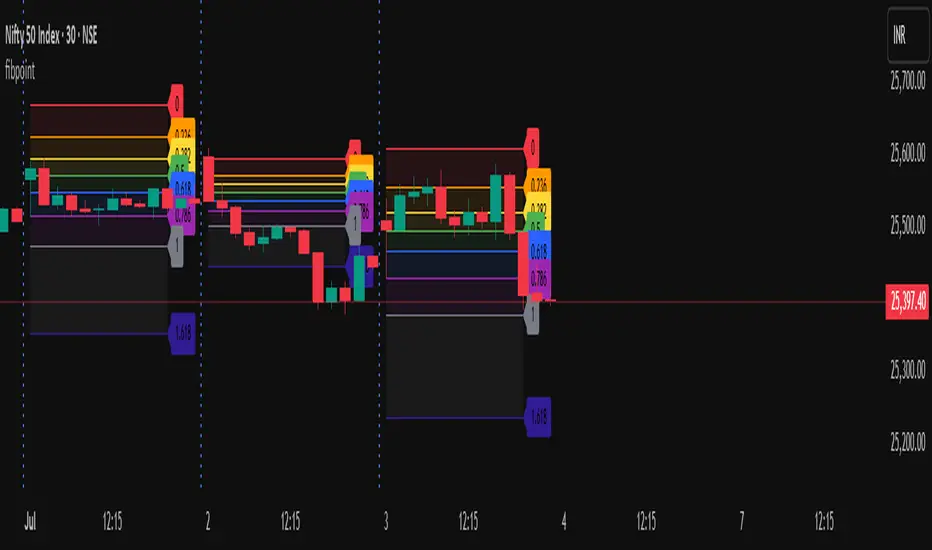
fibpointLibrary "fibpoint" A library for generating Fibonacci retracement levels on a chart, including customizable lines, labels, and filled areas between levels. It provides functionality to plot Fibonacci levels based on given price points and bar indices, with options for custom levels and colors. getFib(startPoint, endPoint, startIdx, endIdx, fibLevels, fibColors, tsp) Calculates Fibonacci retracement levels between two price points and draws corresponding lines and labels on the chart. Parameters: startPoint (float) : The starting price point for the Fibonacci retracement. endPoint (float) : The ending price point for the Fibonacci retracement. startIdx (int) : The bar index where the Fibonacci retracement starts. endIdx (int) : The bar index where the Fibonacci retracement ends. fibLevels (array) : An optional array of custom Fibonacci levels (default is ). fibColors (array) : An optional array of colors for each Fibonacci level (default is a predefined color array). tsp (int) : The transparency level for the fill between Fibonacci levels (default is 90). Returns: A tuple containing an array of fibItem objects (each with a line and label) and an array of linefill objects for the filled areas between levels. fibItem A custom type representing a Fibonacci level with its associated line and label. Fields: line (series line) : The line object drawn for the Fibonacci level. label (series label) : The label object displaying the Fibonacci level value.Библиотека Pine Script®от protradingartОбновлено 18
Color█ OVERVIEW This library is a Pine Script® programming tool for advanced color processing. It provides a comprehensive set of functions for specifying and analyzing colors in various color spaces, mixing and manipulating colors, calculating custom gradients and schemes, detecting contrast, and converting colors to or from hexadecimal strings. █ CONCEPTS Color Color refers to how we interpret light of different wavelengths in the visible spectrum . The colors we see from an object represent the light wavelengths that it reflects, emits, or transmits toward our eyes. Some colors, such as blue and red, correspond directly to parts of the spectrum. Others, such as magenta, arise from a combination of wavelengths to which our minds assign a single color. The human interpretation of color lends itself to many uses in our world. In the context of financial data analysis, the effective use of color helps transform raw data into insights that users can understand at a glance. For example, colors can categorize series, signal market conditions and sessions, and emphasize patterns or relationships in data. Color models and spaces A color model is a general mathematical framework that describes colors using sets of numbers. A color space is an implementation of a specific color model that defines an exact range (gamut) of reproducible colors based on a set of primary colors , a reference white point , and sometimes additional parameters such as viewing conditions. There are numerous different color spaces — each describing the characteristics of color in unique ways. Different spaces carry different advantages, depending on the application. Below, we provide a brief overview of the concepts underlying the color spaces supported by this library. RGB RGB is one of the most well-known color models. It represents color as an additive mixture of three primary colors — red, green, and blue lights — with various intensities. Each cone cell in the human eye responds more strongly to one of the three primaries, and the average person interprets the combination of these lights as a distinct color (e.g., pure red + pure green = yellow). The sRGB color space is the most common RGB implementation. Developed by HP and Microsoft in the 1990s, sRGB provided a standardized baseline for representing color across CRT monitors of the era, which produced brightness levels that did not increase linearly with the input signal. To match displays and optimize brightness encoding for human sensitivity, sRGB applied a nonlinear transformation to linear RGB signals, often referred to as gamma correction . The result produced more visually pleasing outputs while maintaining a simple encoding. As such, sRGB quickly became a standard for digital color representation across devices and the web. To this day, it remains the default color space for most web-based content. TradingView charts and Pine Script `color.*` built-ins process color data in sRGB. The red, green, and blue channels range from 0 to 255, where 0 represents no intensity, and 255 represents maximum intensity. Each combination of red, green, and blue values represents a distinct color, resulting in a total of 16,777,216 displayable colors. CIE XYZ and xyY The XYZ color space, developed by the International Commission on Illumination (CIE) in 1931, aims to describe all color sensations that a typical human can perceive. It is a cornerstone of color science, forming the basis for many color spaces used today. XYZ, and the derived xyY space, provide a universal representation of color that is not tethered to a particular display. Many widely used color spaces, including sRGB, are defined relative to XYZ or derived from it. The CIE built the color space based on a series of experiments in which people matched colors they perceived from mixtures of lights. From these experiments, the CIE developed color-matching functions to calculate three components — X, Y, and Z — which together aim to describe a standard observer's response to visible light. X represents a weighted response to light across the color spectrum, with the highest contribution from long wavelengths (e.g., red). Y represents a weighted response to medium wavelengths (e.g., green), and it corresponds to a color's relative luminance (i.e., brightness). Z represents a weighted response to short wavelengths (e.g., blue). From the XYZ space, the CIE developed the xyY chromaticity space, which separates a color's chromaticity (hue and colorfulness) from luminance. The CIE used this space to define the CIE 1931 chromaticity diagram , which represents the full range of visible colors at a given luminance. In color science and lighting design, xyY is a common means for specifying colors and visualizing the supported ranges of other color spaces. CIELAB and Oklab The CIELAB (L*a*b*) color space, derived from XYZ by the CIE in 1976, expresses colors based on opponent process theory. The L* component represents perceived lightness, and the a* and b* components represent the balance between opposing unique colors. The a* value specifies the balance between green and red , and the b* value specifies the balance between blue and yellow . The primary intention of CIELAB was to provide a perceptually uniform color space, where fixed-size steps through the space correspond to uniform perceived changes in color. Although relatively uniform, the color space has been found to exhibit some non-uniformities, particularly in the blue part of the color spectrum. Regardless, modern applications often use CIELAB to estimate perceived color differences and calculate smooth color gradients. In 2020, a new LAB-oriented color space, Oklab , was introduced by Björn Ottosson as an attempt to rectify the non-uniformities of other perceptual color spaces. Similar to CIELAB, the L value in Oklab represents perceived lightness, and the a and b values represent the balance between opposing unique colors. Oklab has gained widespread adoption as a perceptual space for color processing, with support in the latest CSS Color specifications and many software applications. Cylindrical models A cylindrical-coordinate model transforms an underlying color model, such as RGB or LAB, into an alternative expression of color information that is often more intuitive for the average person to use and understand. Instead of a mixture of primary colors or opponent pairs, these models represent color as a hue angle on a color wheel , with additional parameters that describe other qualities such as lightness and colorfulness (a general term for concepts like chroma and saturation). In cylindrical-coordinate spaces, users can select a color and modify its lightness or other qualities without altering the hue. The three most common RGB-based models are HSL (Hue, Saturation, Lightness), HSV (Hue, Saturation, Value), and HWB (Hue, Whiteness, Blackness). All three define hue angles in the same way, but they define colorfulness and lightness differently. Although they are not perceptually uniform, HSL and HSV are commonplace in color pickers and gradients. For CIELAB and Oklab, the cylindrical-coordinate versions are CIELCh and Oklch , which express color in terms of perceived lightness, chroma, and hue. They offer perceptually uniform alternatives to RGB-based models. These spaces create unique color wheels, and they have more strict definitions of lightness and colorfulness. Oklch is particularly well-suited for generating smooth, perceptual color gradients. Alpha and transparency Many color encoding schemes include an alpha channel, representing opacity . Alpha does not help define a color in a color space; it determines how a color interacts with other colors in the display. Opaque colors appear with full intensity on the screen, whereas translucent (semi-opaque) colors blend into the background. Colors with zero opacity are invisible. In Pine Script, there are two ways to specify a color's alpha: • Using the `transp` parameter of the built-in `color.*()` functions. The specified value represents transparency (the opposite of opacity), which the functions translate into an alpha value. • Using eight-digit hexadecimal color codes. The last two digits in the code represent alpha directly. A process called alpha compositing simulates translucent colors in a display. It creates a single displayed color by mixing the RGB channels of two colors (foreground and background) based on alpha values, giving the illusion of a semi-opaque color placed over another color. For example, a red color with 80% transparency on a black background produces a dark shade of red. Hexadecimal color codes A hexadecimal color code (hex code) is a compact representation of an RGB color. It encodes a color's red, green, and blue values into a sequence of hexadecimal ( base-16 ) digits. The digits are numerals ranging from `0` to `9` or letters from `a` (for 10) to `f` (for 15). Each set of two digits represents an RGB channel ranging from `00` (for 0) to `ff` (for 255). Pine scripts can natively define colors using hex codes in the format `#rrggbbaa`. The first set of two digits represents red, the second represents green, and the third represents blue. The fourth set represents alpha . If unspecified, the value is `ff` (fully opaque). For example, `#ff8b00` and `#ff8b00ff` represent an opaque orange color. The code `#ff8b0033` represents the same color with 80% transparency. Gradients A color gradient maps colors to numbers over a given range. Most color gradients represent a continuous path in a specific color space, where each number corresponds to a mix between a starting color and a stopping color. In Pine, coders often use gradients to visualize value intensities in plots and heatmaps, or to add visual depth to fills. The behavior of a color gradient depends on the mixing method and the chosen color space. Gradients in sRGB usually mix along a straight line between the red, green, and blue coordinates of two colors. In cylindrical spaces such as HSL, a gradient often rotates the hue angle through the color wheel, resulting in more pronounced color transitions. Color schemes A color scheme refers to a set of colors for use in aesthetic or functional design. A color scheme usually consists of just a few distinct colors. However, depending on the purpose, a scheme can include many colors. A user might choose palettes for a color scheme arbitrarily, or generate them algorithmically. There are many techniques for calculating color schemes. A few simple, practical methods are: • Sampling a set of distinct colors from a color gradient. • Generating monochromatic variants of a color (i.e., tints, tones, or shades with matching hues). • Computing color harmonies — such as complements, analogous colors, triads, and tetrads — from a base color. This library includes functions for all three of these techniques. See below for details. █ CALCULATIONS AND USE Hex string conversion The `getHexString()` function returns a string containing the eight-digit hexadecimal code corresponding to a "color" value or set of sRGB and transparency values. For example, `getHexString(255, 0, 0)` returns the string `"#ff0000ff"`, and `getHexString(color.new(color.red, 80))` returns `"#f2364533"`. The `hexStringToColor()` function returns the "color" value represented by a string containing a six- or eight-digit hex code. The `hexStringToRGB()` function returns a tuple containing the sRGB and transparency values. For example, `hexStringToColor("#f23645")` returns the same value as color.red . Programmers can use these functions to parse colors from "string" inputs, perform string-based color calculations, and inspect color data in text outputs such as Pine Logs and tables. Color space conversion All other `get*()` functions convert a "color" value or set of sRGB channels into coordinates in a specific color space, with transparency information included. For example, the tuple returned by `getHSL()` includes the color's hue, saturation, lightness, and transparency values. To convert data from a color space back to colors or sRGB and transparency values, use the corresponding `*toColor()` or `*toRGB()` functions for that space (e.g., `hslToColor()` and `hslToRGB()`). Programmers can use these conversion functions to process inputs that define colors in different ways, perform advanced color manipulation, design custom gradients, and more. The color spaces this library supports are: • sRGB • Linear RGB (RGB without gamma correction) • HSL, HSV, and HWB • CIE XYZ and xyY • CIELAB and CIELCh • Oklab and Oklch Contrast-based calculations Contrast refers to the difference in luminance or color that makes one color visible against another. This library features two functions for calculating luminance-based contrast and detecting themes. The `contrastRatio()` function calculates the contrast between two "color" values based on their relative luminance (the Y value from CIE XYZ) using the formula from version 2 of the Web Content Accessibility Guidelines (WCAG) . This function is useful for identifying colors that provide a sufficient brightness difference for legibility. The `isLightTheme()` function determines whether a specified background color represents a light theme based on its contrast with black and white. Programmers can use this function to define conditional logic that responds differently to light and dark themes. Color manipulation and harmonies The `negative()` function calculates the negative (i.e., inverse) of a color by reversing the color's coordinates in either the sRGB or linear RGB color space. This function is useful for calculating high-contrast colors. The `grayscale()` function calculates a grayscale form of a specified color with the same relative luminance. The functions `complement()`, `splitComplements()`, `analogousColors()`, `triadicColors()`, `tetradicColors()`, `pentadicColors()`, and `hexadicColors()` calculate color harmonies from a specified source color within a given color space (HSL, CIELCh, or Oklch). The returned harmonious colors represent specific hue rotations around a color wheel formed by the chosen space, with the same defined lightness, saturation or chroma, and transparency. Color mixing and gradient creation The `add()` function simulates combining lights of two different colors by additively mixing their linear red, green, and blue components, ignoring transparency by default. Users can calculate a transparency-weighted mixture by setting the `transpWeight` argument to `true`. The `overlay()` function estimates the color displayed on a TradingView chart when a specific foreground color is over a background color. This function aids in simulating stacked colors and analyzing the effects of transparency. The `fromGradient()` and `fromMultiStepGradient()` functions calculate colors from gradients in any of the supported color spaces, providing flexible alternatives to the RGB-based color.from_gradient() function. The `fromGradient()` function calculates a color from a single gradient. The `fromMultiStepGradient()` function calculates a color from a piecewise gradient with multiple defined steps. Gradients are useful for heatmaps and for coloring plots or drawings based on value intensities. Scheme creation Three functions in this library calculate palettes for custom color schemes. Scripts can use these functions to create responsive color schemes that adjust to calculated values and user inputs. The `gradientPalette()` function creates an array of colors by sampling a specified number of colors along a gradient from a base color to a target color, in fixed-size steps. The `monoPalette()` function creates an array containing monochromatic variants (tints, tones, or shades) of a specified base color. Whether the function mixes the color toward white (for tints), a form of gray (for tones), or black (for shades) depends on the `grayLuminance` value. If unspecified, the function automatically chooses the mix behavior with the highest contrast. The `harmonyPalette()` function creates a matrix of colors. The first column contains the base color and specified harmonies, e.g., triadic colors. The columns that follow contain tints, tones, or shades of the harmonic colors for additional color choices, similar to `monoPalette()`. █ EXAMPLE CODE The example code at the end of the script generates and visualizes color schemes by processing user inputs. The code builds the scheme's palette based on the "Base color" input and the additional inputs in the "Settings/Inputs" tab: • "Palette type" specifies whether the palette uses a custom gradient, monochromatic base color variants, or color harmonies with monochromatic variants. • "Target color" sets the top color for the "Gradient" palette type. • The "Gray luminance" inputs determine variation behavior for "Monochromatic" and "Harmony" palette types. If "Auto" is selected, the palette mixes the base color toward white or black based on its brightness. Otherwise, it mixes the color toward the grayscale color with the specified relative luminance (from 0 to 1). • "Harmony type" specifies the color harmony used in the palette. Each row in the palette corresponds to one of the harmonious colors, starting with the base color. The code creates a table on the first bar to display the collection of calculated colors. Each cell in the table shows the color's `getHexString()` value in a tooltip for simple inspection. Look first. Then leap. █ EXPORTED FUNCTIONS Below is a complete list of the functions and overloads exported by this library. getRGB(source) Retrieves the sRGB red, green, blue, and transparency components of a "color" value. getHexString(r, g, b, t) (Overload 1 of 2) Converts a set of sRGB channel values to a string representing the corresponding color's hexadecimal form. getHexString(source) (Overload 2 of 2) Converts a "color" value to a string representing the sRGB color's hexadecimal form. hexStringToRGB(source) Converts a string representing an sRGB color's hexadecimal form to a set of decimal channel values. hexStringToColor(source) Converts a string representing an sRGB color's hexadecimal form to a "color" value. getLRGB(r, g, b, t) (Overload 1 of 2) Converts a set of sRGB channel values to a set of linear RGB values with specified transparency information. getLRGB(source) (Overload 2 of 2) Retrieves linear RGB channel values and transparency information from a "color" value. lrgbToRGB(lr, lg, lb, t) Converts a set of linear RGB channel values to a set of sRGB values with specified transparency information. lrgbToColor(lr, lg, lb, t) Converts a set of linear RGB channel values and transparency information to a "color" value. getHSL(r, g, b, t) (Overload 1 of 2) Converts a set of sRGB channels to a set of HSL values with specified transparency information. getHSL(source) (Overload 2 of 2) Retrieves HSL channel values and transparency information from a "color" value. hslToRGB(h, s, l, t) Converts a set of HSL channel values to a set of sRGB values with specified transparency information. hslToColor(h, s, l, t) Converts a set of HSL channel values and transparency information to a "color" value. getHSV(r, g, b, t) (Overload 1 of 2) Converts a set of sRGB channels to a set of HSV values with specified transparency information. getHSV(source) (Overload 2 of 2) Retrieves HSV channel values and transparency information from a "color" value. hsvToRGB(h, s, v, t) Converts a set of HSV channel values to a set of sRGB values with specified transparency information. hsvToColor(h, s, v, t) Converts a set of HSV channel values and transparency information to a "color" value. getHWB(r, g, b, t) (Overload 1 of 2) Converts a set of sRGB channels to a set of HWB values with specified transparency information. getHWB(source) (Overload 2 of 2) Retrieves HWB channel values and transparency information from a "color" value. hwbToRGB(h, w, b, t) Converts a set of HWB channel values to a set of sRGB values with specified transparency information. hwbToColor(h, w, b, t) Converts a set of HWB channel values and transparency information to a "color" value. getXYZ(r, g, b, t) (Overload 1 of 2) Converts a set of sRGB channels to a set of XYZ values with specified transparency information. getXYZ(source) (Overload 2 of 2) Retrieves XYZ channel values and transparency information from a "color" value. xyzToRGB(x, y, z, t) Converts a set of XYZ channel values to a set of sRGB values with specified transparency information xyzToColor(x, y, z, t) Converts a set of XYZ channel values and transparency information to a "color" value. getXYY(r, g, b, t) (Overload 1 of 2) Converts a set of sRGB channels to a set of xyY values with specified transparency information. getXYY(source) (Overload 2 of 2) Retrieves xyY channel values and transparency information from a "color" value. xyyToRGB(xc, yc, y, t) Converts a set of xyY channel values to a set of sRGB values with specified transparency information. xyyToColor(xc, yc, y, t) Converts a set of xyY channel values and transparency information to a "color" value. getLAB(r, g, b, t) (Overload 1 of 2) Converts a set of sRGB channels to a set of CIELAB values with specified transparency information. getLAB(source) (Overload 2 of 2) Retrieves CIELAB channel values and transparency information from a "color" value. labToRGB(l, a, b, t) Converts a set of CIELAB channel values to a set of sRGB values with specified transparency information. labToColor(l, a, b, t) Converts a set of CIELAB channel values and transparency information to a "color" value. getOKLAB(r, g, b, t) (Overload 1 of 2) Converts a set of sRGB channels to a set of Oklab values with specified transparency information. getOKLAB(source) (Overload 2 of 2) Retrieves Oklab channel values and transparency information from a "color" value. oklabToRGB(l, a, b, t) Converts a set of Oklab channel values to a set of sRGB values with specified transparency information. oklabToColor(l, a, b, t) Converts a set of Oklab channel values and transparency information to a "color" value. getLCH(r, g, b, t) (Overload 1 of 2) Converts a set of sRGB channels to a set of CIELCh values with specified transparency information. getLCH(source) (Overload 2 of 2) Retrieves CIELCh channel values and transparency information from a "color" value. lchToRGB(l, c, h, t) Converts a set of CIELCh channel values to a set of sRGB values with specified transparency information. lchToColor(l, c, h, t) Converts a set of CIELCh channel values and transparency information to a "color" value. getOKLCH(r, g, b, t) (Overload 1 of 2) Converts a set of sRGB channels to a set of Oklch values with specified transparency information. getOKLCH(source) (Overload 2 of 2) Retrieves Oklch channel values and transparency information from a "color" value. oklchToRGB(l, c, h, t) Converts a set of Oklch channel values to a set of sRGB values with specified transparency information. oklchToColor(l, c, h, t) Converts a set of Oklch channel values and transparency information to a "color" value. contrastRatio(value1, value2) Calculates the contrast ratio between two colors values based on the formula from version 2 of the Web Content Accessibility Guidelines (WCAG). isLightTheme(source) Detects whether a background color represents a light theme or dark theme, based on the amount of contrast between the color and the white and black points. grayscale(source) Calculates the grayscale version of a color with the same relative luminance (i.e., brightness). negative(source, colorSpace) Calculates the negative (i.e., inverted) form of a specified color. complement(source, colorSpace) Calculates the complementary color for a `source` color using a cylindrical color space. analogousColors(source, colorSpace) Calculates the analogous colors for a `source` color using a cylindrical color space. splitComplements(source, colorSpace) Calculates the split-complementary colors for a `source` color using a cylindrical color space. triadicColors(source, colorSpace) Calculates the two triadic colors for a `source` color using a cylindrical color space. tetradicColors(source, colorSpace, square) Calculates the three square or rectangular tetradic colors for a `source` color using a cylindrical color space. pentadicColors(source, colorSpace) Calculates the four pentadic colors for a `source` color using a cylindrical color space. hexadicColors(source, colorSpace) Calculates the five hexadic colors for a `source` color using a cylindrical color space. add(value1, value2, transpWeight) Additively mixes two "color" values, with optional transparency weighting. overlay(fg, bg) Estimates the resulting color that appears on the chart when placing one color over another. fromGradient(value, bottomValue, topValue, bottomColor, topColor, colorSpace) Calculates the gradient color that corresponds to a specific value based on a defined value range and color space. fromMultiStepGradient(value, steps, colors, colorSpace) Calculates a multi-step gradient color that corresponds to a specific value based on an array of step points, an array of corresponding colors, and a color space. gradientPalette(baseColor, stopColor, steps, strength, model) Generates a palette from a gradient between two base colors. monoPalette(baseColor, grayLuminance, variations, strength, colorSpace) Generates a monochromatic palette from a specified base color. harmonyPalette(baseColor, harmonyType, grayLuminance, variations, strength, colorSpace) Generates a palette consisting of harmonious base colors and their monochromatic variants. Библиотека Pine Script®от TradingViewОбновлено 33106
juan_dibujosLibrary "juan_dibujos" extend_line(lineId, labelId) : Extend specific line with its label Parameters: lineId (line) labelId (label) update_line_coordinates(lineId, labelId, x1, y1, x2, y2) : Update specific line coordinates with its label Parameters: lineId (line) labelId (label) x1 (int) y1 (float) x2 (int) y2 (float) update_label_coordinates(labelId, value) : Update coordinates of a label Parameters: labelId (label) value (float) delete_line(lineId, labelId) : Delete specific line with its label Parameters: lineId (line) labelId (label) update_box_coordinates(boxId, labelId, left, top, right, bottom) : Update specific box coordinates with its label Parameters: boxId (box) labelId (label) left (int) top (float) right (int) bottom (float) delete_box(boxId, labelId) : Delete specific box with its label Parameters: boxId (box) labelId (label)Библиотека Pine Script®от juanihernandez19900
MirPapa_Library_ICTLibrary "MirPapa_Library_ICT" GetHTFoffsetToLTFoffset(_offset, _chartTf, _htfTf) GetHTFoffsetToLTFoffset @description Adjust an HTF offset to an LTF offset by calculating the ratio of timeframes. Parameters: _offset (int) : int The HTF bar offset (0 means current HTF bar). _chartTf (string) : string The current chart’s timeframe (e.g., "5", "15", "1D"). _htfTf (string) : string The High Time Frame string (e.g., "60", "1D"). @return int The corresponding LTF bar index. Returns 0 if the result is negative. IsConditionState(_type, _isBull, _level, _open, _close, _open1, _close1, _low1, _low2, _low3, _low4, _high1, _high2, _high3, _high4) IsConditionState @description Evaluate a condition state based on type for COB, FVG, or FOB. Overloaded: first signature handles COB, second handles FVG/FOB. Parameters: _type (string) : string Condition type ("cob", "fvg", "fob"). _isBull (bool) : bool Direction flag: true for bullish, false for bearish. _level (int) : int Swing level (only used for COB). _open (float) : float Current bar open price (only for COB). _close (float) : float Current bar close price (only for COB). _open1 (float) : float Previous bar open price (only for COB). _close1 (float) : float Previous bar close price (only for COB). _low1 (float) : float Low 1 bar ago (only for COB). _low2 (float) : float Low 2 bars ago (only for COB). _low3 (float) : float Low 3 bars ago (only for COB). _low4 (float) : float Low 4 bars ago (only for COB). _high1 (float) : float High 1 bar ago (only for COB). _high2 (float) : float High 2 bars ago (only for COB). _high3 (float) : float High 3 bars ago (only for COB). _high4 (float) : float High 4 bars ago (only for COB). @return bool True if the specified condition is met, false otherwise. IsConditionState(_type, _isBull, _pricePrev, _priceNow) IsConditionState @description Evaluate FVG or FOB condition based on price movement. Parameters: _type (string) : string Condition type ("fvg", "fob"). _isBull (bool) : bool Direction flag: true for bullish, false for bearish. _pricePrev (float) : float Previous price (for FVG/FOB). _priceNow (float) : float Current price (for FVG/FOB). @return bool True if the specified condition is met, false otherwise. IsSwingHighLow(_isBull, _level, _open, _close, _open1, _close1, _low1, _low2, _low3, _low4, _high1, _high2, _high3, _high4) IsSwingHighLow @description Public wrapper for isSwingHighLow. Parameters: _isBull (bool) : bool Direction flag: true for bullish, false for bearish. _level (int) : int Swing level (1 or 2). _open (float) : float Current bar open price. _close (float) : float Current bar close price. _open1 (float) : float Previous bar open price. _close1 (float) : float Previous bar close price. _low1 (float) : float Low 1 bar ago. _low2 (float) : float Low 2 bars ago. _low3 (float) : float Low 3 bars ago. _low4 (float) : float Low 4 bars ago. _high1 (float) : float High 1 bar ago. _high2 (float) : float High 2 bars ago. _high3 (float) : float High 3 bars ago. _high4 (float) : float High 4 bars ago. @return bool True if swing condition is met, false otherwise. AddBox(_left, _right, _top, _bot, _xloc, _colorBG, _colorBD) AddBox @description Draw a rectangular box on the chart with specified coordinates and colors. Parameters: _left (int) : int Left bar index for the box. _right (int) : int Right bar index for the box. _top (float) : float Top price coordinate for the box. _bot (float) : float Bottom price coordinate for the box. _xloc (string) : string X-axis location type (e.g., xloc.bar_index). _colorBG (color) : color Background color for the box. _colorBD (color) : color Border color for the box. @return box Returns the created box object. Addline(_x, _y, _xloc, _color, _width) Addline @description Draw a vertical or horizontal line at specified coordinates. Parameters: _x (int) : int X-coordinate for start (bar index). _y (int) : float Y-coordinate for start (price). _xloc (string) : string X-axis location type (e.g., xloc.bar_index). _color (color) : color Line color. _width (int) : int Line width. @return line Returns the created line object. Addline(_x, _y, _xloc, _color, _width) Parameters: _x (int) _y (float) _xloc (string) _color (color) _width (int) Addline(_x1, _y1, _x2, _y2, _xloc, _color, _width) Parameters: _x1 (int) _y1 (int) _x2 (int) _y2 (int) _xloc (string) _color (color) _width (int) Addline(_x1, _y1, _x2, _y2, _xloc, _color, _width) Parameters: _x1 (int) _y1 (int) _x2 (int) _y2 (float) _xloc (string) _color (color) _width (int) Addline(_x1, _y1, _x2, _y2, _xloc, _color, _width) Parameters: _x1 (int) _y1 (float) _x2 (int) _y2 (int) _xloc (string) _color (color) _width (int) Addline(_x1, _y1, _x2, _y2, _xloc, _color, _width) Parameters: _x1 (int) _y1 (float) _x2 (int) _y2 (float) _xloc (string) _color (color) _width (int) AddlineMid(_type, _left, _right, _top, _bot, _xloc, _color, _width) AddlineMid @description Draw a midline between top and bottom for FVG or FOB types. Parameters: _type (string) : string Type identifier: "fvg" or "fob". _left (int) : int Left bar index for midline start. _right (int) : int Right bar index for midline end. _top (float) : float Top price of the region. _bot (float) : float Bottom price of the region. _xloc (string) : string X-axis location type (e.g., xloc.bar_index). _color (color) : color Line color. _width (int) : int Line width. @return line or na Returns the created line or na if type is not recognized. GetHtfFromLabel(_label) GetHtfFromLabel @description Convert a Korean HTF label into a Pine Script timeframe string via handler library. Parameters: _label (string) : string The Korean label (e.g., "5분", "1시간"). @return string Returns the corresponding Pine Script timeframe (e.g., "5", "60"). IsChartTFcomparisonHTF(_chartTf, _htfTf) IsChartTFcomparisonHTF @description Determine whether a given HTF is greater than or equal to the current chart timeframe. Parameters: _chartTf (string) : string Current chart timeframe (e.g., "5", "15", "1D"). _htfTf (string) : string HTF timeframe (e.g., "60", "1D"). @return bool True if HTF ≥ chartTF, false otherwise. CreateBoxData(_type, _isBull, _useLine, _top, _bot, _xloc, _colorBG, _colorBD, _offset, _htfTf, htfBarIdx, _basePoint) CreateBoxData @description Create and draw a box and optional midline for given type and parameters. Returns success flag and BoxData. Parameters: _type (string) : string Type identifier: "fvg", "fob", "cob", or "sweep". _isBull (bool) : bool Direction flag: true for bullish, false for bearish. _useLine (bool) : bool Whether to draw a midline inside the box. _top (float) : float Top price of the box region. _bot (float) : float Bottom price of the box region. _xloc (string) : string X-axis location type (e.g., xloc.bar_index). _colorBG (color) : color Background color for the box. _colorBD (color) : color Border color for the box. _offset (int) : int HTF bar offset (0 means current HTF bar). _htfTf (string) : string HTF timeframe string (e.g., "60", "1D"). htfBarIdx (int) : int HTF bar_index (passed from HTF request). _basePoint (float) : float Base point for breakout checks. @return tuple(bool, BoxData) Returns a boolean indicating success and the created BoxData struct. ProcessBoxDatas(_datas, _useMidLine, _closeCount, _colorClose) ProcessBoxDatas @description Process an array of BoxData structs: extend, record volume, update stage, and finalize boxes. Parameters: _datas (array) : array Array of BoxData objects to process. _useMidLine (bool) : bool Whether to update the midline endpoint. _closeCount (int) : int Number of touches required to close the box. _colorClose (color) : color Color to apply when a box closes. @return void No return value; updates are in-place. BoxData Fields: _isActive (series bool) _isBull (series bool) _box (series box) _line (series line) _basePoint (series float) _boxTop (series float) _boxBot (series float) _stage (series int) _isStay (series bool) _volBuy (series float) _volSell (series float) _result (series string) LineData Fields: _isActive (series bool) _isBull (series bool) _line (series line) _basePoint (series float) _stage (series int) _isStay (series bool) _result (series string)Библиотека Pine Script®от goodiaОбновлено 1
FvgTypes█ OVERVIEW This library serves as a foundational module for Pine Script™ projects focused on Fair Value Gaps (FVGs). Its primary purpose is to define and centralize custom data structures (User-Defined Types - UDTs) and enumerations that are utilized across various components of an FVG analysis system. By providing standardized types for FVG characteristics and drawing configurations, it promotes code consistency, readability, and easier maintenance within a larger FVG indicator or strategy. █ CONCEPTS The library introduces several key data structures (User-Defined Types - UDTs) and an enumeration to organize Fair Value Gap (FVG) related data logically. These types are central to the functioning of FVG analysis tools built upon this library. Timeframe Categorization (`tfType` Enum) To manage and differentiate FVGs based on their timeframe of origin, the `tfType` enumeration is defined. It includes: `LTF`: Low Timeframe (typically the current chart). `MTF`: Medium Timeframe. `HTF`: High Timeframe. This allows for distinct logic and visual settings to be applied depending on the FVG's source timeframe. FVG Data Encapsulation (`fvgObject` UDT) The `fvgObject` is a comprehensive UDT designed to encapsulate all pertinent information and state for an individual Fair Value Gap throughout its lifecycle. Instead of listing every field, its conceptual structure can be understood as holding: Core Definition: The FVG's fundamental price levels (top, bottom) and its formation time (`startTime`). Classification Attributes: Characteristics such as its direction (`isBullish`) and whether it qualifies as a Large Volume FVG (`isLV`), along with its originating timeframe category (`tfType`). Lifecycle State: Current status indicators including full mitigation (`isMitigated`, `mitigationTime`), partial fill levels (`currentTop`, `currentBottom`), midline interaction (`isMidlineTouched`), and overall visibility (`isVisible`). Drawing Identifiers: References (`boxId`, `midLineId`, `mitLineLabelId`, etc.) to the actual graphical objects drawn on the chart to represent the FVG and its components. Optimization Cache: Previous-bar state values (`prevIsMitigated`, `prevCurrentTop`, etc.) crucial for optimizing drawing updates by avoiding redundant operations. This comprehensive structure facilitates easy access to all FVG-related information through a single object, reducing code complexity and improving manageability. Drawing Configuration (`drawSettings` UDT) The `drawSettings` UDT centralizes all user-configurable parameters that dictate the visual appearance of FVGs across different timeframes. It's typically populated from script inputs and conceptually groups settings for: General Behavior: Global FVG classification toggles (e.g., `shouldClassifyLV`) and general display rules (e.g., `shouldHideMitigated`). FVG Type Specific Colors: Colors for standard and Large Volume FVGs, both active and mitigated (e.g., `lvBullColor`, `mitigatedBearBoxColor`). Timeframe-Specific Visuals (LTF, MTF, HTF): Detailed parameters for each timeframe category, covering FVG boxes (visibility, colors, extension, borders, labels), midlines (visibility, style, color), and mitigation lines (visibility, style, color, labels, persistence after mitigation). Contextual Information: The current bar's time (`currentTime`) for accurate positioning of time-dependent drawing elements and timeframe display strings (`tfString`, `mtfTfString`, `htfTfString`). This centralized approach allows for extensive customization of FVG visuals and simplifies the management of drawing parameters within the main script. Such centralization also enhances the maintainability of the visual aspects of the FVG system. █ NOTES User-Defined Types (UDTs): This library extensively uses UDTs (`fvgObject`, `drawSettings`) to group related data. This improves code organization and makes it easier to pass complex data between functions and libraries. Mutability and Reference Behavior of UDTs: When UDT instances are passed to functions or methods in other libraries (like `fvgObjectLib`), those functions might modify the fields of the passed object if they are not explicitly designed to return new instances. This is because UDTs are passed by reference and are mutable in Pine Script™. Users should be aware of this standard behavior to prevent unintended side effects. Optimization Fields: The `prev_*` fields in `fvgObject` are crucial for performance optimization in the drawing logic. They help avoid unnecessary redrawing of FVG elements if their state or relevant settings haven't changed. No Direct Drawing Logic: `FvgTypes` itself does not contain any drawing logic. It solely defines the data structures. The actual drawing and manipulation of these objects are handled by other libraries (e.g., `fvgObjectLib`). Centralized Definitions: By defining these types in a separate library, any changes to the structure of FVG data or settings can be made in one place, ensuring consistency across all dependent scripts and libraries. █ EXPORTED TYPES fvgObject fvgObject Represents a Fair Value Gap (FVG) object. Fields: top (series float) : The top price level of the FVG. bottom (series float) : The bottom price level of the FVG. startTime (series int) : The start time (timestamp) of the bar where the FVG formed. isBullish (series bool) : Indicates if the FVG is bullish (true) or bearish (false). isLV (series bool) : Indicates if the FVG is a Large Volume FVG. tfType (series tfType) : The timeframe type (LTF, MTF, HTF) to which this FVG belongs. isMitigated (series bool) : Indicates if the FVG has been fully mitigated. mitigationTime (series int) : The time (timestamp) when the FVG was mitigated. isVisible (series bool) : The current visibility status of the FVG, typically managed by drawing logic based on filters. isMidlineTouched (series bool) : Indicates if the price has touched the FVG's midline (50% level). currentTop (series float) : The current top level of the FVG after partial fills. currentBottom (series float) : The current bottom level of the FVG after partial fills. boxId (series box) : The drawing ID for the main FVG box. mitigatedBoxId (series box) : The drawing ID for the box representing the partially filled (mitigated) area. midLineId (series line) : The drawing ID for the FVG's midline. mitLineId (series line) : The drawing ID for the FVG's mitigation line. boxLabelId (series label) : The drawing ID for the FVG box label. mitLineLabelId (series label) : The drawing ID for the mitigation line label. testedBoxId (series box) : The drawing ID for the box of a fully mitigated (tested) FVG, if kept visible. keptMitLineId (series line) : The drawing ID for a mitigation line that is kept after full mitigation. prevIsMitigated (series bool) : Stores the isMitigated state from the previous bar for optimization. prevCurrentTop (series float) : Stores the currentTop value from the previous bar for optimization. prevCurrentBottom (series float) : Stores the currentBottom value from the previous bar for optimization. prevIsVisible (series bool) : Stores the visibility status from the previous bar for optimization (derived from isVisibleNow passed to updateDrawings). prevIsMidlineTouched (series bool) : Stores the isMidlineTouched status from the previous bar for optimization. drawSettings drawSettings A structure containing settings for drawing FVGs. Fields: shouldClassifyLV (series bool) : Whether to classify FVGs as Large Volume (LV) based on ATR. shouldHideMitigated (series bool) : Whether to hide FVG boxes once they are fully mitigated. currentTime (series int) : The current bar's time, used for extending drawings. lvBullColor (series color) : Color for Large Volume Bullish FVGs. mitigatedLvBullColor (series color) : Color for mitigated Large Volume Bullish FVGs. lvBearColor (series color) : Color for Large Volume Bearish FVGs. mitigatedLvBearColor (series color) : Color for mitigated Large Volume Bearish FVGs. shouldShowBoxes (series bool) : Whether to show FVG boxes for the LTF. bullBoxColor (series color) : Color for LTF Bullish FVG boxes. mitigatedBullBoxColor (series color) : Color for mitigated LTF Bullish FVG boxes. bearBoxColor (series color) : Color for LTF Bearish FVG boxes. mitigatedBearBoxColor (series color) : Color for mitigated LTF Bearish FVG boxes. boxLengthBars (series int) : Length of LTF FVG boxes in bars (if not extended). shouldExtendBoxes (series bool) : Whether to extend LTF FVG boxes to the right. shouldShowCurrentTfBoxLabels (series bool) : Whether to show labels on LTF FVG boxes. shouldShowBoxBorder (series bool) : Whether to show a border for LTF FVG boxes. boxBorderWidth (series int) : Border width for LTF FVG boxes. boxBorderStyle (series string) : Border style for LTF FVG boxes (e.g., line.style_solid). boxBorderColor (series color) : Border color for LTF FVG boxes. shouldShowMidpoint (series bool) : Whether to show the midline (50% level) for LTF FVGs. midLineWidthInput (series int) : Width of the LTF FVG midline. midpointLineStyleInput (series string) : Style of the LTF FVG midline. midpointColorInput (series color) : Color of the LTF FVG midline. shouldShowMitigationLine (series bool) : Whether to show the mitigation line for LTF FVGs. (Line always extends if shown) mitLineWidthInput (series int) : Width of the LTF FVG mitigation line. mitigationLineStyleInput (series string) : Style of the LTF FVG mitigation line. mitigationLineColorInput (series color) : Color of the LTF FVG mitigation line. shouldShowCurrentTfMitLineLabels (series bool) : Whether to show labels on LTF FVG mitigation lines. currentTfMitLineLabelOffsetX (series float) : The horizontal offset value for the LTF mitigation line's label. shouldKeepMitigatedLines (series bool) : Whether to keep showing mitigation lines of fully mitigated LTF FVGs. mitigatedMitLineColor (series color) : Color for kept mitigation lines of mitigated LTF FVGs. tfString (series string) : Display string for the LTF (e.g., "Current TF"). shouldShowMtfBoxes (series bool) : Whether to show FVG boxes for the MTF. mtfBullBoxColor (series color) : Color for MTF Bullish FVG boxes. mtfMitigatedBullBoxColor (series color) : Color for mitigated MTF Bullish FVG boxes. mtfBearBoxColor (series color) : Color for MTF Bearish FVG boxes. mtfMitigatedBearBoxColor (series color) : Color for mitigated MTF Bearish FVG boxes. mtfBoxLengthBars (series int) : Length of MTF FVG boxes in bars (if not extended). shouldExtendMtfBoxes (series bool) : Whether to extend MTF FVG boxes to the right. shouldShowMtfBoxLabels (series bool) : Whether to show labels on MTF FVG boxes. shouldShowMtfBoxBorder (series bool) : Whether to show a border for MTF FVG boxes. mtfBoxBorderWidth (series int) : Border width for MTF FVG boxes. mtfBoxBorderStyle (series string) : Border style for MTF FVG boxes. mtfBoxBorderColor (series color) : Border color for MTF FVG boxes. shouldShowMtfMidpoint (series bool) : Whether to show the midline for MTF FVGs. mtfMidLineWidthInput (series int) : Width of the MTF FVG midline. mtfMidpointLineStyleInput (series string) : Style of the MTF FVG midline. mtfMidpointColorInput (series color) : Color of the MTF FVG midline. shouldShowMtfMitigationLine (series bool) : Whether to show the mitigation line for MTF FVGs. (Line always extends if shown) mtfMitLineWidthInput (series int) : Width of the MTF FVG mitigation line. mtfMitigationLineStyleInput (series string) : Style of the MTF FVG mitigation line. mtfMitigationLineColorInput (series color) : Color of the MTF FVG mitigation line. shouldShowMtfMitLineLabels (series bool) : Whether to show labels on MTF FVG mitigation lines. mtfMitLineLabelOffsetX (series float) : The horizontal offset value for the MTF mitigation line's label. shouldKeepMtfMitigatedLines (series bool) : Whether to keep showing mitigation lines of fully mitigated MTF FVGs. mtfMitigatedMitLineColor (series color) : Color for kept mitigation lines of mitigated MTF FVGs. mtfTfString (series string) : Display string for the MTF (e.g., "MTF"). shouldShowHtfBoxes (series bool) : Whether to show FVG boxes for the HTF. htfBullBoxColor (series color) : Color for HTF Bullish FVG boxes. htfMitigatedBullBoxColor (series color) : Color for mitigated HTF Bullish FVG boxes. htfBearBoxColor (series color) : Color for HTF Bearish FVG boxes. htfMitigatedBearBoxColor (series color) : Color for mitigated HTF Bearish FVG boxes. htfBoxLengthBars (series int) : Length of HTF FVG boxes in bars (if not extended). shouldExtendHtfBoxes (series bool) : Whether to extend HTF FVG boxes to the right. shouldShowHtfBoxLabels (series bool) : Whether to show labels on HTF FVG boxes. shouldShowHtfBoxBorder (series bool) : Whether to show a border for HTF FVG boxes. htfBoxBorderWidth (series int) : Border width for HTF FVG boxes. htfBoxBorderStyle (series string) : Border style for HTF FVG boxes. htfBoxBorderColor (series color) : Border color for HTF FVG boxes. shouldShowHtfMidpoint (series bool) : Whether to show the midline for HTF FVGs. htfMidLineWidthInput (series int) : Width of the HTF FVG midline. htfMidpointLineStyleInput (series string) : Style of the HTF FVG midline. htfMidpointColorInput (series color) : Color of the HTF FVG midline. shouldShowHtfMitigationLine (series bool) : Whether to show the mitigation line for HTF FVGs. (Line always extends if shown) htfMitLineWidthInput (series int) : Width of the HTF FVG mitigation line. htfMitigationLineStyleInput (series string) : Style of the HTF FVG mitigation line. htfMitigationLineColorInput (series color) : Color of the HTF FVG mitigation line. shouldShowHtfMitLineLabels (series bool) : Whether to show labels on HTF FVG mitigation lines. htfMitLineLabelOffsetX (series float) : The horizontal offset value for the HTF mitigation line's label. shouldKeepHtfMitigatedLines (series bool) : Whether to keep showing mitigation lines of fully mitigated HTF FVGs. htfMitigatedMitLineColor (series color) : Color for kept mitigation lines of mitigated HTF FVGs. htfTfString (series string) : Display string for the HTF (e.g., "HTF").Библиотека Pine Script®от no1xОбновлено 5