Bitcoin Stock to FlowModeling Bitcoin's Value With Scarcity
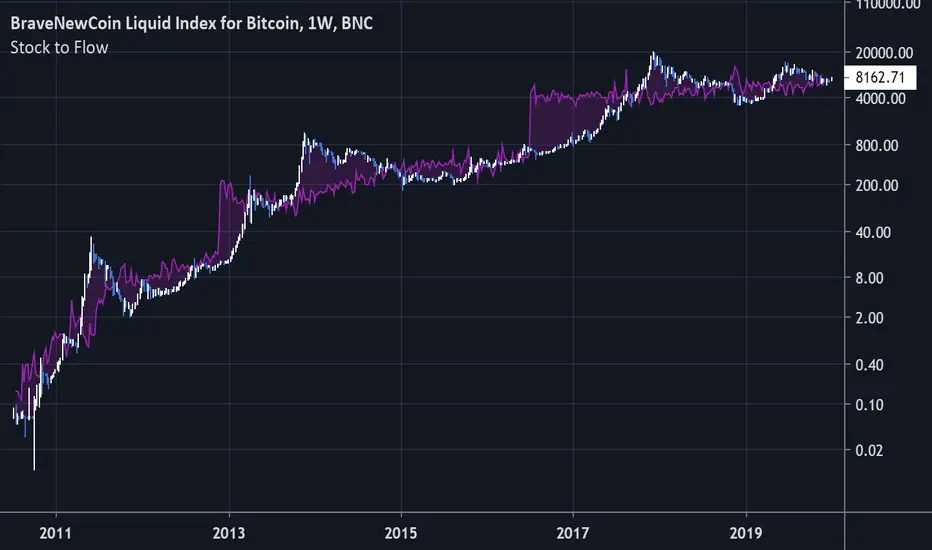
The Stock to Flow model for Bitcoin suggests that Bitcoin price is driven by scarcity over time.
Bitcoin is the first scarce digital object the world has ever seen. It is scarce like silver & gold, and can be sent over the internet, radio, satellite etc. Bitcoin includes a mathematical mechanism to restrict its supply over time making it more rare as time goes on. Digital Scarcity.
In 2017 BTC exceeded the market capitalization of Silver. After the next halving in 2024, Bitcoin will become the hardest asset the world has ever seen, rarer than Gold.
There is only enough Bitcoin in the world for each person to own .0023 BTC. Because of this, Bitcoin's value should continue to rise over time.
Поиск скриптов по запросу "GOLD"
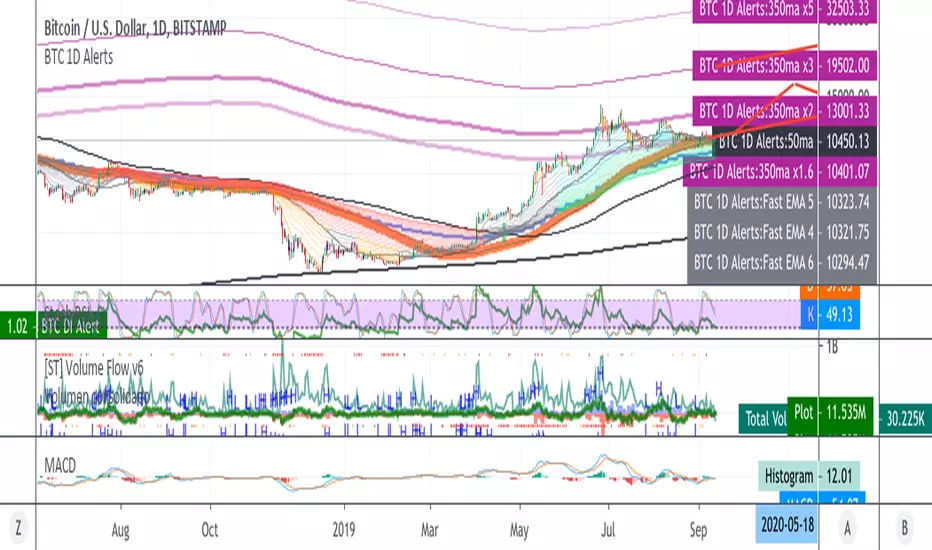
BTC 1D Alerts V1This script contains a variety of key indicator for bitcoin all-in-one and they can be activated individually in the menu. These are meant to be used on the 1D chart for Bitcoin.
1457 Day Moving Average: the bottom of the bitcoin price and arguably the rock bottom price target.
Ichimoku Cloud: a common useful indicator for bitcoin support and resistance.
350ma fibs (21 8 5 3 2 and 1.6) : Signify the tops of each logarthmic rise in bitcoin price. They are generally curving higher over the long term. For halvening #3, the predicted market crash would be after hitting the 350ma x3 fib. Also the 350 ma / 111 ma cross signifies bull market top within about 3 days as well. Using the combination of the 350ma fibs and the 350/111 crosses, reasonably identify when market top is about to occur.
50,120,200 ma: Common moving averages that bitcoin retests during bull market runs. Also, the 50/200 golden and death crosses.
1D EMA Superguppy Ribbons: green = bull market, gray is indeterminate, red = bear market. Very high specificity indicator of bull runs, especially for bitcoin. You can change to 3D candle for even more specificity for a bull market start. Use the 1W for even more specificity. 1D Superguppy is recommended for decisionmaking.
1W EMA21: a very good moving average programmed to be shown on both the daily and weekly candle time. Bitcoin commonly corrects to this repeatedly during past bull runs. Acts as support during bull run and resistance during a bear market.
Steps to identifying a bull market:
1. 50/200 golden cross
2. 1D EMA superguppy green
3. 3D EMA superguppy green (if you prefer more certainty than step 2).
4. Hitting the 1W EMA21 and bouncing off during the bull run signifies corrections.
Once a bull market is identified,
Additional recommended buying and selling techniques:
Indicators:
- Fiblines - to determine retracements from peaks (such as all time high or recent highs)
- Stochastic RSI - 1d, 3d, and 1W SRSI are great time to buy, especially the 1W SRSI which comes much less frequently.
- volumen consolidado - for multi exchange volumes compiled into a single line. I prefer buying on the lowest volume days which generally coincide with dips.
- MACD - somewhat dubious utility but many algorithms are programmed to buy or sell based on this.
Check out the Alerts for golden crosses and 350ma Fib crosses which are invaluable for long term buying planning.
I left this open source so that all the formulas can be understood and verified. Much of it hacked together from other sources but all indicators that are fundamental to bitcoin. I apologize in advance for not attributing all the articles and references... but then again I am making no money off of this anyway.


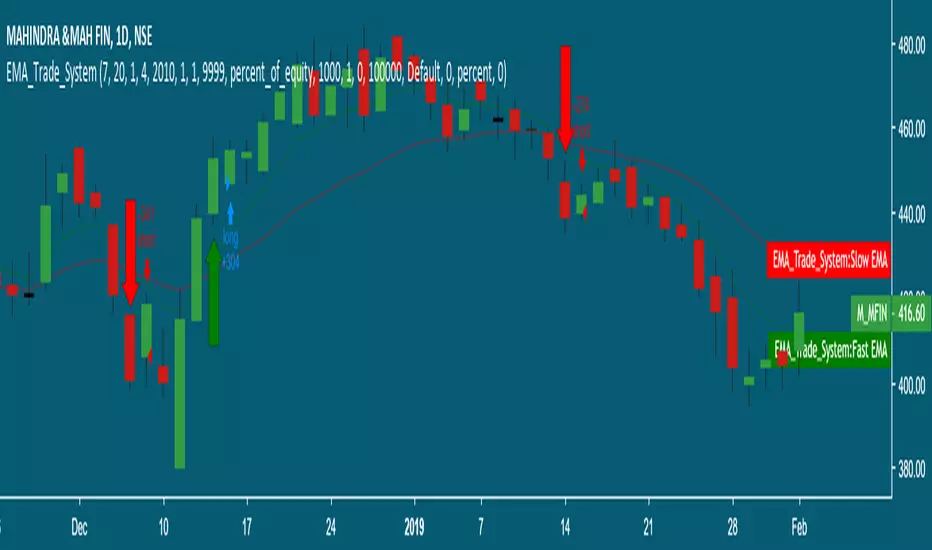
dmw_3SMACross3 SMA set to 5 10 20 used to find the crossing points for pattern reversals or breakouts.

Lysergik's Stochastic SynergyThis indicator shows the average Stochastic RSI output of the 15m, 1h, 2h, 4h, and Daily Stochastic RSI. It will change in its behavior depending on the time-frame you're using, but for many markets it works best on the 30m time-frame and the daily time-frame.
It is best used along with Lysergik's Fib Cross, which will allow you to avoid false signals in the stochastic synergy indicator. If your MA cross (50, 200) indicates a direction change opposite of the stochastic RSI synergy indicator then that is a signal to wait for more price action to determine your entry/exit points.
Using the Lysergik's Fib Cross, the same applies, but remember that a golden cross (white cross symbol) followed directly by a golden ratio cross (gold cross symbol) is even further indication that the stochastic RSI needs more breathing room before reversing.
This indicator is fully adjustable for you to back-test against charts and refine the indicator to your market.
The inputs in respective order are as follows:
RSI Length, Stoch Length, Smooth K, Smooth D, Upper Limit, Lower Limit, Basis
Enjoy and remember only make trades on your own terms.
Happy trading/investing! :)

SynergySynergy
This indicator was developed for use in an investigation/tutorial using Pine Script to analyse Gold and US Dollar Index correlation.
The first indicator shall measure the percentage change between the open and close of each bar and compare it to the same percentage change of an alternative asset. Additionally, we shall color the background when the two assets move in the same direction. This should allow us to more easily see when the two assets move together and spot trends in their moment.
The yellow bars show use the percentage change in the price of gold. The blue bars show the percentage change in the price of the US Dollar index. If the bar is above zero, it means that the asset closed up. Conversely, if it is below zero, it means the asset closed down. Finally, the grey bars show bars in which the two assets closed in the same direction.
It can be used in conjunction with a second indicator (to be published soon) that provides statistics generated from this indicator.
The full free post can be found here: backtest-rookies.com

BO Willians EMA'sBo Williams is a North America/Brazilian trader. He created a trading software called PHI CUBE.
This ema ratios are very used in Brazil. They a based in the Golden Number PHI.
"There is a special ratio that can be used to describe the proportions of everything from nature's smallest building blocks, such as atoms, to the most advanced patterns in the universe, such as unimaginably large celestial bodies. Nature relies on this innate proportion to maintain balance, but the financial markets also seem to conform to this "golden ratio." Here, we take a look at some technical analysis tools that have been developed to take advantage of it.
The Mathematics
Mathematicians, scientists and naturalists have known this ratio for centuries. It's derived from something known as the Fibonacci sequence, named after its Italian founder, Leonardo Fibonacci (whose birth is assumed to be around 1175 A.D. and death around 1250 A.D.). Each term in this sequence is simply the sum of the two preceding terms (1, 1, 2, 3, 5, 8, 13, etc.).
But this sequence is not all that important; rather, it is the quotient of the adjacent terms that possesses an amazing proportion, roughly 1.618, or its inverse 0.618. This proportion is known by many names: the golden ratio, the golden mean, PHI and the divine proportion, among others. So, why is this number so important? Well, almost everything has dimensional properties that adhere to the ratio of 1.618, so it seems to have a fundamental function for the building blocks of nature. "
More here www.goldennumber.net

EMA 50, 100 and 200Draw a set of 3 EMA: 50, 100 and 200. It highlight with a circle the crossing of EMA(50) with other EMAs

IV/HV ratio 1.0 [dime]This script compares the implied volatility to the historic volatility as a ratio.
The plot indicates how high the current implied volatility for the next 30 days is relative to the actual volatility realized over the set period. This is most useful for options traders as it may show when the premiums paid on options are over valued relative to the historic risk.
The default is set to one year (252 bars) however any number of bars can be set for the lookback period for HV.
The default is set to VIX for the IV on SPX or SPY but other CBOE implied volatility indexes may be used. For /CL you have OVX/HV and for /GC you have GVX/HV.
Note that the CBOE data for these indexes may be delayed and updated EOD
and may not be suitable for intraday information. (Future versions of this script may be developed to provide a realtime intraday study. )
There is a list of many volatility indexes from CBOE listed at:
www.cboe.com
(Some may not yet be available on Tradingview)
RVX Russell 2000
VXN NASDAQ
VXO S&P 100
VXD DJIA
GVX Gold
OVX OIL
VIX3M 3-Month
VIX6M S&P 500 6-Month
VIX1Y 1-Year
VXEFA Cboe EFA ETF
VXEEM Cboe Emerging Markets ETF
VXFXI Cboe China ETF
VXEWZ Cboe Brazil ETF
VXSLV Cboe Silver ETF
VXGDX Cboe Gold Miners ETF
VXXLE Cboe Energy Sector ETF
EUVIX FX Euro
JYVIX FX Yen
BPVIX FX British Pound
EVZ Cboe EuroCurrency ETF Volatility Index
Amazon VXAZN
Apple VXAPL
Goldman Sachs VXGS
Google VXGOG
IBM VXIBM

Moving Average Cross Strategy Simply define your fast and slow M then backtest the strategy.
*First script, work in progress. Will allow you to combine two TV indicators into one.

MA Cross 50/200 - Moving Averageindicates short-term 50-day moving average AND long-term 200-day moving average CROSS
@GateTicker

Multi-Timeframe Probability Zones [DW]This is an experimental study based on multi-timeframe price action and a simple average.
Use it to quickly identify MTF support and resistance, and high probability price levels.
NOTE: Because higher timeframe levels are not certain until the interval is closed, refresh your chart as new levels are drawn.

Line Break StrategyLine Break Strategy
Entry rule:
Long on a bullish line and short on a bearish line.
Backtest:
Profit factors are shown below for three-line break.
Daily time frame, FXCM broker.
EURUSD: 1.267, USDJPY: 1.039, GBPUSD: -0.816, AUDUSD: -0.959
S&P500: -0.783, Nikkei225: 1.099
CrudeOil: 1.03, Gold: 1.196
BTCUSD: -0.883
Reference:
Steve Nison, Beyond Candlesticks - New Japanese Charting Techniques Revealed
Note:
This strategy doesn't work properly on the linebreak chart.
A good example is shown below. The entry prices are not always correct.
If you have signal, but the next candle moves in the opposite direction, the entry price is drawn at the Open of the new candle instead of the Close of the previous candle.
The results of backtest are unreliable due to this reason.

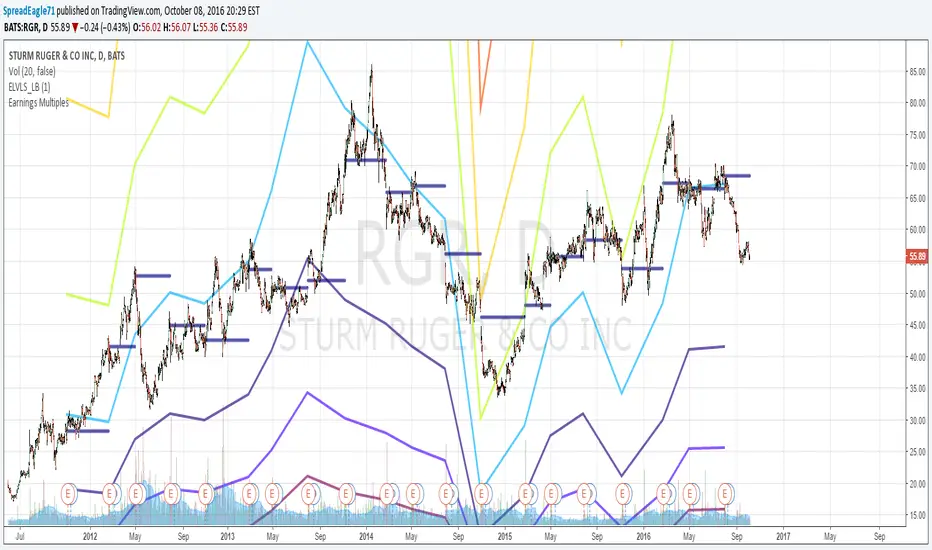
Earnings MultiplesMultiplies Quarterly Earnings x 13, x 21, x 34, x 55, x 89, x 144, x 233.
Yes its a fibonacci sequence.
"Goldilocks zone" seems to be in the 55x - 89x area.
Also when companies become profitable, the indicator looks like a "starburst".
EMA & SMA with FRACTAL DEVIATION BANDS by @XeL_ArjonaEMA & SMA with FRACTAL DEVIATION BANDS
Ver. 1.0.25.08.2015
By Ricardo M Arjona @XeL_Arjona
DISCLAIMER:
DISCLAIMER:
The Following indicator/code IS NOT intended to be a formal investment advice or recommendation by the author, nor should be construed as such. Users will be fully responsible by their use regarding their own trading vehicles/assets. The embedded code and ideas within this work are FREELY AND PUBLICLY available on the Web for NON LUCRATIVE ACTIVITIES and must remain as is.
WHAT IS THIS?
This is the adaptation of the FRACTAL DEVIATION BANDS to be used on Traditional Moving Averages (Simple & Exponential).
ALL NEW IDEAS OR MODIFICATIONS to these indicator(s) are Welcome in favor to deploy a better and more accurate readings. I will be very glad to be notified at Twitter or TradingVew accounts at: @XeL_Arjona
Any important addition to this work MUST REMAIN PUBLIC by means of CreativeCommons CC & TradingView.
2015

Educational Market Structure & Trend Context🔍 Overview
This time-limited indicator is designed for educational and analytical purposes only. It helps users visually study price structure behavior and trend context by marking key structural points on the chart and overlaying a trend reference line. The indicator does not generate trading signals, predictions, or recommendations.
⚙️ How the Indicator Works
The script analyzes price action over a user-defined lookback period to identify local structural points:
Higher Highs within the selected range
Lower Lows within the selected range
These points are plotted as simple visual markers to help users understand how price is evolving over time.
In addition, a moving average is applied to provide broader trend context.
🟢 Green Markers (Structure Strength)
Appear when price forms a local higher high within the lookback window
Represent relative strength in price structure
They are not buy signals and do not indicate future movement
🔴 Red Markers (Structure Weakness)
Appear when price forms a local lower low within the lookback window
Represent relative weakness in price structure
They are not sell signals and do not indicate reversals
➖ Grey Line (Trend Context Line)
This line is a moving average calculated over a fixed period
It provides trend context only, helping users visually distinguish between upward and downward environments
It does not act as support, resistance, or entry guidance
🎨 Background Shading (Optional Context)
A subtle background color may appear depending on price position relative to the trend line
This shading is purely visual context, not a signal or confirmation
🎯 Purpose & Benefits
Helps users study market structure in a clean and simple way
Encourages price-action awareness instead of signal dependency
Supports manual analysis, learning, and chart reading skills
Keeps the chart minimal, non-predictive, and professional
⚠️ Important Notes
This indicator does not provide buy/sell signals
No targets, stop levels, or profit expectations are included
Past structure points do not predict future outcomes
Users should apply their own analysis and risk management

Vietnam Asset Monitoring ToolVietNamese Asset Correlation Tracking Chart
This chart monitors the relationship between major asset classes which Vietnamese analyst should monitor:
Gold Price: Gold is currently in the spotlight as international trade tensions show no signs of easing.
U.S. Dollar Index (DXY): The strength of the U.S. dollar, a key indicator that has relative correlations with most asset classes.
VN30: Vietnam’s benchmark stock index, representing the top 30 leading listed companies.
VNREAL: The stock index tracking Vietnam’s real estate–related companies.
Hanoi Residential Property Prices: Apartment and landed house prices in Hanoi, compiled and aggregated by **VietRealty.Pro**
Development in progress..

SILVER (XAGUSD) Targets📌 AG Target – XAU-Based Silver Target Levels
AG Target is a ratio-based indicator designed to analyze Silver (XAGUSD) using the price of Gold (XAUUSD) as a reference.
The indicator projects dynamic target, support, and resistance levels on the silver chart by dividing the Gold price by historically significant XAU/XAG ratios.
🔍 How It Works
Retrieves XAUUSD (Gold spot price)
Divides it by predefined XAU/XAG ratio levels
Plots the resulting values directly on the XAGUSD chart
Fixed ratio levels used:
44.260
39.628
31.707
These ratios represent historically important zones in the Gold–Silver ratio.
🎨 Visual Logic
Green line → XAG price is above the level
Red line → XAG price is below the level
Line thickness increases with level importance
🚨 Alert System
The indicator includes individual alerts and one combined alert:
Separate alerts for each ratio level crossover
A single combined alert triggers when XAG price crosses any of the target levels
Alerts are triggered only on real cross events, avoiding repeated signals.
🏷️ Label Features
Automatic target labels on the last bar
Toggle labels on/off
Adjustable transparency, size, and horizontal offset
Labels display:
Current target price
Corresponding XAU/XAG ratio
🎯 Who Is This For?
Traders using the Gold–Silver ratio
Macro and ratio-based analysts
Medium to long-term silver traders
Users who prefer clean, objective price levels on their charts
⚠️ Disclaimer
This indicator is not financial advice.
It is designed as a ratio-based reference tool and should be used together with other technical or fundamental analysis methods.

Supply Demand Zones ProSupply Demand Zones PRO
Version: 1.0
Built with: Pine Script v6
________________________________________
🧭 HOW TO USE Start Here
🧠 What it does default behavior
• ✅ Automatically identifies Supply & Demand zones on your chart
• ✅ Automatically ranks each zone from 0 to 10 higher = stronger
• ✅ Works across most TradingView symbols and timeframes with default settings
⚙️ Default settings recommended for most instruments
Use the default settings for:
• 💱 Forex
• 🪙 Crypto
• 📊 Indices
• 🛢️ Commodities
• 🏛️ Stocks
Defaults are tuned to provide a balanced mix of quality zones + clean charts.
🎯 How to trade with it high-level workflow
1. 🥇 Prioritize strong zones
o Focus on higher scores commonly 7–10 for best reversal potential.
2. 🔄 Wait for a reversal setup at the zone
o Example triggers: rejection wick, engulfing candle, strong reaction candle, structure shift.
3. ✅ Confirm with other indicators before entering
o Use confirmation tools (your choice), such as:
📈 Trend filter (MA / market structure)
🧪 Momentum (RSI / Stoch / MACD)
📉 Volume / volatility tools
o Then take BUY from demand or SELL from supply *only when confirmation aligns
🧩🖤 Executive Summary: PRO Features Overview
The Supply Demand Zones PRO indicator is a professional-grade tool built on the latest Pine Script v6, designed to automatically identify and score high-probability supply and demand zones.
It moves beyond simple zone plotting by incorporating a suite of advanced features that provide a deeper, more actionable market context. This helps traders filter out noise, focus on significant levels, and make more informed decisions.
The indicator is universally compatible and works seamlessly across all major asset classes and timeframes:
• Forex: EURUSD, GBPUSD, USDJPY
• Commodities: Gold/XAUUSD, Silver, Oil
• Indices: NQ, ES, DAX, FTSE
• Cryptocurrencies: Bitcoin, Ethereum, Altcoins
• Stocks: Individual equities
Most symbols available on TradingView are fully supported.
Notice on repainting 🕯️⬛
Active zones won’t repaint unless they are invalidated. Gray/Historic zones may repaint, and that’s fine—this script only displays the most recent and stronger historic zones (if historic zones are enabled).
________________________________________
⬛🛠️Key PRO Features Overview
⚙️ Feature 📌 Description
Zone Strength Ranking ||| Each zone is dynamically scored from 1–10 based on its age and number of retests. Fresher, less-tested zones are stronger, helping prioritize high-impact levels.
Real-Time Distance ||| Each active zone’s info label shows the exact distance (in pips) from current price to the zone edge for quick risk/opportunity assessment.
Trading Session Tracking ||| Zones are tagged by formation session (Asian / London / New York) for added context—high-volume session zones often matter more.
Automated Retest Markers ||| The script tracks retests and places an “R” marker for each retest, giving a clear visual history of price interaction.
Advanced ATR Filtering ||| Volatility-based filters control zone quality: set min/max zone height and optionally enforce a consistent zone height using ATR.
Minimum Zone Distance ||| Reduces clutter by requiring a minimum number of bars between new zones, ensuring zones are distinct and well-separated.
Dual Label Controls Independently toggle info labels for Active vs Historic zones to keep charts clean while preserving key detail.
Built on Pine Script v6 ||| Uses the newest Pine Script version for better efficiency, reliability, and smoother handling of complex logic/drawings.
________________________________________
Detailed Feature Breakdown ⬛
Zone Strength Ranking ⬛
The strength score is a proprietary calculation that helps traders instantly gauge the potential of a supply or demand zone. It is calculated in real time using:
1. Age of the Zone: As zones age, they may lose relevance. Strength decreases as the number of bars since creation increases.
2. Number of Retests: The first test is often the highest-probability reaction. Each retest reduces strength as liquidity is absorbed.
✅ A high score (7/10+) indicates a fresh, less-tested zone that may produce a strong reaction.
⚠️ A low score suggests a zone is old and/or heavily tested—use extra caution.
________________________________________
🧱⬛Invalidation & Historic Zones
A zone becomes invalidated broken when price closes beyond its outer boundary or wicks beyond it, depending on settings. Once broken, it becomes a Historic Zone and turns gray.
This matters for structure: a broken supply zone can become future demand a flip zone, and vice versa.
________________________________________
🧪⬛Advanced Filtering Explained
Three ATR-based filters control zone quality:
• Max Zone Height (ATR Multiplier): Blocks zones that are too large to trade effectively. Example: 1.0 ignores zones taller than 1× ATR.
• Min Zone Height (ATR Multiplier): Filters out zones that are too thin and likely noise. Example: 1.0 rejects zones smaller than 1× ATR.
• Force Zone Height (ATR Multiplier): Normalizes zone heights by expanding smaller valid zones up to the minimum ATR target. Example: 1.0 expands zones to at least 1× ATR.
________________________________________
🧾⬛Configuration Guide
⚙️⬛Zone Detection
⚙️ Setting 🔧 Default 📝 Description
Swing Length (Sensitivity) 12 Lookback bars for pivot high/low detection. Higher = fewer, stronger zones.
Max Zones to Display 10 Max number of active Supply + Demand zones shown.
Max Zone Height (ATR) 1.0 Rejects zones taller than this ATR multiplier.
Min Zone Height (ATR) 1.0 Rejects zones smaller than this ATR multiplier.
Force Zone Height (ATR) 1.0 Expands valid zones to be at least this ATR multiplier.
Min Distance Between Zones 44 Minimum bars required between consecutive zones of the same type.
________________________________________
🧱⬛Zone Settings
⚙️ Setting 🔧 Default 📝 Description
Zone Invalidation Close “Close” = candle must close past zone; “Wick” = wick past zone breaks it.
Show Historic Zones On Toggles visibility of broken (historic) zones.
Active Zones Lookback 1000 Hides active zones older than this many bars.
Historic Zones Lookback 1000 Hides historic zones older than this many bars.
________________________________________
🖥️⬛Display
⚙️ Setting 🔧 Default 📝 Description
Show Active Zone Info On Toggles text labels for active (unbroken) zones.
Show Historic Zone Info Off Toggles text labels for historic (broken) zones.
Label Size Small Adjusts the font size of zone info labels.

POTAE INDICATORThis strategy is a Trend-Following system designed for Gold (XAUUSD) on lower timeframes (M1). it focuses on capturing continuation moves after a pullback (retrace) and uses a "memory" filter to avoid choppy markets.

Piv X ProPiv X Pro - Advanced Pivot Detection with Multi-Timeframe Confluence Analysis
Overview
Piv X Pro identifies pivot highs and lows using a confluence scoring system. It combines pivot detection, volume-weighted analysis, Williams %R divergence, and multi-timeframe confirmation to highlight higher-probability pivot zones.
What Makes This Script Original
This script combines several components into a single workflow:
Dynamic pivot strength calculation based on ATR
Confluence scoring (10+ factors) to rank pivot quality
Multi-timeframe VWAP analysis (bottom/top extremes plus period-based VWAPs)
Williams %R divergence detection with anchored VWAPs
Market structure shift (CHoCH) identification
Real-time and confirmation modes for different trading styles
How It Works
Pivot Detection:
Uses ATR-based dynamic pivot strength (adjusts to volatility)
Filters pivots by significance (distance from recent averages)
Optional volume confirmation
Real-time mode for immediate detection or confirmation mode for verified pivots
Confluence Scoring System:
Each pivot receives a score (0-100+) based on:
Volume spikes (15 points)
Higher timeframe trend alignment (20 points)
RSI oversold/overbought conditions (25 points)
Price exhaustion signals (10 points)
RSI divergence (15 points)
Swing failure patterns (15 points)
Liquidity sweeps (10 points)
Candle reversal confirmation (10 points)
Key level alignment (10 points)
Fair value gap fills (10 points)
Session weighting (10 points)
Multi-timeframe pivot confluence (15 points)
Major Pivot Thresholds:
Real-time mode: 60+ confluence score
Confirmation mode: 80+ confluence score
Golden zones: 90+ score (highlighted differently)
VWAP Analysis:
Bottom/Top VWAPs: Anchored to absolute extremes within a lookback period
Period VWAPs: Weekly, Monthly, Yearly, plus 4D, 9D, 4H, 8H
Previous period VWAPs: Shows last period's VWAP for reference
Williams Divergence VWAPs: Anchored VWAPs triggered by bullish/bearish divergences
Market Structure:
Identifies Market Structure Shifts (CHoCH) when pivot sequences break
Draws structure lines connecting major pivots
Visual zones around major pivot levels
How to Use
Setup:
Apply to any timeframe (optimized for 1min, 5min, 15min, 1H)
Adjust pivot detection sensitivity via "ATR Pivot Strength Multiplier"
Choose Real-Time Mode (immediate) or Confirmation Mode (verified pivots)
Reading the Signals:
Major Pivot Low (PL): Green zones with confluence score
Major Pivot High (PH): Purple zones with confluence score
Golden Zones: Yellow highlights (90+ score)
CHoCH: Blue dashed lines marking structure breaks
Williams Divergence: Triangles + anchored VWAP lines
Trading Applications:
Support/Resistance: Use major pivot zones as key levels
Entry Timing: Combine confluence scores with price action
Trend Following: Use CHoCH signals for trend changes
Divergence Trading: Williams %R divergences with anchored VWAPs
Multi-Timeframe: Use HTF trend filter and VWAPs for context
Important Notes:
This is a technical analysis tool, not a trading system
Confluence scores indicate probability, not guarantees
Past performance does not predict future results
Always use proper risk management
Combine with your own analysis and strategy
Key Features
Pivot Quality Filters:
ATR-based significance filtering
Volume confirmation (optional)
Multi-timeframe confluence
Session-based weighting (optional)
Visual Elements:
Pivot zones (extendable boxes)
Structure lines (connecting major pivots)
CHoCH markers (market structure shifts)
Multiple VWAP overlays
Williams divergence markers
Customization:
Adjustable pivot strength multiplier
Enable/disable individual confluence factors
Customizable colors and visual styles
Alert system for major pivots and structure shifts
Technical Details
Open Source:
This script is open source. The code is available for review and modification. Users can see exactly how calculations are performed.
Calculations:
Pivot detection uses ta.pivothigh() and ta.pivotlow() with dynamic strength
VWAP calculations use cumulative price×volume / cumulative volume
Confluence scoring is additive based on multiple technical factors
Williams %R divergence uses pivot comparison logic
Limitations:
Historical data access limits apply (Pine Script constraints)
Structure lines limited to 500 bars for performance
Real-time mode may show pivots that later invalidate
Confirmation mode adds lag but increases reliability
Disclaimer
This script is for educational and informational purposes. It does not provide financial advice. Trading involves risk. Always do your own research and use proper risk management. Past performance does not guarantee future results.
