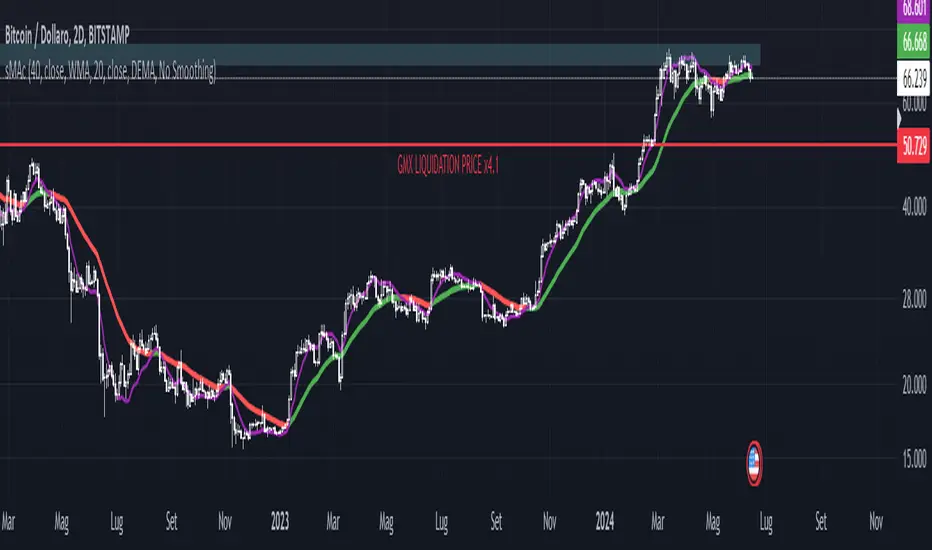
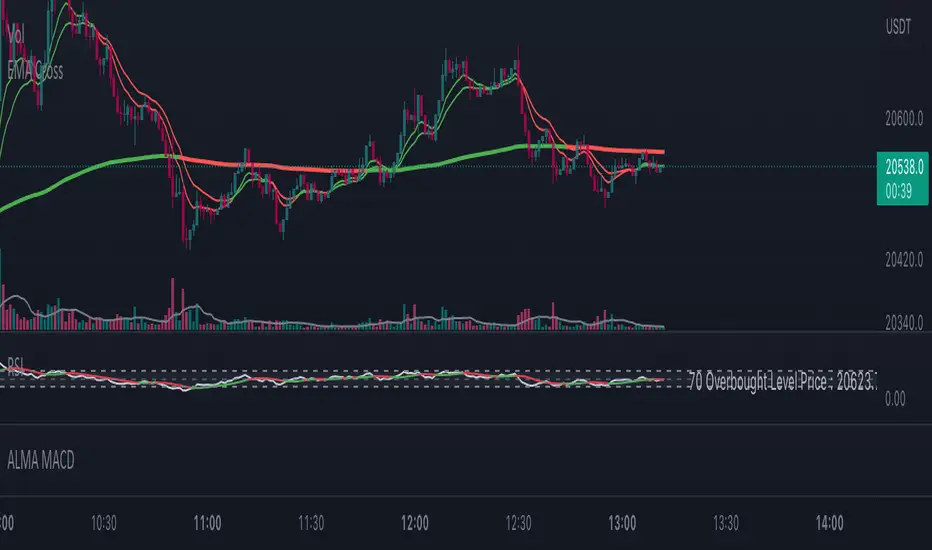
Death Cross - 200 MA / 50 Cross CheckerBITFINEX:BTCUSD You can check if 200 day MA crossed by 50 day MA. Nuff said. Индикатор Pine Script®от MexPayne77825
Multiple Moving AverageSuper simple script integrating three moving averages within only one script. It's going to help you to keep your chart cleaner while saving two spots for other indicators you may like. Try it out and let me know what you think. A possible trading strategy: Buy/Sell crossover of the MAs. Buy/Sell when fast MA crosses medium MA, double down when medium MA crosses slow MA. Combining trading strategy is always a good idea.Индикатор Pine Script®от fernandofurtadoОбновлено 125
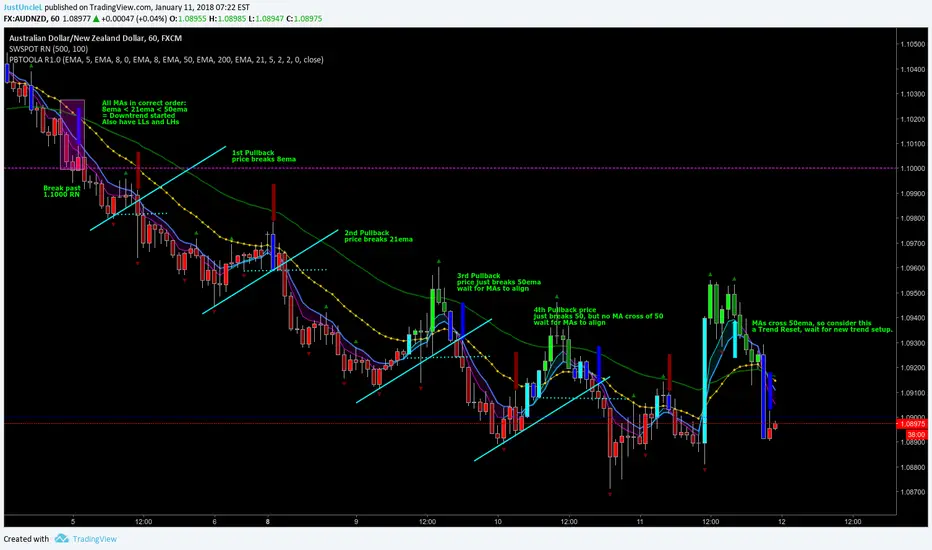
Pullback Trading Tool ALT R1.0 by JustUncleLThis study is an alternative Pullback Tool to my previous versions "Pullback Trading Tool R#.# by JustUncleL". This version aims to provide a cleaner but powerful trading tool. It incorporates the majority of the indicators needed to analyse trade Trends for Pullbacks and Reversals. You can optionally use Heikin Ashi candle or Renko charts. The notes here are mainly in reference to using standard Candlestick 60min signal chart (or Anchor chart time frame), other higher time frames can be used instead as Anchor Time Frames such as 240min(4hr) or 1440min(Daily). NOTE: A Pullback is synomous to Retracement, generally a Pullback refers to a large Retracement of 100pips or more. In the context of this Tool and any comments related to it, a Pullback will be the same as a Retracement. Incorporated within this tool are the following indicators: 1. Three Moving Averages (EMA by default) that can optionally be Anchored to a Higher Time Frame: DodgerBlue = EMA08 (default) Green = EMA50 (default) Gray = EMA200 (default), disabled by default. 2. One Anchored Signal Moving Average line Yellow EMA21 (default). 3. Two Un-Anchored Moving Averages as Ribbon, can be disabled. Aqua = EMA03 (default) Fuchsia = EMA08 (default) 4. Display Pivots and optional Pivot Levels. By default Pivot is set to : 2 candles RHS of Pivot and 2 candles LHS of Pivot; this is the setting required to show standard Fractal points. 5. Optional HH, LH, LL, HL finder to help with drawing Trend lines and mini Trend Lines. 6. Coloured coded Bar based on the signal MA: the Standard candle colours: Blue = candle open and closed above signal MA. Red = candle open and closed below signal MA. Yellow = Candle stradle across signal MA. the Grab candles scheme: Lime = Bull candle open and closed above signal MA. Green = Bear candle open and closed above signal MA. Red = Bull candle open and closed below signal MA. DarkRed = Bear candle open and closed below signal MA. Aqua = Bull candle closed across signal MA. Blue = Bear candle stradle across signal MA. 7. Alert entry arrows generated within a Trend or at the start of a new trend. An Uptrend is defined as anchored fast (8ema) above anchored signal (21ema) above anchored medium (50ema). A Downtrend is defined as anchored fast (8ema) below anchored signal (21ema) below anchored medium (50ema). A Pullback generates an red (short entry) or green (long entry) arrow when price crosses anchored fast or signal MAs and then crosses back to return to trend direction. A Trend Break, which is defined as any of the MAs crossing breaking trend, generates a blue (short) or aqua (long) arrow and then make new trend (in same or new trend direction). Индикатор Pine Script®от JustUncleLОбновлено 4646 6.8 K
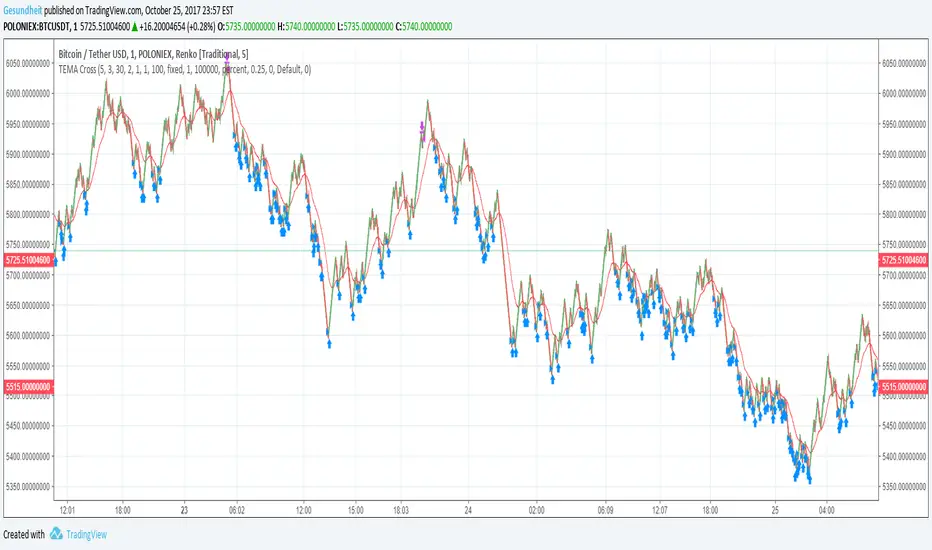
TEMA Cross on Renko CandlesRenko candles filter out noise by plotting a fixed change in price rather than a fixed time frame. Strategies like MACD or MA cross can give a lot of false signals when the price is wavy, but not actually going anywhere. This is especially a problem with small time frames. Since it's so easy to identify trends on a Renko plot, this strategy uses a simple moving average cross idea. Instead of an EMA, we use a TEMA ( triple exponential moving average ) because that version does not lag as much. We also will avoid buying when the price is above a longer-term smoothed moving average. This means we will hopefully reduce bags, but we will also miss some trades. Also included are avg_protection -- if >0 only buy when it will bring down our average price, else buy whenever the TEMA crosses over the short-term SMA gain_protection -- if >0 only sell when we meet out min_gain %, otherwise sell whenever TEMA crosses under the short-term SMA I've been setting my Renko candles to a fixed range instead of ATR, and I use increments of roughly 0.1% in the example chart.Стратегия Pine Script®от Gesundheit55264
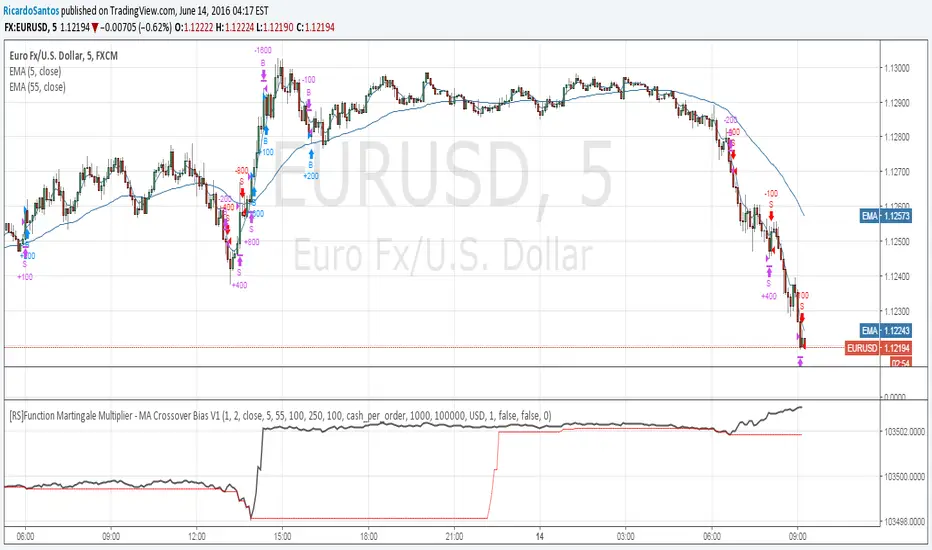
[RS]Function Martingale Multiplier - MA Crossover Bias V1EXPERIMENTAL: WARNING: Martingale is subject to HUGE drawdown spikes, use at your own risk! updated function to also double(aply multiplier) on even trades, example with a MA's crossover. Стратегия Pine Script®от RicardoSantos88369
SMA Multi-Sync Granville & MTF CounterSMA Multi-Sync Granville & MTF Counter Overview This indicator is an environmental awareness tool that identifies when and to what level moving averages (SMAs) across multiple time frames align in the same direction, visualizing the timing and freshness of the trend. Its greatest feature is that it does not simply determine synchronization; rather, it precisely distinguishes the time frame upon which synchronization is completed using the number of stars (★). Key Features 1. Calculation of "Stars" Based on Confirmed Time Frame Trigger The number of stars displayed upon synchronization completion indicates the signal's "temporal weight." ★ (1): Synchronization is completed upon confirmation of the displayed time frame. ★★ (2): Synchronization is completed upon confirmation of the next higher time frame (e.g., 15 minutes). ★★★ (3): Synchronization is completed upon confirmation of the next higher time frame (e.g., 1 hour). The more higher the time frame is confirmed, the more powerful the trend reversal or regression it acts as. 2. MTF Sync Panel The table on the right side of the screen displays the price position (background) and MA direction (text) for each level (displayed to daily) in real time. By watching the background and text colors match, you can understand the accumulation of energy before a star appears. 3. Cross Counter The number of bars elapsed from the synchronization starting point (MA crossover, etc.) to the current bar is displayed numerically in the lower right corner. The closer to "0" the number, the more likely it is the beginning of a trend, while the higher the number, the more likely it is the end of the trend (expiration date). Usability of Input Settings Min Stars (1-5) This sets the signal cutoff. Setting it to "2" eliminates noise caused by the displayed bar being confirmed and narrows down to only the moment when the higher bar is confirmed (★2 or higher). Cancel Alert if MA Slope Same If the MA of the displayed time frame is already leaning in the same direction (leading), the confirmation (★1) on that time frame will be considered "not an initial move" and excluded. 5m TF: Use 30m SMA When using 5-minute time frames, this physically changes the ★2 trigger from the confirmation on the 15-minute chart to the confirmation on the 30-minute chart. This is effective when targeting milestones on larger time frames. *If you have any questions about how to use this, please ask in the comments. SMA Multi-Sync Granville & MTF Counter 概要 本インジケーターは、複数の時間足の移動平均線(SMA)が「いつ、どの階層まで同じ方向に揃ったか」を特定し、そのトレンドの**「確定タイミング」と「鮮度」**を可視化する環境認識ツールです。 最大の特徴は、単なる同調判定ではなく、**「どの時間足の確定(Close)によって同期が完成したか」**を星(★)の数で厳密に区別する点にあります。 主な機能 1. 確定足トリガーによる「星」の算出 同期が完成した瞬間に表示される星の数は、そのシグナルの「時間的な重み」を示します。 ★(1つ):表示足の確定により同期が完成。 ★★(2つ):1つ上の上位足(15分等)の確定により同期が完成。 ★★★(3つ):2つ上の上位足(1時間等)の確定により同期が完成。 上位の足が確定する節目ほど、より強力なトレンドの転換・回帰として機能します。 2. MTF同期パネル 画面右側のテーブルで、各階層(表示足〜日足)の「価格の位置(背景)」と「MAの向き(文字)」をリアルタイムに表示します。 背景色と文字色が一致していく過程を見ることで、星が出る前の**「エネルギーの蓄積」**を把握できます。 3. クロスカウンター 同期の起点(MAクロス等)から、現在の足まで何本経過したかを右下に数値で表示します。 「0」に近いほど初動であり、数値が大きくなるほどトレンドの終盤(賞味期限切れ)である可能性を論理的に示唆します。 インプット設定の使い勝手 Min Stars (1-5) シグナルの足切り設定です。「2」に設定すれば、表示足の確定によるノイズを排除し、**上位足の確定が伴った瞬間(★2以上)**のみに絞り込めます。 Cancel Alert if MA Slope Same 表示足のMAがすでに同方向へ傾いている(先行している)場合、その足での確定(★1)を「初動ではない」とみなして除外します。 5m TF: Use 30m SMA 5分足運用時、★2のトリガーを「15分足」から「30分足」の確定に物理的に変更します。より大きな時間軸の節目を狙う場合に有効です。 ※使い方が不明なところはコメントで聞いてください。Индикатор Pine Script®от hmp5below5
Simple MA Crossover w/ SLTPPicture two cheetahs on a racetrack made of price candles. One cheetah is fast and twitchy (the short-term EMA). The other is chill, lumbering, and takes its sweet time (the long-term EMA). When the twitchy cheetah sprints ahead and crosses above the chill one → “BUY, YOU MAGNIFICENT DEGEN!” When the twitchy one gets tired, slows down, and gets lapped from above → “SELL before this turns into a horror movie!” That, my friend, is the EMA crossover strategy in its purest, most dramatic form.Стратегия Pine Script®от Thighighs5
Smart Money Concepts [XoRonX]# Smart Money Concepts (SMC) - Advanced Trading Indicator ## 📊 Deskripsi **Smart Money Concepts ** adalah indicator trading komprehensif yang menggabungkan konsep Smart Money Trading dengan berbagai alat teknikal analisis modern. Indicator ini dirancang untuk membantu trader mengidentifikasi pergerakan institusional (smart money), struktur pasar, zona supply/demand, dan berbagai sinyal trading penting. Indicator ini mengintegrasikan multiple timeframe analysis, order blocks detection, fair value gaps, fibonacci retracement, volume profile, RSI multi-timeframe, dan moving averages dalam satu platform yang powerful dan mudah digunakan. --- ## 🎯 Fitur Utama ### 1. **Smart Money Structure** - **Internal Structure** - Struktur pasar jangka pendek untuk entry presisi - **Swing Structure** - Struktur pasar jangka panjang untuk trend analysis - **BOS (Break of Structure)** - Konfirmasi kelanjutan trend - **CHoCH (Change of Character)** - Deteksi potensi reversal ### 2. **Order Blocks** - **Internal Order Blocks** - Zona demand/supply jangka pendek - **Swing Order Blocks** - Zona demand/supply jangka panjang - Filter otomatis berdasarkan volatilitas (ATR/Range) - Mitigation tracking (High/Low atau Close) - Customizable display (jumlah order blocks yang ditampilkan) ### 3. **Equal Highs & Equal Lows (EQH/EQL)** - Deteksi otomatis equal highs/lows - Indikasi liquidity zones - Threshold adjustment untuk sensitivitas - Visual lines dan labels ### 4. **Fair Value Gaps (FVG)** - Multi-timeframe FVG detection - Auto threshold filtering - Bullish & Bearish FVG boxes - Extension control - Color customization ### 5. **Premium & Discount Zones** - Premium Zone (75-100% dari range) - Equilibrium Zone (47.5-52.5% dari range) - Discount Zone (0-25% dari range) - Auto-update berdasarkan swing high/low ### 6. **Fibonacci Retracement** - **Equilibrium to Discount** - Fib dari EQ ke discount zone - **Equilibrium to Premium** - Fib dari EQ ke premium zone - **Discount to Premium** - Fib full range - Reverse option - Show/hide lines - Custom colors ### 7. **Volume Profile (VRVP)** - Visible Range Volume Profile - Point of Control (POC) - Value Area (70% volume) - Auto-adjust rows - Placement options (Left/Right) - Width customization ### 8. **RSI Multi-Timeframe** - Monitor 3 timeframes sekaligus - Overbought/Oversold signals - Visual table display - Color-coded signals (Red OB, Green OS) - Customizable position & size ### 9. **Moving Averages** - 3 Moving Average lines - Pilihan tipe: EMA, SMA, WMA - Automatic/Manual period mode - Individual color & width settings - Cross alerts (MA vs MA, Price vs MA) ### 10. **Multi-Timeframe Levels** - Support up to 5 different timeframes - Previous high/low levels - Custom line styles - Color customization ### 11. **Candle Color** - Color candles berdasarkan trend - Bullish = Green, Bearish = Red - Optional toggle --- ## 🛠️ Cara Penggunaan ### **A. Setup Awal** 1. **Tambahkan Indicator ke Chart** - Buka TradingView - Klik "Indicators" → "My Scripts" atau paste code - Pilih "Smart Money Concepts " 2. **Pilih Mode Display** - **Historical**: Tampilkan semua struktur (untuk backtesting) - **Present**: Hanya tampilkan struktur terbaru (clean chart) 3. **Pilih Style** - **Colored**: Warna berbeda untuk bullish/bearish - **Monochrome**: Tema warna abu-abu --- ### **B. Penggunaan Fitur** #### **1. Smart Money Structure** **Internal Structure (Real-time):** - ✅ Aktifkan "Show Internal Structure" - Pilih tampilan: All, BOS only, atau CHoCH only - Gunakan untuk entry timing presisi - Filter confluence untuk mengurangi noise **Swing Structure:** - ✅ Aktifkan "Show Swing Structure" - Pilih tampilan struktur bullish/bearish - Adjust "Swings Length" (default: 50) - Gunakan untuk konfirmasi trend utama **Tips:** - BOS = Konfirmasi trend continuation - CHoCH = Warning untuk possible reversal - Tunggu price retest ke order block setelah BOS --- #### **2. Order Blocks** **Setup:** - ✅ Aktifkan Internal/Swing Order Blocks - Set jumlah blocks yang ditampil (1-20) - Pilih filter: ATR atau Cumulative Mean Range - Pilih mitigation: Close atau High/Low **Cara Trading:** 1. Tunggu BOS/CHoCH terbentuk 2. Identifikasi order block terdekat 3. Wait for price pullback ke order block 4. Entry saat price respek order block (rejection) 5. Stop loss di bawah/atas order block 6. Target: swing high/low berikutnya **Color Code:** - 🔵 Light Blue = Internal Bullish OB - 🔴 Light Red = Internal Bearish OB - 🔵 Dark Blue = Swing Bullish OB - 🔴 Dark Red = Swing Bearish OB --- #### **3. Equal Highs/Lows (EQH/EQL)** **Setup:** - ✅ Aktifkan "Equal High/Low" - Set "Bars Confirmation" (default: 3) - Adjust threshold (0-0.5, default: 0.1) **Interpretasi:** - EQH = Liquidity di atas, kemungkinan sweep lalu dump - EQL = Liquidity di bawah, kemungkinan sweep lalu pump - Biasanya smart money akan grab liquidity sebelum move besar **Trading Strategy:** - Wait for EQH/EQL formation - Anticipate liquidity grab - Entry setelah sweep dengan konfirmasi (order block, FVG, CHoCH) --- #### **4. Fair Value Gaps (FVG)** **Setup:** - ✅ Aktifkan "Fair Value Gaps" - Pilih timeframe (default: chart timeframe) - Enable/disable auto threshold - Set extension bars **Cara Trading:** 1. Bullish FVG = Support zone untuk buy 2. Bearish FVG = Resistance zone untuk sell 3. Price tends to fill FVG (retest) 4. Entry saat price kembali ke FVG 5. Partial fill = valid, full fill = invalidated **Tips:** - FVG + Order Block = High probability setup - Multi-timeframe FVG lebih kuat - Unfilled FVG = strong momentum --- #### **5. Premium & Discount Zones** **Setup:** - ✅ Aktifkan "Premium/Discount Zones" - Zones akan auto-update berdasarkan swing high/low **Interpretasi:** - 🟢 **Discount Zone** = Area BUY (price murah) - ⚪ **Equilibrium** = Neutral (50%) - 🔴 **Premium Zone** = Area SELL (price mahal) **Trading Strategy:** - BUY dari discount zone - SELL dari premium zone - Avoid trading di equilibrium - Combine dengan structure confirmation --- #### **6. Fibonacci Retracement** **Setup:** - Pilih Fib yang ingin ditampilkan: - Equilibrium to Discount - Equilibrium to Premium - Discount to Premium - Toggle show lines - Enable reverse jika perlu - Custom colors **Key Levels:** - 0.236 = Shallow retracement - 0.382 = Common retracement - 0.5 = 50% golden level - 0.618 = Golden ratio (penting!) - 0.786 = Deep retracement **Cara Pakai:** - 0.618-0.786 = Ideal entry zone dalam trend - Combine dengan order blocks - Wait for confirmation candle --- #### **7. Volume Profile (VRVP)** **Setup:** - ✅ Aktifkan "Show Volume Profile" - Set jumlah rows (10-100) - Adjust width (5-50%) - Pilih placement (Left/Right) - Enable POC dan Value Area **Interpretasi:** - **POC (Point of Control)** = Harga dengan volume tertinggi = magnet - **Value Area** = 70% volume = fair price range - **Low Volume Nodes** = Weak support/resistance - **High Volume Nodes** = Strong support/resistance **Trading:** - POC acts as support/resistance - Price tends to return to POC - Breakout dari Value Area = momentum --- #### **8. RSI Multi-Timeframe** **Setup:** - ✅ Aktifkan "Show RSI Table" - Set 3 timeframes (default: chart, 5m, 15m) - Set RSI period (default: 14) - Set Overbought level (default: 70) - Set Oversold level (default: 30) - Pilih posisi & ukuran table **Interpretasi:** - 🟢 **OS (Oversold)** = RSI ≤ 30 = Kondisi jenuh jual - 🔴 **OB (Overbought)** = RSI ≥ 70 = Kondisi jenuh beli - **-** = Neutral zone **Trading Strategy:** 1. Multi-timeframe alignment = strong signal 2. OS + Bullish structure = BUY signal 3. OB + Bearish structure = SELL signal 4. Divergence RSI vs Price = reversal warning **Contoh:** - TF1: OS, TF2: OS, TF3: OS + Price di discount zone = STRONG BUY --- #### **9. Moving Averages** **Setup:** - Pilih MA Type: EMA, SMA, atau WMA (berlaku untuk ketiga MA) - Pilih Period Mode: Automatic atau Manual - Set period untuk MA 1, 2, 3 (default: 20, 50, 100) - Custom color & width per MA - ✅ Enable Cross Alerts **Interpretasi:** - **Golden Cross** = MA fast cross above MA slow = Bullish - **Death Cross** = MA fast cross below MA slow = Bearish - Price above all MAs = Strong uptrend - Price below all MAs = Strong downtrend **Trading Strategy:** 1. MA1 (20) = Short-term trend 2. MA2 (50) = Medium-term trend 3. MA3 (100) = Long-term trend **Entry Signals:** - Price bounce dari MA dalam trend = continuation - MA cross dengan konfirmasi structure = entry - Multiple MA confluence = strong support/resistance **Alerts Available:** - MA1 cross MA2/MA3 - MA2 cross MA3 - Price cross any MA --- #### **10. Multi-Timeframe Levels** **Setup:** - Enable HTF Level 1-5 - Set timeframes (contoh: 5m, 1H, 4H, D, W) - Pilih line style (solid/dashed/dotted) - Custom colors **Cara Pakai:** - Previous high/low dari HTF = strong S/R - Breakout HTF level = significant move - Multiple HTF levels confluence = major zone --- ### **C. Trading Setup Combination** #### **Setup 1: High Probability Buy (Bullish)** 1. ✅ Swing structure: Bullish BOS 2. ✅ Price di Discount Zone 3. ✅ Pullback ke Bullish Order Block 4. ✅ Bullish FVG di bawah 5. ✅ RSI Multi-TF: Oversold 6. ✅ Price bounce dari MA 7. ✅ POC/Value Area support 8. ✅ Fibonacci 0.618-0.786 retracement **Entry:** Saat price reject dari order block dengan confirmation candle **Stop Loss:** Below order block **Target:** Swing high atau premium zone --- #### **Setup 2: High Probability Sell (Bearish)** 1. ✅ Swing structure: Bearish BOS 2. ✅ Price di Premium Zone 3. ✅ Pullback ke Bearish Order Block 4. ✅ Bearish FVG di atas 5. ✅ RSI Multi-TF: Overbought 6. ✅ Price reject dari MA 7. ✅ POC/Value Area resistance 8. ✅ Fibonacci 0.618-0.786 retracement **Entry:** Saat price reject dari order block dengan confirmation candle **Stop Loss:** Above order block **Target:** Swing low atau discount zone --- #### **Setup 3: Liquidity Grab (EQH/EQL)** 1. ✅ Identifikasi EQH atau EQL 2. ✅ Wait for liquidity sweep 3. ✅ Konfirmasi dengan CHoCH 4. ✅ Order block terbentuk setelah sweep 5. ✅ Entry saat retest order block --- ### **D. Tips & Best Practices** **Risk Management:** - Selalu gunakan stop loss - Risk 1-2% per trade - Risk:Reward minimum 1:2 - Jangan over-leverage **Confluence adalah Kunci:** - Minimal 3-4 konfirmasi sebelum entry - Lebih banyak konfirmasi = higher probability - Quality over quantity **Timeframe Analysis:** - HTF (Higher Timeframe) = Trend direction - LTF (Lower Timeframe) = Entry timing - Align dengan HTF trend **Backtesting:** - Gunakan mode "Historical" - Test strategy di berbagai market condition - Record dan analyze hasil **Market Condition:** - Trending market = Follow BOS, use order blocks - Ranging market = Use premium/discount zones, EQH/EQL - High volatility = Wider stops, wait for clear structure **Avoid:** - Trading di equilibrium zone - Entry tanpa konfirmasi - Fighting the trend - Overleveraging - Emotional trading --- ## 📈 Recommended Settings ### **For Scalping (1m - 5m):** - Internal Structure: ON - Swing Structure: OFF - Order Blocks: Internal only - RSI Timeframes: 1m, 5m, 15m - MA Periods: 9, 21, 50 ### **For Day Trading (15m - 1H):** - Internal Structure: ON - Swing Structure: ON - Order Blocks: Both - RSI Timeframes: 15m, 1H, 4H - MA Periods: 20, 50, 100 ### **For Swing Trading (4H - D):** - Internal Structure: OFF - Swing Structure: ON - Order Blocks: Swing only - RSI Timeframes: 4H, D, W - MA Periods: 20, 50, 200 --- ## ⚠️ Disclaimer Indicator ini adalah alat bantu analisis teknikal. Tidak ada indicator yang 100% akurat. Selalu: - Lakukan analisa fundamental - Gunakan proper risk management - Praktik di demo account terlebih dahulu - Trading memiliki resiko, trade at your own risk --- ## 📝 Version Info **Version:** 5.0 **Platform:** TradingView Pine Script v5 **Author:** XoRonX **Max Labels:** 500 **Max Lines:** 500 **Max Boxes:** 500 --- ## 🔄 Updates & Support Untuk update, bug reports, atau pertanyaan: - Check documentation regularly - Test new features in replay mode - Backup your settings before updates --- ## 🎓 Learning Resources **Recommended Study:** 1. Smart Money Concepts (SMC) basics 2. Order blocks theory 3. Liquidity concepts 4. ICT (Inner Circle Trader) concepts 5. Volume profile analysis 6. Multi-timeframe analysis **Practice:** - Start with higher timeframes - Master one concept at a time - Keep a trading journal - Review your trades weekly --- **Happy Trading! 🚀📊** _Remember: The best indicator is your own analysis and discipline._ Индикатор Pine Script®от groupyproo45
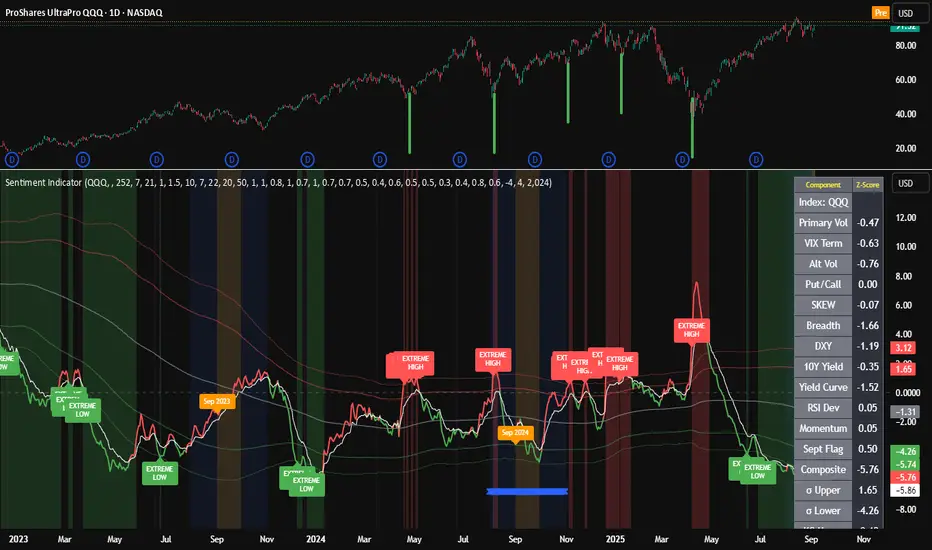
Composite Sentiment Indicator (SPY/QQQ/SOXX + VixFix)# Multi-Index Composite Sentiment Indicator A comprehensive sentiment indicator that works across SPY, QQQ, SOXX, and custom symbols. Combines volatility, options flow, macro factors, technicals, and seasonality into a single z-score composite. ## What It Does Takes multiple market sentiment inputs (VIX, put/call ratios, breadth, yields, etc.) and smooshes them into one normalized line. When the composite is high = markets getting spooked. When it's low = markets getting complacent. ## Key Features - **Multi-Index Support**: Automatically adapts for SPY (uses VIX), QQQ (uses VXN), SOXX (uses VixFix), or custom symbols - **VixFix Integration**: Larry Williams' VixFix for indices without dedicated VIX measures - **Signal MA**: Choose from SMA/EMA/WMA/HMA/TEMA/DEMA with color coding (red above MA = risk-on, green below = risk-off) - **September Focus**: Built-in seasonality weighting for September weakness patterns - **Comprehensive Components**: Volatility, options sentiment, macro factors, technicals, and sector-specific metrics ## How to Use **Basic Setup:** 1. Pick your index (SPY/QQQ/SOXX) 2. Choose signal MA type and length (EMA 21 is a good start) 3. Watch for extreme readings and MA crossovers **Color Signals:** - Red composite = above signal MA = bearish sentiment - Green composite = below signal MA = bullish sentiment - Extreme high readings (red background) = potential tops - Extreme low readings (green background) = potential bottoms **For Different Indices:** - **QQQ**: Uses NASDAQ VIX (VXN) when available, falls back to VixFix - **SOXX**: Includes semiconductor cycle indicators, uses VixFix for volatility - **Custom**: Adapts automatically, relies on VixFix and general market metrics ## Components Included **Volatility**: VIX/VXN/VixFix, term structure, historical vol **Options**: Put/call ratios, SKEW index **Macro**: DXY, 10Y yields, yield curve, TIPS spreads **Technical**: RSI deviation, momentum **Seasonality**: September effects, quad witching, month-end patterns **Breadth**: S&P 500 and NASDAQ breadth measures ## Pro Tips - Works well on Daily Timeframe - September gets extra weight automatically - watch for August setup signals - Keltner envelope breaks often mark sentiment exhaustion points - Use alerts for extreme readings and MA crossovers Works best when you understand that sentiment extremes often mark turning points, not continuation signals. High readings don't mean "keep shorting" - they mean "start looking for reversal setups." ## Settings Worth Tweaking - Signal MA type/length for your timeframe - Component weights based on what matters for your index - Envelope multipliers for your risk tolerance - VixFix parameters if default doesn't fit your symbol's volatility The table shows all current component readings so you can see what's driving the signal. Good for context and debugging weird readings.Индикатор Pine Script®от ky_yule1010Обновлено 4469
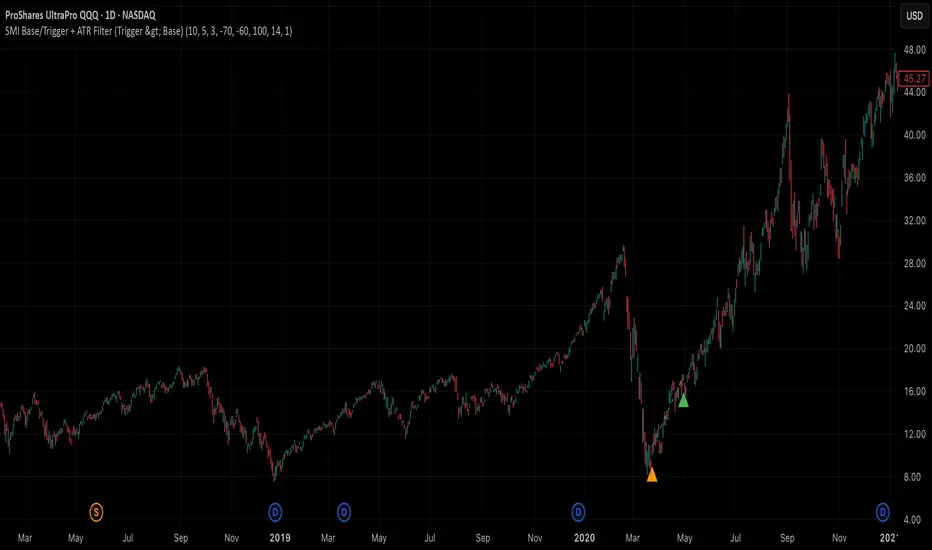
SMI Base-Trigger Bullish Re-acceleration (Higher High)Description What it does This indicator highlights a two-step bullish pattern using Stochastic Momentum Index (SMI) plus an ATR distance filter: 1. Base (orange) – Marks a momentum “reset.” A base prints when SMI %K crosses up through %D while %K is below the Base level (default -70). The base stores the base price and starts a waiting window. 2. Trigger (green) – Confirms momentum and price strength. A trigger prints only if, before the timeout window ends: • SMI %K crosses up through %D again, • %K is above the Trigger level (default -60), • Close > Base Price, and • Price has advanced at least Min ATR multiple (default 1.0× the 14-period ATR) above the base price. A dashed green line connects the base to the trigger. Why it’s useful It seeks a bullish divergence / reacceleration: momentum recovers from deeply negative territory, then price reclaims and exceeds the base by a volatility-aware margin. This helps filter out weak “oversold bounces.” Signals • Base ▲ (orange): Potential setup begins. • Trigger ▲ (green): Confirmation—momentum and price agree. Inputs (key ones) • %K Length / EMA Smoothing / %D Length: SMI construction. • Base when %K < (default -70): depth required for a valid reset. • Trigger when %K > (default -60): strength required on confirmation. • Base timeout (days) (default 100): maximum look-ahead window. • ATR Length (default 14) and Min ATR multiple (default 1.0): price must exceed the base by this ATR-scaled distance. How traders use it (example rules) • Entry: On the Trigger. • Risk: A common approach is a stop somewhere between the base price and a multiple of ATR below trigger; or use your system’s volatility stop. • Exits: Your choice—trend MA cross, fixed R multiple, or structure-based levels. Notes & tips • Works best on liquid symbols and mid-to-higher timeframes (reduce noise). • Increase Min ATR multiple to demand stronger price confirmation; tighten or widen Base/Trigger levels to fit your market. • This script plots signals only; convert to a strategy to backtest entries/exits. Индикатор Pine Script®от suresh789Обновлено 35
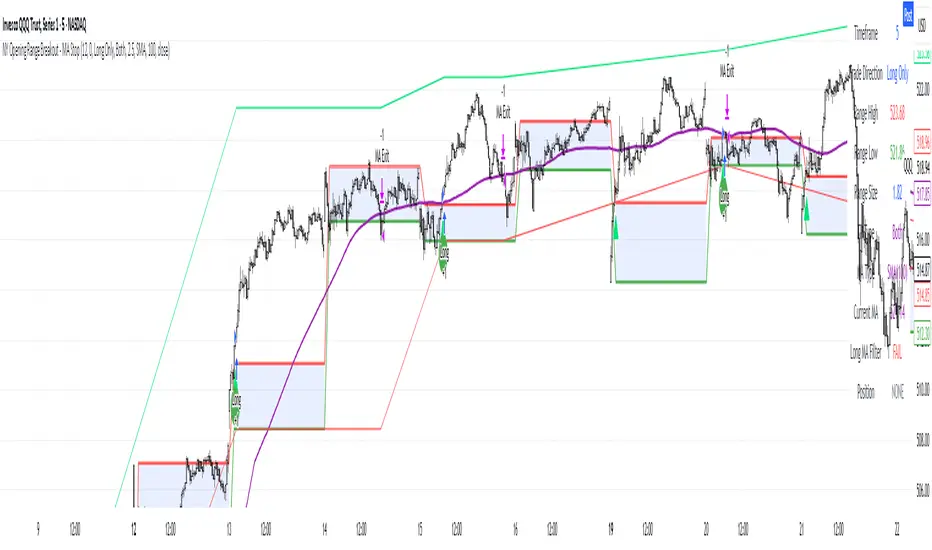
NY Opening Range Breakout - MA StopCore Concept This strategy trades breakouts from the New York opening range (9:30-9:45 AM NY time) on intraday timeframes, designed for scalping and day trading. Setup Requirements Timeframe: Works on any timeframe under 15 minutes (1m, 2m, 3m, 5m, 10m) Session: New York market hours Range Period: 9:30-9:45 AM NY time (15-minute opening range) Entry Rules Long Entries: Wait for a candle to close above the opening range high Enter long on the next candle (before 12:00 PM NY time) Must be above moving average if using MA-based take profit Short Entries: Wait for a candle to close below the opening range low Enter short on the next candle (before 12:00 PM NY time) Must be below moving average if using MA-based take profit Risk Management Stop Loss: Long trades: Opening range low Short trades: Opening range high Take Profit Options: Fixed Risk Reward: 1.5x the range size (customizable ratio) Moving Average: Exit when price crosses back through MA Both: Whichever comes first Key Features Trade Direction Options: Long Only Short Only Both directions Moving Average Filter: Prevents entries that would immediately hit stop loss Uses EMA/SMA/WMA/VWMA with customizable length Acts as dynamic support/resistance Time Restrictions: No entries after 12:00 PM NY time (customizable cutoff) One trade per direction per day Daily reset of all variables Visual Elements Red/green lines showing opening range Purple line for moving average Entry and breakout signals with shapes Take profit and stop loss levels plotted Information table with current status Strategy Logic Flow Morning: Capture 9:30-9:45 range high/low Wait: Monitor for breakout (previous candle close outside range) Filter: Check MA condition if using MA-based exits Enter: Trade on next candle after breakout Manage: Exit at fixed TP, MA cross, or stop loss Reset: Start fresh next trading day This is a momentum-based breakout strategy that capitalizes on early market volatility while using the opening range as natural support/resistance levels.Стратегия Pine Script®от shui296777129
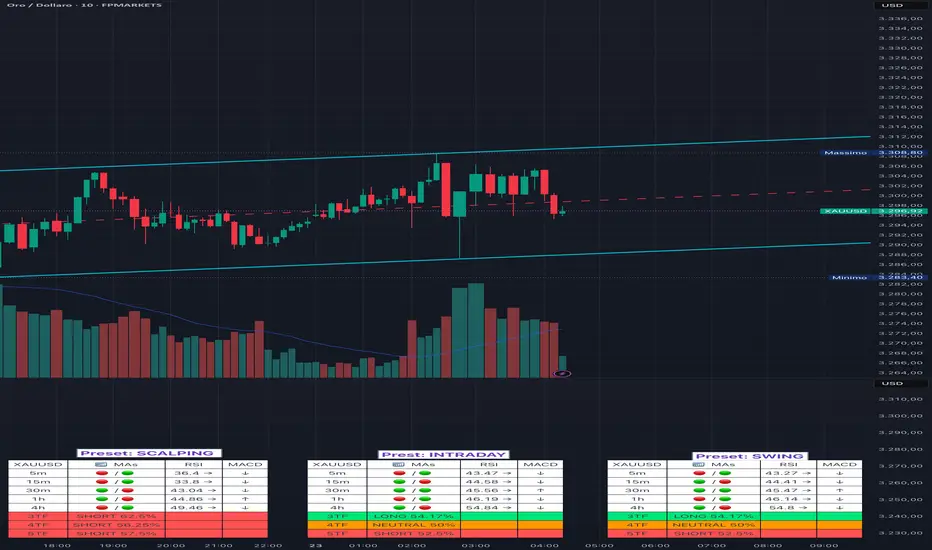
Adaptive Multi-TF Indicator Table with Presets giua64📌 Script Name: Adaptive Multi-Timeframe Indicator Table with Presets — giua64 📄 Description: This script displays an adaptive multi-timeframe dashboard that summarizes the signals of three key technical indicators: Moving Averages (MAs), Relative Strength Index (RSI), and MACD. It provides a fast and visually intuitive overview of market conditions across five timeframes (5m, 15m, 30m, 1h, 4h), helping traders quickly identify potential directional biases (e.g., bullish, bearish, or neutral) based on either predefined presets or fully manual settings. 🧰 Preset Configurations: You can choose between four trading styles, each with optimized indicator parameters: Scalping • MAs: 5 / 10 (Fast), 20 / 50 (Slow) • RSI: 7 periods | Overbought: 70 | Oversold: 30 • MACD: 5 / 13 | Signal: 3 Intraday • MAs: 9 / 21 (Fast), 50 / 100 (Slow) • RSI: 14 periods | Overbought: 60 | Oversold: 40 • MACD: 12 / 26 | Signal: 9 Swing • MAs: 10 / 20 (Fast), 50 / 200 (Slow) • RSI: 14 periods | Overbought: 65 | Oversold: 35 • MACD: 12 / 26 | Signal: 9 Manual • Full custom control over all indicator settings. 🛠️ All settings can be customized manually from the options panel, including the exact MA periods, RSI thresholds, and MACD structure. 🧠 How It Works: For each timeframe, the script evaluates: MA crossover status (two levels): The first symbol refers to the crossover of the fast MAs The second symbol refers to the crossover of the slow MAs 🟢 = Bullish crossover 🔴 = Bearish crossover ➖ = Flat or no clear signal RSI Direction: ↑ = RSI above upper threshold (potential overbought) ↓ = RSI below lower threshold (potential oversold) → = RSI in neutral range MACD Line vs Signal Line: ↑ = MACD line is above signal line (bullish) ↓ = MACD line is below signal line (bearish) → = Flat or neutral signal Each signal is assigned a numerical score. These are aggregated per timeframe to compute a combined score that reflects the directional bias for that specific time window. 🧠 Adaptive Logic by Asset: This script is designed to be universally compatible across all asset types — including forex, crypto, stocks, indices, and commodities. Thanks to its multi-timeframe nature and flexible indicator presets, the script automatically adjusts its behavior based on the asset selected, ensuring relevant analysis without requiring manual recalibration. 🧾 Summary Table Output: At the bottom of the dashboard, a combined sentiment is displayed for: 3TF → 5m, 15m, 30m 4TF → Adds 1h 5TF → Adds 4h Each row shows: Signal → LONG / SHORT / NEUTRAL Confidence (%) → Based on score aggregation and signal consistency 📌 Customization Options: Table Position: Left, Right, or Center Text Size: Small, Normal, or Large Full Manual Configuration: All MA, RSI, and MACD parameters can be adjusted as needed ⚠️ Disclaimer: This script is for educational and analytical purposes only. It does not constitute financial advice or guarantee any trading results. Always do your own research and apply responsible risk management.Индикатор Pine Script®от giua6444138
UM Dual MA with Price Bar Color change & Fill Description This is a dual moving average indicator with colored bars and moving averages. I wrote this indicator to keep myself on the right side of the market and trends. It plots two moving averages, (length and type of MA are user-defined) and colors the MAs green when trending higher or red when trending lower. The price bars are green when both MAs are green, red when both MAs are red, and orange when one MA is green and the other is red. The idea behind the indicator is to be extremely visual. If I am buying a red bar, I ask myself "why?" If I am selling a green bar, again, "why?" Recommended Usage Configure your tow favorite Moving averages. Consider long positions when one or both turn green. Scale into a position with a portion upon the first MA turning green, and then more when the second turns green. Consider scaling out when the bars are orange after an up move. Orange bars are either areas of consolidation or prior to major turns. You can also look for MA crossovers. The indicator works on any timeframe and any security. I use it on daily, hourly, 2 day charts. Default settings The defaults are the author's preferred settings: - 8 period WMA and 16 period WMA. - Bars are green when both MAs are trending higher, red when both MAs are trending lower, and orange when one MA is trending higher and the other is trending lower. Moving average types, lengths, and colors are user-configurable. Bar colors are also user-configurable. Alerts Alerts can be set by right-clicking the indicator and selecting the dropdown: - Bullish Trend Both MAs turning green - Bearish Trend Both MAs turning red - Mixed Trend, 1 green 1 red MA Helpful Hints: Look for bullish areas when both MAs turn green after a sustained downtrend Look for bearish areas when both MAs turn red Careful in areas of orange bars, this could be a consolidation or a warning to a potential trend direction change. Switch up your timeframes, I toggle back and forth between 1 and 2 days. Stretch your timeframe over a lower time frame; for example, I like the 8 and 16 daily WMA. With most securities I get 16 bars with pre and post market. This translates into 128 and 256 MAs on the hourly chart. This slows down moves and color transitions for better manageability. Author's Subjective Observations I like the 128/256 WMA on the hourly charts for leveraged and inverse ETFs such as SPXL/SPXS, TQQQ/SQQQ, TNA/TZA. Or even the volatility ETFs/ETNS: UVXY, VXX. Here is a one-hour chart example: I have noticed that as volatility increases, I should begin looking at higher timeframes. This seems counterintuitive, but higher volatility increases the level of noise or swings. I question myself when I short a green bar or buy a red bar; "Why am I doing this?" The colors help me visually stay on the right side of trend. If I am going to speculate on a market turn, at least do it when the bars are orange (MA trends differ) My last observation is a 2-day chart of leveraged ETFs with the 8 and 16 WMAs. I frequently trade SPXL, FNGA, and TNA. If you are really dissecting this indicator, look at a few 2-day charts. 2-day charts seem to catch the major swings nicely up and down. They also weed out the daily sudden big swings such as a panic move from economic data or tweets. When both the MAs turn red on a 2-day chart the same day or same bar, beware; this could be a rough ride or short opportunity. I found weekly charts too long for my style but good to review for direction. Less decisions on longer charts equate to less brain damage for myself. These are just my thoughts, of course you do you and what suits your style best! Happy Trading.Индикатор Pine Script®от UnderwearMillionaire1132
LinReg Heikin Ashi CandlesLinear Regression Heikin Ashi Candles will dramatically change how the candlesticks on your chart will appear. This script creates Heikin Ashi candles from the existing candlesticks and then applies wickless Linear Regression candles as an overlay. The result is an ultra smoothed 'Renko-like' chart that remains time-based and responsive. Key Features: Heikin Ashi Base: Provides a smoother representation of price trends by filtering out noise. Linear Regression Candles on Heikin Ashi: Plots Linear Regression lines as candles on the Heikin Ashi chart, potentially highlighting the immediate trend direction and momentum within the smoothed data. Wicks are intentionally removed for a clearer focus on the linear progression. Tillson T3 Moving Averages: Includes fast and slow T3 Moving Averages with customizable length and alpha. These smoothed moving averages can help identify trend direction and potential crossover signals. Users can toggle their visibility. Volatility Bands: Integrates Volatility Bands based on Average True Range (ATR) with customizable length, ATR type (RMA, SMA, EMA, WMA), and inner/outer multipliers. These bands help gauge price volatility and potential reversal zones. Users can toggle the visibility of the basis line. Customizable Colors: Allows users to customize the colors of the Linear Regression Heikin Ashi bullish and bearish candles. How to Use: This is an overlay on your chart so you'll need to 'hide' the existing candlesticks on your chart. This indicator can be used on any timeframe from seconds to days to quickly identify market trend, gauge volatility, and potentially find entry/exit points. Consider looking for confluence between the candle color/direction, T3 MA crossovers, and price interaction with the Volatility Bands. Note: This indicator plots Linear Regression directly on Heikin Ashi candles, removing wicks for a focus on the linear trend within the smoothed data. Adjust the input parameters to suit your trading style and the specific market conditions. HUGE CREDIT to ugurvu who originally created the Linear Regression Candles indicator that my indicator pulls code from. Индикатор Pine Script®от B3AR_TradesОбновлено 1414 1.8 K
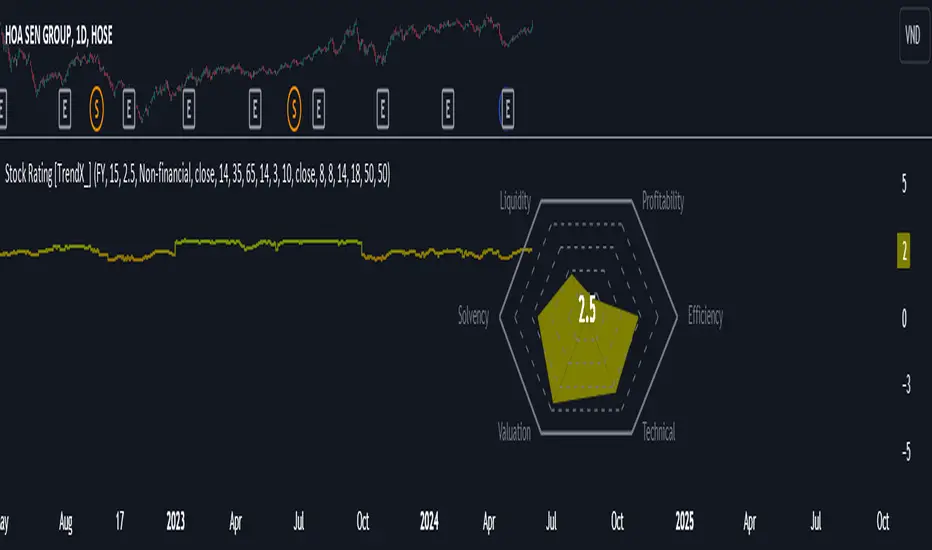
Stock Rating [TrendX_]# OVERVIEW This Stock Rating indicator provides a thorough evaluation of a company (NON-FINANCIAL ONLY) ranging from 0 to 5. The rating is the average of six core financial metrics: efficiency, profitability, liquidity, solvency, valuation, and technical ratings. Each metric encompasses several financial measurements to ensure a robust and holistic evaluation of the stock. ## EFFICIENCY METRICS 1. Asset-to-Liability Ratio : Measures a company's ability to cover its liabilities with its assets. 2. Equity-to-Liability Ratio : Indicates the proportion of equity used to finance the company relative to liabilities. 3. Net Margin : Shows the percentage of revenue that translates into profit. 4. Operating Expense : Reflects the costs required for normal business operations. 5. Operating Expense Ratio : Compares operating expenses to total revenue. 6. Operating Profit Ratio : Measures operating profit as a percentage of revenue. 7. PE to Industry Relative PE/PB : Compares the company's PE ratio to the industry average. ## PROFITABILITY METRICS 1. ROA : Indicates how efficiently a company uses its assets to generate profit. 2. ROE : Measures profitability relative to shareholders' equity. 3. EBITDA : Reflects a company's operational profitability. 4. Free Cash Flow Margin : Shows the percentage of revenue that remains as free cash flow. 5. Revenue Growth : Measures the percentage increase in revenue over a period. 6. Gross Margin : Reflects the percentage of revenue exceeding the cost of goods sold. 7. Net Margin : Percentage of revenue that is net profit. 8. Operating Margin : Measures the percentage of revenue that is operating profit. ## LIQUIDITY METRICS 1. Current Ratio : Indicates the ability to cover short-term obligations with short-term assets. 2. Interest Coverage Ratio : Measures the ability to pay interest on outstanding debt. 3. Debt-to-EBITDA : Compares total debt to EBITDA. 4. Debt-to-Equity Ratio : Indicates the relative proportion of debt and equity financing. ## SOLVENCY METRICS 1. Altman Z-score : Predicts bankruptcy risk 2. Beneish M-score : Detects earnings manipulation. 3. Fulmer H-factor : Predicts business failure risk. ## VALUATION METRICS 1. Industry Relative PE/PB Comparison : Compares the company's PE and PB ratios to industry averages. 2. Momentum of PE, PB, and EV/EBITDA Multiples : Tracks the trends of PE, PB, and EV/EBITDA ratios over time. ## TECHNICAL METRICS 1. Relative Strength Index (RSI) : Measures the speed and change of price movements. 2. Supertrend : Trend-following indicator that identifies market trends. 3. Moving Average Golden-Cross : Occurs when a short-term MA crosses above mid-term and long-term MA which are determined by half-PI increment in smoothing period. 4. On-Balance Volume Golden-Cross : Measures cumulative buying and selling pressure. Индикатор Pine Script®от TrendXvn50
Simplified MA Crossover indicatorThis is my first script, it is really simple logic and you probably saw something similar before. Is a crossover indicator between 2 Moving Average, one fast MA and the second slow MA. Inputs you can adjust: - 8 different source of MA's - lenght of the MA's - 7 different types of MA's ("EMA", "SMA", "RMA", "WMA", "DEMA", "TEMA", "HMA") - 3 smoothing level of the fast MA - plotting fast MA into the chart - plotting crossover triangle shapes I really enjoed the creation of this simple concept indicator, maybe not the fastest because of his nature but I liked work on it. I am sure is a good base to improve, study and try new idea. Индикатор Pine Script®от Cinnamon_BearОбновлено 22126
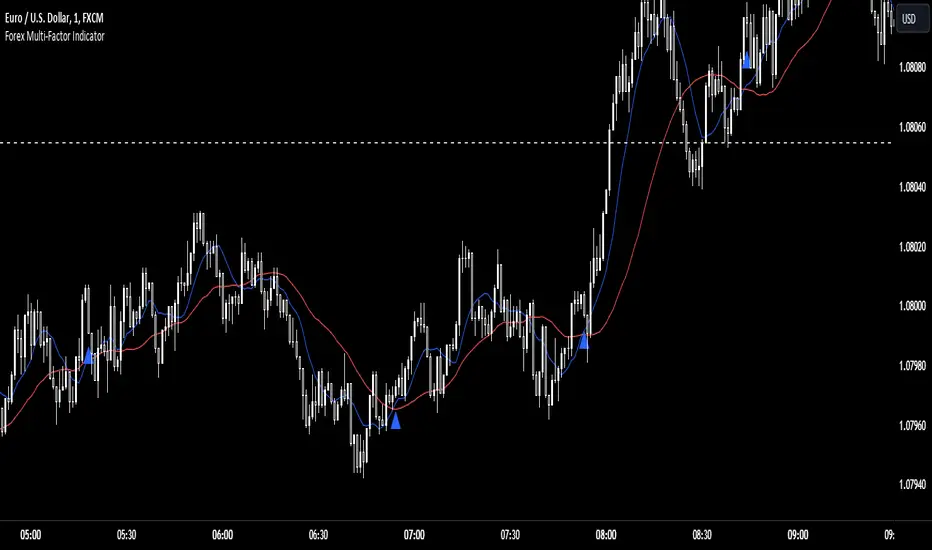
Forex Multi-Factor IndicatorMoving Averages (MA): Two moving averages are plotted on the chart: a fast MA (blue line) and a slow MA (red line). The fast MA is calculated using a shorter period (10 periods by default), while the slow MA is calculated using a longer period (30 periods by default). Moving averages help identify trends by smoothing out price fluctuations. When the fast MA crosses above the slow MA, it suggests a bullish trend, and when the fast MA crosses below the slow MA, it suggests a bearish trend. Relative Strength Index (RSI): The RSI indicator (orange line) is plotted on a separate axis. RSI measures the speed and change of price movements and oscillates between 0 and 100. RSI values above 70 are considered overbought, indicating a potential reversal to the downside, while RSI values below 30 are considered oversold, indicating a potential reversal to the upside. Volume Moving Average (Volume MA): The volume moving average (purple line) is plotted on the same axis as the volume. The volume moving average is calculated over a specified period (20 periods by default). Volume analysis provides insights into the strength of price movements. When the volume increases along with price movements, it suggests strong conviction from traders. Buy and Sell Signals: Buy signals (green triangle) are generated when all of the following conditions are met: The fast MA crosses above the slow MA (indicating a bullish trend). The RSI is below the oversold level (indicating potential upward momentum). The current price is above the fast MA, and the volume is higher than the volume MA (indicating positive volume trend). Sell signals (red triangle) are generated when all of the following conditions are met: The fast MA crosses below the slow MA (indicating a bearish trend). The RSI is above the overbought level (indicating potential downward momentum). The current price is below the fast MA, and the volume is lower than the volume MA (indicating negative volume trend). Overall, this multi-factor indicator combines moving averages, RSI, and volume analysis to identify potential buying and selling opportunities in the Forex market. Traders can use the signals generated by this indicator as part of their trading strategy, but it's important to consider other factors such as risk management and market conditions before making trading decisionsИндикатор Pine Script®от griffinw1851
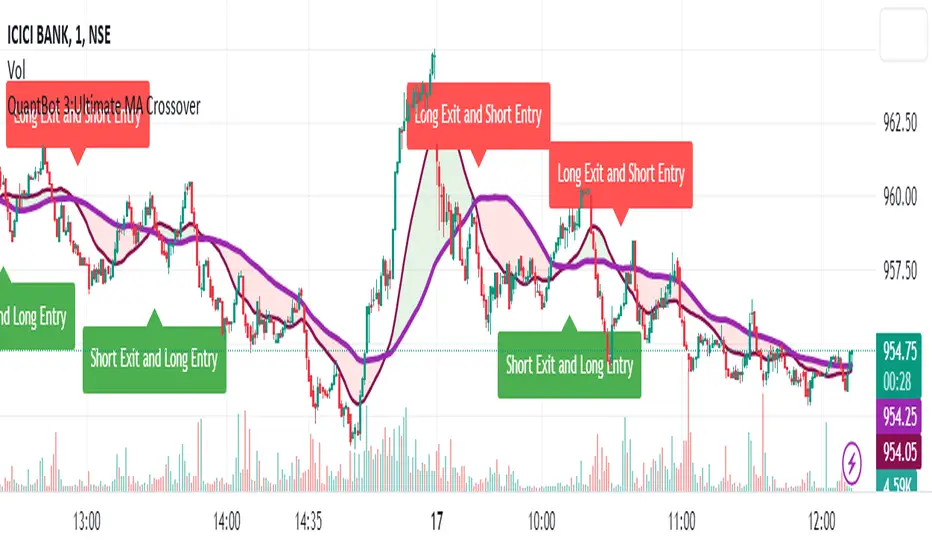
QuantBot 3:Ultimate MA CrossoverTHIS IS A SAMPLE CODE TO AUTOMATE WITH QUANTBOT The moving average strategy is a popular and widely used technique in financial analysis and trading. It involves the calculation and analysis of moving averages, which are mathematical indicators that smooth out price data over a specified period. This strategy is primarily applied in the context of stock trading, but it can be used for other financial instruments as well. The concept behind the moving average strategy is to identify trends and potential entry or exit points in the market. By calculating and analyzing moving averages of different timeframes, traders aim to capture the overall direction of the price movement and filter out short-term fluctuations or noise. To implement the moving average strategy, a trader typically selects two or more moving averages with different periods. The most common combinations include the 50-day and 200-day moving averages. The shorter-term moving average is considered more reactive to price changes, while the longer-term moving average provides a smoother trend line. When the shorter-term moving average crosses above the longer-term moving average, it generates a buy signal, indicating a potential upward trend. Conversely, when the shorter-term moving average crosses below the longer-term moving average, it generates a sell signal, indicating a potential downward trend. Traders can use various variations of the moving average strategy based on their trading objectives and risk tolerance. For instance, some traders may prefer to use exponential moving averages (EMAs) instead of simple moving averages (SMAs) to give more weight to recent price data. Others may incorporate additional indicators or filters to confirm signals or avoid false signals. One of the strengths of the moving average strategy is its simplicity and ease of interpretation. It provides a clear visual representation of the trend direction and potential entry or exit points. However, it's important to note that the moving average strategy is a lagging indicator, meaning that it relies on past price data. Therefore, it may not always accurately predict future market movements or capture sudden reversals. Like any trading strategy, the moving average strategy is not foolproof and carries risks. It is crucial for traders to conduct thorough analysis, consider other relevant factors, and manage their risk through proper position sizing and risk management techniques. Additionally, it's important to adapt the strategy to specific market conditions and combine it with other complementary strategies or indicators for improved decision-making. Overall, the moving average strategy serves as a valuable tool for traders to identify and follow trends in financial markets, aiding in the analysis of price movements and potential trading opportunities.Индикатор Pine Script®от TheQuantBot1141
TCG AI ToolsIntroduction: This script is a result of an AI recommended created trading strategy that is design to offer new traders’ easy access to trend information and oversold/overbought conditions. Here we have combined commonly used indicators into a single unique visualization that quickly identifies trend changes and both RSI and Bollinger Band based overbought and oversold conditions, and allows all three indicators to be used simultaneously while taking up limited space on the chart. The value in combining these three indicators is found in the harmony and clarity they are able to provide new traders. Trend changes can be difficult to identify based solely on candlestick analysis, therefore using the moving averages allows the trader to simplify the process of establishing bullish or bearish trends. Once a trend is established it can be very attractive for new traders to establish entries at the wrong time. For this reason, it is useful to include two different overbought and oversold indicators. The Bollinger Bands are included as one of the methods for establishing extreme prices that often result in reversals, and the relative strength index is similarly utilized as a second means to warn traders of extreme conditions. Using the Indicator 1. MA10 MA20 Trend Indicator The large red/green horizontal bar located at the 0 line on the X axis is the trend direction indicator. This visualization compares the 10 and 20 period moving averages to establish trend. When the MA10 is above the MA20 the trend is considered bullish and supportive of long positions and indicates such by changing the color of the horizontal bar to green. When the MA10 is below MA20 the trend is considered bearish and indicates such by changing the color of the horizontal bar to red. Color changes occur at the moment of a MA crossover/under. 2. Relative Strength Index. The vertical red and green bars that make up the background of the panel indicate conditions wherein the RSI is considered overbought or oversold. When the vertical bar is red it indicates that RSI is below 30 suggesting that current conditions are oversold and supportive of long entries. When the vertical bar is green it suggests that the current conditions are overbought and are supportive of short entries. 3. Bollinger Band Extremes Within the horizontal red/green bar there are red and green arrows. These arrows represent periods where the price is exceeding the upper or lower Bollinger bands and indicate overbought/oversold conditions. When a green arrow appears, it indicates that the price has crossed below the lower BB and is supportive of long entries. If a red arrow appears it indicates that the price has crossed above the upper Bollinger band and conditions are supportive of short entries. Индикатор Pine Script®от TheChartGuys1313453
RSI with Slow and Fast MA Crossing Strategy (by Coinrule)This strategy utilises 3 different conditions that have to be met to buy and 1 condition to sell. This strategy works best on the ETH/USDT pair on the 4-hour timescale. In order for the strategy to enter the trade, it must meet all of the conditions listed below: ENTRY RSI increases by 5 RSI is lower than 70 MA9 crosses above MA50 To exit a trade, the below condition must be met: EXIT MA50 crosses above MA9 This strategy works well on LINK/USDT on the 1-day timeframe, MIOTA/USDT on the 2-hour timeframe, BTC/USDT on the 4-hour timeframe, and BEST/USDT on the 1-day timeframe (and 4h). Back-tested from 1 January 2020. The strategy assumes each order is using 30% of the available coins to make the results more realistic and to simulate you only ran this strategy on 30% of your holdings. A trading fee of 0.1% is also taken into account and is aligned to the base fee applied on Binance.Стратегия Pine Script®от Coinrule33181
RSI + rCalcThis is a modification of the TradingView RSI. I have added HMA and ALMA options to the MA settings and also the option for a colour change on RSI cross. A reverse calc has also been added. This will display the MA cross/Overbought/Oversold price predictions. There is also the option to display an entered RSI or Price for a prediction display. All colours and modifications can be turned on/off. Enjoy! :)Индикатор Pine Script®от TinyTtrades61
MA VisualizerThe MA Visualizer is made up of 5 Moving Averages (MA) All MA change color when the price closes above or below the MA line. The background between the MA line and price will also change color, this creates the Visualizer. When two or more MA are selected the two visualizer's will combine and create a gradient effect. Each MA can be adjusted with 6 source selection's to choose from (SMA , EMA , WMA , HMA , RMA , WVMA). The Visualizer can be turned off while leaving the MA lines turned on and vice versa. Their is also a MA Cross indicator built-in.Индикатор Pine Script®от SatosaurОбновлено 1111147
Instrument-Z (3Commas Bot)Instrument-Z is what I am currently using as my 3Commas Bot. It allows you to customize signals from 3 indicators; Crossing MA's, Stochastic RSI, and WaveTrend. Better yet, it allows you to setup these signals separately depending on whether the Trend MA is going up or down. So there are 2 sets of inputs for everything, Uptrend inputs and Downtrend inputs. I have realized that we can't expect a strategy to work the same way in an uptrend vs downtrend, so the inputs should be separated too. In my testing, separating increased the net profit by 60% on average. You can select whether you are trading Long or Short. You can choose your stop loss and take profit levels as well as trade expiration. You can choose if you only want to trade with the trend (making the opposing signals irrelevant). The trend is based on the Trend MA. This script is specifically for cryptocurrencies. I've noticed that MA crosses on other asset classes are unreliable because the fluctuations are not strong enough to push the MA's across each other in a meaningful way. If you want to use this as a 3Commas Bot, then you will have to copy the code of the strategy and paste it into your own personal script. Then you have to change the alert messages at the bottom of the script. Make sure to change your alert message from this; {"message_type": "bot", "bot_id": 0000000, "email_token": "0b000a0a-0aa0-00aa-0aa0-000a00000a0a", "delay_seconds": 0} To this; {\n\"message_type\": \"bot\",\n\"bot_id\": 0000000,\n\"email_token\": \"0a000a0a-0aa0-00aa-0aa0-000a00000a0a\",\n\"delay_seconds\": 0\n} With \n after each new line and \ before each quotation. In the Alert setup, select "alert() function calls only". This indicator is like a middle ground of complexity between the Juicy Trend indicator and the Instrument-A indicator. And because it does not feature my neural network project, I have made it open script. Enjoy! Стратегия Pine Script®от UnknownUnicorn28067390Обновлено 6666 1.6 K