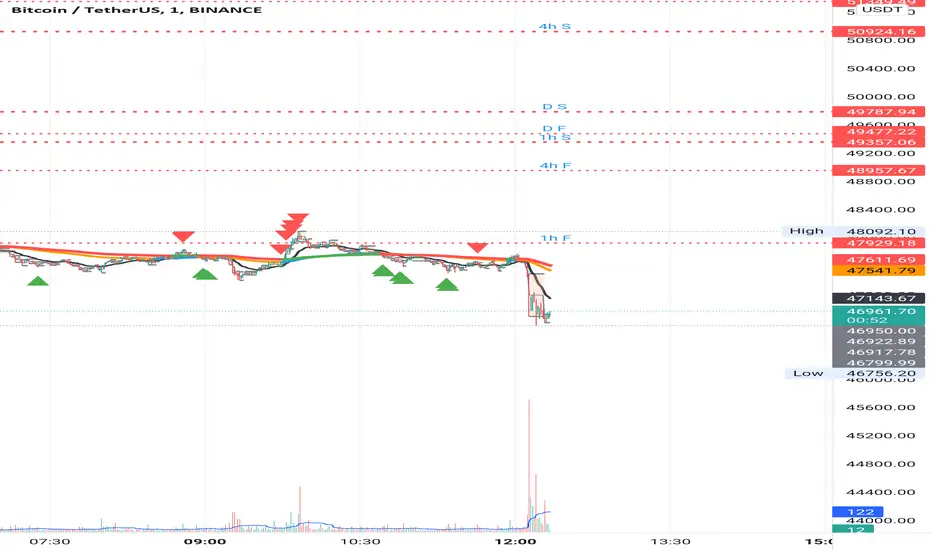
EMA MTF PlusI like trading the 1 minute and 3 minutes time-frames. I'm what is commonly called a "scalper". Long term investments yes, I have some, but for trading, I don't have neither the time,
nor the patience to wait hours or days for my trade to be complete.
This doesn't mean I discount the higher time-frames, no, I actually rely heavily on them. I found that EMAs do a decent job as support/resistance, sometimes to a tick level of precision. And this is important for a 1 minute trader.
As such, I made this script that tracks the higher time-frames EMAs and displays the last value as a line.
I do not need the whole EMA, I'm not interested in crossovers or crossunders, these are anyway late signals for me.
What's with the triangles? These are local tops/bottoms , candles that have a have decent size of the wick. These tops and bottoms are by no means "final", they are merely a rejection at certain levels of price. Due to markets complexities (and human erratic behaviors hehe) these levels could be breached at the very next candle. For a more "final" version (nothing is really final but..) I added Schaff Trend Cycle as filter, so a triangle will pop only when a trend is mature enough ( STC with a value near 0 or near 100).
Colored bars. When the body of the candle is big, it shows strength. Strong bars tend to have follow through, especially when breaking key levels. The script looks at the body of the candle and compares it with ATR (Average True Range), if it's at least 0.8 of ATR it changes the bar color to yellow (bull candles) or fuchsia(bear candles).
Range identifier. This code is copied from Lazy Bear (if there are any issues please let me know), it's very useful in conjunction with colored bars.
I look for breakout candles that go outside of the range as a signal for a trade.
There are many ways in which this script can be useful, like trading mean reversions or momentum trades (breakouts) or simply trend following trades.
I hope you guys find it useful, you can play with default values and change them as you like, these are what I found to be working best for me and my trading universe (mostly crypto).
Special thanks for the original work of:
LazyBear
everget
Jim8080
Поиск скриптов по запросу "break"
Volume Positive Negative (VPN) [LevelUp]The idea and calculations for the Volume Positive Negative (VPN) indicator were created by Markos Katsanos. Markos wrote about the indicator in the article Detecting High-Volume Breakouts, published in Technical Analysis of Stocks & Commodities April, 2021 (Vol. 39, Issue 5).
The goal of the VPN indicator is to detect breakouts using only volume. The basic idea is to compare volume on up days versus volume on down days. The indicator can oscillate between the range of -100 and 100. Values between 0 and 20 are generally considered bullish, negative are bearish.
When the plotted VPN crosses over what Markos refers to as the critical value, that may indicate a high volume breakout. The critical value can be adjusted between 0 to 20, 10 is the default,
Volume Positive Negative Calculation (VPN)
VPN = (VP - VN) / MAV / Period * 100
VP - sum of positive volume
VN - sum of negative volume
MAV - moving average of volume
Volume is considered positive when the average price is higher than the previous day's price by more than .1 of the ATR (average true range).

Please help to make Larry Williams' volatility breakthrough.Hello Traders!
I'm going to backtest Larry Williams' volatility breakthrough strategy.
However, contrary to my expectation, orders at certain bars are made the next day.
Is there anything I missed at my pine script code?
Please give me any tiny tips.
Thank you!!

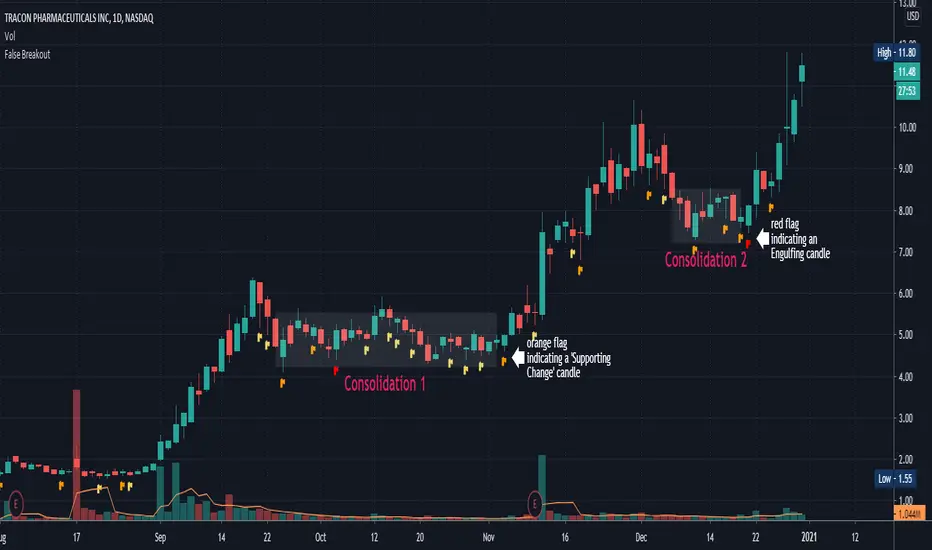
False BreakoutA false breakout is when the price temporarily moves above or below a key support or resistance level, but then later retreats back to the same side as it started.
The “False Breakout” indicator reveals false breakouts in comparison to the previous candle.
In case we're looking to trade the stock for long this would mean that the price of the stock broke the previous low (support) and then got back above that low.
In case we're looking to trade the stock for short then a false breakout would mean the stock broke the previous high (resistance) and then got back below that high.
How to use the indicator?
First choose the direction you're looking to trade, meaning either long or short.
Then choose how strict you want to be about the Falls brakes.
There are three options:
The first option named “All“ means that it's enough that the stock broke the previous level and then get back to the original side.
The second option is “Supporting Change” meaning not only that the stock broke the previous key level (support or resistance), but also the change at the end of the candle is supporting the main direction - meaning the change is positive for long or negative for short.
The third option is “Engulfing”. This is a well-known candle, but to make it clear, in our case “Engulfing” means that not only the stock broke the previous level but it also ended the day on the other side of the candle - higher than the previous high, in case of long, and lower than the previous low, in case of short.
When you choose the level of strictness you determine how many indications you're going to get on the chart.
If you choose the highest level of strictness, meaning “Engulfing”, you would only see the red flags indicating engulfing candles.
If you choose the lowest level of strictness, meaning “All”, you will get more indications on your chart, including every false breakout.
When the direction you're looking for is long, all indications would appear below the candles.
When the direction you're looking for is short, then all indications would appear above the candles.
The Engulfing candles are represented by Red flags, and the Simple breakouts candles are represented by yellow. All colors may be adjusted to your preference.
Explaining the example above:
In the chart above we can see two consolidations. At the end of each consolidation, we can see a candle with an indication from the indicator that points out that this could be the end of the consolidation and the stock might continue its move.
In “consolidation 1” we can see that there is an orange flag below the candle right before the stock began to move up again.
In “consolidation 2” we can see that there is a red flag below the candle, right before the stock began another move.
Wishing you all the best :)
SMT - Smart Money Thursday Boxes
The Smart Money Trading Thursday - is a very specific trading system. You only trade it on a Thursday.
The script/indicator will color Thursdays as two boxes. If you just want one color, use same color for
both boxes. The boxes is there to indicate London/New York sessions.
SETTINGS
In the setting you find a numeric value as 1700-0400:5
The "5" indicate Thursday. You can change that if you prefer to color another specific day.
For example "4" would indicate Wednesday. And you can change the hours to fit your
sessions and trading style.
You can also use the 2 boxes on different days. If you for example would like to color up
London for Wednesday and Thursday. Then set hours to fit London session and adjust the
:5 to 4 on the 1st box and 5 on the 2nd.
HOW TO USE IT?
The Smart Money works in a way retail trading does not. Smart Money has an objective
to locate retail patterns, where there will be a lot of stop loss volume to be grabbed.
So when a retail trader see a setup like a "Double Top / Bottom". The Institutional
will see $$$ of dumb money, ready to be taken. The best moves happen on a Thursday
but if you are a skilled trader, you can see the move also occur on Wednesday or Friday.
The first thing that will happen, is that the Smart Money Breaks out of session. Meaning
they will leave the current weeks high/low range. To start collect negative contracts
of the retail volume.
When you see that happen. And you see a breakout that consist of 4 in a row 1 hour
chart candles. Then you have your first rule meet.
#1 Thursday breakout of current weeks high/low. And the move is a clean 4 hour move
as 4x H1 candles. The move can start within range. But must end clearly outside.
Visual Example:
#2 Next, we await an engulf at peak or near peak. That is where Institutional
may have problem to match any more contracts, and since they used their own
money to make this move. They must now mitigate orders, and return back to
the original retail pattern as most retail traders are now stopped out.
(Normally this is a long/clear candle out of range. they rarely go lower
then retail traders entry in the 1st push. This to not save any souls :)
#3 Price returns back to where the breakout from the retail happens.
You can now take your profit as a Smart Money Trader. Trading with less risk,
you can take profit of the return of that latest 4x H1 candle move. (Order
Block)
CONCLUSION
The best trade is when you can combine a retail pattern, followed by a
breakout which holds 4x 1 hour candles in the outbreak direction.
2nd best is when you have the 4x H1 breakout and really no clear retail
pattern. Still is the same game. Just not as clear as the one above.
Study the steps in this image and you see what to look after:
Good Luck with your trading!
Regards,
The Hunter Trading Group

Soldiers Pattern ModifiedThis can be perceived as modified 3 soldiers, relaxed NR4 or even extended harami candlestick pattern.
Works for any instrument and any timeframe.
The idea is to find out any number of candles having their individual highs and lows, all within high and low range of base candle.
The count of soldiers and if they must be of same color, both can be configured.
Additional configurable settings is to add further check of having body of soldiers as well within body of base candle.
Trading strategy: Trade high or low breakout of base candle, having other as stop loss, for a risk reward ratio of 1:2.

Big Breakout IndexBig Breakout Index is a great indicator for detecting breakouts. When the current close breaks out of consolidation, the indicator will tell you.
Green - Buy
Red - Sell

Force IndexWhat is the force index ?
The force index is an oscillator used to confirm price breakout strengths and identify potential trends.
It was popularized by A. Elder.
How the force index is computed ?
Knowing that volume is the fuel of a price movement, reliable breakouts and trend continuation are more likely to occur on high volume breakouts. This is why the force index is computed with the intensity of the price movement, and it's volume , using the formula ema13((close(n) - close(n-1)) * volume ) .
How to use the force index
An important change in the force index indicate a strong momentum in the price action.
You can read more about the force index interpretation on Investopedia
Customization
You can display the indicator as an histogram, or as a line chart.
You can change EMA length, although it's recommended to keep it at default value.

CPR by Anand with PDL/PDH & Breakouts 15/30 minsThis is an enhanced version of CPR by Anand with Configurable previous day high and low and option to configure breakout lines of 15 and 30 mins.
Will be an useful tool for day traders who follows CPR tricks and breakouts.

Order Blocks & Breaker Blocks Destek DirencOrder Blocks & Breaker Blocks Destek Direnc Al Sat Bölgeleri

Baekdoo VWAP & High-Volume Node Momentum Breakout (V6)Indicator Name: Baekdoo VWAP & High-Volume Node Momentum Breakout (V6)
Description Summary: This indicator tracks the interaction between the VWAP (Volume Weighted Average Price)—the market's "fair value"—and the High-Volume Node (Resistance) from the past 20 bars. The goal is to identify "True Breakouts" where the average entry price of all participants, not just the spot price, successfully surmounts a major supply zone.
Key Features:
Annual Cumulative VWAP: Uses a yearly-anchored VWAP to filter out daily noise on 1D charts and provide a stable trend baseline.
Volume-Based Resistance: Identifies the high of the candle with the maximum volume over 20 periods as a critical supply wall.
Institutional Volume Filter: Signals are only triggered when volume exceeds 2x the 5-day average, ensuring significant market interest.
Dual Exit Strategy: Incorporates a 1.5 ATR Trailing Stop for partial profit-taking and a 20 SMA crossunder for a full risk-off exit.
---------------
지표 명칭: 백두 VWAP 매물대 모멘텀 돌파 전략 (V6)
설명 요약: 본 지표는 시장의 평균 합의 가격인 **VWAP(Volume Weighted Average Price)**과 최근 20일간 가장 강력한 거래가 발생한 **매물대(High Volume Node)**의 상호작용을 추적합니다. 단순히 가격이 뚫는 것이 아니라, 시장 참여자들의 평균 단가 자체가 저항선을 넘어서는 '진성 돌파'를 포착하는 데 목적이 있습니다.
주요 특징:
연간 누적 VWAP: 일봉 차트에서의 노이즈를 줄이기 위해 연간 단위로 누적된 평균 단가를 사용합니다.
매물대 저항선: 지난 20일 중 최대 거래량이 터진 봉의 고점을 저항선으로 설정하여, 악성 매물이 쏟아질 수 있는 구간을 시각화합니다.
거래량 필터: 5일 평균 거래량 대비 2배 이상의 거래가 실릴 때만 신호를 발생시켜 기관 및 세력의 개입 여부를 확인합니다.
스마트 엑싯: 1.5 ATR 트레일링 스톱을 통한 수익 보존과 20일 이평선 이탈을 통한 리스크 관리를 동시에 수행합니다.

Multiple Daily Breakouts (Close Only)Pine Script strategy builds the high and low of the first four hours of the New York session (9:00 AM–1:00 PM ET), locks that range after the 1:00 PM candle closes, and then trades breakouts based strictly on candle closes (wicks ignored). The strategy allows multiple breakouts per day, entering long when price closes above the NY range and short when it closes below, with configurable position sizing and risk-reward targets; stops can be set at the opposite side of the range or dynamically calculated. It works both for historical backtesting in the Strategy Tester and for live trading/alerts, making it suitable for intraday markets on lower timeframes such as 5- to 15-minute charts.
Update: removed continuous lines between bars
Update: added h/l lines
Update: renamed

NY First 4H Range Breakout Strategy (1PM Close)Strategy builds the high and low of the first four hours of the New York session (9:00 AM–1:00 PM ET), locks that range after the 1:00 PM candle closes, and then trades breakouts based strictly on candle closes (wicks ignored).
The strategy allows multiple breakouts per day, entering long when price closes above the NY range and short when it closes below, with configurable position sizing and risk-reward targets; stops can be set at the opposite side of the range or dynamically calculated.
It works both for historical back testing in the Strategy Tester and for live trading/alerts, making it suitable for intraday markets on lower timeframes such as 5- to 15-minute charts.

Open Range BreakoutOpen Range Breakout is a volatility harvesting tool designed to exploit directional expansion following major market opens. It isolates price action during initial liquidity injections to project institutional-grade zones that define a session's structural bias.
Core Methodology
The script uses a time-anchored engine to map critical supply and demand boundaries:
Anchor Identification: The algorithm captures the absolute High and Low within a user-defined window at the start of Tokyo, London, or New York sessions.
Structural Projection: It generates a Neutrality Box. A breach via candle close signals the transition from consolidation to expansion.
Mathematical Risk Modeling: Upon breakout, it calculates a 3:1 Risk-Reward framework based on fixed percentage volatility.
Session Dynamics
The system is optimized for the global liquidity cycle:
Session 1 (Asia): Maps early-day consolidation and range-bound liquidity.
Session 2 (Europe): Captures the London Move to identify the trend.
Session 3 (US): Analyzes high-volume New York opens for maximum momentum.
Key Features
Dynamic Price Mitigation: TP/SL zones stop extending the moment price touches the target or invalidation level to keep charts clean.
Volatility-Adjusted Levels: Stop Loss parameters are normalized to price percentage for consistency across Indices, Forex, or Crypto.
Minimalist Interface: Professional aesthetic with high-contrast visual cues for instant scannability.
Use Cases
Momentum Trading: Identifying the Origin of the Move post-open.
Mean Reversion: Recognizing failed breakouts when price returns inside the range.
Quantitative Backtesting: Benchmarking 3.0 RR targets across different session anchors.

4 EMA Perfect Order + Strength + MTF + Breakdown Alerts (v6.1)📘 Description
4 EMA Perfect Order + Strength + MTF + Breakdown Alerts (v6.1)
This indicator provides a complete multi‑EMA trend structure analysis with Perfect Order detection, breakdown alerts, strength measurement, and multi‑timeframe confirmation. It is designed for traders who want a clean, reliable, and highly configurable trend‑following tool.
---
🔍 Key Features
1. Customizable EMA System (1–4 lines)
You can choose how many EMAs to display (1 to 4) and freely set the period for each EMA.
This allows you to adapt the indicator to any trading style—from scalping to swing trading.
2. Perfect Order Detection
The script identifies:
• Bullish Perfect Order (EMA1 > EMA2 > EMA3 > EMA4)
• Bearish Perfect Order (EMA1 < EMA2 < EMA3 < EMA4)
Signals are triggered only when the structure changes, ensuring clean and meaningful alerts.
3. Breakdown Alerts
The indicator detects when a previously established Perfect Order collapses:
• Bullish PO Breakdown
• Bearish PO Breakdown
These moments often signal trend exhaustion or the beginning of a reversal.
4. Multi‑Timeframe (MTF) EMA Confirmation
All EMAs are calculated on a higher timeframe of your choice.
This helps you align entries with the dominant trend and avoid counter‑trend traps.
5. Trend Strength Measurement
The indicator calculates the percentage distance between the fastest and slowest EMA.
Displayed directly on the chart:
• Current timeframe strength
• MTF strength
This gives you a quick visual gauge of trend momentum.
6. Clean Visual Signals
• Arrows for Perfect Order confirmation
• Circles for breakdown events
• Optional EMA visibility based on your selected count
Everything is designed for clarity and minimal chart clutter.
7. Full Alert Support
Alerts are available for:
• Bullish Perfect Order
• Bearish Perfect Order
• Bullish Breakdown
• Bearish Breakdown
Perfect for automated notifications or bot integration.
---
🎯 Ideal For
• Trend‑following traders
• EMA‑based systems
• Multi‑timeframe confluence strategies
• Reversal detection
• Scalping, day trading, swing trading
---
💡 Summary
This indicator combines flexibility, precision, and multi‑timeframe logic to help you identify strong trends, detect structural shifts, and stay aligned with market momentum.
Highly customizable and suitable for any market or timeframe.

Custom Time-Range Breakout with 4x EMA Filter Time-Range Breakout Monitor with 4x EMA FilterThis indicator is a powerful tool designed to capture volatility during specific market hours (like London or New York opens). It monitors a custom price range (High/Low) and tracks whether these levels are breached, using a 4x EMA ribbon as a trend filter.Key Features:Adjustable Range: Define your own start and end time (hours and minutes) to mark the session range.Breakout Tracking: The indicator visually tracks if the High or Low of the session has been taken (Broken) and displays the status in a real-time dashboard.4x EMA Ribbon: Integrated trend filter with specific color coding for quick visual confirmation.Smart Alerts: Built-in alerts for both Bullish (Up) and Bearish (Down) breakouts.EMA Color Legend (Rafał's Setup):EMA PeriodColorRoleEMA 20GrayShort-term momentumEMA 50GreenMedium-term trend confirmationEMA 100YellowIntermediate support/resistanceEMA 200RedLong-term baseline (The "Trendline")How to Use:Set the Session: Input your target range in the settings (e.g., 09:00 - 10:00).Monitor the Dashboard: The top-right table shows "TAK" (YES) or "NIE" (NO) if the levels have been breached during the current day.Confirm the Trend: * Long: Price breaks above the range AND is supported by the Green (50) and Red (200) EMAs.Short: Price breaks below the range AND is trending under the Green (50) and Red (200) EMAs.Settings:Start/End Hour & Minute: Full control over the tracked time window.Alerts: Enable "Wybicie Górą" or "Wybicie Dołem" in the TradingView Alert menu.

RSI Apex: Breakout & DivergenceRSI Apex: Breakout & Divergence System
RSI Apex:突破与背离交易系统
🇬🇧 English Description
RSI Apex is a comprehensive trading system designed to capture both Trend Breakouts and Market Reversals. Unlike traditional RSI indicators that rely solely on fixed levels (70/30), RSI Apex integrates Donchian Channels, Volatility Squeeze, and the Libertus Divergence Algorithm to provide high-probability signals.
🚀 Key Features
Trend Push System (Donchian Breakout):
Detects when RSI momentum is strong enough to push the upper/lower Donchian Channel bands.
Signal: Displays ▲ (Bull) or ▼ (Bear) at levels 20/80.
Libertus Divergence (No-Lag):
Uses a real-time pivot tracking algorithm to identify divergences between Price and RSI without the lag of traditional pivot points.
Signal: Displays "Div" labels at levels 30/70.
Smart Coloring (Extreme Highlight):
Green/Red: Normal Trend.
White (Extreme): When RSI breaches 70 (Overbought) or 30 (Oversold), the line turns bright White. This highlights the most volatile zones where reversals or strong continuations occur.
Volatility Squeeze Filter:
Monitors market volatility. When the Donchian Channel compresses significantly (below historical average), the background turns Purple.
Meaning: "Calm before the storm"—expect a major move soon.
🛠 How to Use
Trend Following: Enter when you see Green/Red RSI lines accompanied by ▲ / ▼ signals. This indicates a "Trend Push."
Reversal Trading: Look for "Div" signals when the RSI line is White (Extreme). This suggests momentum is fading despite price action.
Exit/Take Profit: Watch for the "Weak" label, which appears when RSI falls back into the neutral zone.
Dashboard: Monitor real-time RSI Value, Market State (Bullish/Bearish/Extreme), and Volatility (Squeeze/Expanding) in the bottom-right table.
🇨🇳 中文简介
RSI Apex 是一套旨在捕捉趋势爆发 (Breakout) 和 市场反转 (Reversal) 的综合交易系统。与仅依赖固定 70/30 线的传统 RSI 不同,本指标融合了 唐奇安通道 (Donchian Channels)、波动率挤压 (Squeeze) 以及 Libertus 无滞后背离算法,以提供高胜率的交易信号。
🚀 核心功能
强趋势推动系统 (唐奇安突破):
检测 RSI 动能是否强劲到足以推动唐奇安通道的上轨或下轨扩张。
信号: 在 20/80 轴位置显示 ▲ (多头推动) 或 ▼ (空头推动)。
Libertus 智能背离 (无滞后):
采用实时 Pivot 追踪算法,精准识别价格与 RSI 之间的背离,解决了传统背离指标的滞后问题。
信号: 在 30/70 轴位置显示 "Div" 标签。
智能变色 (极端行情高亮):
绿色/红色: 正常趋势状态。
白色 (White): 极端区域。当 RSI 突破 70 (超买) 或跌破 30 (超卖) 时,线条会强制变为醒目的亮白色,提示此处为变盘/背离高发区。
波动率挤压 (Squeeze) 过滤器:
实时监控市场波动率。当通道宽度显著收窄(低于历史平均水平)时,背景会填充为半透明紫色。
含义: “暴风雨前的宁静”——预示着大行情即将爆发,此时应空仓等待突破方向。
🛠 使用策略
顺势交易 (Trend): 当 RSI 呈现 绿色/红色 并伴随 ▲ / ▼ 信号时进场。这代表动能极强,处于主升/主跌浪。
左侧反转 (Reversal): 重点关注 RSI 线条变为 白色 (Extreme) 时出现的 "Div" 背离信号。这通常意味着价格虽创新高,但动能已耗尽。
止盈/离场: 留意 "Weak" (衰竭) 标签,它出现在 RSI 掉回中间震荡区时。
仪表盘: 右下角面板实时显示 RSI 数值、市场状态 (极值/背离/趋势) 以及波动率状态 (挤压/扩张)。

Stop Loss Hunting Zones This Pine Script indicator identifies and visualizes potential "stop loss hunting zones" on charts. It marks price levels where institutional traders or market makers might trigger retail stop losses before reversing direction, helping traders avoid false breakouts and better time their entries.
Key Features:
Four Types of Detection Zones-
1.Swing Zones (Red/Green): Identifies swing highs and lows using pivot point analysis where stop losses typically cluster above resistance and below support levels.
2.Breakout Zones (Orange): Detects consolidation periods and marks levels where false breakouts might occur, trapping traders who enter too early.
3.Wick Trap Zones (Purple): Highlights candles with disproportionately large wicks relative to body size, indicating potential stop loss raids with quick reversals.
4.Volume Reversal Zones (Blue): Identifies high-volume reversal patterns where price briefly touches a level before sharply reversing, suggesting stop loss absorption.
Customizable Parameters:
Swing Lookback: Period for pivot point detection (5-100 bars)
Swing Threshold: Minimum percentage move to qualify as a swing (0.5-10%)
Volume Threshold: Multiplier for detecting unusual volume (1-5x average)
Wick Ratio: Minimum wick-to-total range ratio for trap detection (0.3-0.9)
ATR Settings: Length and multiplier for zone buffer calculation
Zone Management: Maximum zones per type and minimum distance between zones
Display Options: Toggle individual zone types, heatmap intensity, labels, and transparency
Visual Features:
Heatmap Mode: Colour intensity reflects how often price has tested each zone
Smart Zone Management: Prevents chart cluttering by limiting zones and removing those too close together
Dynamic Labels: Clear zone identification with customizable display
Adjustable Transparency: Control zone visibility (10-90%)
How It Works:
The indicator uses ATR-based buffers to create zones around detected levels. It tracks price history to calculate "intensity" scores for the heatmap feature, helping identify the most significant hunting zones. The algorithm ensures zones are meaningful by enforcing minimum distances and limiting total zones displayed.
Avoid placing stop losses at obvious levels where hunting is likely
Identify potential reversal points for counter-trend trades
Recognize false breakout patterns before they complete
Time entries after stop loss hunts are absorbed
Technical Details:
Maximum 500 boxes, lines, and labels for comprehensive zone tracking
Compatible with all timeframes
Works on any market (stocks, forex, crypto, futures)
Real-time detection as new bars confirm
This indicator is designed for traders who want to understand where institutional players might target retail stop losses and use that information to their advantage. Please boost & follow for more. Happy trading !!
Disclaimer: This indicator is for educational and informational purposes only. It should not be considered financial advice. Always perform your own analysis and risk management before trading.

Borna Zones Entry First Close BreakThis indicator marks close-based entry signals for DAX / GER40 on the 1-minute timeframe, using two fixed intraday zones:
08:00 candle → Zone 08
09:00 candle → Zone 09
If the zones overlap, an entry is marked on the first candle close breaking the combined zone.
If the zones are separated, an entry is marked on the first candle close breaking the 09:00 zone, in the direction of the 08:00 zone.
Entries are shown only between 09:00 and 11:00 and only on the first valid breakout (no repeated signals).

SNIPER ORB V4SNIPER ORB V4
### What It Does
Draws 5/15/30 minute Opening Range Breakout levels with confirmation patterns.
### Session Times
| Session | Hours (ET) |
|---------|------------|
| London | 3:00 - 9:30 |
| New York | 9:30 - 17:00 |
### Levels Drawn
| Level | Color Default | Purpose |
|-------|---------------|---------|
| 5m ORB H/L | Blue | Scalp levels |
| 15m ORB H/L | Cyan | Swing levels |
| 30m ORB H/L | Purple | **Primary levels** |
| Targets 1x-3x | Green/Red | Profit targets |
### Signals
| Signal | Meaning | Priority |
|--------|---------|----------|
| `ORB↑` | Confirmed breakout up | ⭐⭐ |
| `ORB↓` | Confirmed breakout down | ⭐⭐ |
| `RT↑` | Retest long entry | ⭐⭐⭐ **BEST** |
| `RT↓` | Retest short entry | ⭐⭐⭐ **BEST** |
| `FVG↑` | FVG zone long | ⭐⭐⭐ |
| `FVG↓` | FVG zone short | ⭐⭐⭐ |
| `ABS` | Absorption (caution) | ⚠️ Warning |
| `FK!` | Fakeout detected | ❌ Avoid |
### FVG Zones (Blue Boxes)
- **Bullish FVG** = Gap below price → Support zone
- **Bearish FVG** = Gap above price → Resistance zone
- **Best Entry** = Price touches FVG + Engulfing candle
### Bar Colors
| Color | Meaning |
|-------|---------|
| Bright Green | Bullish breakout confirmed |
| Bright Red | Bearish breakout confirmed |
| Light Green | Bullish retest entry |
| Light Red | Bearish retest entry |
### Info Table Key
| Field | Green = Good | Yellow/Orange = Caution |
|-------|--------------|-------------------------|
| Volume | HIGH VOL | Normal |
| Body | STRONG (70%+) | Normal/Weak |
| Status | BROKE HIGH/LOW | IN RANGE |
### Quick Trade Plan
```
LONG:
1. Wait for 30m ORB to complete
2. Watch for ORB↑ breakout
3. WAIT for pullback to ORB High
4. Enter on RT↑ or FVG↑ signal
5. SL = Below 30m ORB Low
6. TP = Target 1x or 2x
SHORT:
1. Wait for 30m ORB to complete
2. Watch for ORB↓ breakout
3. WAIT for pullback to ORB Low
4. Enter on RT↓ or FVG↓ signal
5. SL = Above 30m ORB High
6. TP = Target 1x or 2x
```
---

SNIPER Initial Balance V1SNIPER INITIAL BALANCE V1
### What It Does
Draws the first hour's high/low range with extensions and breakout signals.
### IB Times (Auto-Selected)
| Market Type | IB Period (ET) |
|-------------|----------------|
| Index (ES/NQ/YM) | 9:30 - 10:30 |
| Gold (GC/MGC) | 8:30 - 9:30 |
| Energy (CL) | 9:00 - 10:00 |
### Levels Drawn
| Level | Style | Purpose |
|-------|-------|---------|
| IB High | Solid | Resistance |
| IB Low | Solid | Support |
| IB Mid | Dashed | Mean reversion |
| 50% Ext | Dotted | Target 1 |
| 100% Ext | Dotted | Target 2 |
| 1SD (1.28x) | Dashed | 80% range |
| 2SD (2.0x) | Dashed | 95% range |
### Signals
| Signal | Meaning | Action |
|--------|---------|--------|
| `IB↑` | Breakout above IB High | Look for long |
| `IB↓` | Breakout below IB Low | Look for short |
| `RT↑` | Retest long entry | **BEST ENTRY** - Go long |
| `RT↓` | Retest short entry | **BEST ENTRY** - Go short |
| `FK` | Fakeout warning | **AVOID** - Don't enter |
### Entry Requirements (All Must Be True)
- ✅ Close above/below level (not just wick)
- ✅ Volume ≥ 1.3x average
- ✅ Body ≥ 60% of candle
- ✅ Minimal adverse wick
### Quick Trade Plan
```
LONG: Wait for RT↑ → SL below IB Low → TP at 50% or 100% ext
SHORT: Wait for RT↓ → SL above IB High → TP at 50% or 100% ext
```
---

Smart Money Concept Change of Character Break of StructureSMC Structure
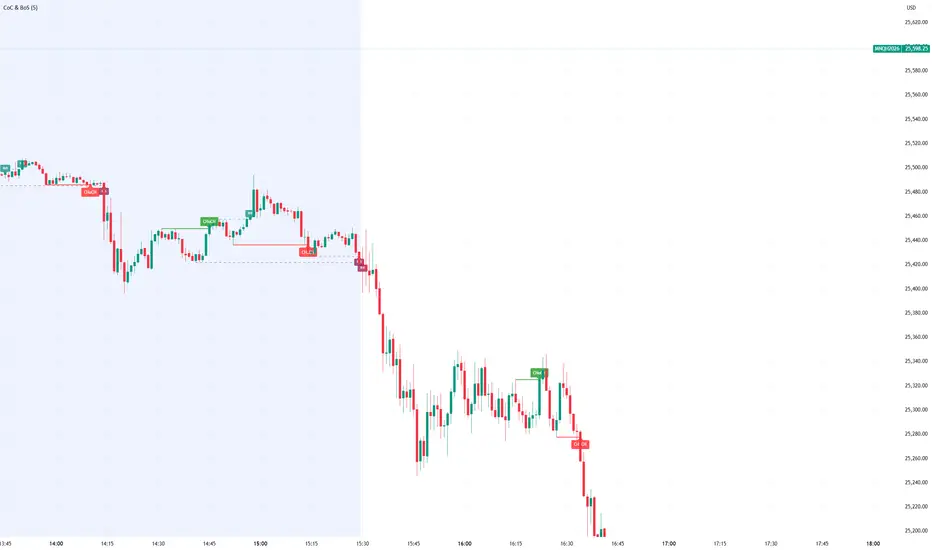
Visualizes Change of Character (CHoCH) and Break of Structure (BoS) - two fundamental Smart Money Concepts for identifying trend reversals and continuations.
This is the 1st version of an implementation of this concept.
It is NOT supposed to be used as a signal but a confirmation. Best use during NYSE hours.
Full Description
Overview
This indicator automatically detects and displays two core Smart Money Concepts (SMC) directly on your chart:
CHoCH (Change of Character) – The first structural break against the prevailing trend, signaling a potential reversal
BoS (Break of Structure) – A structural break in the direction of the current trend, confirming continuation
These concepts are essential building blocks of SMC trading methodology, helping traders identify where institutional players may be entering or exiting positions.
How It Works
The indicator uses pivot-based swing detection to identify significant highs and lows. When price breaks through these levels, it classifies the move as either a CHoCH or BoS based on the current trend context.
CHoCH (Change of Character)
Occurs when price breaks structure AGAINST the current trend
First warning sign that the trend may be reversing
Displayed as a solid horizontal line with "CHoCH" label
Green = Bullish reversal | Red = Bearish reversal
BoS (Break of Structure)
Occurs when price breaks structure IN THE DIRECTION of the current trend
Confirms that the existing trend remains intact
Displayed as a dashed horizontal line with "BoS" label
Teal = Bullish continuation | Maroon = Bearish continuation
Visual Example
Uptrend with BoS (continuation):
HH ◄── BoS (trend continues)
/
HL
/
HH
/
HL
Uptrend → CHoCH → Downtrend (reversal):
HH
/ \
HL \
LL ◄── CHoCH (trend reversal!)
Settings
Pivot Settings
Pivot Lookback: Number of bars used to identify swing highs/lows (default: 5). Higher values = fewer but more significant structure points.
Display Options
Show CHoCH: Toggle CHoCH visualization
Show BoS: Toggle BoS visualization
Show Swing Points: Display SH/SL labels at detected pivots
Extend Lines to Right: Extend structure lines into future bars
Show Info Table: Display current trend and last swing levels
Show Trend Background: Color the chart background based on trend direction
Colors
Fully customizable colors for all elements
How to Use
Identify the trend: Look at the sequence of CHoCH and BoS signals to understand market structure
Watch for CHoCH: A CHoCH signals potential reversal – wait for confirmation before trading against the previous trend
Trade with BoS: BoS confirms trend continuation – look for entries on pullbacks in the direction of the trend
Combine with other SMC concepts: Works great alongside Order Blocks, Fair Value Gaps, and liquidity concepts
Tips
Use higher pivot lookback values on higher timeframes for cleaner signals
A CHoCH doesn't guarantee reversal – it's the first warning sign, not confirmation
Multiple BoS signals in a row indicate a strong, healthy trend
Look for CHoCH occurring at key levels (support/resistance, order blocks) for higher probability setups
Feedback Welcome!
This is an open-source indicator and I'd love to hear your thoughts!
Please comment below if you have:
Feature requests or ideas for improvements
Bug reports or issues
Suggestions for additional SMC concepts to add
Your feedback helps make this indicator better for everyone. Happy trading! 🚀
Custom Session ORB - Extending Past Current CandleCustom Session ORB - Extending Past Current Candle
This indicator plots Opening Range Breakout (ORB) levels for one or two customizable trading sessions directly on your chart. It dynamically tracks the high, low, and midpoint of the defined session(s) and extends these levels beyond the session using a configurable offset.
Features:
Supports two custom sessions.
New York and Asia pre-saved.
Automatically tracks session High, Low, and Mid.
Option to extend ORB levels past the live candle.
Option to display only the most recent ORB for a clean chart.
Configurable line thickness, style, and label size.
Works in Eastern Standard Time (EST) without manual adjustment.
Settings:
Show Labels: Toggle to display ORB values on chart.
Label Font Size: Small, Normal, Large.
Mid Line Style: Solid, Dashed, or Dotted.
ORB Line Thickness: Set line thickness of ORB levels.
Extend Past Current Candle by N Bars: Controls how far the ORB extends visually.
Show Only Current ORB: Cleans chart by removing previous session ORB levels.
Enable Session 1 / 2: Toggle individual sessions on/off.
Session Time: Set the start and end times for each session (automatically in EST).
How It Works:
The indicator monitors the defined session time, records the high, low, and midpoint, and draws lines at those levels. When the session ends, the lines are extended by the specified offset for easy breakout visualization. Labels can optionally show the exact price levels.
