Ichimoku ScreenerChecks the status of Ichimoku Cloud for 30 coins/stocks. It may take several seconds ( around 30 sec ) to load. Индикатор Pine Script®от hajixdeОбновлено 4646949
Relative Strength vs SPY - real time & multi TF analysisOne of the most requested features for TradingView is the ability to include custom indicators in the stock market scanner. While I am sure this feature is coming soon (seriously TV, PLEASE) I decided to use the amazing template provided by QuantNomad (), but I wanted to allow the user to modify the table a bit better so that a multi time frame analysis approach could be used. The recommended way to use this indicator is to apply it three times to your chart. For each instance, assign it a plotting location (left, center, right) and choose the timeframe you wish to use for the RS analysis. By default, the relative strength of all 39 pre selected stocks will be compared against SPY, on the 5 min timeframe. I personally like having this chart on the left, then the 4 hour timeframe in the center, and the daily on the right. Not only does this setup allow you to see the relative strength/weakness of 39 stocks in real time (the one on the left), but you have all the information in front of you including how the stock has been performing relative to SPY on the 4H and D charts. To make it easiest to read, you should disable all visual elements to the chart you are applying this indicator to. By minimizing the chart and putting it by your side, you can see the bigger picture on how all your stocks are behaving relative to the market. If you wish to change any of the stocks I have pre selected, make sure to save your chart template. Otherwise you would need to do this every time you load the indicator to your chart which would be incredibly time consuming.Индикатор Pine Script®от soosh_77864
Volatility ScreenerA screener to find easily volatile coins. The method is based on the standard deviation to the price average ratio. Choose your target coins (coin1 to coin 15) and selected the length of observation. By choose the minimum volatility level you can distinguish the coins with high volatility. Change the timeframe to your desired. Индикатор Pine Script®от hajixdeОбновлено 22371
Crypto Scannner for Traffic Lights StrategyI allways try to make trading easier. Developing Scripts for a quick backtest and improvement of a strategy, getting alerts for entry and exit a position. Loading data to a spreadsheet is also important and takes time. In this case finding good parameters in different markets or assets to enter in a position, is a bit exhausting. It is something you have to do everyday, and sometimes in different moments of the day. So I manage to develop a Screener, to take a quick look at specific hours, and tell if I have a buy or sell condition in an specific asset. Obviously this is not an alert to make a trade instantaneusly, but this help you filter a lot of information in matters of seconds. Then open those specific charts and make a better analisys. A few weeks ago, I published a scrpipt called "Traffic Lights Strategy", that uses 4 emas to get a buy or a sell condition. It is easy to understand and use, but if you don´t want to missed some opportunities, and don't want to be look at the screen in all the time looking for them, I have here a simple solution. This script works plotting 2 labels. The first one plots all the assets in which the condition is true (fastema > medema > slowema > filterema or fastema < medema < slowema < filterema) The second one plots the assets were the condition is true only if happened up to 5 candles back, so you can be in time to enter a trade. You can take the script and customize it for a different strategy or assets. I coded like this because I backtested this strategy in this specific assets, and statistics suggest that it might be profitable. I hope this works for you. In other time I'll try to code a script for the others strategies I published. Индикатор Pine Script®от Trading_Solutions_11210
Simple Watchlist with % Change Screener & AlertsHi fellow traders.. TV has generously increased the number of alerts!! A Simple Watchlist with heatmap based on % change on daily timeframe. Gives % change and RSI you can set the percentage in the input box and then set alerts on your favorite watchlist. Alerts also include days high and low.. Simple Table and array based code. set for scrip close >10 can be easily changed in line 43.. Hope you Like it! Индикатор Pine Script®от sharaaU7Обновлено 1919857
1St Bar GAP+BkOut Screener v2 by RMFirst Bar Gap and subsequent conditions are used as one of the several strategies for Day traders. This script runs on first bar and checks if the stocks has an initial Gap (up or down), then checks for next bars to be inside the boundaries of the first candle you can customize this screener according to your requirement. There are a number of very clever people I have taken bits of code and ideas, thanks to you all :) Used part of this code as published by @PineCoders and Public Libraries. Also add some power query code to help you create the symbols input in the script Disclaimer: This is not a Financial advisory tool. For education purposes only. * Use at your own risk * Outline: gap up/ gap down on 1 min first candle -> good 2nd candle inside 1st candle -> good 3rd to nth candle to break out from first candle range -> good /alert/ Plot flag //M (Excel power query) code to load and format watchlist from txt file format //Input: , Output: let // replace and for the correspondign values in your computer Source = Csv.Document(File.Contents("C:\ \ "), ), #"Transposed Table" = Table.Transpose(Source), #"Sorted Rows" = Table.Sort(#"Transposed Table",{{"Column1", Order.Ascending}}), #"Added Index" = Table.AddIndexColumn(#"Sorted Rows", "Index", 1, 1, Int64.Type), #"Changed Type1" = Table.TransformColumnTypes(#"Added Index",{{"Index", type text}}), #"Inserted Merged Column1" = Table.AddColumn(#"Changed Type1", "Merged", each Text.Combine({"0", }), type text), #"Inserted First Characters" = Table.AddColumn(#"Inserted Merged Column1", "Two Characters", each Text.End( , 2), type text), #"Removed Columns" = Table.RemoveColumns(#"Inserted First Characters",{"Index", "Merged"}), #"Inserted Merged Column" = Table.AddColumn(#"Removed Columns", "Merged", each Text.Combine({"s", , " = input( '", , "' , type=input.string)"}), type text) in #"Inserted Merged Column" //--> once input string is created Copy&Paste in this code after // Symbols _ Use Power Query in Excel // end of M code to load watchlist from txt formatСтратегия Pine Script®от raul3429Обновлено 4466
VPF ScreenerThis script is inspired by @midtownsk8rguy and created at my request with the pine mastery of @DonovanWall. All the credits go to them. Basically, this script will screen for the long-only condition of the Voss Predictive Filter in maximum 40 securities at your choice. I personally find the signals quite reliable for scalping indices and swing trading momentum stocks. Hope you guys find it useful Индикатор Pine Script®от QallianceTech4450
Supertrend Screener PanelScript to display Supertrend trend state of 8 different securities in a panel. Timeframe & Tickers which are to be displayed can be configured from settings. Part of code is from the ADX DI Monitoring Panel script by u/wugamlo with his permission. Thanks to him for that and do please check out his work also. Индикатор Pine Script®от zzzcrypto12388 1.4 K
MTF Stoch RSI ScreenerDisplays when multiple timeframes of Stochastic RSI are overbought/oversold. Multiple consecutive timeframes being overbought/oversold can signify a short term top or bottom. Thanks to Micse in Pinescripters telegram who helped remove a few errors from this. Индикатор Pine Script®от zzzcrypto12333341
[A618] Vortex Indicator Alert Screener [Noise Filtered]This Indicator helps you get alerts from Vortex Indicator if a trend is Established. One of my followers asked me to do this: @Kiran_05 How this is made ? 1. Vortex Crossovers are taken into consideration in a noise filtered manner 2. Noise filtering is done by trend establishment due to Ehlers 2 pole ButterWorth Filter and EMA50 Crosses How to use it ? 1. Can be used as a screener on the Script to generate the screened Securities from a Watchlist of Securities 2. Wait for a Candle break above of the generate green signal to get into trade, and vice versa Credits : @CheatCountry For Ehlers 2 Pole Butterworth Filter V2 Hope this Helps Индикатор Pine Script®от Ankit_161811182
Envlope Breakout Screener 01This screener depicts chart break out from Envlope indicatorИндикатор Pine Script®от ritzio1125
Envlope Breakout Screener 02This screener depicts chart break out from Envlope indicatorИндикатор Pine Script®от ritzio35
Tradingview - Screener RatingsEver wondered what is behind the the Tradingview Screener Signals: www.tradingview.com Strong buy is between 0.5 and 1 Buy is between 0 and 0.5 Sell is between 0 and -0.5 Strong Sell is between -0.5 and -1 Индикатор Pine Script®от QuantTherapyОбновлено 66302
Volatility Contraction ScoreVolatility Contraction Score (VCS) Overview Volatility Contraction Score (VCS) is a technical indicator inspired by Mark Minervini’s Volatility Contraction Pattern (VCP) concept. It is designed to quantify volatility compression and supply-demand equilibrium on a scale from 0 to 100. This indicator does not detect VCP patterns directly. Instead, it measures the structural characteristics commonly observed in VCP bases, such as price range contraction and volume dry-up, and converts them into a numerical score. A high score indicates that price volatility is compressed and energy is being stored within the structure. While this condition often precedes significant price expansion, it does not predict direction. Score Components VCS is calculated as a weighted composite of multiple factors: 1. Price Compression (ATR & Standard Deviation) Short-term ATR and standard deviation are compared to their longer-term averages to measure how tightly price is trading. 2. Volume Contraction Recent volume is compared to its historical average to detect signs of supply exhaustion. 3. Efficiency Filter Strong directional trend phases are penalized. The purpose is to favor genuine compression phases rather than momentum expansion. 4. Higher Low Structure Check The indicator verifies whether recent lows are holding above prior structural lows. If the structure deteriorates, the score is reduced rather than fully invalidated. 5. Consistency Bonus The longer compression persists, the more additional points are awarded. This prioritizes bases that have formed over time instead of short-lived contractions. Interpreting the Score 80 and above (Green) Critical Tightness Extremely compressed volatility. Energy accumulation is at elevated levels. 60 to 80 (Blue) Setup Stage Compression is developing. Suitable for watchlist candidates. Below 60 (Gray) Loose / Expansion Phase Price remains volatile and lacks compression characteristics. Important Note VCS measures compression intensity. It does not determine whether price will move up or down. Usage & Interpretation VCS visualizes the degree of energy compression. The score itself does not indicate trade direction. When the score rises above 80 and the histogram turns green, monitor price closely and observe which boundary of the consolidation range is broken. 1. Bullish Setup (Long Consideration) Condition The score remains above 80 while price forms a tight consolidation or small flag pattern. Trigger A decisive breakout above the upper boundary (resistance) of the range, ideally accompanied by expanding volume. Interpretation Stored energy is being released to the upside. This suggests a potential continuation move aligned with the prior trend. 2. Avoidance / Short Setup (Downside Risk) Condition The score remains elevated while price begins to form lower lows or fails to hold key support levels. Trigger A breakdown below a major support level. Interpretation Supply-demand equilibrium has failed, and stored energy is being released to the downside. This may represent a failed base or failed VCP-type structure and warrants caution. Pine Screener Integration This indicator outputs additional data fields for TradingView’s Pine screener. VCS Total compression score (0 to 100) Example: Filter for values above 60 to identify tight candidates. Relative Strength Percentile rank of performance relative to a selected benchmark. Example: Above 60 to focus on stocks outperforming the market. ADR % Average daily range percentage over the selected period. Useful for risk filtering. Avg Vol Average trading volume. Used as a liquidity filter. Market Cap Market capitalization, using reported data or estimated calculation. Settings VCP Logic Settings Adjust short and long compression measurement periods. Trend Filter Control the strength of the directional trend penalty. Structure Settings Adjust penalty strength when higher low structure fails. Consistency Weight Set the maximum bonus for sustained compression. Screener Data Customize periods used for screener output metrics. Design Philosophy This indicator is built to: • Quantify volatility compression • Objectify the concept of tight price action • Improve efficiency in identifying breakout candidates VCS is not an entry signal. It should be used in conjunction with structure analysis, trend context, and volume confirmation.Индикатор Pine Script®от oratnekОбновлено 11119
Market structure + TF Bucket Market Structure + TF Bucket This Pine Script™ indicator, published under the Mozilla Public License 2.0, extends the "Market Structure" script by mickes (), with full credit to mickes. It integrates the enhanced MarketStructure library by Fenomentn (), also based on mickes’ library under MPL 2.0, to provide advanced market structure analysis with multi-timeframe pivot length customization. Functionality Market Structure Analysis: Detects internal (orderflow) and swing market structures, visualizing Break of Structure (BOS), Change of Character (CHoCH), Equal High/Low (EQH/EQL), and liquidity zones using the MarketStructure library. Timeframe Bucket (TF Bucket): Dynamically adjusts pivot lengths for six user-defined timeframes (e.g., 3m, 5m, 10m, 15m, 4h, 12h), optimizing structure detection across different chart timeframes. Trend Strength Visualization: Displays a trend strength metric (from the library) for internal and swing structures, indicating trend reliability based on pivot frequency and volatility. Statistics Table: Shows yearly counts of BOS and CHoCH events for internal and swing structures, configurable by a user-defined period. Screener Support: Outputs BOS and CHoCH signals for TradingView’s screener, with a configurable signal persistence period. Customizable Alerts: Enables alerts for BOS and CHoCH events, separately configurable for internal and swing structures. Methodology Pivot Detection: Uses the library’s Pivot function, which applies a volatility filter (ATR-based) to confirm significant pivots, reducing false signals in low-volatility markets. TF Bucket: Maps user-selected timeframes to Pine Script’s timeframe.period using f_getTimeframePeriod, applying custom pivot lengths when the chart’s timeframe matches a selected one (or base lengths in Static mode). Trend Strength: Calculates a score as pivotCount / LeftLength * (currentATR / ATR), displayed via labels to help traders assess trend reliability. BOS/CHoCH Detection: Identifies BOS when price breaks a pivot in the trend direction and CHoCH when price reverses against the trend, labeling events as “MSF” or “MSF+” based on pivot patterns. EQH/EQL and Liquidity: Draws boxes for equal high/low zones within ATR-based thresholds and visualizes liquidity levels with confirmation bars. Statistics and Screener: Tracks BOS/CHoCH events in a yearly table and outputs signals for screener use, with persistence controlled by a user-defined period. Usage Integration: Apply the indicator to any chart and import the library via import Fenomentn/MarketStructure/1. Configuration: Set up to six timeframes with custom pivot lengths, enable/disable internal and swing structures, configure alerts, and adjust statistics years in the settings panel. Alerts: Enable BOS and CHoCH alerts for real-time notifications, triggered on bar close to avoid repainting. Screener: Use the plotted signals to monitor BOS/CHoCH events across multiple tickers in TradingView’s screener. Best Practices: Optimal for forex and crypto charts on 1m to 12h timeframes. Adjust pivot lengths and the library’s volatility threshold for specific market conditions. Originality This indicator enhances mickes’ original script with: Timeframe Bucket: Dynamic pivot length selection for multi-timeframe analysis, not present in the original. Trend Strength Display: Visualizes the library’s TrendStrength metric for enhanced trend analysis. Enhanced Library Integration: Leverages Fenomentn/MarketStructure/1, which adds a volatility-based pivot filter, dynamic label sizing, and customizable BOS/CHoCH visualization styles.No additional open-source code was reused beyond mickes’ script and library, fully credited under MPL 2.0. Индикатор Pine Script®от Fenomentn60
TRS (Trend Readiness System)TRS – Trend Readiness System TRS (Trend Readiness System) is a trend-aligned trading framework designed to help you identify stocks that are becoming ready for entry , not just those already breaking out. Instead of producing noisy buy/sell signals, TRS evaluates trend quality, pullback structure, momentum rebuilding, and market context , and converts them into clear scores, states, and timing awareness — both on the chart and inside the TradingView Screener. --- Core Philosophy Strong trends don’t start at the breakout — they start when conditions quietly align. TRS focuses on: • Primary trend alignment • Healthy pullbacks above long-term support • Early momentum recovery • Market regime confirmation • Entry timing (fresh vs late) --- What TRS Measures 1. Setup Score (Trend Quality) Answers the question: “Is this stock structurally worth watching?” Based on: • Price position relative to MA150 • Long-term trend direction • Higher-low structure • Distance from MA150 (overextension control) • Market regime (bullish / bearish) --- 2. Entry Score (Timing Quality) Answers the question: “Is the timing right — or still early?” Based on: • Short and mid-term moving averages • Pullback behavior • Momentum stabilization • Volume confirmation --- 3. General Score A combined readiness score used for ranking in the TradingView Screener: General Score = Setup Score + Entry Score --- Entry State Tracking (Key Feature) TRS tracks the full entry lifecycle , not just signals: • Valid Entry • Pending Entry (almost ready) • Bars Since Valid Entry • Entry Window (Fresh / Expired) • Entry Still Valid (Yes / No) This helps avoid chasing late or already-played setups. --- Market Regime Filter Signals automatically adapt to overall market conditions: • Market trend confirmation (e.g. SPY / QQQ) • Reduced false signals during weak markets • Clear explanation when setups are blocked --- Visual Dashboard (Optional) The on-chart dashboard can display: • General Score • Market state • Setup quality • Entry status • Entry window • Bars since entry • Blocking reason (if any) You can switch between: • Minimal mode – essential info only • Full table mode – detailed diagnostics --- Screener Integration TRS exposes clean numeric outputs for the TradingView Pine Screener: • Setup Score • Entry Score • General Score • Pending Entry (1 / 0) • Valid Entry (1 / 0) • Bars Since Valid Entry • Market Bullish (1 / 0) Example Screener Filters: • Setup Score ≥ 50 • Pending Entry = 1 • Bars Since Valid Entry ≤ 3 • Market Bullish = 1 --- How to Use TRS (Daily Routine) Step 1 – Scan • Look for high Setup Score • Prefer Pending Entry = 1 Step 2 – Review • Confirm pullback quality • Check MA150 support • Observe momentum rebuilding Step 3 – Act • Enter only on Valid Entry • Avoid expired entry windows • Skip setups blocked by market regime --- What TRS Is NOT • Not a breakout chaser • Not a day-trading system • Not signal spam TRS is a decision-support system for swing and position traders who value structure, context, and timing. --- Best Used On • Daily timeframe (1D) • Liquid stocks & ETFs • Trend-following strategies • Portfolio-level screening --- Индикатор Pine Script®от mike_penzinОбновлено 64
Clenow MomentumClenow Momentum Method The Clenow Momentum Method, developed by Andreas Clenow, is a systematic, quantitative trading strategy focused on capturing medium- to long-term price trends in financial markets. Popularized through Clenow’s book, Stocks on the Move: Beating the Market with Hedge Fund Momentum Strategies, the method leverages momentum—an empirically observed phenomenon where assets that have performed well in the recent past tend to continue performing well in the near future. Theoretical Foundation Momentum investing is grounded in behavioral finance and market inefficiencies. Investors often exhibit herding behavior, underreact to new information, or chase trends, causing prices to trend beyond fundamental values. Clenow’s method builds on academic research, such as Jegadeesh and Titman (1993), which demonstrated that stocks with high returns over 3–12 months outperform those with low returns over similar periods. Clenow’s approach specifically uses **annualized momentum**, calculated as the rate of return over a lookback period (typically 90 days), annualized to reflect a yearly percentage. The formula is: Momentum=(((Close N periods agoCurrent Close)^N252)−1)×100 - Current Close: The most recent closing price. - Close N periods ago: The closing price N periods back (e.g., 90 days). - N: Lookback period (commonly 90 days). - 252: Approximate trading days in a year for annualization. This metric ranks stocks by their momentum, prioritizing those with the strongest upward trends. Clenow’s method also incorporates risk management, diversification, and volatility adjustments to enhance robustness. Methodology The Clenow Momentum Method involves the following steps: 1. Universe Selection: - A broad universe of liquid stocks is chosen, often from major indices (e.g., S&P 500, Nasdaq 100) or global exchanges. - Filters should exclude illiquid stocks (e.g., low average daily volume) or those with extreme volatility. 2. Momentum Calculation: - Stocks are ranked based on their annualized momentum over a lookback period (typically 90 days, though 60–120 days can be common tests). - The top-ranked stocks (e.g., top 10–20%) are selected for the portfolio. 3. Volatility Adjustment (Optional): - Clenow sometimes adjusts momentum scores by volatility (e.g., dividing by the standard deviation of returns) to favor stocks with smoother trends. - This reduces exposure to erratic price movements. 4. Portfolio Construction: - A diversified portfolio of 10–25 stocks is constructed, with equal or volatility-weighted allocations. - Position sizes are often adjusted based on risk (e.g., 1% of capital per position). 5. Rebalancing: - The portfolio is rebalanced periodically (e.g., weekly or monthly) to maintain exposure to high-momentum stocks. - Stocks falling below a momentum threshold are replaced with higher-ranked candidates. 6. Risk Management: - Stop-losses or trailing stops may be applied to limit downside risk. - Diversification across sectors reduces concentration risk. Implementation in TradingView Key features include: - Customizable Lookback: Users can adjust the lookback period in pinescript (e.g., 90 days) to align with Clenow’s methodology. - Visual Cues: Background colors (green for positive, red for negative momentum) and a zero line help identify trend strength. - Integration with Screeners: TradingView’s stock screener can filter high-momentum stocks, which can then be analyzed with the custom indicator. Strengths 1. Simplicity: The method is straightforward, relying on a single metric (momentum) that’s easy to calculate and interpret. 2. Empirical Support: Backed by decades of academic research and real-world hedge fund performance. 3. Adaptability: Applicable to stocks, ETFs, or other asset classes, with flexible lookback periods. 4. Risk Management: Diversification and periodic rebalancing reduce idiosyncratic risk. 5. TradingView Integration: Pine Script implementation enables real-time visualization, enhancing decision-making for stocks like NVDA or SPY. Limitations 1. Mean Reversion Risk: Momentum can reverse sharply in bear markets or during sector rotations, leading to drawdowns. 2. Transaction Costs: Frequent rebalancing increases trading costs, especially for retail traders with high commissions. This is not as prevalent with commission free trading becoming more available. 3. Overfitting Risk: Over-optimizing lookback periods or filters can reduce out-of-sample performance. 4. Market Conditions: Underperforms in low-momentum or highly volatile markets. Practical Applications The Clenow Momentum Method is ideal for: Retail Traders: Use TradingView’s screener to identify high-momentum stocks, then apply the Pine Script indicator to confirm trends. Portfolio Managers: Build diversified momentum portfolios, rebalancing monthly to capture trends. Swing Traders: Combine with volume filters to target short-term breakouts in high-momentum stocks. Cross-Platform Workflow: Integrate with Python scanners to rank stocks, then visualize on TradingView for trade execution. Comparison to Other Strategies Vs. Minervini’s VCP: Clenow’s method is purely quantitative, while Minervini’s Volatility Contraction Pattern (your April 11, 2025 query) combines momentum with chart patterns. Clenow is more systematic but less discretionary. Vs. Mean Reversion: Momentum bets on trend continuation, unlike mean reversion strategies that target oversold conditions. Vs. Value Investing: Momentum outperforms in bull markets but may lag value strategies in recovery phases. Conclusion The Clenow Momentum Method is a robust, evidence-based strategy that capitalizes on price trends while managing risk through diversification and rebalancing. Its simplicity and adaptability make it accessible to retail traders, especially when implemented on platforms like TradingView with custom Pine Script indicators. Traders must be mindful of transaction costs, mean reversion risks, and market conditions. By combining Clenow’s momentum with volume filters and alerts, you can optimize its application for swing or position trading. Индикатор Pine Script®от thrilledFalcon1450
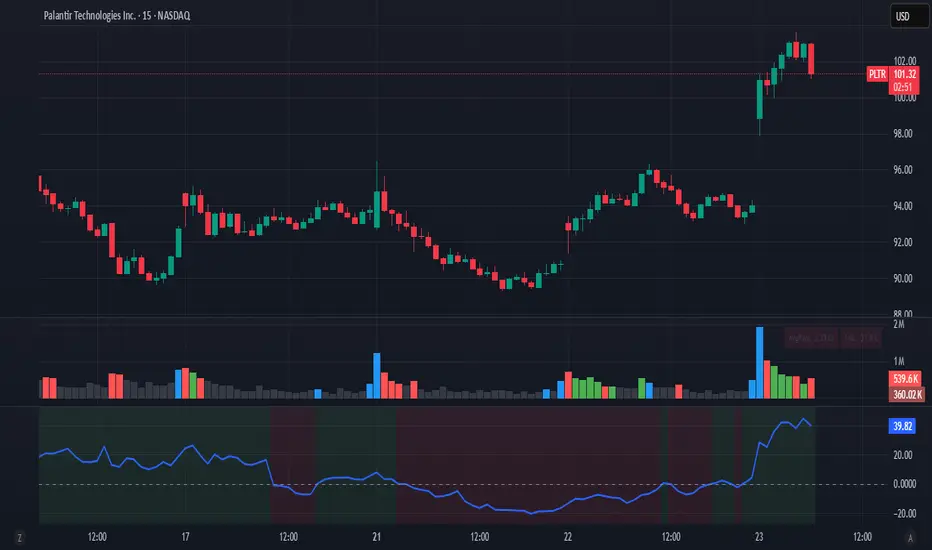
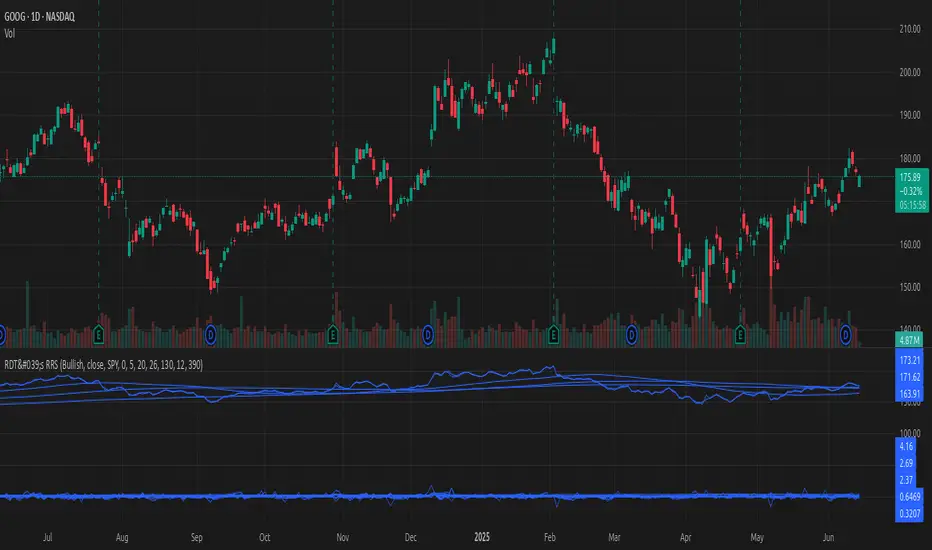
[#ps #mft] RDT's Real Relative StrengthIndicator to use with Pine Screener for filtering watchlists with RDT's Real Relative Strength. See r/realdaytrading for more info on the RRS. How to: 1. Mark the indicator as "Favorite". 2. Open Pine Screener. 3. Choose a watchlist. 4. Choose this indicator. 5. Change the settings as needed. 6. Make sure you set timeframe to "5 minutes" and not the default "1 day". If you choose "Bullish trend", then "Signal X" is a shortcut for RRS > 0 for that timeframe. Similarly "Bearish trend" for "Signal X" means RRS < 0. Pro-tip #1: use Symbol syncing between tabs to easily go over the results. Pro-tip #2: you can have two tabs open for "Bullish" and "Bearish" pine screeners (even synced to the same color), so you don't have to change settings everytime.Индикатор Pine Script®от satayevОбновлено 223
Hellenic EMA Matrix - PremiumHellenic EMA Matrix - Alpha Omega Premium Complete User Guide Table of Contents Introduction Indicator Philosophy Mathematical Constants EMA Types Settings Trading Signals Visualization Usage Strategies FAQ Introduction Hellenic EMA Matrix is a premium indicator based on mathematical constants of nature: Phi (Phi - Golden Ratio), Pi (Pi), e (Euler's number). The indicator uses these universal constants to create dynamic EMAs that adapt to the natural rhythms of the market. Key Features: 6 EMA types based on mathematical constants Premium visualization with Neon Glow and Gradient Clouds Automatic Fast/Mid/Slow EMA sorting STRONG signals for powerful trends Pulsing Ribbon Bar for instant trend assessment Works on all timeframes (M1 - MN) Indicator Philosophy Why Mathematical Constants? Traditional EMAs use arbitrary periods (9, 21, 50, 200). Hellenic Matrix goes further, using universal mathematical constants found in nature: Phi (1.618) - Golden Ratio: galaxy spirals, seashells, human body proportions Pi (3.14159) - Pi: circles, waves, cycles e (2.71828) - Natural logarithm base: exponential growth, radioactive decay Markets are also a natural system composed of millions of participants. Using mathematical constants allows tuning into the natural rhythms of market cycles. Mathematical Constants Phi (Phi) - Golden Ratio Phi = 1.618033988749895 Properties: Phi² = Phi + 1 = 2.618 Phi³ = 4.236 Phi⁴ = 6.854 Application: Ideal for trending movements and Fibonacci corrections Pi (Pi) - Pi Number Pi = 3.141592653589793 Properties: 2Pi = 6.283 (full circle) 3Pi = 9.425 4Pi = 12.566 Application: Excellent for cyclical markets and wave structures e (Euler) - Euler's Number e = 2.718281828459045 Properties: e² = 7.389 e³ = 20.085 e⁴ = 54.598 Application: Suitable for exponential movements and volatile markets EMA Types 1. Phi (Phi) - Golden Ratio EMA Description: EMA based on the golden ratio Period Formula: Period = Phi^n × Base Multiplier Parameters: Phi Power Level (1-8): Power of Phi Phi¹ = 1.618 → ~16 period (with Base=10) Phi² = 2.618 → ~26 period Phi³ = 4.236 → ~42 period (recommended) Phi⁴ = 6.854 → ~69 period Recommendations: Phi² or Phi³ for day trading Phi⁴ or Phi⁵ for swing trading Works excellently as Fast EMA 2. Pi (Pi) - Circular EMA Description: EMA based on Pi for cyclical movements Period Formula: Period = Pi × Multiple × Base Multiplier Parameters: Pi Multiple (1-10): Pi multiplier 1Pi = 3.14 → ~31 period (with Base=10) 2Pi = 6.28 → ~63 period (recommended) 3Pi = 9.42 → ~94 period Recommendations: 2Pi ideal as Mid or Slow EMA Excellently identifies cycles and waves Use on volatile markets (crypto, forex) 3. e (Euler) - Natural EMA Description: EMA based on natural logarithm Period Formula: Period = e^n × Base Multiplier Parameters: e Power Level (1-6): Power of e e¹ = 2.718 → ~27 period (with Base=10) e² = 7.389 → ~74 period (recommended) e³ = 20.085 → ~201 period Recommendations: e² works excellently as Slow EMA Ideal for stocks and indices Filters noise well on lower timeframes 4. Delta (Delta) - Adaptive EMA Description: Adaptive EMA that changes period based on volatility Period Formula: Period = Base Period × (1 + (Volatility - 1) × Factor) Parameters: Delta Base Period (5-200): Base period (default 20) Delta Volatility Sensitivity (0.5-5.0): Volatility sensitivity (default 2.0) How it works: During low volatility → period decreases → EMA reacts faster During high volatility → period increases → EMA smooths noise Recommendations: Works excellently on news and sharp movements Use as Fast EMA for quick adaptation Sensitivity 2.0-3.0 for crypto, 1.0-2.0 for stocks 5. Sigma (Sigma) - Composite EMA Description: Composite EMA combining multiple active EMAs Composition Methods: Weighted Average (default): Sigma = (Phi + Pi + e + Delta) / 4 Simple average of all active EMAs Geometric Mean: Sigma = fourth_root(Phi × Pi × e × Delta) Geometric mean (more conservative) Harmonic Mean: Sigma = 4 / (1/Phi + 1/Pi + 1/e + 1/Delta) Harmonic mean (more weight to smaller values) Recommendations: Enable for additional confirmation Use as Mid EMA Weighted Average - most universal method 6. Lambda (Lambda) - Wave EMA Description: Wave EMA with sinusoidal period modulation Period Formula: Period = Base Period × (1 + Amplitude × sin(2Pi × bar / Frequency)) Parameters: Lambda Base Period (10-200): Base period Lambda Wave Amplitude (0.1-2.0): Wave amplitude Lambda Wave Frequency (10-200): Wave frequency in bars How it works: Period pulsates sinusoidally Creates wave effect following market cycles Recommendations: Experimental EMA for advanced users Works well on cyclical markets Frequency = 50 for day trading, 100+ for swing Settings Matrix Core Settings Base Multiplier (1-100) Multiplies all EMA periods Base = 1: Very fast EMAs (Phi³ = 4, 2Pi = 6, e² = 7) Base = 10: Standard (Phi³ = 42, 2Pi = 63, e² = 74) Base = 20: Slow EMAs (Phi³ = 85, 2Pi = 126, e² = 148) Recommendations by timeframe: M1-M5: Base = 5-10 M15-H1: Base = 10-15 (recommended) H4-D1: Base = 15-25 W1-MN: Base = 25-50 Matrix Source Data source selection for EMA calculation: close - closing price (standard) open - opening price high - high low - low hl2 - (high + low) / 2 hlc3 - (high + low + close) / 3 ohlc4 - (open + high + low + close) / 4 When to change: hlc3 or ohlc4 for smoother signals high for aggressive longs low for aggressive shorts Manual EMA Selection Critically important setting! Determines which EMAs are used for signal generation. Use Manual Fast/Slow/Mid Selection Enabled (default): You select EMAs manually Disabled: Automatic selection by periods Fast EMA Fast EMA - reacts first to price changes Recommendations: Phi Golden (recommended) - universal choice Delta Adaptive - for volatile markets Must be fastest (smallest period) Slow EMA Slow EMA - determines main trend Recommendations: Pi Circular (recommended) - excellent trend filter e Natural - for smoother trend Must be slowest (largest period) Mid EMA Mid EMA - additional signal filter Recommendations: e Natural (recommended) - excellent middle level Pi Circular - alternative None - for more frequent signals (only 2 EMAs) IMPORTANT: The indicator automatically sorts selected EMAs by their actual periods: Fast = EMA with smallest period Mid = EMA with middle period Slow = EMA with largest period Therefore, you can select any combination - the indicator will arrange them correctly! Premium Visualization Neon Glow Enable Neon Glow for EMAs - adds glowing effect around EMA lines Glow Strength: Light - subtle glow Medium (recommended) - optimal balance Strong - bright glow (may be too bright) Effect: 2 glow layers around each EMA for 3D effect Gradient Clouds Enable Gradient Clouds - fills space between EMAs with gradient Parameters: Cloud Transparency (85-98): Cloud transparency 95-97 (recommended) Higher = more transparent Dynamic Cloud Intensity - automatically changes transparency based on EMA distance Cloud Colors: Phi-Pi Cloud: Blue - when Pi above Phi (bullish) Gold - when Phi above Pi (bearish) Pi-e Cloud: Green - when e above Pi (bullish) Blue - when Pi above e (bearish) 2 layers for volumetric effect Pulsing Ribbon Bar Enable Pulsing Indicator Bar - pulsing strip at bottom/top of chart Parameters: Ribbon Position: Top / Bottom (recommended) Pulse Speed: Slow / Medium (recommended) / Fast Symbols and colors: Green filled square - STRONG BULLISH Pink filled square - STRONG BEARISH Blue hollow square - Bullish (regular) Red hollow square - Bearish (regular) Purple rectangle - Neutral Effect: Pulsation with sinusoid for living market feel Signal Bar Highlights Enable Signal Bar Highlights - highlights bars with signals Parameters: Highlight Transparency (88-96): Highlight transparency Highlight Style: Light Fill (recommended) - bar background fill Thin Line - bar outline only Highlights: Golden Cross - green Death Cross - pink STRONG BUY - green STRONG SELL - pink Show Greek Labels Shows Greek alphabet letters on last bar: Phi - Phi EMA (gold) Pi - Pi EMA (blue) e - Euler EMA (green) Delta - Delta EMA (purple) Sigma - Sigma EMA (pink) When to use: For education or presentations Show Old Background Old background style (not recommended): Green background - STRONG BULLISH Pink background - STRONG BEARISH Blue background - Bullish Red background - Bearish Not recommended - use new Gradient Clouds and Pulsing Bar Info Table Show Info Table - table with indicator information Parameters: Position: Top Left / Top Right (recommended) / Bottom Left / Bottom Right Size: Tiny / Small (recommended) / Normal / Large Table contents: EMA list - periods and current values of all active EMAs Effects - active visual effects TREND - current trend state: STRONG UP - strong bullish STRONG DOWN - strong bearish Bullish - regular bullish Bearish - regular bearish Neutral - neutral Momentum % - percentage deviation of price from Fast EMA Setup - current Fast/Slow/Mid configuration Trading Signals Show Golden/Death Cross Golden Cross - Fast EMA crosses Slow EMA from below (bullish signal) Death Cross - Fast EMA crosses Slow EMA from above (bearish signal) Symbols: Yellow dot "GC" below - Golden Cross Dark red dot "DC" above - Death Cross Show STRONG Signals STRONG BUY and STRONG SELL - the most powerful indicator signals Conditions for STRONG BULLISH: EMA Alignment: Fast > Mid > Slow (all EMAs aligned) Trend: Fast > Slow (clear uptrend) Distance: EMAs separated by minimum 0.15% Price Position: Price above Fast EMA Fast Slope: Fast EMA rising Slow Slope: Slow EMA rising Mid Trending: Mid EMA also rising (if enabled) Conditions for STRONG BEARISH: Same but in reverse Visual display: Green label "STRONG BUY" below bar Pink label "STRONG SELL" above bar Difference from Golden/Death Cross: Golden/Death Cross = crossing moment (1 bar) STRONG signal = sustained trend (lasts several bars) IMPORTANT: After fixes, STRONG signals now: Work on all timeframes (M1 to MN) Don't break on small retracements Work with any Fast/Mid/Slow combination Automatically adapt thanks to EMA sorting Show Stop Loss/Take Profit Automatic SL/TP level calculation on STRONG signal Parameters: Stop Loss (ATR) (0.5-5.0): ATR multiplier for stop loss 1.5 (recommended) - standard 1.0 - tight stop 2.0-3.0 - wide stop Take Profit R:R (1.0-5.0): Risk/reward ratio 2.0 (recommended) - standard (risk 1.5 ATR, profit 3.0 ATR) 1.5 - conservative 3.0-5.0 - aggressive Formulas: LONG: Stop Loss = Entry - (ATR × Stop Loss ATR) Take Profit = Entry + (ATR × Stop Loss ATR × Take Profit R:R) SHORT: Stop Loss = Entry + (ATR × Stop Loss ATR) Take Profit = Entry - (ATR × Stop Loss ATR × Take Profit R:R) Visualization: Red X - Stop Loss Green X - Take Profit Levels remain active while STRONG signal persists Trading Signals Signal Types 1. Golden Cross Description: Fast EMA crosses Slow EMA from below Signal: Beginning of bullish trend How to trade: ENTRY: On bar close with Golden Cross STOP: Below local low or below Slow EMA TARGET: Next resistance level or 2:1 R:R Strengths: Simple and clear Works well on trending markets Clear entry point Weaknesses: Lags (signal after movement starts) Many false signals in ranging markets May be late on fast moves Optimal timeframes: H1, H4, D1 2. Death Cross Description: Fast EMA crosses Slow EMA from above Signal: Beginning of bearish trend How to trade: ENTRY: On bar close with Death Cross STOP: Above local high or above Slow EMA TARGET: Next support level or 2:1 R:R Application: Mirror of Golden Cross 3. STRONG BUY Description: All EMAs aligned + trend + all EMAs rising Signal: Powerful bullish trend How to trade: ENTRY: On bar close with STRONG BUY or on pullback to Fast EMA STOP: Below Fast EMA or automatic SL (if enabled) TARGET: Automatic TP (if enabled) or by levels TRAILING: Follow Fast EMA Entry strategies: Aggressive: Enter immediately on signal Conservative: Wait for pullback to Fast EMA, then enter on bounce Pyramiding: Add positions on pullbacks to Mid EMA Position management: Hold while STRONG signal active Exit on STRONG SELL or Death Cross appearance Move stop behind Fast EMA Strengths: Most reliable indicator signal Doesn't break on pullbacks Catches large moves Works on all timeframes Weaknesses: Appears less frequently than other signals Requires confirmation (multiple conditions) Optimal timeframes: All (M5 - D1) 4. STRONG SELL Description: All EMAs aligned down + downtrend + all EMAs falling Signal: Powerful bearish trend How to trade: Mirror of STRONG BUY Visual Signals Pulsing Ribbon Bar Quick market assessment at a glance: Symbol Color State Filled square Green STRONG BULLISH Filled square Pink STRONG BEARISH Hollow square Blue Bullish Hollow square Red Bearish Rectangle Purple Neutral Pulsation: Sinusoidal, creates living effect Signal Bar Highlights Bars with signals are highlighted: Green highlight: STRONG BUY or Golden Cross Pink highlight: STRONG SELL or Death Cross Gradient Clouds Colored space between EMAs shows trend strength: Wide clouds - strong trend Narrow clouds - weak trend or consolidation Color change - trend change Info Table Quick reference in corner: TREND: Current state (STRONG UP, Bullish, Neutral, Bearish, STRONG DOWN) Momentum %: Movement strength Effects: Active visual effects Setup: Fast/Slow/Mid configuration Usage Strategies Strategy 1: "Golden Trailing" Idea: Follow STRONG signals using Fast EMA as trailing stop Settings: Fast: Phi Golden (Phi³) Mid: Pi Circular (2Pi) Slow: e Natural (e²) Base Multiplier: 10 Timeframe: H1, H4 Entry rules: Wait for STRONG BUY Enter on bar close or on pullback to Fast EMA Stop below Fast EMA Management: Hold position while STRONG signal active Move stop behind Fast EMA daily Exit on STRONG SELL or Death Cross Take Profit: Partially close at +2R Trail remainder until exit signal For whom: Swing traders, trend followers Pros: Catches large moves Simple rules Emotionally comfortable Cons: Requires patience Possible extended drawdowns on pullbacks Strategy 2: "Scalping Bounces" Idea: Scalp bounces from Fast EMA during STRONG trend Settings: Fast: Delta Adaptive (Base 15, Sensitivity 2.0) Mid: Phi Golden (Phi²) Slow: Pi Circular (2Pi) Base Multiplier: 5 Timeframe: M5, M15 Entry rules: STRONG signal must be active Wait for price pullback to Fast EMA Enter on bounce (candle closes above/below Fast EMA) Stop behind local extreme (15-20 pips) Take Profit: +1.5R or to Mid EMA Or to next level For whom: Active day traders Pros: Many signals Clear entry point Quick profits Cons: Requires constant monitoring Not all bounces work Requires discipline for frequent trading Strategy 3: "Triple Filter" Idea: Enter only when all 3 EMAs and price perfectly aligned Settings: Fast: Phi Golden (Phi³) Mid: e Natural (e²) Slow: Pi Circular (3Pi) Base Multiplier: 15 Timeframe: H4, D1 Entry rules (LONG): STRONG BUY active Price above all three EMAs Fast > Mid > Slow (all aligned) All EMAs rising (slope up) Gradient Clouds wide and bright Entry: On bar close meeting all conditions Or on next pullback to Fast EMA Stop: Below Mid EMA or -1.5 ATR Take Profit: First target: +3R Second target: next major level Trailing: Mid EMA For whom: Conservative swing traders, investors Pros: Very reliable signals Minimum false entries Large profit potential Cons: Rare signals (2-5 per month) Requires patience Strategy 4: "Adaptive Scalper" Idea: Use only Delta Adaptive EMA for quick volatility reaction Settings: Fast: Delta Adaptive (Base 10, Sensitivity 3.0) Mid: None Slow: Delta Adaptive (Base 30, Sensitivity 2.0) Base Multiplier: 3 Timeframe: M1, M5 Feature: Two different Delta EMAs with different settings Entry rules: Golden Cross between two Delta EMAs Both Delta EMAs must be rising/falling Enter on next bar Stop: 10-15 pips or below Slow Delta EMA Take Profit: +1R to +2R Or Death Cross For whom: Scalpers on cryptocurrencies and forex Pros: Instant volatility adaptation Many signals on volatile markets Quick results Cons: Much noise on calm markets Requires fast execution High commissions may eat profits Strategy 5: "Cyclical Trader" Idea: Use Pi and Lambda for trading cyclical markets Settings: Fast: Pi Circular (1Pi) Mid: Lambda Wave (Base 30, Amplitude 0.5, Frequency 50) Slow: Pi Circular (3Pi) Base Multiplier: 10 Timeframe: H1, H4 Entry rules: STRONG signal active Lambda Wave EMA synchronized with trend Enter on bounce from Lambda Wave For whom: Traders of cyclical assets (some altcoins, commodities) Pros: Catches cyclical movements Lambda Wave provides additional entry points Cons: More complex to configure Not for all markets Lambda Wave may give false signals Strategy 6: "Multi-Timeframe Confirmation" Idea: Use multiple timeframes for confirmation Scheme: Higher TF (D1): Determine trend direction (STRONG signal) Middle TF (H4): Wait for STRONG signal in same direction Lower TF (M15): Look for entry point (Golden Cross or bounce from Fast EMA) Settings for all TFs: Fast: Phi Golden (Phi³) Mid: e Natural (e²) Slow: Pi Circular (2Pi) Base Multiplier: 10 Rules: All 3 TFs must show one trend Entry on lower TF Stop by lower TF Target by higher TF For whom: Serious traders and investors Pros: Maximum reliability Large profit targets Minimum false signals Cons: Rare setups Requires analysis of multiple charts Experience needed Practical Tips DOs Use STRONG signals as primary - they're most reliable Let signals develop - don't exit on first pullback Use trailing stop - follow Fast EMA Combine with levels - S/R, Fibonacci, volumes Test on demo before real Adjust Base Multiplier for your timeframe Enable visual effects - they help see the picture Use Info Table - quick situation assessment Watch Pulsing Bar - instant state indicator Trust auto-sorting of Fast/Mid/Slow DON'Ts Don't trade against STRONG signal - trend is your friend Don't ignore Mid EMA - it adds reliability Don't use too small Base Multiplier on higher TFs Don't enter on Golden Cross in range - check for trend Don't change settings during open position Don't forget risk management - 1-2% per trade Don't trade all signals in row - choose best ones Don't use indicator in isolation - combine with Price Action Don't set too tight stops - let trade breathe Don't over-optimize - simplicity = reliability Optimal Settings by Asset US Stocks (SPY, AAPL, TSLA) Recommendation: Fast: Phi Golden (Phi³) Mid: e Natural (e²) Slow: Pi Circular (2Pi) Base: 10-15 Timeframe: H4, D1 Features: Use on daily for swing STRONG signals very reliable Works well on trending stocks Forex (EUR/USD, GBP/USD) Recommendation: Fast: Delta Adaptive (Base 15, Sens 2.0) Mid: Phi Golden (Phi²) Slow: Pi Circular (2Pi) Base: 8-12 Timeframe: M15, H1, H4 Features: Delta Adaptive works excellently on news Many signals on M15-H1 Consider spreads Cryptocurrencies (BTC, ETH, altcoins) Recommendation: Fast: Delta Adaptive (Base 10, Sens 3.0) Mid: Pi Circular (2Pi) Slow: e Natural (e²) Base: 5-10 Timeframe: M5, M15, H1 Features: High volatility - adaptation needed STRONG signals can last days Be careful with scalping on M1-M5 Commodities (Gold, Oil) Recommendation: Fast: Pi Circular (1Pi) Mid: Phi Golden (Phi³) Slow: Pi Circular (3Pi) Base: 12-18 Timeframe: H4, D1 Features: Pi works excellently on cyclical commodities Gold responds especially well to Phi Oil volatile - use wide stops Indices (S&P500, Nasdaq, DAX) Recommendation: Fast: Phi Golden (Phi³) Mid: e Natural (e²) Slow: Pi Circular (2Pi) Base: 15-20 Timeframe: H4, D1, W1 Features: Very trending instruments STRONG signals last weeks Good for position trading Alerts The indicator supports 6 alert types: 1. Golden Cross Message: "Hellenic Matrix: GOLDEN CROSS - Fast EMA crossed above Slow EMA - Bullish trend starting!" When: Fast EMA crosses Slow EMA from below 2. Death Cross Message: "Hellenic Matrix: DEATH CROSS - Fast EMA crossed below Slow EMA - Bearish trend starting!" When: Fast EMA crosses Slow EMA from above 3. STRONG BULLISH Message: "Hellenic Matrix: STRONG BULLISH SIGNAL - All EMAs aligned for powerful uptrend!" When: All conditions for STRONG BUY met (first bar) 4. STRONG BEARISH Message: "Hellenic Matrix: STRONG BEARISH SIGNAL - All EMAs aligned for powerful downtrend!" When: All conditions for STRONG SELL met (first bar) 5. Bullish Ribbon Message: "Hellenic Matrix: BULLISH RIBBON - EMAs aligned for uptrend" When: EMAs aligned bullish + price above Fast EMA (less strict condition) 6. Bearish Ribbon Message: "Hellenic Matrix: BEARISH RIBBON - EMAs aligned for downtrend" When: EMAs aligned bearish + price below Fast EMA (less strict condition) How to Set Up Alerts: Open indicator on chart Click on three dots next to indicator name Select "Create Alert" In "Condition" field select needed alert: Golden Cross Death Cross STRONG BULLISH STRONG BEARISH Bullish Ribbon Bearish Ribbon Configure notification method: Pop-up in browser Email SMS (in Premium accounts) Push notifications in mobile app Webhook (for automation) Select frequency: Once Per Bar Close (recommended) - once on bar close Once Per Bar - during bar formation Only Once - only first time Click "Create" Tip: Create separate alerts for different timeframes and instruments FAQ 1. Why don't STRONG signals appear? Possible reasons: Incorrect Fast/Mid/Slow order Solution: Indicator automatically sorts EMAs by periods, but ensure selected EMAs have different periods Base Multiplier too large Solution: Reduce Base to 5-10 on lower timeframes Market in range Solution: STRONG signals appear only in trends - this is normal Too strict EMA settings Solution: Try classic combination: Phi³ / Pi×2 / e² with Base=10 Mid EMA too close to Fast or Slow Solution: Select Mid EMA with period between Fast and Slow 2. How often should STRONG signals appear? Normal frequency: M1-M5: 5-15 signals per day (very active markets) M15-H1: 2-8 signals per day H4: 3-10 signals per week D1: 2-5 signals per month W1: 2-6 signals per year If too many signals - market very volatile or Base too small If too few signals - market in range or Base too large 4. What are the best settings for beginners? Universal "out of the box" settings: Matrix Core: Base Multiplier: 10 Source: close Phi Golden: Enabled, Power = 3 Pi Circular: Enabled, Multiple = 2 e Natural: Enabled, Power = 2 Delta Adaptive: Enabled, Base = 20, Sensitivity = 2.0 Manual Selection: Fast: Phi Golden Mid: e Natural Slow: Pi Circular Visualization: Gradient Clouds: ON Neon Glow: ON (Medium) Pulsing Bar: ON (Medium) Signal Highlights: ON (Light Fill) Table: ON (Top Right, Small) Signals: Golden/Death Cross: ON STRONG Signals: ON Stop Loss: OFF (while learning) Timeframe for learning: H1 or H4 5. Can I use only one EMA? No, minimum 2 EMAs (Fast and Slow) for signal generation. Mid EMA is optional: With Mid EMA = more reliable but rarer signals Without Mid EMA = more signals but less strict filtering Recommendation: Start with 3 EMAs (Fast/Mid/Slow), then experiment 6. Does the indicator work on cryptocurrencies? Yes, works excellently! Especially good on: Bitcoin (BTC) Ethereum (ETH) Major altcoins (SOL, BNB, XRP) Recommended settings for crypto: Fast: Delta Adaptive (Base 10-15, Sensitivity 2.5-3.0) Mid: Pi Circular (2Pi) Slow: e Natural (e²) Base: 5-10 Timeframe: M15, H1, H4 Crypto market features: High volatility → use Delta Adaptive 24/7 trading → set alerts Sharp movements → wide stops 7. Can I trade only with this indicator? Technically yes, but NOT recommended. Best approach - combine with: Price Action - support/resistance levels, candle patterns Volume - movement strength confirmation Fibonacci - retracement and extension levels RSI/MACD - divergences and overbought/oversold Fundamental analysis - news, company reports Hellenic Matrix: Excellently determines trend and its strength Provides clear entry/exit points Doesn't consider fundamentals Doesn't see major levels 8. Why do Gradient Clouds change color? Color depends on EMA order: Phi-Pi Cloud: Blue - Pi EMA above Phi EMA (bullish alignment) Gold - Phi EMA above Pi EMA (bearish alignment) Pi-e Cloud: Green - e EMA above Pi EMA (bullish alignment) Blue - Pi EMA above e EMA (bearish alignment) Color change = EMA order change = possible trend change 9. What is Momentum % in the table? Momentum % = percentage deviation of price from Fast EMA Formula: Momentum = ((Close - Fast EMA) / Fast EMA) × 100 Interpretation: +0.5% to +2% - normal bullish momentum +2% to +5% - strong bullish momentum +5% and above - overheating (correction possible) -0.5% to -2% - normal bearish momentum -2% to -5% - strong bearish momentum -5% and below - oversold (bounce possible) Usage: Monitor momentum during STRONG signals Large momentum = don't enter (wait for pullback) Small momentum = good entry point 10. How to configure for scalping? Settings for scalping (M1-M5): Base Multiplier: 3-5 Source: close or hlc3 (smoother) Fast: Delta Adaptive (Base 8-12, Sensitivity 3.0) Mid: None (for more signals) Slow: Phi Golden (Phi²) or Pi Circular (1Pi) Visualization: - Gradient Clouds: ON (helps see strength) - Neon Glow: OFF (doesn't clutter chart) - Pulsing Bar: ON (quick assessment) - Signal Highlights: ON Signals: - Golden/Death Cross: ON - STRONG Signals: ON - Stop Loss: ON (1.0-1.5 ATR, R:R 1.5-2.0) Scalping rules: Trade only STRONG signals Enter on bounce from Fast EMA Tight stops (10-20 pips) Quick take profit (+1R to +2R) Don't hold through news 11. How to configure for long-term investing? Settings for investing (D1-W1): Base Multiplier: 20-30 Source: close Fast: Phi Golden (Phi³ or Phi⁴) Mid: e Natural (e²) Slow: Pi Circular (3Pi or 4Pi) Visualization: - Gradient Clouds: ON - Neon Glow: ON (Medium) - Everything else - to taste Signals: - Golden/Death Cross: ON - STRONG Signals: ON - Stop Loss: OFF (use percentage stop) Investing rules: Enter only on STRONG signals Hold while STRONG active (weeks/months) Stop below Slow EMA or -10% Take profit: by company targets or +50-100% Ignore short-term pullbacks 12. What if indicator slows down chart? Indicator is optimized, but if it slows: Disable unnecessary visual effects: Neon Glow: OFF (saves 8 plots) Gradient Clouds: ON but low quality Lambda Wave EMA: OFF (if not using) Reduce number of active EMAs: Sigma Composite: OFF Lambda Wave: OFF Leave only Phi, Pi, e, Delta Simplify settings: Pulsing Bar: OFF Greek Labels: OFF Info Table: smaller size 13. Can I use on different timeframes simultaneously? Yes! Multi-timeframe analysis is very powerful: Classic scheme: Higher TF (D1, W1) - determine global trend Wait for STRONG signal This is our trading direction Middle TF (H4, H1) - look for confirmation STRONG signal in same direction Precise entry zone Lower TF (M15, M5) - entry point Golden Cross or bounce from Fast EMA Precise stop loss Example: W1: STRONG BUY active (global uptrend) H4: STRONG BUY appeared (confirmation) M15: Wait for Golden Cross or bounce from Fast EMA → ENTRY Advantages: Maximum reliability Clear timeframe hierarchy Large targets 14. How does indicator work on news? Delta Adaptive EMA adapts excellently to news: Before news: Low volatility → Delta EMA becomes fast → pulls to price During news: Sharp volatility spike → Delta EMA slows → filters noise After news: Volatility normalizes → Delta EMA returns to normal Recommendations: Don't trade at news release moment (spreads widen) Wait for STRONG signal after news (2-5 bars) Use Delta Adaptive as Fast EMA for quick reaction Widen stops by 50-100% during important news Advanced Techniques Technique 1: "Divergences with EMA" Idea: Look for discrepancies between price and Fast EMA Bullish divergence: Price makes lower low Fast EMA makes higher low = Possible reversal up Bearish divergence: Price makes higher high Fast EMA makes lower high = Possible reversal down How to trade: Find divergence Wait for STRONG signal in divergence direction Enter on confirmation Technique 2: "EMA Tunnel" Idea: Use space between Fast and Slow EMA as "tunnel" Rules: Wide tunnel - strong trend, hold position Narrow tunnel - weak trend or consolidation, caution Tunnel narrowing - trend weakening, prepare to exit Tunnel widening - trend strengthening, can add Visually: Gradient Clouds show this automatically! Trading: Enter on STRONG signal (tunnel starts widening) Hold while tunnel wide Exit when tunnel starts narrowing Technique 3: "Wave Analysis with Lambda" Idea: Lambda Wave EMA creates sinusoid matching market cycles Setup: Lambda Base Period: 30 Lambda Wave Amplitude: 0.5 Lambda Wave Frequency: 50 (adjusted to asset cycle) How to find correct Frequency: Look at historical cycles (distance between local highs) Average distance = your Frequency Example: if highs every 40-60 bars, set Frequency = 50 Trading: Enter when Lambda Wave at bottom of sinusoid (growth potential) Exit when Lambda Wave at top (fall potential) Combine with STRONG signals Technique 4: "Cluster Analysis" Idea: When all EMAs gather in narrow cluster = powerful breakout soon Cluster signs: All EMAs (Phi, Pi, e, Delta) within 0.5-1% of each other Gradient Clouds almost invisible Price jumping around all EMAs Trading: Identify cluster (all EMAs close) Determine breakout direction (where more volume, higher TFs direction) Wait for breakout and STRONG signal Enter on confirmation Target = cluster size × 3-5 This is very powerful technique for big moves! Technique 5: "Sigma as Dynamic Level" Idea: Sigma Composite EMA = average of all EMAs = magnetic level Usage: Enable Sigma Composite (Weighted Average) Sigma works as dynamic support/resistance Price often returns to Sigma before trend continuation Trading: In trend: Enter on bounces from Sigma In range: Fade moves from Sigma (trade return to Sigma) On breakout: Sigma becomes support/resistance Risk Management Basic Rules 1. Position Size Conservative: 1% of capital per trade Moderate: 2% of capital per trade (recommended) Aggressive: 3-5% (only for experienced) Calculation formula: Lot Size = (Capital × Risk%) / (Stop in pips × Pip value) 2. Risk/Reward Ratio Minimum: 1:1.5 Standard: 1:2 (recommended) Optimal: 1:3 Aggressive: 1:5+ 3. Maximum Drawdown Daily: -3% to -5% Weekly: -7% to -10% Monthly: -15% to -20% Upon reaching limit → STOP trading until end of period Position Management Strategies 1. Fixed Stop Method: Stop below/above Fast EMA or local extreme DON'T move stop against position Can move to breakeven For whom: Beginners, conservative traders 2. Trailing by Fast EMA Method: Each day (or bar) move stop to Fast EMA level Position closes when price breaks Fast EMA Advantages: Stay in trend as long as possible Automatically exit on reversal For whom: Trend followers, swing traders 3. Partial Exit Method: 50% of position close at +2R 50% hold with trailing by Mid EMA or Slow EMA Advantages: Lock profit Leave position for big move Psychologically comfortable For whom: Universal method (recommended) 4. Pyramiding Method: First entry on STRONG signal (50% of planned position) Add 25% on pullback to Fast EMA Add another 25% on pullback to Mid EMA Overall stop below Slow EMA Advantages: Average entry price Reduce risk Increase profit in strong trends Caution: Works only in trends In range leads to losses For whom: Experienced traders Trading Psychology Correct Mindset 1. Indicator is a tool, not holy grail Indicator shows probability, not guarantee There will be losing trades - this is normal Important is series statistics, not one trade 2. Trust the system If STRONG signal appeared - enter Don't search for "perfect" moment Follow trading plan 3. Patience STRONG signals don't appear every day Better miss signal than enter against trend Quality over quantity 4. Discipline Always set stop loss Don't move stop against position Don't increase risk after losses Beginner Mistakes 1. "I know better than indicator" Indicator says STRONG BUY, but you think "too high, will wait for pullback" Result: miss profitable move Solution: Trust signals or don't use indicator 2. "Will reverse now for sure" Trading against STRONG trend Result: stops, stops, stops Solution: Trend is your friend, trade with trend 3. "Will hold a bit more" Don't exit when STRONG signal disappears Greed eats profit Solution: If signal gone - exit! 4. "I'll recover" After losses double risk Result: huge losses Solution: Fixed % risk ALWAYS 5. "I don't like this signal" Skip signals because of "feeling" Result: inconsistency, no statistics Solution: Trade ALL signals or clearly define filters Trading Journal What to Record For each trade: 1. Entry/exit date and time 2. Instrument and timeframe 3. Signal type Golden Cross STRONG BUY STRONG SELL Death Cross 4. Indicator settings Fast/Mid/Slow EMA Base Multiplier Other parameters 5. Chart screenshot Entry moment Exit moment 6. Trade parameters Position size Stop loss Take Profit R:R 7. Result Profit/Loss in $ Profit/Loss in % Profit/Loss in R 8. Notes What was right What was wrong Emotions during trade Lessons Journal Analysis Analyze weekly: 1. Win Rate Win Rate = (Profitable trades / All trades) × 100% Good: 50-60% Excellent: 60-70% Exceptional: 70%+ 2. Average R Average R = Sum of all R / Number of trades Good: +0.5R Excellent: +1.0R Exceptional: +1.5R+ 3. Profit Factor Profit Factor = Total profit / Total losses Good: 1.5+ Excellent: 2.0+ Exceptional: 3.0+ 4. Maximum Drawdown Track consecutive losses If more than 5 in row - stop, check system 5. Best/Worst Trades What was common in best trades? (do more) What was common in worst trades? (avoid) Pre-Trade Checklist Technical Analysis STRONG signal active (BUY or SELL) All EMAs properly aligned (Fast > Mid > Slow or reverse) Price on correct side of Fast EMA Gradient Clouds confirm trend Pulsing Bar shows STRONG state Momentum % in normal range (not overheated) No close strong levels against direction Higher timeframe doesn't contradict Risk Management Position size calculated (1-2% risk) Stop loss set Take profit calculated (minimum 1:2) R:R satisfactory Daily/weekly risk limit not exceeded No other open correlated positions Fundamental Analysis No important news in coming hours Market session appropriate (liquidity) No contradicting fundamentals Understand why asset is moving Psychology Calm and thinking clearly No emotions from previous trades Ready to accept loss at stop Following trading plan Not revenging market for past losses If at least one point is NO - think twice before entering! Learning Roadmap Week 1: Familiarization Goals: Install and configure indicator Study all EMA types Understand visualization Tasks: Add indicator to chart Test all Fast/Mid/Slow settings Play with Base Multiplier on different timeframes Observe Gradient Clouds and Pulsing Bar Study Info Table Result: Comfort with indicator interface Week 2: Signals Goals: Learn to recognize all signal types Understand difference between Golden Cross and STRONG Tasks: Find 10 Golden Cross examples in history Find 10 STRONG BUY examples in history Compare their results (which worked better) Set up alerts Get 5 real alerts Result: Understanding signals Week 3: Demo Trading Goals: Start trading signals on demo account Gather statistics Tasks: Open demo account Trade ONLY STRONG signals Keep journal (minimum 20 trades) Don't change indicator settings Strictly follow stop losses Result: 20+ documented trades Week 4: Analysis Goals: Analyze demo trading results Optimize approach Tasks: Calculate win rate and average R Find patterns in profitable trades Find patterns in losing trades Adjust approach (not indicator!) Write trading plan Result: Trading plan on 1 page Month 2: Improvement Goals: Deepen understanding Add additional techniques Tasks: Study multi-timeframe analysis Test combinations with Price Action Try advanced techniques (divergences, tunnels) Continue demo trading (minimum 50 trades) Achieve stable profitability on demo Result: Win rate 55%+ and Profit Factor 1.5+ Month 3: Real Trading Goals: Transition to real account Maintain discipline Tasks: Open small real account Trade minimum lots Strictly follow trading plan DON'T increase risk Focus on process, not profit Result: Psychological comfort on real Month 4+: Scaling Goals: Increase account Become consistently profitable Tasks: With 60%+ win rate can increase risk to 2% Upon doubling account can add capital Continue keeping journal Periodically review and improve strategy Share experience with community Result: Stable profitability month after month Additional Resources Recommended Reading Technical Analysis: "Technical Analysis of Financial Markets" - John Murphy "Trading in the Zone" - Mark Douglas (psychology) "Market Wizards" - Jack Schwager (trader interviews) EMA and Moving Averages: "Moving Averages 101" - Steve Burns Articles on Investopedia about EMA Risk Management: "The Mathematics of Money Management" - Ralph Vince "Trade Your Way to Financial Freedom" - Van K. Tharp Trading Journals: Edgewonk (paid, very powerful) Tradervue (free version + premium) Excel/Google Sheets (free) Screeners: TradingView Stock Screener Finviz (stocks) CoinMarketCap (crypto) Conclusion Hellenic EMA Matrix is a powerful tool based on universal mathematical constants of nature. The indicator combines: Mathematical elegance - Phi, Pi, e instead of arbitrary numbers Premium visualization - Neon Glow, Gradient Clouds, Pulsing Bar Reliable signals - STRONG BUY/SELL work on all timeframes Flexibility - 6 EMA types, adaptation to any trading style Automation - auto-sorting EMAs, SL/TP calculation, alerts Key Success Principles: Simplicity - start with basic settings (Phi/Pi/e, Base=10) Discipline - follow STRONG signals strictly Patience - wait for quality setups Risk Management - 1-2% per trade, ALWAYS Journal - document every trade Learning - constantly improve skills Remember: Indicator shows probability, not guarantee Important is series statistics, not one trade Psychology more important than technique Quality more important than quantity Process more important than result Acknowledgments Thank you for using Hellenic EMA Matrix - Alpha Omega Premium! The indicator was created with love for mathematics, markets, and beautiful visualization. Wishing you profitable trading! Guide Version: 1.0 Date: 2025 Compatibility: Pine Script v6, TradingView "In the simplicity of mathematical constants lies the complexity of market movements"Индикатор Pine Script®от Sesilya102
Correlation AnalysisAs the name suggests, this indicator is a market correlation analysis tool. It contains two main features: - The Curve: represents the historic correlation coefficient between the current chart and the “Reference Market” input from the settings menu. It aims to give more depth to the current correlation values found in the second feature. - The Screener: this second feature displays all correlation coefficient values between the (max) 20 markets inputs. You can use it to create several screeners for several market types (crypto, forex, metals, etc.) or even replicate your current portfolio of investments and gauge the correlation of its components. Aside from these two previous features, you can visually plot the variation rate from one bar to another along with the covariance coefficient (both used in the correlation calculation). Finally, a simple “signal” moving average can be applied to the correlation coefficient . I might add alerts to this script or even turn it into a strategy to do some backtesting. Do not hesitate to contact me or comment below if this is something you would be interested in or if you have any suggestions for improvement. Enjoy!!Индикатор Pine Script®от LucasVivienОбновлено 2260
INAZUMA Bollinger Bands [v3.0]Overview This indicator detects Bollinger Band ±2σ breaks ("Band Walk") and visualizes trend initiation and continuation with "Lightning/Magma" effects and count labels. v3.0 Updates Pine Screener Support (MTF Filter): Added functionality to output Band Walk counts for a specified timeframe (e.g., Monthly) specifically for the Pine Screener. You can now screen for tickers that are band-walking on higher timeframes regardless of the chart's current timeframe. MTF Up Bandwalk Count: Consecutive upward band walk count for the specified timeframe. MTF Down Bandwalk Count: Consecutive downward band walk count for the specified timeframe. Note: Calculations are performed in real-time without waiting for the bar to close, allowing for the detection of the latest trends even on monthly charts. Code Optimization: Cleaned up internal logic and variable naming conventions. Features Visual Effects: Draws gradients based on price deviation when bands are broken. Consecutive Count Labels: Displays the number of consecutive band walks directly on the chart. Multi-Timeframe Settings: You can change the timeframe used for screener calculations (1D, 1W, 1M) via "Filter Timeframe" in the settings. How to use with Screener Select this indicator in the Pine Screener. Add "MTF Up Bandwalk Count" or "MTF Down Bandwalk Count" to your columns. Set the desired timeframe (default: "1M") in the "Filter Timeframe" setting of the indicator. Индикатор Pine Script®от maru_jp8
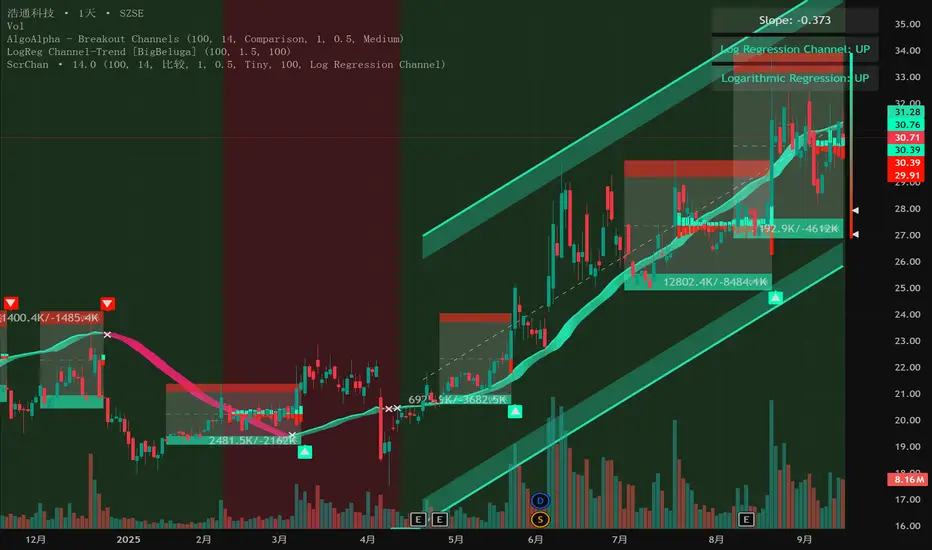
Intelligent Currency Breakout ChannelIndicator: Intelligent Currency Breakout Channel This document provides a detailed explanation of the "Intelligent Currency Breakout Channel" indicator for TradingView. 1. Overview The Intelligent Currency Breakout Channel is an advanced technical analysis tool designed to identify periods of price consolidation and signal potential breakouts. It automatically draws channels around ranging price action and utilizes sophisticated volume analysis to provide deeper insights into market sentiment. The indicator also includes a built-in logarithmic regression screener to help traders align their breakout signals with the broader market trend. 2. Key Features Automatic Channel Detection: The indicator identifies periods of low volatility and automatically draws a containing channel (box) around the price action. Breakout Signals: It generates clear visual alerts (▲ for bullish, ▼ for bearish) when the price closes decisively outside of a channel. In-Depth Volume Analysis: Within each channel, the indicator plots volume as candlestick-like bars, offering three distinct modes: Total Volume, Buy/Sell Comparison, and Volume Delta. This helps traders gauge the strength and conviction behind price movements. Real-time Sentiment Gauge: When a channel is active, a dynamic color-graded gauge appears on the right side of the chart. It visualizes the current volume delta momentum relative to its recent range, offering an at-a-glance sentiment reading. Integrated Trend Screener: A secondary analysis tool based on logarithmic regression is included to determine the underlying trend direction (Up, Down, or Neutral), which can be used to filter breakout signals. Fully Customizable: Users can extensively customize all parameters, from calculation lengths and breakout sensitivity to the visual appearance of every component. 3. How to Use Channel Formation: Watch for the indicator to draw a new channel. This signifies that the market is in a consolidation or ranging phase. The formation of a channel itself can be an alertable event. Volume Interpretation: Observe the volume bars inside the channel. An increase in volume as the price approaches the channel's upper or lower boundary can foreshadow a potential breakout. Use the Volume Display Mode to analyze if buying pressure (Comparison, Delta) or selling pressure is building. Breakout Confirmation: A bullish breakout signal (▲) appears when the price closes above the channel's upper boundary. A bearish breakout signal (▼) appears when the price closes below the lower boundary. For higher-quality signals, enable the Strong Closes Only option. Trend Confirmation (Screener): Use the screener's plot and background color to confirm the broader trend. For instance, you might choose to only take bullish breakout signals when the screener indicates an uptrend (green background) and bearish signals when it indicates a downtrend (red background). Sentiment Gauge: The pointer on the gauge indicates current momentum. A pointer in the upper (green) section suggests bullish pressure, while a pointer in the lower (red) section suggests bearish pressure. This can provide additional confluence for a trade decision. 4. Settings and Inputs Main Settings Overlap Channels: If enabled, allows multiple channels to be drawn on the chart simultaneously, even if they overlap. When disabled, a new channel will only form if it doesn't intersect with an existing one. Strong Closes Only: If enabled, a breakout is only triggered if the midpoint of the candle's body (average of open and close) is outside the channel. This helps filter out false signals caused by long wicks. If disabled, any close outside the channel triggers a breakout. Normalization Length: The lookback period (in bars) used for price normalization. A higher value creates a more stable normalization but may be slower to react to recent price changes. Box Detection Length: The lookback period used to detect the channel formation pattern. A lower value will result in more frequent channels but may be more sensitive to noise. A higher value will result in fewer, but potentially more significant, channels. Volume Analysis Show Volume Analysis: Toggles the visibility of the candlestick-like volume bars inside the channel. Volume Display Mode: Volume: Displays total volume as symmetrical bars around the channel's midline. Comparison: Shows buying volume (green) above the midline and selling volume (red) below it. Delta: Shows the net difference between buying and selling volume. Positive delta is shown above the midline, and negative delta is shown below. Volume Delta Timeframe Source: The timeframe from which to source volume data for calculations. Using a lower timeframe can provide a more granular view of volume dynamics. Volume Scaling: A multiplier that adjusts the vertical size of the volume bars relative to the channel's height. Appearance Volume Text Size: Sets the size of the volume data text displayed in the corners of the channel. Options: Tiny, Small, Medium, Large. Bullish Color: The primary color for all bullish visual elements, including breakout signals and positive volume bars. Bearish Color: The primary color for all bearish visual elements, including breakout signals and negative volume bars. Screener Settings Lookback Period: The number of bars used for the logarithmic regression calculation to determine the trend. Screener Type: Log Regression Channel: The signal is based on the slope of the entire regression channel over the lookback period. An upward sloping channel is bullish (1), and a downward sloping one is bearish (-1). Logarithmic Regression: The signal is based on the most recent value of the regression line compared to its value 3 bars ago. This provides a more responsive measure of the immediate trend. 5. Alerts You can set up the following alerts through the TradingView alerts panel: New Channel Formed: Triggers when a new price consolidation channel is detected and drawn on the chart. Bullish Breakout: Triggers when the price breaks out and closes above the upper boundary of a channel. Bearish Breakout: Triggers when the price breaks out and closes below the lower boundary of a channel. Is In Channel: Triggers on every bar that the price is currently trading inside an active channel. Signal UP: Triggers when the Screener's signal turns bullish (1). Signal DOWN: Triggers when the Screener's signal turns bearish (-1).Индикатор Pine Script®от imtpcsuva252
RS Rating (1-99)RS Rating This indicator implements a Relative Strength (RS) rating for TradingView and is designed specifically to be used with the Pine Screener. Concept Relative Strength is calculated using weighted price performance over multiple time windows (approximately 3, 6, 9, and 12 months). More recent performance is weighted more heavily, following well-established relative strength methodologies. The resulting raw RS score is then compressed into a 1–99 scale, creating an intuitive and stable ranking metric. Because TradingView scripts cannot rank a stock against the entire market universe, this indicator uses a behavioral proxy: the current RS score is mapped against its own historical distribution. This produces RS values that behave similarly to widely used RS ratings, but it is not a true cross-sectional percentile rank. IPO handling RS Rating is not displayed until sufficient price history exists (default: ~9 months / 189 bars). This avoids distorted RS values for newly listed stocks. IPOs are better evaluated using separate momentum, volume, or structure-based tools until they mature. Interpretation (rule of thumb) - RS ≥ 80 → strong relative performance - RS ≥ 90 → leader - RS ≥ 95 → very selective / top-tier - RS Rating is best used as a ranking and confirmation tool, not as an entry signal. Using RS Rating with TradingView Pine Screener This indicator is designed to work directly with the TradingView Pine Screener (beta). Setup - Add the indicator to a chart - Open Pine Screener - Select this script as a filter source - Use the plotted RS Rating (1–99) value for sorting or filtering The screener reads the single plotted RS value and treats it as a sortable numeric column. Typical screening workflows Leader scan Filter: RS Rating ≥ 90 Sort: Descending by RS Rating Identifies stocks with sustained relative outperformance. Broad strength scan Filter: RS Rating ≥ 80 Useful for identifying emerging leaders or strong secondary names. Top-of-universe view No filter Sort: Descending by RS Rating Shows the strongest names within the selected universe. Important notes on Pine Screener (beta) The Pine Screener currently displays a limited number of results (approximately 100). Symbols may be pre-sampled before filtering. For larger universes, consider: - splitting symbols to be scanned into multiple watchlists Best practices Use RS Rating to rank and prioritize candidates, not to time entries. Combine RS with: - price structure, - volume behavior, - overall market regime. RS is most effective when used as part of a multi-factor screening process.Индикатор Pine Script®от kulturdesken3345