New Age Global Sessions ═════════════════════════════════════════════════════════════
New Age Global SESSIONS
Global Trading Sessions Overlay for Smarter Trading
═════════════════════════════════════════════════════════════
🔒 INVITE-ONLY ACCESS
This script requires an invitation to use.
To request access, please send me a private message.
═════════════════════════════════════════════════════════════
🎯 OVERVIEW
The New Age Sessions is a clean, professional session overlay indicator with a futuristic visual style featuring dynamic neon glow effects.
Designed for all 24/5 markets (Forex, Indices, Commodities, Metals) and 24/7 markets (Crypto).
Works on all timeframes with Regular Candles.
The indicator displays global trading sessions with color-coded backgrounds to help traders identify optimal trading windows.
💎 WHAT MAKES THIS UNIQUE
Unlike standard session indicators, this overlay combines:
- 5 Global Trading Sessions with distinct color backgrounds
- London + NY Overlap detection for high-volatility periods
- NY Afternoon and US Close warnings for reversal zones
- Emoji labels at session start for quick identification
- 12 Timezone Support - works correctly for traders worldwide
- BONUS: ORB Box with 3-layer Neon Glow visualization
This combination of session awareness and Visual Design is not available in standard session scripts.
Trade Smarter, not Harder.
📦 WHAT IS THIS INDICATOR?
This is a **visual overlay only** - it does NOT generate buy/sell signals.
**Sessions Overlay**
Displays color-coded backgrounds showing which global market session is currently active. Helps traders identify optimal trading windows and avoid low-liquidity periods.
⚡ KEY FEATURES
⏰ GLOBAL SESSIONS
- 🌙 Sydney - Purple - Range-bound, quiet
- 🗼 Tokyo - Pink - Trends may begin
- 🇨🇳 Hong Kong/Shanghai - Orange - China news, commodities
- 🇬🇧 London - Blue - Breakouts, stops Asia trends
- 🇺🇸 New York - Green - Volatility, news
- ⚡ London + NY Overlap - Yellow - Strongest moves
- ⚠️ NY Afternoon - Orange - Often reversal zone
- 🔴 US Close - Warning label
🏷️ SESSION LABELS
- Emoji labels appear at session start
- Quick visual identification of active session
- Toggle on/off in settings
🎁 BONUS: ORB BOX (9:30-9:45 NY)
- Captures High/Low of first 15 minutes US market open
- Dynamic color change based on price position
- 3-layer Neon Glow effect for high visibility
- Adjustable buffer and duration
- Use as support/resistance reference
- You can deactivate it per Checkbox
⚙️ SETTINGS
TIMEZONE
└── Your Timezone: Select from 12 global timezones
Available: UTC, New York, Chicago, Los Angeles, London, Berlin,
Zurich, Paris, Tokyo, Hong Kong, Singapore, Sydney
SESSIONS
├── Show Sydney: true/false
├── Show Tokyo: true/false
├── Show Hong Kong: true/false
├── Show London: true/false
├── Show New York: true/false
├── Show Overlap: true/false
└── Show Session Labels: true/false
SESSION COLORS
├── Sydney Color (Default: Purple)
├── Tokyo Color (Default: Pink)
├── Hong Kong Color (Default: Orange)
├── London Color (Default: Blue)
├── New York Color (Default: Green)
├── Overlap Color (Default: Yellow)
└── NY Afternoon Color (Default: Orange)
🎁 BONUS: ORB BOX
├── Show ORB Box: true/false
├── Neon Glow Effect: true/false
├── ORB Box Buffer: Points (+/-)
├── ORB Box Duration: 0.5 - 8 hours
├── Bullish Color: Default #00ffbb (Cyan)
└── Bearish Color: Default #ff1100 (Red)
📈 HOW TO USE
1. Apply to any chart (Forex, Crypto, Indices, Commodities)
2. Select your Timezone in settings
3. Toggle sessions you want to see
4. Use session backgrounds to identify:
→ High volatility windows (London, NY, Overlap)
→ Low volatility windows (Sydney, Lunch)
→ Reversal zones (NY Afternoon, US Close)
5. Combine with your own strategy for entries/exits
💡 BEST PRACTICES
- London Open often breaks Asia session ranges
- Overlap (14:00-17:00) has strongest moves and volume
- NY Afternoon (19:00+) often reverses the day's direction
- Avoid entries during Sydney (low liquidity)
- Watch for US Close (22:00) position squaring
📊 SUPPORTED MARKETS
- 24/5: Forex, Indices, Commodities, Metals
- 24/7: Crypto
⚠️ IMPORTANT NOTE
This is an **overlay indicator only**. It does NOT generate trading signals. Use it to visualize market sessions and plan your trading windows. Always combine with your own analysis and risk management.
📞 SUPPORT
Support is provided exclusively to users with active access.
Questions? Send me a private message.
═════════════════════════════════════════════════════════════
© AL_R4D1 - New Age Style Trading Tools
═════════════════════════════════════════════════════════════
Поиск скриптов по запросу "session"

Smart Session ProjectionsSmart Session Projections - Indicator Explanation
הסבר על אינדיקטור Smart Session Projections
English
What Does This Indicator Do?
Smart Session Projections is a multi-timeframe trading indicator that visualizes hierarchical market cycles and sessions on your chart. It helps traders identify market structure by displaying nested time periods with color-coded ranges.
Key Features:
1. Multi-Timeframe Cycle Display
The indicator adapts to your chart timeframe and displays the appropriate cycles:
1-Minute Chart: Shows 22.5-minute cycles (64 cycles per day)
5-Minute Chart: Shows 90-minute quarters (16 cycles per day)
15-Minute Chart: Shows 6-hour sessions (ASIA, LONDON, NY AM, NY PM)
1-Hour Chart: Shows daily cycles (Monday through Sunday)
2. Hierarchical Parent Frames
Each cycle can display up to 3 levels of "parent" frames that show the larger context:
Level 0: No parent frames (only main cycles)
Level 1: Immediate parent cycle
Level 2: Grandparent cycle
Level 3: Great-grandparent cycle
Example on 1-Minute Chart:
Main cycles: 22.5-minute quarters
Level 1: 90-minute sessions (e.g., "ASIA Q1")
Level 2: 6-hour sessions (e.g., "ASIA")
Level 3: Daily cycle (e.g., "Monday")
3. Trading Day Structure (Starts at 18:00 UTC)
All cycles align with the forex trading day that begins at 18:00 (6:00 PM) on Sunday:
Sunday 18:00 → Monday Trading Day Begins
├─ ASIA Session (18:00-00:00)
├─ LONDON Session (00:00-06:00)
├─ NY AM Session (06:00-12:00)
└─ NY PM Session (12:00-18:00)
Monday 18:00 → Tuesday Trading Day Begins
4. Color-Coded Sessions
Each quarter/session has its own color (customizable):
Q1/ASIA: Customizable color
Q2/LONDON: Customizable color
Q3/NY AM: Customizable color
Q4/NY PM: Customizable color
5. Customizable Parent Frames
Parent frames appear as thin outlined boxes with labels:
Adjustable opacity (0-100%)
Adjustable width (1-5 pixels)
Multiple border styles (Solid/Dashed/Dotted)
Labels positioned at top center with vertical offsets to prevent overlap
Settings:
Main Settings:
Price Source: Choose High/Low or Close for range calculation
Timezone: UTC offset or use exchange timezone
GMT Shift: Additional hour adjustment
Parent Frame Settings:
Parent Cycle Levels: 0-3 (how many parent levels to display)
Opacity: 0-100% transparency for frames
Width: 1-5 pixel border thickness
Style: Solid, Dashed, or Dotted lines
Show Labels: Toggle parent cycle labels on/off
Quarter/Session Colors:
Enable/disable each quarter independently
Customize colors for each session
Use Cases:
Intraday Structure: See how smaller cycles fit within larger sessions
Session Trading: Identify when specific market sessions (Asia, London, NY) are active
Cycle Analysis: Track repeating time-based patterns in the market
Multi-Timeframe Context: Understand your current position within larger cycles
עברית
מה עושה האינדיקטור הזה?
Smart Session Projections הוא אינדיקטור מסחר רב-מסגרות זמן המציג מחזורי שוק ומושבי מסחר היררכיים על הגרף שלך. הוא עוזר לסוחרים לזהות את מבנה השוק על ידי הצגת תקופות זמן מקוננות עם טווחים בקידוד צבעים.
תכונות עיקריות:
1. תצוגת מחזורים רב-מסגרות זמן
האינדיקטור מתאים את עצמו למסגרת הזמן של הגרף שלך ומציג את המחזורים המתאימים:
גרף דקה: מציג מחזורים של 22.5 דקות (64 מחזורים ביום)
גרף 5 דקות: מציג רבעונים של 90 דקות (16 מחזורים ביום)
גרף 15 דקות: מציג מושבים של 6 שעות (אסיה, לונדון, ניו יורק בוקר, ניו יורק אחה"צ)
גרף שעה: מציג מחזורים יומיים (ראשון עד שבת)
2. מסגרות הורה היררכיות
כל מחזור יכול להציג עד 3 רמות של מסגרות "הורה" המציגות את ההקשר הגדול יותר:
רמה 0: אין מסגרות הורה (רק המחזורים העיקריים)
רמה 1: מחזור הורה מיידי
רמה 2: מחזור סבא/סבתא
רמה 3: מחזור סבא רבא/סבתא רבתא
דוגמה בגרף דקה:
מחזורים עיקריים: רבעונים של 22.5 דקות
רמה 1: מושבים של 90 דקות (למשל, "ASIA Q1")
רמה 2: מושבים של 6 שעות (למשל, "ASIA")
רמה 3: מחזור יומי (למשל, "Monday")
3. מבנה יום המסחר (מתחיל ב-18:00 UTC)
כל המחזורים מיושרים עם יום המסחר בפורקס שמתחיל ב-18:00 (6:00 אחה"צ) ביום ראשון:
ראשון 18:00 → יום המסחר של יום שני מתחיל
├─ מושב אסיה (18:00-00:00)
├─ מושב לונדון (00:00-06:00)
├─ מושב ניו יורק בוקר (06:00-12:00)
└─ מושב ניו יורק אחה"צ (12:00-18:00)
שני 18:00 → יום המסחר של יום שלישי מתחיל
4. מושבים בקידוד צבעים
לכל רבעון/מושב יש צבע משלו (ניתן להתאמה אישית):
Q1/אסיה: צבע הניתן להתאמה אישית
Q2/לונדון: צבע הניתן להתאמה אישית
Q3/ניו יורק בוקר: צבע הניתן להתאמה אישית
Q4/ניו יורק אחה"צ: צבע הניתן להתאמה אישית
5. מסגרות הורה הניתנות להתאמה אישית
מסגרות ההורה מופיעות כקופסאות דקות עם קו מתאר ותוויות:
שקיפות ניתנת לכוונון (0-100%)
רוחב ניתן לכוונון (1-5 פיקסלים)
סגנונות גבול מרובים (מלא/מקווקו/מנוקד)
תוויות ממוקמות במרכז העליון עם היסטים אנכיים למניעת חפיפה
הגדרות:
הגדרות עיקריות:
מקור מחיר: בחר High/Low או Close לחישוב טווח
אזור זמן: היסט UTC או שימוש באזור זמן של הבורסה
היסט GMT: התאמת שעה נוספת
הגדרות מסגרת הורה:
רמות מחזור הורה: 0-3 (כמה רמות הורה להציג)
שקיפות: 0-100% שקיפות עבור מסגרות
רוחב: עובי גבול של 1-5 פיקסלים
סגנון: קווים מלאים, מקווקוים או מנוקדים
הצג תוויות: הפעל/כבה תוויות מחזור הורה
צבעי רבעון/מושב:
הפעל/כבה כל רבעון באופן עצמאי
התאם אישית צבעים עבור כל מושב
מקרי שימוש:
מבנה תוך-יומי: ראה איך מחזורים קטנים מתאימים בתוך מושבים גדולים יותר
מסחר במושבים: זהה מתי מושבי שוק ספציפיים (אסיה, לונדון, ניו יורק) פעילים
ניתוח מחזורי: עקוב אחרי דפוסים חוזרים מבוססי זמן בשוק
הקשר רב-מסגרות זמן: הבן את המיקום הנוכחי שלך בתוך מחזורים גדולים יותר
Complete Cycle Hierarchy / היררכיית מחזורים מלאה
1-Minute Chart / גרף דקה:
Level 3: Daily (Monday, Tuesday, etc.)
יומי (שני, שלישי, וכו')
↓
Level 2: 6-Hour Sessions (ASIA, LONDON, NY AM, NY PM)
מושבים של 6 שעות (אסיה, לונדון, ניו יורק בוקר, ניו יורק אחה"צ)
↓
Level 1: 90-Minute Quarters (ASIA Q1, ASIA Q2, etc.)
רבעונים של 90 דקות (אסיה Q1, אסיה Q2, וכו')
↓
Main: 22.5-Minute Cycles (64 per day)
מחזורים של 22.5 דקות (64 ליום)
5-Minute Chart / גרף 5 דקות:
Level 3: Weekly (Week 1, Week 2, Week 3, Week 4)
שבועי (שבוע 1, שבוע 2, שבוע 3, שבוע 4)
↓
Level 2: Daily (Monday, Tuesday, etc.)
יומי (שני, שלישי, וכו')
↓
Level 1: 6-Hour Sessions (ASIA, LONDON, NY AM, NY PM)
מושבים של 6 שעות (אסיה, לונדון, ניו יורק בוקר, ניו יורק אחה"צ)
↓
Main: 90-Minute Quarters (16 per day)
רבעונים של 90 דקות (16 ליום)
15-Minute Chart / גרף 15 דקות:
Level 2: Weekly (Week 1, Week 2, Week 3, Week 4)
שבועי (שבוע 1, שבוע 2, שבוע 3, שבוע 4)
↓
Level 1: Daily (Monday, Tuesday, etc.)
יומי (שני, שלישי, וכו')
↓
Main: 6-Hour Sessions (ASIA, LONDON, NY AM, NY PM)
מושבים של 6 שעות (אסיה, לונדון, ניו יורק בוקר, ניו יורק אחה"צ)
1-Hour Chart / גרף שעה:
Level 1: Weekly (Week 1, Week 2, Week 3, Week 4)
שבועי (שבוע 1, שבוע 2, שבוע 3, שבוע 4)
↓
Main: Daily Cycles (Monday through Sunday)
מחזורים יומיים (ראשון עד שבת)
Tips for Best Results / טיפים לתוצאות הטובות ביותר
English:
Start with Level 1 parent frames to see immediate context without clutter
Adjust opacity if frames are too prominent or too subtle
Use different colors for each quarter to quickly identify session transitions
Disable quarters you don't trade to reduce visual noise
Match your strategy timeframe - use 1M for scalping, 5M for intraday, 15M for swing context
עברית:
התחל עם רמה 1 של מסגרות הורה כדי לראות הקשר מיידי ללא עומס ויזואלי
התאם את השקיפות אם המסגרות בולטות מדי או עדינות מדי
השתמש בצבעים שונים לכל רבעון כדי לזהות במהירות מעברי מושבים
השבת רבעונים שבהם אתה לא סוחר כדי להפחית רעש ויזואלי
התאם את מסגרת הזמן לאסטרטגיה שלך - השתמש ב-1M לסקלפינג, 5M לתוך-יומי, 15M להקשר סווינג

Volume + VWAP + Prior Session Levels DashboardVolume Spike + VWAP + Session Levels Dashboard
This indicator is a real-time market context dashboard designed to help traders quickly understand participation, value, and key reference levels without cluttering the chart with multiple indicators.
Instead of plotting lines or signals, the script summarizes critical intraday information into a compact on-chart table, allowing traders to make faster, more informed decisions based on how active the market is, where fair value is, and where important reference levels exist.
Core Concepts Used
This script is built on three widely used market principles:
Relative Volume Participation
Volume-Weighted Average Price (VWAP)
Prior Session Reference Levels
The indicator does not attempt to predict direction. Its purpose is to provide objective context that traders can combine with their own strategies.
How the Indicator Works
1. Volume Spike Analysis (Relative Volume)
Rather than showing raw volume, the script measures how unusual the current bar’s volume is compared to recent activity.
A moving average of volume is calculated using a user-defined lookback period.
Current volume is divided by this average to produce a volume multiple (for example, 2.0× normal volume).
This multiple is translated into a descriptive strength label, ranging from Below Threshold to Legendary.
This approach helps traders immediately recognize when participation is significantly above normal, which often coincides with institutional activity, breakouts, or important reactions near key levels.
2. Daily VWAP (Current and Prior Day)
VWAP (Volume-Weighted Average Price) represents the average price traded, weighted by volume, and is commonly used as a measure of fair value.
This script calculates VWAP internally by:
Accumulating price × volume throughout the day
Dividing by total volume
Automatically resetting at the start of each new trading day
The dashboard displays:
Current day VWAP – real-time session fair value
Prior day VWAP – an important reference from the previous session
Traders often use these levels to evaluate whether price is trading at a premium, discount, or near equilibrium.
3. Previous Day High and Low
The indicator also displays:
Previous day high
Previous day low
These levels frequently act as liquidity targets, support/resistance zones, or reaction points, especially during intraday trading sessions.
Dashboard Design
All information is presented in a two-column dashboard showing:
Metric name
Current value or status
The dashboard can be positioned in any corner of the chart and updates in real time, allowing traders to maintain awareness without constantly switching indicators or timeframes.
How to Use This Indicator
This script is best used as a decision-support tool, not a standalone trading system.
Typical uses include:
Identifying abnormally high volume near important price levels
Evaluating price position relative to VWAP
Monitoring reactions around prior day highs and lows
Staying oriented during fast market conditions without chart clutter
The indicator works on any timeframe and adapts automatically to the instrument’s trading session.
Customization Options
Users can:
Adjust the volume moving average length to define what “normal” volume means
Choose the price source used for VWAP calculation
Change the dashboard’s on-screen position
Summary
The Volume Spike + VWAP + Session Levels Dashboard provides a clear, objective snapshot of market conditions by combining participation, value, and reference levels into a single visual tool. It is designed to help traders answer a simple but critical question:
“Is the market doing something meaningful right now — and where?”
This indicator focuses on context, clarity, and usability for traders who want insight without unnecessary complexity.

Global Sessions Pro NY/London/Tokyo - O/C/H/LGLOBAL SESSIONS PRO — NY / LONDON / TOKYO
Session Opens, Highs, Lows, Midpoints, Closes, Ranges & Killzones
OVERVIEW
Global Sessions Pro is a comprehensive session-mapping indicator designed for traders who rely on market structure, session context, and time-based behavior.
The indicator automatically plots New York, London, and Tokyo sessions, including:
• Session Open, High, Low, Midpoint, and Close
• Prior session levels projected forward
• Session range boxes
• Right-side labeled price levels (clearly identified)
• Stacked session summary labels (no overlap)
• Optional killzones and overlap windows
• Breakout alerts (prior or current session levels)
The script is fully timezone-aware, DST-safe, and works on any chart timeframe.
KEY FEATURES
SESSION MAPPING
For each session (NY / London / Tokyo), the indicator can display:
• Open
• High
• Low
• Midpoint (High + Low) / 2
• Close
Each level is drawn with its own horizontal line and optional right-side label, so there is never confusion about which line represents which level.
SESSION RANGE BOXES
Optional shaded boxes highlight the true session range as it develops in real time.
These are useful for visualizing:
• Compression vs expansion
• Relative session volatility
• Strength or weakness between sessions
Opacity and visibility are fully configurable.
RIGHT-SIDE LEVEL LABELS
Each session level can be labeled on the right edge of the chart, showing:
• Session name (NY / Lon / Tok)
• Level type (O / H / L / M / C)
• Optional price value
Examples:
NY H: 18234.25
Lon L: 18098.50
Tok M: 18142.75
This eliminates ambiguity when multiple session levels overlap or share similar colors.
SESSION SUMMARY LABELS (AUTO-STACKED)
At the top of each session range, an optional summary label displays:
• Session name
• Open / High / Low / Close
• Total range (points)
• Range in ticks
• ATR multiple
Summary labels are automatically stacked vertically using ATR-based or tick-based spacing, preventing overlap even when multiple sessions occur close together.
PRIOR SESSION LEVELS
The indicator can project prior session levels into the next session, including:
• Prior High and Low
• Optional prior Open, Close, and Midpoint
These levels are commonly used for:
• Support and resistance
• Liquidity sweeps
• Mean reversion
• Failed breakouts
Projection length is configurable and safely capped to comply with TradingView drawing limits.
KILLZONES AND SESSION OVERLAPS
Optional background shading highlights key institutional windows:
• London Open
• New York Open
• London / New York overlap
These zones help identify high-probability volatility windows and time-based trade filters.
All killzones respect the selected session timezone basis.
ALERTS
Built-in alerts are available for:
• Break of prior session high
• Break of prior session low
• Break of current session high
• Break of current session low
Alerts can be configured to trigger on wick or close.
Alert logic is written using precomputed crossover detection to ensure historical consistency and avoid missed or false alerts.
TIMEZONE AND SESSION HANDLING (IMPORTANT)
SESSION TIME BASIS OPTIONS
The indicator supports three session-time modes:
Market Local (DST-aware) – Recommended
• New York uses America/New_York
• London uses Europe/London
• Tokyo uses Asia/Tokyo
• Automatically adjusts for daylight saving time
UTC (Fixed)
• Sessions are interpreted strictly in UTC
• Best for crypto or non-DST workflows
• Requires manual adjustment during DST changes
Custom Timezone
• Define a single custom timezone for all sessions
This ensures sessions display correctly regardless of the chart’s timezone.
DEFAULT SESSION TIMES
(Default values assume Market Local (DST-aware) mode)
Tokyo: 09:00 – 15:00
London: 08:00 – 16:30
New York: 09:30 – 16:00
These defaults are optimized for cash and index trading.
FX traders may adjust session windows as needed.
BEST USE CASES
This indicator is particularly effective for:
• Index futures (ES, NQ, RTY, DAX, FTSE)
• Forex session-based strategies
• Time-based breakout systems
• Liquidity sweep and mean-reversion models
• London Open and New York Open trading
• Multi-session market context analysis
PERFORMANCE AND SAFETY NOTES
• All future-drawn objects are capped to comply with TradingView limits
• Crossover logic is evaluated every bar to prevent calculation drift
• Old session drawings are automatically culled to reduce chart clutter
• Works on all intraday and higher timeframes
RECOMMENDED SETTINGS
For most traders:
• Session Time Basis: Market Local (DST-aware)
• Show Open / High / Low / Midpoint: ON
• Prior Session Levels: ON
• Summary Labels: ON
• Killzones: ON
• Alerts: ON (Close-based)
FINAL NOTES
This indicator is designed to provide objective session structure without opinionated trade signals. It works best as a context layer combined with your own execution rules, confirmations, and risk management.
If you trade time, structure, and liquidity, this script provides the framework.

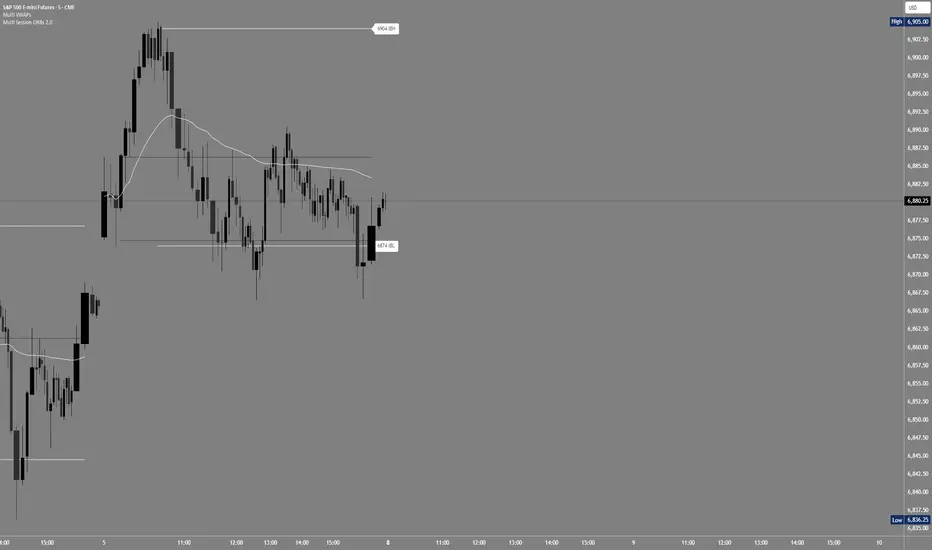
Multi Session ORBs 2.0Multi Session ORBs 2.0 is an intraday tool for session-based traders who rely on Opening Range Breakout and Initial Balance structures to frame trades around the Tokyo, London, and New York sessions. It automatically detects the main sessions in New York time and plots each session’s opening-range high, low, and optional mid, with shaded boxes that highlight the active range and clean horizontal levels that extend across the session for precise breakout, rejection, and rotation analysis.
The script also builds a dedicated New York Initial Balance from 09:30 to 10:30 ET and then projects those IB levels forward from 10:30 through the rest of the NY session, helping intraday traders track first-hour value, monitor when price accepts or rejects that area, and structure trades around range breaks or mean reversion. Optional labels and vertical markers print 15 minutes before the London and New York opens, making it easier to anticipate volatility windows and align entries with key session transitions.
This indicator is designed to be used preferably in confluence with the separate Multi VWAPs tool, which plots multiple VWAPs across different time horizons so that traders can combine session ORB/IB levels with VWAP-based dynamic support and resistance for stronger intraday bias and higher-quality trade locations.
One for AllOne for All (OFA) - Complete ICT Analysis Suite
Version 3.3.0 by theCodeman
📊 Overview
One for All (OFA) is a comprehensive TradingView indicator designed for traders who follow Inner Circle Trader (ICT) concepts. This all-in-one tool combines essential ICT analysis features—sessions, kill zones, previous period levels, and higher timeframe candles with Fair Value Gaps (FVGs) and Volume Imbalances (VIs)—into a single, highly customizable indicator. Whether you're a beginner learning ICT concepts or an experienced trader refining your edge, OFA provides the visual structure needed for precise market analysis and execution.
✨ Key Features
- 🏷️ Customizable Watermark**: Display your trading identity with customizable titles, subtitles, symbol info, and full style control
- 🌍 Trading Sessions**: Visualize Asian, London, and New York sessions with high/low lines, range boxes, and open/close markers
- 🎯 Kill Zones**: Highlight 5 critical ICT kill zones with precise timing and visual boxes
- 📈 Previous Period H/L**: Track Daily, Weekly, and Monthly highs/lows with customizable styles and lookback periods
- 🕐 Higher Timeframe Candles**: Display up to 5 HTF timeframes with OHLC trace lines, timers, and interval labels
- 🔍 FVG & VI Detection**: Automatically detect and visualize Fair Value Gaps and Volume Imbalances on HTF candles
- ⚙️ Universal Timezone Support**: Works globally with GMT-12 to GMT+14 timezone selection
- 🎨 Full Customization**: Control colors, styles, visibility, and layout for every feature
🚀 How to Use
Watermark Setup
The watermark overlay helps you identify your charts and maintain focus on your trading principles:
1. Enable/disable watermark via "Show Watermark" toggle
2. Customize the title (default: "Name") to display your trading name or account identifier
3. Set up to 3 subtitles (default: "Patience", "Confidence", "Execution") as trading reminders
4. Choose position (9 locations available), size, color, and transparency
5. Toggle symbol and timeframe display as needed
Use Case: Display your trading principles or account name for multi-monitor setups or content creation.
Trading Sessions Analysis
Sessions define market character and liquidity availability:
1. Enable "Show All Sessions" to visualize all three sessions
2. Adjust timezone to match your local market (default: UTC-5 for EST)
3. Customize session times if needed (defaults cover standard hours)
4. Enable session range boxes to see consolidation zones
5. Use session high/low lines to identify key levels for the current session
6. Enable open/close markers to track session transitions
Use Case: Identify which session you're trading in, track session highs/lows for liquidity, and anticipate session transition volatility.
Kill Zones Trading
Kill zones are ICT's high-probability trading windows:
1. Enable individual kill zones or use "Show All Kill Zones"
2. **Asian Kill Zone** (2000-0000 GMT): Early positioning and smart money accumulation
3. **London Kill Zone** (0300-0500 GMT): European market opening volatility
4. **NY AM Kill Zone** (0930-1100 EST): Post-NYSE open expansion
5. **NY Lunch Kill Zone** (1200-1300 EST): Midday consolidation or manipulation
6. **NY PM Kill Zone** (1330-1600 EST): Afternoon positioning and closes
7. Customize colors and times to match your trading style
8. Set max days display to control historical visibility (default: 30 days)
Use Case: Focus entries during high-probability windows. Watch for liquidity sweeps at kill zone openings and institutional positioning.
Previous Period High/Low Levels
Previous period levels act as magnetic price targets and support/resistance:
1. Enable Daily (PDH/PDL), Weekly (PWH/PWL), or Monthly (PMH/PML) levels individually
2. Set lookback period (how many previous periods to display)
3. Choose line style: Solid (current emphasis), Dashed (standard), or Dotted (subtle)
4. Customize colors per timeframe for visual hierarchy
5. Adjust line width (1-5) for visibility preference
6. Enable gradient effect to fade older periods
7. Position labels left or right based on chart layout
8. Customize label text for your preferred notation
Use Case: Identify key levels where price is likely to react. Daily levels work on intraday timeframes, Weekly on daily charts, Monthly for swing trading.
Higher Timeframe (HTF) Candles
HTF candles reveal the larger market context while trading lower timeframes:
1. Enable up to 5 HTF slots simultaneously (default: 5m, 15m, 1H, 4H, Daily)
2. Choose display mode: "Below Chart" (stacked rows) or "Right Side" (compact column)
3. Customize timeframe, colors (bull/bear), and titles for each slot
4. **OHLC Trace Lines**: Visual lines connecting HTF candle levels to chart bars
5. **HTF Timer**: Countdown showing time remaining until HTF candle close
6. **Interval Labels**: Display day of week (Daily+) or time (intraday) on each candle
7. For Daily candles: Choose open time (Midnight, 8:30, 9:30) to match your market structure preference
Use Case: Trade lower timeframes while respecting higher timeframe structure. Watch for HTF candle closes to confirm directional bias.
FVG & VI Detection
Fair Value Gaps and Volume Imbalances highlight inefficiencies that price often revisits:
1. **Fair Value Gaps (FVGs)**: Detected when HTF candle wicks don't overlap between 3 consecutive candles
- Bullish FVG: Gap between candle 1 high and candle 3 low (green box by default)
- Bearish FVG: Gap between candle 1 low and candle 3 high (red box by default)
2. **Volume Imbalances (VIs)**: Similar detection but focuses on body gaps
- Bullish VI: Gap between candle 1 close and candle 3 open
- Bearish VI: Gap between candle 1 open and candle 3 close
3. Enable FVG/VI detection per HTF slot individually
4. Customize colors and transparency for each imbalance type
5. Boxes appear on chart at formation and remain visible as retracement targets
**Use Case**: Identify high-probability retracement zones. Price often returns to fill FVGs and VIs before continuing the trend. Use as entry zones or profit targets.
🎨 Customization
OFA is built for flexibility. Every feature includes extensive customization options:
Visual Customization
- **Colors**: Independent color control for every element (sessions, kill zones, lines, labels, FVGs, VIs)
- **Transparency**: Adjust box and label transparency (0-100%) for clean charts
- **Line Styles**: Choose Solid, Dashed, or Dotted for previous period lines
- **Sizes**: Control text size, line width, and box borders
- **Positions**: Place watermark in 9 positions, labels left/right
Layout Control
- **HTF Display Mode**: "Below Chart" for detailed analysis, "Right Side" for space efficiency
- **Drawing Limits**: Set max days for sessions/kill zones to manage chart clutter
- **Lookback Periods**: Control how many previous periods to display (1-10)
- **Gradient Effects**: Enable fading for older previous period lines
Timing Adjustments
- **Timezone**: Universal GMT offset selector (-12 to +14) for global markets
- **Session Times**: Customize each session's start/end times
- **Kill Zone Times**: Adjust kill zone windows to match your market's characteristics
- **Daily Open**: Choose Midnight, 8:30, or 9:30 for Daily HTF candle open time
💡 Best Practices
1. Start Simple: Enable one feature at a time to learn how each element affects your analysis
2. Match Your Timeframe: Use Daily levels on intraday charts, Weekly on daily charts, HTF candles one or two levels above your trading timeframe
3. Kill Zone Focus: Concentrate your trading activity during kill zones for higher probability setups
4. HTF Confirmation: Wait for HTF candle closes before committing to directional bias
5. FVG/VI Entries: Look for price to return to unfilled FVGs/VIs for entry opportunities with favorable risk/reward
6. Customize Colors: Use a consistent color scheme that matches your chart theme and reduces visual fatigue
7. Reduce Clutter: Disable features you're not actively using in your current trading plan
8. Session Context: Understand which session controls the market—trade with session direction or anticipate reversals at session transitions
⚙️ Settings Guide
OFA organizes settings into logical groups for easy navigation:
- **═══ WATERMARK ═══**: Title, subtitles, position, style, symbol/timeframe display
- **═══ SESSIONS ═══**: Enable/disable sessions, times, colors, high/low lines, boxes, markers
- **═══ KILL ZONES ═══**: Individual kill zone toggles, times, colors, max days display
- **═══ PREVIOUS H/L - DAILY ═══**: Daily high/low lines, style, color, lookback, labels
- **═══ PREVIOUS H/L - WEEKLY ═══**: Weekly high/low lines, style, color, lookback, labels
- **═══ PREVIOUS H/L - MONTHLY ═══**: Monthly high/low lines, style, color, lookback, labels
- **═══ HTF CANDLES ═══**: Global display mode, layout settings
- **═══ HTF SLOT 1-5 ═══**: Individual HTF configuration (timeframe, colors, title, FVG/VI detection, trace lines, timer, interval labels)
Each setting includes tooltips explaining its function. Hover over any input for detailed guidance.
📝 Final Notes
One for All (OFA) represents a complete ICT analysis toolkit in a single indicator. By combining watermark customization, session visualization, kill zone highlighting, previous period levels, and higher timeframe candles with FVG/VI detection, OFA eliminates the need for multiple indicators cluttering your chart.
**Version**: 3.3.0
**Author**: theCodeman
**Pine Script**: v6
**License**: Mozilla Public License 2.0
Start with default settings to learn the indicator's structure, then customize extensively to match your personal trading style. Remember: tools provide information, but your edge comes from disciplined execution of a proven strategy.
Happy Trading! 📈

LucciThis indicator identifies trade setups based on session liquidity levels and price structure analysis during New York trading sessions.
Unlike basic support/resistance indicators, this system tracks untested session extremes and monitors their interaction with price. It combines break-and-retest mechanics with bounce detection at key liquidity zones, providing multiple entry methodologies within a single framework.
METHODOLOGY:
The system maps high/low points from each trading session (Asia: 6PM-3AM, London: 3AM-8AM, NY: 8AM-5PM EST) and monitors price behavior around these levels. It identifies two primary setup types: momentum continuation after level breaks and reversal bounces at untested extremes. Visual differentiation shows which levels remain untested (darker) versus swept levels (lighter).
SETUP IDENTIFICATION:
Break & Retest Signals:
- Detects breaks of NY Open range (15-minute candle at 8:00 AM EST)
- Waits minimum bars after break before validating retest
- Triggers when price returns to level within tolerance zone
Bounce Signals:
- Identifies approaches to untested session highs/lows
- Optional wick confirmation for reversal validation
- Signals when price rejects from liquidity zone
CONFIGURATION OPTIONS:
Entry Parameters:
- Min Bars After Break: 1-10 (delay before retest valid)
- Retest Tolerance: 0.1-10 points (precision of level test)
- Bounce Zone: 0.5-5 points (distance from level)
- Wick Confirmation: On/off reversal filter
Risk Management:
- Risk Reward Options: 1:3, 1:5, or Custom (1:1 to 1:10)
- Stop Loss: Configurable in points
- Max Daily Signals: 1-5 trade limiter
- Trading Hours: Customizable active window
Visual Elements:
- Session Levels: Orange (Asian), Yellow (London), Blue (NY)
- Signal Markers: Triangles (B&R), Diamonds (Bounce)
- TP/SL Lines: Automatic calculation and display
- Info Table: Shows bias, untested levels, daily signals
OPTIMAL USAGE:
Trading Windows:
- 9:30-11:00 AM EST: Primary trading window
- First touch of untested levels: Highest probability
- 15-minute timeframe: Recommended for futures
- Volume filter: Optional quality enhancement
Signal Prioritization:
- Untested levels provide stronger reactions
- Multiple confirmations increase probability
- Respect market structure and session context
- Combine with volume for filtering
TECHNICAL SPECIFICATIONS:
- Multi-timeframe: Uses 15-minute data for NY Open
- Session-based: Resets levels at session transitions
- Alert system: Detailed messages with levels
- Position tracking: Manages active trades visually
IMPORTANT NOTES:
This tool maps liquidity zones based on session extremes and price structure. No trading system guarantees profits. Combine with market context and proper risk management. Designed for active intraday trading on liquid instruments.
The indicator provides objective level identification while requiring trader discretion for optimal results.

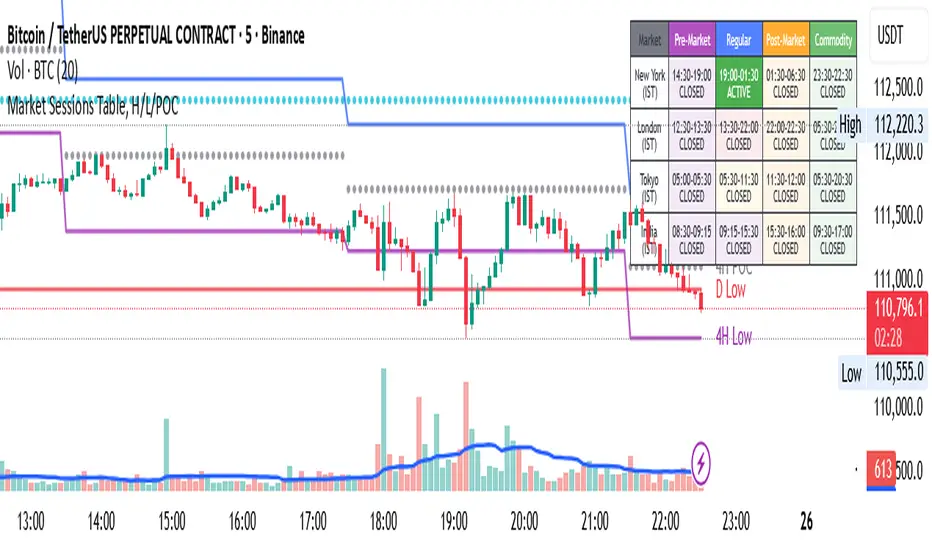
Market Sessions Table, H/L/POCHello Everyone,
This is my first effort and first script for the community. This indicator has two major parts
Table with Pre-Market Session Time, Regular Market Session Time and Commodity Market Session
High, Low and POC (Middle) of 4 Hour, Previous 1 Day and Last Week
This will mark the following:
High, Low and POC of 4 Hours Candle with Lines
High, Low and POC of previous day Candle with Lines
High, Low and POC of previous week Candle with Lines
User has option to either disable any or all the Lines.
User has option to change the color, size and line type (flat or dotted) on lines.
User also has an option to see the High, Low and POC in a separate table as well.
Table with Pre-Market Session Time, Regular Market Session Time and Commodity Market Session
As the name suggest this is a table which shows the Pre-Market Session Time, Regular Market Session Time and Commodity Market Session of US, UK, Tokyo and Indian Exchanges.
User has an ability to enable or disable any Exchange or session.
User can also enable or disable highlighting a particular market session in the chart background.
Additionally user can choose to display the different market session is there own local time zone. Since I am from India I choose to display the open and close of market session as per India standard time.
Guys please suggest any improvement or anything additional you wanted on the same indicator.
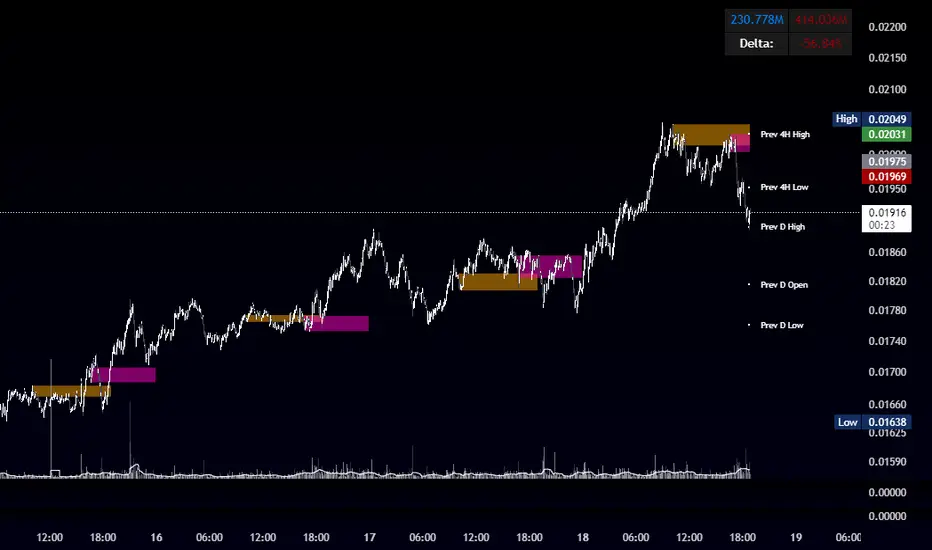
OBR 15min Session Opening Range Breakout + Volume Trend DeltaQuick Overview
This Pine Script plots the opening range for London and New York sessions, highlights breakout levels, draws previous session pivots, and offers a live volume delta table for trend confirmation.
Session Opening Range
- Captures the high/low of the first 15 minutes (configurable) for both London & NY sessions.
- Fills the range area with adjustable semi‑transparent colors.
- Optional alerts fire on breakout above the high or below the low.
Previous Session Levels
- Automatically draws previous day’s High, Low, Open and previous 4‑hour High/Low.
- Helps identify key S/R zones as price approaches ORB breakouts.
Volume Trend Delta
- Uses a CMO‑weighted moving average and ATR bands to detect trend state.
- Accumulates bullish vs. bearish volume during each trend.
- Displays Bull Vol, Bear Vol, and Delta % in a movable table for quick strength checks.
How to Use
1. Let the opening range complete (first 15 min).
2. Look for price closing above/below the ORB—enter long on an upside break, short on a downside break.
3. Check the Volume Delta table: positive delta confirms buying strength; negative delta confirms selling pressure.
4. Use previous day/4h levels as additional support/resistance filters.
Settings & Customization
- ORB Duration & Session Times (London/NY), fill colors, and toggles.
- Enable/disable Previous Day & 4H levels.
- Trend Period, Momentum Window, and Delta table position/size.
- Pre‑built alert conditions for all ORB breakouts.
Developer Notes
- Fully commented for easy adjustments.
- Modular sections: ORB, previous levels, trend delta, and alerts.
- No external libraries—pure Pine Script v6.
Tip
Combine ORB breakouts with Volume Delta and prior session pivots to filter false signals and trade stronger, more reliable moves.
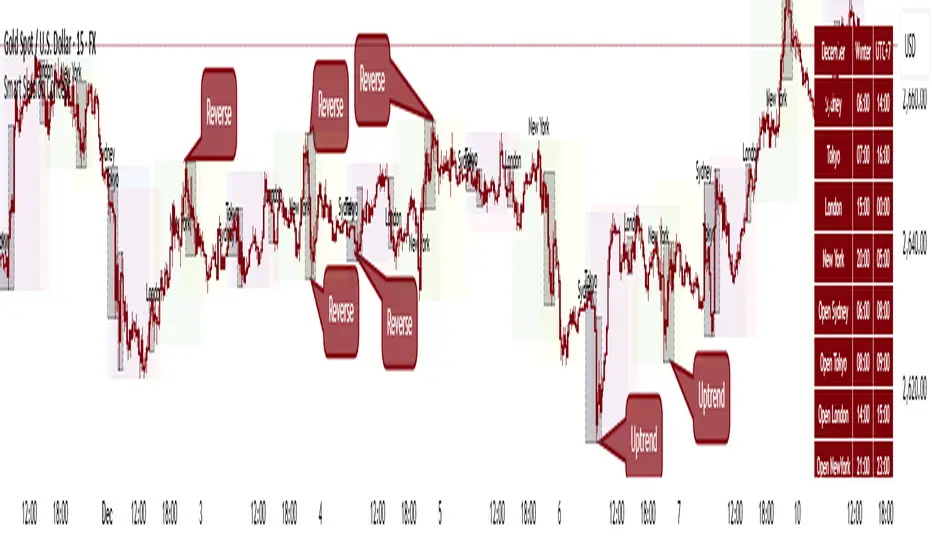
Smart Session ConceptSmart Session Concept — Intelligent Trading Session Overlay
Smart Session Concept is designed to detect major reversal points and key price pivots formed on higher timeframes, particularly during high-volume periods of the day — often marking the footprints of institutional orders and whales.
🔍 Key Features:
Displays standard sessions (Asian, London, New York) and allows adding custom time sessions.
Offers two visualization modes:
Time session table
Visual session boxes plotted on the chart
Auto-sync with seasonal time changes (Summer/Winter), supports Daylight Saving Time (DST)
Full flexibility:
Toggle table, boxes, and labels on/off
Customize colors for all session elements
Choose which months are considered summer/winter
💡 Suggested Use Case:
Use Smart Session Sync to pinpoint critical price structures such as:
Peaks and troughs of trending waves
Highs/lows in Wyckoff trading ranges
Liquidity sweeps or untouched liquidity zones
----------------------
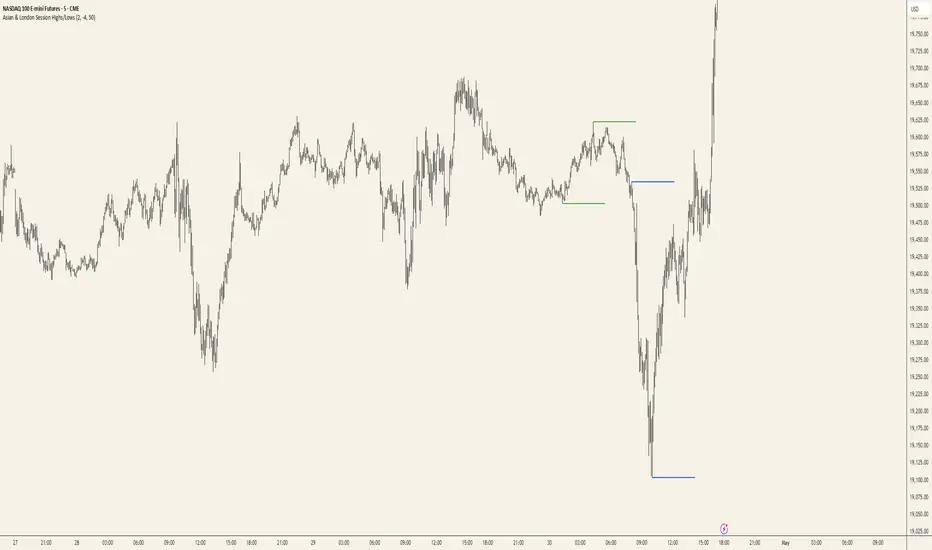
Asian & London Session Highs/LowsAsian & London Session Highs/Lows with Extendable Lines
This TradingView script automatically marks the highs and lows of the Asian and London trading sessions for the most recent day, allowing traders to identify key levels during these active periods. The lines representing the high and low of each session are drawn at the exact price point where the high/low occurred, and they extend to the right for a customizable number of bars, helping to visualize how the price reacts to these key levels after the session ends.
Key Features:
Session High/Low Tracking: Automatically tracks the highest and lowest points for the Asian and London sessions.
Extendable Lines: Lines start at the exact bar where the high/low occurred and can be extended to the right for a specified number of bars.
Timezone Adjustment: Allows you to input a timezone offset to adjust session times based on your local time or desired market time zone.
Customizable Colors & Line Thickness: Adjust the color and thickness of the session high and low lines to suit your visual preferences.
Clear & Precise Levels: Helps identify important support and resistance levels, making it easier to spot market reactions around session highs and lows.
This indicator is perfect for day traders and those looking to trade during specific market hours, offering clear visual markers of session boundaries and critical price levels.
Trading SessionsTrading Sessions Indicator
Overview
Trading Sessions is a visually displays major trading sessions worldwide. It overlays the trading hours of four major markets - Sydney, Tokyo, London, and New York - on your chart.
Key Features
Simultaneous display of 4 trading sessions
Visual session dividers
Customizable session boxes
Session status display in top-right corner
Session Settings
Configuration Options per Session
Toggle visibility
Timezone configuration
Trading hours setting (Default: 08:00-17:00)
Background color setting (95% transparency)
Default Session Configuration
Sydney Session (Yellow)
Tokyo Session (Red)
London Session (Blue)
New York Session (Lime)
Session Divider Settings
Toggle divider visibility
Divider line position (top/bottom)
Session emoji position (top/bottom)
Customizable emoji per session
Sydney: 🦘
Tokyo: 🗼
London: 🚇
New York: 🗽
Overlay Settings
Force Overlay
When enabled: Forces session backgrounds behind candles
When disabled: Standard overlay display
Box Overlay
When enabled: Displays price range boxes during sessions
Shows session name at box top
Individual color settings per session
Display Features
1. Background Color Distinction
Each session shown in configured color
Visibility adjusted through transparency
2. Session Divider Display
Vertical line (|): Session start/end
Upper line (¯)/lower line (_): During session
Emoji: Session start
3. Status Display
Session status shown in top-right
Active sessions highlighted in corresponding colors
Inactive sessions shown in gray
Limitations
Timezones must conform to IANA Time Zone Database format

OHLC, Sessions & Key Levels [Orderflowing]Multi-Timeframe (+) OHLC, Sessions & Key Levels | Custom-Timeframe OHLC | Sessions Analysis | Market Key Levels
Built using Pine Script V5.
Introduction
The OHLC, Sessions & Key Levels Indicator is a tool designed for traders who want to integrate Multi-Timeframe (MTF) OHLC Data, Sessions Analysis, and Key Market Levels into their trading system.
This Indicator can help traders by automatically marking the OHLC, Sessions & Key Levels directly on the price chart, saving time furthermore potentially allowing for better judgement in their trading and risk management process.
Innovation and Inspiration
The Indicator draws from multiple concepts;
The OHLC levels across different timeframes, session-based analysis, and plotting potentially important and pivotal market levels.
Concept Inspiration from ICT-Traders / Market Maker Model Traders.
Use of Open-Source Code
Specific parts of this Indicator's code have been inspired by & further developed from publicly available code originally developed for the MetaTrader platform.
All such integrations have been wired to work within the TradingView environment, specifically using Pine Script Version 5.
Elements have been made to benefit the overall functionality, the code logic, to make sure it offers unique value to TradingView's users.
Core Features
OHLC MTF Analysis
Foundation
This component allows traders to track the Open, High, Low, and Close levels across different timeframes, ranging from intraday periods to yearly data.
Customization
Traders can adjust the bar offset, width, and colors of the OHLC bars, as well as display options. Option to highlight the Open/Close with labels and the High/Low with marks.
Application
The OHLC MTF component gives traders a clear view of important price levels, which can serve as support, resistance, or potential entry/exit points.
Main Trading Sessions & Custom Sessions
Starting Point
The Sessions component relies on the user-inputted key market sessions, defaults include New York, London, Asia, and optionally Sydney. Session Defaults to UTC.
Please Note: Adjust Time Zone in TradingView's Desktop App or Web Interface to use the sessions in correct local time.
Customization
Traders can adjust session names, session times, time zone, visibility, session colors, and session-specific high and low markers.
This allows us to visualize price movements during these selected periods.
Application
By highlighting different trading sessions, traders can potentially better time their trades, understanding when significant price movements usually occur. This can potentially be used to try and find patterns in a time-based method.
Key Levels
Customization
Traders can choose which key levels to display and adjust the visual style of these levels, including line width, style, and color.
Application
The Key Levels feature can help traders identify support and resistance levels that can serve as potential entry or exit points. Can be useful in market structure analysis by marking significant price levels based on different timeframes.
Designed for multi-timeframe analysis, allowing traders to track OHLC levels, session ranges, and key market levels.
It’s highly customizable, making it suitable across trading styles and charting setups, whether scalping, day trading, swing trading or longer term investing.
Multi-Timeframe (MTF) OHLC
Can be plotted as a Candlestick or Bar-Chart or Both
These can help traders keep an eye on price levels across multiple timeframes while allowing the actual chart to be on another timeframe than the displayed OHLC.
Example - OHLC on the Weekly Candle/Bar - Chart 4 Hourly Candles
While being on lower timeframes, the trader can keep an eye on how the OHLC candle is developing. ICT-Traders find the Daily (Default Setting) OHLC useful in analysis.
It can be customized to any timeframe the trader wishes to use.
Inspired by ICT-Traders / Market Maker Model Traders and Top-Down Analysis Style.
Combined with Session Analysis to view into the price behavior during specific trading sessions, could potentially be very useful for finding trading setups.
OHLC Levels
Creates lines based on user input - Can potentially be important reference points for trade setups / invalidation / confirmation, levels could be used as the HTF Origin.
Conclusion
The OHLC MTF, Sessions & Key Levels Indicator is a tool that combines multiple market analysis concepts into a single unique script. It offers another view of the market's behavior by combining OHLC data from a different timeframe, main trading sessions, and key levels.
Why Invite-Only?
The OHLC, Sessions & Key Levels Indicator is offered as invite-only because you receive a quality and customizable tool that combines multiple functions into one convenient script.
This Indicator stands out by being a complete and optimized trading tool based on three desirable components.
—
Multi-Timeframe OHLC Analysis, Sessions Tracking & Key Levels
—
Into One Customizable Indicator.
Disclaimer
While the Indicator offers a view of the OHLC price action on multiple timeframes, key levels & trading sessions, traders should not solely rely on it for trading decisions. As with all trading tools, it should be used as part of a complete trading strategy.

CM Opening Range-Asia and Europe SessionCM Opening Range Asia AndEurope Sessions
Requested by rayhug1 to use Asia Range of 5pm Est to 2am Est...uses 540 minutes (5pm to 2am Est — 9 Hours) to calculate the Range...then breakouts trigger after 2am
-Ability to change Start and End Times to use any entire session.
---Defaults to 540 minutes (9 hours) but Opening Range Calculation can be changed to 1 hour, 2 hour etc. in Inputs tab
***Known Bug…Currently will NOT Plot accurately the U.S. Session from 0800 to 0759. Will Update Indicator when Fixed.
-Ability to Change the Start and End Times to Accommodate any session.
—Default is 1700 to 1659 (Asian Range)
—Europe Session 0200 to 0159
***All times are based on New York Time or Eastern Standard time … GMT-5
***Times will change based on Daylight Savings Time.

IU Time SessionsDISCRIPTION
IU Time Sessions is a multi–market session indicator designed to visually highlight major global trading sessions directly on your chart.
It helps traders easily identify when Tokyo, London, New York, and Sydney sessions are active based on their selected time zone.
The indicator automatically adjusts session timings according to the chosen time zone, making it extremely useful for traders across different countries.
Each session is displayed with a customizable background color, allowing you to instantly recognize market behavior, volatility changes, and session overlaps.
In addition, session start alerts can be enabled so traders never miss the opening of important market hours.
USER INPUTS :
• Select Your Time Zone
Allows users to choose their local or preferred market time zone for accurate session calculation.
• Background Color Transparency
Adjust the transparency level of session background colors for better chart visibility.
• Enable / Disable Individual Sessions
Users can turn ON or OFF:
* Tokyo Session
* London Session
* New York Session
* Sydney Session
• Session Time Settings
Each session has customizable start and end times.
• Session Colors
Each trading session has its own selectable background color.
• Session Alerts
Optional alerts for:
* Tokyo session start
* London session start
* New York session start
* Sydney session start
WHY IT IS UNIQUE:
• Fully time-zone adaptive (works globally)
• Supports all major forex and crypto trading sessions
• Clean background visualization without clutter
• Custom session timing flexibility
• Individual session enable/disable control
• Session start alerts without repainting
• Works on all timeframes
• Lightweight and optimized Pine Script v6 code
Unlike basic session indicators, this tool focuses on clarity, flexibility, and accurate time-zone conversion — making it suitable for both beginners and professional traders.
HOW USER CAN BENIFIT FROM IT :
• Easily identify high-liquidity market hours
• Understand session-based price behavior
• Spot session overlaps for increased volatility
• Improve timing for entries and exits
• Avoid low-volume trading periods
• Use alerts to stay disciplined and prepared
• Suitable for forex, crypto, indices, and commodities
This indicator helps traders align their strategies with institutional trading hours and make better-timed trading decisions.

Thiru Time CyclesThiru Time Cycles - Advanced Time-Based Market Analysis System
WHAT IT DOES:
Automatically identifies and visualizes trading sessions, time cycles, and market structure elements. Helps traders identify optimal entry times, track session ranges, and monitor market structure through ICT/SMC methodologies.
KEY FEATURES:
1. SESSION KILLZONES
- Asia, London, NY AM, NY PM, Lunch, Power Hour sessions
- Customizable colors, transparency, and visual styles (Filled, Outline, TopLine, SideBars)
- Real-time high/low tracking within each session
2. 90-MINUTE TIME CYCLES
- Divides major sessions into three 90-minute cycles (A/M/D phases)
- London: LO A, LO M, LO D
- NY AM: AM A, AM M, AM D
- NY PM: PM A, PM M, PM D
3. 30-MINUTE SUB-CYCLES
- Granular 30-minute breakdowns (A1-A3, M1-M3, D1-D3)
- Precise entry timing within larger cycles
4. TOI (TIME OF INTEREST) TRACKER
- London: 2:45-3:15 AM, 3:45-4:15 AM
- NY AM: 9:45-10:15 AM, 10:45-11:15 AM
- NY PM: 1:45-2:15 PM, 2:45-3:15 PM
5. TRADE SETUP TIME WINDOWS
- London: 2:30-4:00 AM
- NY AM: 9:30-10:30 AM
- NY PM: 1:30-2:30 PM
6. TOI VERTICAL LINES
- 90-minute and 30-minute cycle boundary markers
- Customizable opacity, style, and height
7. PIVOT ANALYSIS
- High/Low pivot identification per session
- Pivot midpoints
- Customizable labels with price display
- Extension options (until mitigated/past mitigation)
8. SESSION RANGE TABLE
- Real-time range display
- Average range calculation
- Color-coded active sessions
9. OPENING PRICE LINES
- Daily Chart Open, hourly opens
- Customizable session opens
10. DAY/WEEK/MONTH FILTERS
- Filter by day of week
- Current week/last 4 weeks options
- D/W/M high/low tracking
HOW TO USE:
BASIC SETUP:
1. Add indicator to chart
2. Set timezone (default: America/New_York)
3. Enable desired sessions in Killzones section
4. Customize colors and styles
FOR SESSION TRADING:
- Enable session killzones you trade
- Monitor session boxes for high/low ranges
- Use range table for current/average ranges
FOR TIME CYCLE ANALYSIS:
- Enable 90-min or 30-min cycles
- Watch price action at cycle boundaries
- Use vertical lines for cycle transitions
FOR PIVOT TRADING:
- Enable "Show Pivots" in Killzone Pivots
- Use pivots as support/resistance
- Set alerts for pivot breaks
FOR TOI TRADING:
- Enable TOI Tracker
- Monitor specific time windows
- Use for precise entry timing
UNIQUE FEATURES:
✓ Custom visual system (Filled/Outline/TopLine/SideBars box styles)
✓ Proprietary color processing functions
✓ Dual cycle system (90-min + 30-min simultaneous tracking)
✓ Integrated TOI system with vertical line visualization
✓ Smart label positioning with collision detection
✓ Comprehensive range analysis with averaging
✓ Flexible session management with custom time windows
TECHNICAL:
- Pine Script v6
- 500 max labels/lines/boxes
- Full DST-aware timezone support
- Multi-timeframe compatible
- Customizable timeframe limits
BEST PRACTICES:
- Start with session killzones, add cycles gradually
- Set appropriate timeframe limits to avoid clutter
- Use consistent colors for clarity
- Enable only sessions you actively trade
- Monitor range table for session volatility
- Set pivot break alerts for your trading sessions
Compatible with all instruments (forex, stocks, futures, crypto). Works on all timeframes, optimized for intraday trading.
For support: @thirudinesh on TradingView
© 2025 thirudinesh - Advanced Time Cycle Analysis System
Proprietary Algorithm - All Rights Reserved

Trading Sessions ConstructorHello friends,
This tool is designed for traders who want a clean, flexible way to visualize trading sessions directly on the chart. It lets you highlight key market sessions (London, New York, Tokyo, Sydney, custom specifications, etc.), add rich visual structure around them, and optionally track basic statistics - all in a highly customizable and timezone-aware format.
🛠️ How It Works
The indicator lets you define up to 8 separate sessions , each with its own name, timezone, and active days of the week. Sessions can share one common timezone or use individual timezones, depending on how you prefer to track global markets.
For each session, the script builds a visual "frame" around price action:
it can draw a box around the full range, plot high/mid/low lines, show a title label above price, and optionally display a box stats label with session metrics (such as volume or pips range).
A progress indicator at the bottom of the chart helps you see how much of the current session has already passed, while an optional summary table aggregates statistics across all visible sessions for quick comparison.
🔥 Key Features
Up to 8 configurable sessions with their own names, timezones, and weekdays
Option to use one common timezone for all sessions or separate timezones per session
Custom session titles with flexible label positioning and size
Customizable vertical start-line
Customizable session box
Per-session box stats label with selectable metrics
Independent high, mid, and low lines with full style and width control
Optional background shading to highlight active trading hours
Bottom progress indicator (◼) showing how much of the session has elapsed
Optional statistics table summarizing all visible sessions
📸 Visual Examples
1. Background + High/Mid/Low lines + Session names above high
2. Background + Boxes + Session names above high
3. Background + Vertical start-line + Session names at the bottom
4. Background + Vertical start-line + Session names at the top + Bottom progress indicator
5. Background + Session names at the bottom + Bottom progress indicator 👋 Good luck and happy trading!
Платный скрипт

ICT Sessions Ranges [SwissAlgo]ICT Session Ranges - ICT Liquidity Zones & Market Structure
OVERVIEW
This indicator identifies and visualizes key intraday trading sessions and liquidity zones based on Inner Circle Trader (ICT) methodology (AM, NY Lunch Raid, PM Session, London Raid). It tracks 'higher high' and 'lower low' price levels during specific time periods that may represent areas where market participants have placed orders (liquidity).
PURPOSE
The indicator helps traders observe:
Session-based price ranges during different market hours
Opening range gaps between market close and next day's open
Potential areas where liquidity may be concentrated and trigger price action
SESSIONS TRACKED
1. London Session (02:00-05:00 ET): Tracks price range during early London trading hours
2. AM Session (09:30-12:00 ET): Tracks price range during the morning New York session
3. NY Lunch Session (12:00-13:30 ET): Tracks price range during typical low-volume lunch period
4. PM Session (13:30-16:00 ET): Tracks price range during the afternoon New York session
CALCULATIONS
Session High/Low: The highest high and lowest low recorded during each active session period
Opening Range Gap: Calculated as the difference between the previous day's 16:00 close and the current day's 09:30 open
Gap Mitigation: A gap is considered mitigated when the price reaches 50% of the gap range
All times are based on America/New_York timezone (ET)
BACKGROUND INDICATORS
NY Trading Hours (09:30-16:00 ET): Optional gray background overlay
Asian Session (20:00-23:59 ET): Optional purple background overlay
VISUAL ELEMENTS
Horizontal lines mark session highs and lows
Subtle background boxes highlight each session range
Labels identify each session type
Orange shaded boxes indicate unmitigated opening range gaps
Dotted line at 50% gap level shows mitigation threshold
FEATURES
Toggle visibility for each session independently
Customizable colors for each session type
Automatic removal of mitigated gaps
All drawing objects use transparent backgrounds for chart clarity
ICT CONCEPTS
This tool relates to concepts discussed by Inner Circle Trader regarding liquidity pools, session-based analysis, and gap theory. The indicator assumes that session highs and lows may represent areas where liquidity is concentrated, and that opening range gaps may attract price until mitigated.
USAGE NOTES
Best used on intraday timeframes (1-15 minute charts)
All sessions are calculated based on actual price movement during specified time periods
Historical session data is preserved as new sessions develop
Gap detection only triggers at 09:30 ET market open
DISCLAIMER
This indicator is for educational and informational purposes only. It displays historical price levels and time-based calculations. Past performance of price levels is not indicative of future results. The identification of "liquidity zones" is a theoretical concept and does not guarantee that orders exist at these levels or that prices will react to them. Trading involves substantial risk of loss. Users should conduct their own analysis and risk assessment before making any trading decisions.
TIME ZONE
Set your timezone to: America/New_York (UTC-5)

Enterprise Digital Clock Pro# Enterprise Digital Clock Pro - User Documentation
## Overview
Enterprise Digital Clock Pro is a professional-grade trading indicator designed to provide real-time global market session monitoring directly on your chart. This comprehensive tool helps traders stay synchronized with international market hours, track multiple trading sessions simultaneously, and receive timely alerts for market transitions.
## Purpose & Benefits
### Why Use This Indicator?
- **Global Market Awareness**: Monitor up to 8 major financial markets simultaneously
- **Real-Time Updates**: Live clock with second-by-second precision
- **Session Management**: Know exactly when markets open, close, or enter pre/post-market sessions
- **Time Zone Flexibility**: Automatically handles time zone conversions
- **Professional Visualization**: Enterprise-grade display with multiple theme options
- **Trading Efficiency**: Never miss important market openings or closings with alert notifications
### Who Should Use This Indicator?
- International traders managing positions across multiple markets
- Day traders focusing on specific session overlaps
- Institutional traders requiring professional market monitoring
- Anyone trading across different time zones
- Traders seeking better timing for entry and exit points
## Features
### Core Functionality
1. **Real-Time Digital Clock**: Displays current time in your selected timezone with live updates
2. **Multi-Market Dashboard**: Track 8 major global markets simultaneously
3. **Market Status Indicators**: Visual indicators showing:
- LIVE (Market Open)
- CLOSED (Market Closed)
- PRE (Pre-Market)
- POST (After-Hours)
- WKND (Weekend)
4. **Time Until Change**: Shows remaining time until market opens or closes
5. **Alert System**: 5-minute warnings before market transitions
6. **Professional Themes**: Multiple pre-configured color schemes
## Configuration Guide
### 🎨 Theme Settings
#### Theme Preset
Choose from professionally designed themes:
- **Dark Professional**: Modern dark theme with high contrast (Default)
- **Light Corporate**: Clean, bright theme for well-lit environments
- **Bloomberg Terminal**: Classic financial terminal appearance
- **Trading Floor**: Professional trading desk aesthetic
- **Custom**: Create your own color scheme
### ⏰ Clock Settings
#### Local Timezone
Select your preferred timezone from extensive global options. The indicator supports all major financial centers including:
- Americas (New York, Chicago, Los Angeles, Toronto, São Paulo, etc.)
- Europe (London, Frankfurt, Paris, Madrid, Bucharest, etc.)
- Asia-Pacific (Tokyo, Shanghai, Hong Kong, Singapore, Sydney, etc.)
**Default**: Europe/Bucharest
#### Dashboard Position
Choose where the clock appears on your chart:
- Top Right (Default)
- Top Left
- Bottom Right
- Bottom Left
- Top Center
- Bottom Center
#### Clock Text Size
Adjust the main clock display size:
- Small
- Normal
- Large (Default)
#### Market Text Size
Control the size of market information text:
- Small
- Normal (Default)
- Large
### ✨ Visual Enhancements
#### Enable Gradient Effects
Adds subtle gradient transitions to enhance visual appeal
- **Default**: Enabled
#### Enable Shadow Effects
Creates depth with shadow effects for better readability
- **Default**: Enabled
#### Enable Animated Status Indicators
Provides dynamic visual feedback for market status changes
- **Default**: Enabled
#### Corner Radius
Adjust the roundness of dashboard corners (0-5)
- **Default**: 2
#### Border Style
Select the dashboard border appearance:
- None
- Subtle (Default)
- Professional
- Bold
### 🎨 Custom Colors
*Only active when "Custom" theme is selected*
- **Header Background**: Background color for the clock header
- **Header Text**: Text color for the clock display
- **Body Background**: Background color for market information
- **Body Text**: Text color for market listings
- **Accent Color**: Highlight color for important elements
- **Market Open**: Color indicating open markets
- **Market Closed**: Color indicating closed markets
- **Warning/Pre-Market**: Color for warnings and pre-market sessions
### 🌏 Market Display
Toggle visibility for each market:
- **Show Tokyo Market** (Default: On)
- **Show Shanghai Market** (Default: On)
- **Show Hong Kong Market** (Default: On)
- **Show Sydney Market** (Default: On)
- **Show London Market** (Default: On)
- **Show Frankfurt Market** (Default: On)
- **Show Bucharest Market** (Default: On)
- **Show NY Market** (Default: On)
- **Show Time Until Open/Close** (Default: On)
### Market Session Settings
Configure trading hours for each market in 24-hour format (HHMM-HHMM):
#### 🇯🇵 Tokyo Session
- **Trading Hours**: Set Tokyo Stock Exchange hours
- **Default (Winter)**: 0200-0800 (Bucharest time)
#### 🇨🇳 Shanghai Session
- **Trading Hours**: Set Shanghai Stock Exchange hours
- **Default (Winter)**: 0330-0900 (Bucharest time)
#### 🇭🇰 Hong Kong Session
- **Trading Hours**: Set Hong Kong Stock Exchange hours
- **Default (Winter)**: 0330-1000 (Bucharest time)
#### 🇦🇺 Sydney Session
- **Trading Hours**: Set Australian Securities Exchange hours
- **Default (Winter)**: 0100-0700 (Bucharest time)
#### 🇩🇪 Frankfurt Session
- **Trading Hours**: Set Frankfurt Stock Exchange hours
- **Default**: 0900-1830 (Bucharest time)
#### 🇷🇴 Bucharest Session
- **Trading Hours**: Set Bucharest Stock Exchange hours
- **Default**: 0930-1600 (Bucharest time)
#### 🇬🇧 London Session
- **Trading Hours**: Set London Stock Exchange hours
- **Default**: 1000-1830 (Bucharest time)
#### 🇺🇸 New York Session
- **Trading Hours**: Set NYSE/NASDAQ hours
- **Default**: 1630-2300 (Bucharest time)
## Usage Instructions
### Initial Setup
1. Add the indicator to your chart
2. Select your local timezone in Clock Settings
3. Choose your preferred theme or customize colors
4. Select which markets you want to monitor
5. Adjust display position and text sizes to your preference
6. Configure session times if different from defaults
### Reading the Display
The dashboard shows:
- **Top Row**: Current time in your selected timezone
- **Date Row**: Current date and timezone information
- **Market Rows**: Each selected market displays:
- Country flag
- Market name
- Status indicator (LIVE/CLOSED/PRE/POST/WKND)
- Current local time in that market
- Time until next status change (optional)
- **Footer**: Summary of active markets
### Status Indicators Explained
- **● LIVE**: Market is currently open for trading
- **○ CLOSED**: Market is closed
- **◐ PRE**: Pre-market session (1 hour before open)
- **◑ POST**: After-hours session (1 hour after close)
- **◉ WKND**: Weekend (market closed)
### Alert System
The indicator automatically generates alerts:
- 5-minute warning before market opening
- 5-minute warning before market closing
- Alerts appear once per bar to avoid spam
## Best Practices
### For Day Traders
- Focus on markets relevant to your trading pairs
- Use the "Time Until Change" feature to prepare for volatility
- Set alerts for session overlaps (highest liquidity periods)
### For Swing Traders
- Monitor major market opens for gap opportunities
- Track after-hours activity in relevant markets
- Use weekend status to plan Monday strategies
### For International Traders
- Keep all markets visible for complete global overview
- Adjust session times for daylight saving changes
- Use Custom theme to match your trading platform
## Troubleshooting
### Common Issues & Solutions
**Clock not updating:**
- Ensure your chart is on a live/real-time data feed
- Refresh your chart or switch timeframes
**Incorrect market status:**
- Verify session times are correctly configured
- Check if daylight saving time affects your settings
- Ensure weekend detection is working properly
**Display issues:**
- Try different position settings if overlapping with price action
- Adjust text sizes for better visibility
- Switch themes for better contrast
**Time zone confusion:**
- All session times should be entered in your local timezone
- The indicator automatically handles conversions
- Verify your selected timezone matches your actual location
## Tips for Optimal Use
1. **Session Overlap Trading**: The most volatile and liquid periods occur when major sessions overlap
2. **Pre-Market Preparation**: Use PRE status to prepare for market opens
3. **Weekend Planning**: Review weekly performance when all markets show WKND
4. **Mobile Trading**: Choose larger text sizes for mobile device visibility
5. **Multi-Monitor Setup**: Position dashboard on secondary monitors using corner options
## Performance Notes
- The indicator updates in real-time without requiring chart refreshes
- Minimal resource usage ensures smooth chart performance
- Compatible with all timeframes and chart types
- Works seamlessly with other indicators
## Conclusion
Enterprise Digital Clock Pro transforms your trading chart into a professional command center for global market monitoring. Whether you're trading forex during London-New York overlap, catching the Asian session, or monitoring international equities, this indicator ensures you're always synchronized with global markets.
Stay informed, trade professionally, and never miss important market transitions with Enterprise Digital Clock Pro.

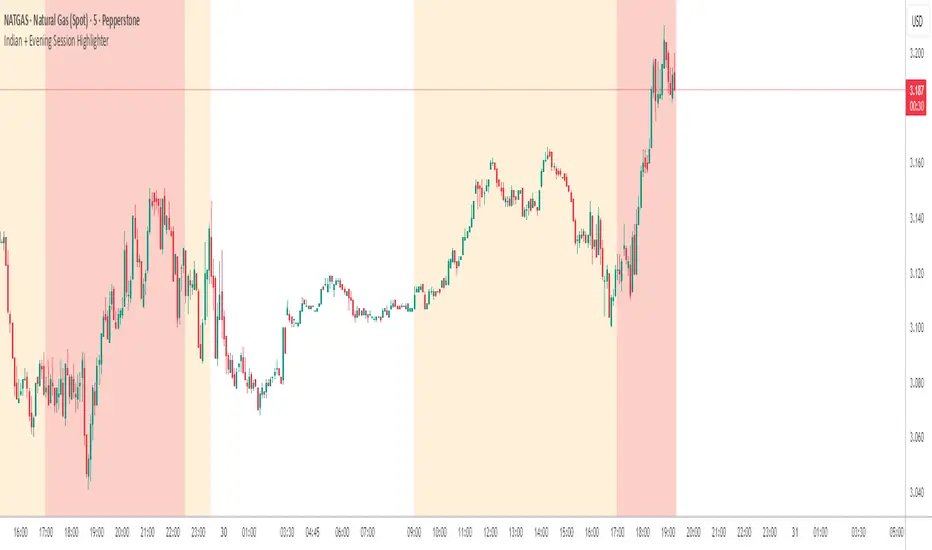
Indian + Evening Session HighlighterThis indicator visually highlights two key trading windows for Indian instruments according to IST:
Indian Session: 9:00 AM to 11:30 PM IST is shaded light orange on the chart, representing the main domestic trading hours for stocks, indices, commodities, or derivatives.
Evening Session: 5:00 PM to 10:30 PM IST is shaded light red, marking the commonly followed evening window, which often captures the impact of US and European market movements.
The indicator automatically overlays these session backgrounds on your chart, helping you quickly identify when price action occurs during India’s core and evening trade windows. This allows traders to focus on strategies specific to these time intervals, identify session-based volatility, and avoid trading during less active periods. If the evening session overlaps with the Indian session, the colors are layered for visual clarity.
It is ideal for intraday traders, option strategists, and anyone monitoring Indian market rhythms or US-linked volatility impacts on Indian assets. No inputs are required; simply apply the script and view distinct session highlights for improved timing and decision making.
ICT Killzones & MacrosICT Killzones & Macros (v1.1.5) — configurable ICT session windows + refined “macro” windows with live High/Low levels, optional extensions, next-window previews, and lightweight opening-price lines. Built to be clock-robust, timezone-aware, and performant on intraday charts.
Tip: All times are interpreted in your chosen IANA timezone (default: America/New_York) and auto-handle DST. You can rename, recolor, enable/disable, and retime every window.
What it plots
- Killzones (5) : Asia (19:00–02:00), London (02:00–05:00), NY AM (07:00–09:30), London Close (10:00–12:00), NY PM (13:30–16:00) — full-height boxes with optional header.
- Macros (8) (defaults tailored for common ICT “refined” windows): Asia-1 (18:00–21:00), Asia-2 (21:00–00:00), London-1 (01:00–04:00), AM-1 (09:45–10:15), AM-2 (10:45–11:15), Lunch (12:00–13:00), PM-1 (13:30–14:30), Power Hour (15:10–16:00).
- Live High/Low lines for the current Macro/Killzone window.
- Optional HL extension to the right until price crosses or the trading day rolls (style selectable).
- “Next” previews : earliest upcoming Macro and Killzone header; optional next-window background band.
- Opening Prices (3 lightweight time lines) : defaults 00:00, 08:30, 09:30 with right-edge labels, scoped to a session you choose (auto-cleans at session end).
- Key inputs & styling
- General : Timezone (IANA), “Sessions to show” (per window) to keep only the last N completed windows.
- Header : height (ticks), gap (ticks), fill opacity, border width/style, text size/color, toggle “Next Macro/Killzone” headers.
- Boxes : global fill opacity, global border width/style (used by both Macros & Killzones).
- High/Low : show HL, HL line style, extend on/off + extension style, optional extension labels.
- Opening Prices : enable Time 1/2/3, set HH:MM for each, session window, per-line colors, style (dotted/dashed/solid), width.
- Per-window controls : each Macro/Killzone has Enable, Session (HHMM-HHMM), Label, Fill color.
How to use (quick start)
- Set Timezone to your preference (default America/New_York).
- Toggle on the Macros and Killzones you trade. Adjust session times if needed.
- (Optional) Turn on Extend High/Low to project levels until crossed/day-roll.
- (Optional) Enable Next… headers to see the next upcoming window at a glance.
- (Optional) Configure Opening Prices (00:00 / 08:30 / 09:30 by default) and the session over which they appear.
Behavior & notes
- Time windows are computed by clock, not by guessing bar timestamps, making them robust across brokers and timeframes.
- With HL extension on, the current window’s levels extend until crossed or the end of the trading day (in your timezone). With it off, completed windows keep static HL markers (limited by “Sessions to show”).
- “Sessions to show” applies per Macro/Killzone to automatically prune older windows and keep charts snappy.
- Opening-price lines exist only within the chosen “Opening Prices Session” and are removed when it ends (keeps charts clean).
Defaults (color cues)
Killzones: Asia (blue), London (purple), NY AM (green), London Close (yellow), NY PM (orange).
Macros: neutral greys with Lunch and PM accents out of the box (all customizable).
Performance tips
- Reduce “Sessions to show” if you scroll far back in history.
- Disable “Next…” previews and/or extension labels on very slow machines.
- Narrow the “Opening Prices Session” window to exactly when you need those lines.
Changelog highlights
- v1.1.5 : Internal refinements and stability.
- v1.1.3 : Live High/Low lines for current windows + optional extension.
- v1.1.2 : Added “next Killzone” preview (to match “next Macro”).
- v1.1.0 : Defaults updated (5 KZ, 8 Macros). Removed “snap-to-killzone” behavior.
- v1.0.0 : Independent Macro vs. Killzone rendering; cleaner header logic.
- Known limitations
If your chart warns about drawings, trim “Sessions to show”.
If your broker session times differ from NY hours, adjust the sessions or change the indicator timezone.
Credits & intent
Inspired by ICT timing concepts; provided for education/mark-up, not financial advice.
Built to be flexible so you can mirror your personal playbook and journaling workflow.

SMC Concepts (Sessions, Lookback Gaps) | קונספטים SMCThe indicator marks the Asian session and the London session in order to see liquidity taking - in addition, it gently marks gaps throughout the entire chart - the indicator marks gaps of a 24/12/6/3 hour back time - from the New York session. The marking of these gaps will be throughout the entire chart until the New York session. Options for selecting a specific time precisely.האינדיקטור מסמן את סשן אסיה ואת סשן לונדון על מנת לראות לקיחת נזילות -בנוסף מסמן בעדינות גאפים לאורך כל הגרף -האינדיקטור מסמן גאפים של זמן לאחור של 24/12/6/3 שעות- מזמן סשן נויורק סימון הגאפים האלו יהיה לאורך כל הגרף עד לסשן נויורק . אפשרויות לבחירת זמן מסוים בדווקה .

ORB & Sessions [Capitalize Labs]ORB & Sessions Indicator
The ORB & Sessions Indicator provides a structured way to analyze intraday price action by combining two well-established concepts: global trading sessions and Opening Range Breakouts (ORB). It is designed to help traders identify where liquidity forms, when volatility expands, and how price behaves around key session and range levels.
Market Sessions Framework
Displays New York, London, and Asian sessions directly on the chart.
Each session can be shown as a highlighted background zone, or with extended highs and lows for liquidity tracking.
Session highs and lows remain projected forward after the session ends, allowing traders to monitor sweeps, retests, and reactions throughout the day.
Session times are fully customizable and can be aligned with the trader’s own timezone or broker feed.
This structure helps traders place price action into context, whether during quiet Asian trading, London-driven volatility, or New York reversals.
Opening Range Breakouts (ORB)
Supports three independent ORBs, each with configurable session times.
During the defined ORB window, the indicator captures the high and low of the range and plots a live updating box.
Once the ORB closes, the range locks and projects breakout targets (T1 and T2) based on user-defined risk-to-reward multiples.
Alerts are included for breakouts of highs, lows, or target levels.
Traders can use a single ORB or multiple—for example, tracking an Asian ORB into London, or London into New York.
Visualization and Clarity
Color-coded boxes and levels for sessions and ORBs.
Labels such as “Range High” and “Range Low” ensure clarity without clutter.
Flexible display settings allow highlighting full zones, just lines, or minimal markers depending on preference.
Practical Applications
This indicator is useful for:
Liquidity and volatility analysis: Observe where session highs and lows form and how they influence later trading.
Breakout and reversal strategies: Use ORB ranges to define risk and plan target projections.
Time-based research: Explore how different session overlaps or ORBs affect markets like indices, FX, and commodities.
Risk planning: Built-in R-multiple targets provide a consistent framework for evaluating setups.
Why It’s Different
Instead of showing sessions and ORBs separately, this indicator integrates them into one framework. Traders can:
See when and where sessions open and establish range levels.
Define precise ORBs with customizable timing.
Track breakout levels and targets in real time with alerts.
The result is a clear, time-structured view of the trading day, helping traders align setups with session dynamics and opening range behavior.
This indicator does not generate buy or sell signals. It is an analytical and visualization tool, providing structure for traders to better interpret intraday price action.
