DeleteArrayObject█ OVERVIEW Delete array object according to array size such as label, line, linefill, box and table. █ CREDITS HeWhoMustNotBeNamedБиблиотека Pine Script®от RozaniGhani-RG3
"Swap" - Bool/Position/Value : Array / Matrix / Var AutoswapLibrary "swap" Side / Boundary Based All Types Swapper - three automagical types for Arrays, Matrixes, and Variables -- no signal : Long/ Short position autoswap -- true / false : Boolean based side choice -- Src / Thresh : if source is above or below the threshold - two operating modes for variables, Holding mode only for arrays/matrixes -- with two items, will automatically change between the two caveat is it does not delete table/box/line(fill VAR items automatically) -- with three items, a neutral is available for NA input or neutral - one function name for all of them. One import name that's easy to type/remember -- make life easy for your conditional items. side(source, thresh, _a, _b, _c) side Change outputs based on position or a crossing level Parameters: source : (float) OPTIONAL value input thresh : (float) OPTIONAL boundary line to cross _a : (any) if Long/True/Above _b : (any) if Short/False/Below _c : (any) OPTIONAL NOT FOR MTX OR ARR... Neutral Item, if var/varip on a/b it will leave behind, ie, a table or box or line will not erase , if it's a varip you're sending in. Returns: first, second, or third items based on input conditions Please notify if bugs found. Thanks.Библиотека Pine Script®от kaigouthroОбновлено 15
[LIB] Array / Matrix DisplayLibrary "ArrayMatrixHUD" Show Array or Matrix Elements In Table For Arrays: Set the number of rows you want the data displayed in and it will generate a table, calculating the columns based on the size of the array being displayed. For Matrix: It will automatically match the Rows and Columns to the values in the matrix. Note: On the left, the table shows the index of the array/matrix value starting at 1. So, to call that value from inside the array, subtract 1 from the index value to the left. For matrices, keep in mind that the row and column are also starting at one when trying to call a value from the matrix. The numbering of the values on the left is for display purposes only. viewArray(_arrayName, _pos, _txtSize, _tRows) Array Element Display (Supports float, int, string, and bool) Parameters: _arrayName : ID of Array to be Displayed _pos : Position for Table _txtSize : Size of Table Cell Text _tRows : Number of Rows to Display Data In (columns will be calculated accordingly) Returns: A Display of Array Values in a Table viewMatrix(_matrixName, _pos, _txtSize) Matrix Element Display (Supports float, int, string, and bool) Parameters: _matrixName : ID of Matrix to be Displayed _pos : Position for Table _txtSize : Size of Table Cell Text Returns: A Display of Matrix Values in a Table Библиотека Pine Script®от kurtsmockОбновлено 111134
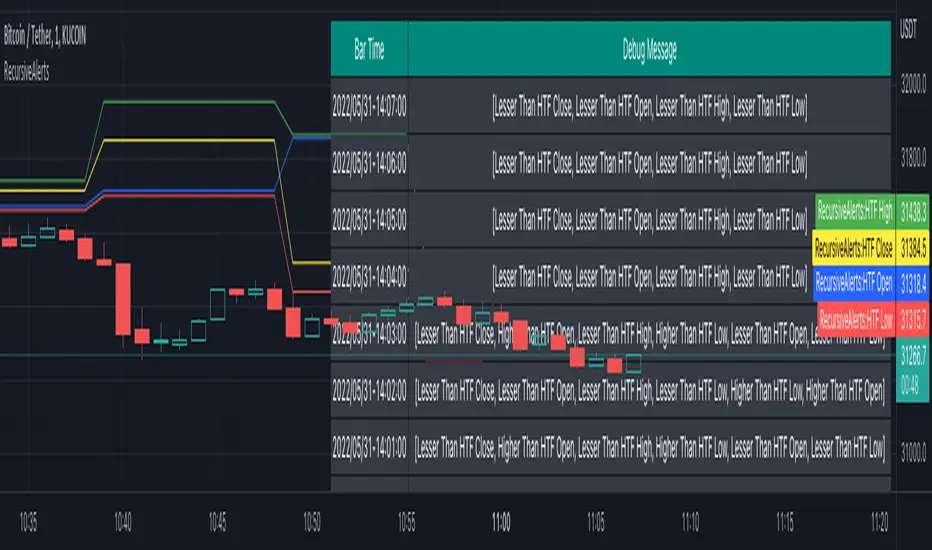
RecursiveAlertsLibrary "RecursiveAlerts" The library provides options to run alert() calls in loop without worrying about limitations of frequency options. When an alert statement is called within a loop, it will fire just once per bar irrespective of how many iterations allowed when fequency is set to alert.freq_once_per_bar or alert.freq_once_per_bar_close it will fire continuously till it breaks when frequency is set to alert.freq_all The function helps overcome this issue by using varip key array which resets on every bar rAlert(message, key) Enhanced alert which can be used in loops Parameters: message : Alert message to be fired key : Key to be checked to avoid repetitive alerts Returns: array containing id of already fired alerts Thanks to @theheirophant, @JohnBaron and @LucF for discussions and suggestion which eventually lead to this solution :)Библиотека Pine Script®от TrendoscopeОбновлено 8876
PivotThis library was designed to create three different datasets using Bill Williams fractals. The goal is to spot trends in reversal data and ultimately use these datasets to help predict future price reversals. First, the pivot() function is used to initialize and populate three separate arrays (high pivot , low pivot , all pivots ). Since each high/low price depends on the bar_index, the bar_index, pivot direction(high/low), and high/low values are compressed into a string to maintain the data's integrity ("__"). Once each string array is populated and organized by bar_index, all three are returned inside a tuple. The return value must be deconstructed H,L,A =pivot() for each array's values to be accessed using getPivot() . This boilerplate allows for data to be accessed more efficiently in a recursive environment. getPivot() was designed to be used inside of a for or while block to populate matrices for further analyses. Again, getPivot() return values must be exposed through deconstruction. x,d,y =getPivot(). See code for more details. pivot(int XLR) initializes and populates arrays Parameters XLR - number of bars to the left and right that must be lower for a high to be considered a pivotHigh, or vice versa. This number will drastically change the size and scope of the returned datasets. smaller values will produce much larger datasets, which might model short term price activity well. In contrast, larger values will produce smaller datasets which might model longer term price activity well. Returns - tuple [string ] getPivot(string arrayID, int index) accesses array data Parameters arrayID - the variable name for one of the three arrays returned by pivot(). index - the index of the provided array, with 0 being the most recent pivot point. can be set to " i " in a loop to access values recursively Returns - tupleБиблиотека Pine Script®от NeoDaNomadОбновлено 4
FunctionIntrabarCrossValueLibrary "FunctionIntrabarCrossValue" intrabar_cross_value(a, b, step) Find the minimum difference of a intrabar cross and return its median value. Parameters: a : float, series a. b : float, series b. step : float, step to iterate x axis, default=0.01 Returns: floatБиблиотека Pine Script®от RicardoSantos7785
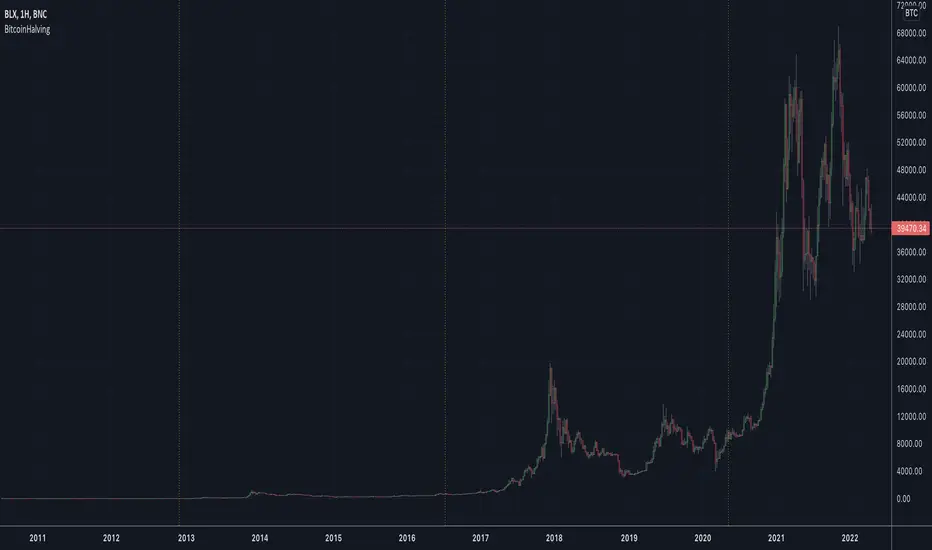
BitcoinHalvingLibrary "BitcoinHalving" Displays where Bitcoin's halvings have been getDates() List of Bitcoin halving dates Returns: array with timestamp dates isHalvingDay() Checks if the current day is a halving day Returns: boolБиблиотека Pine Script®от cryptohaev16
matrixautotableLibrary "matrixautotable" Automatic Table from Matrixes with pseudo correction for na values and default color override for missing values. uses overloads in cases of cheap float only, with additional addon for strings next, then cell colors, then text colors, and tooltips last.. basic size and location are auto, include the template to speed this up... TODO : make bools version var string group_table = ' Table' var int _tblssizedemo = input.int ( 10 ) string tableYpos = input.string ( 'middle' , '↕' , inline = 'place' , group = group_table, options= ) string tableXpos = input.string ( 'center' , '↔' , inline = 'place' , group = group_table, options= , tooltip='Position on the chart.') int _textSize = input.int ( 1 , 'Table Text Size' , inline = 'place' , group = group_table) var matrix _floatmatrix = matrix.new (_tblssizedemo, _tblssizedemo, 0 ) var matrix _stringmatrix = matrix.new (_tblssizedemo, _tblssizedemo, 'test' ) var matrix _bgcolormatrix = matrix.new (_tblssizedemo, _tblssizedemo, color.white ) var matrix _textcolormatrix = matrix.new (_tblssizedemo, _tblssizedemo, color.black ) var matrix _tooltipmatrix = matrix.new (_tblssizedemo, _tblssizedemo, 'tool' ) // basic table ready to go with the aboec matrixes (replace in your code) // for demo purpose, random colors, random nums, random na vals if barstate.islast varip _xsize = matrix.rows (_floatmatrix) -1 varip _ysize = matrix.columns (_floatmatrix) -1 for _xis = 0 to _xsize -1 by 1 for _yis = 0 to _ysize -1 by 1 _randomr = int(math.random(50,250)) _randomg = int(math.random(50,250)) _randomb = int(math.random(50,250)) _randomt = int(math.random(10,90 )) bgcolor = color.rgb(250 - _randomr, 250 - _randomg, 250 - _randomb, 100 - _randomt ) txtcolor = color.rgb(_randomr, _randomg, _randomb, _randomt ) matrix.set(_bgcolormatrix ,_yis,_xis, bgcolor ) matrix.set(_textcolormatrix ,_yis,_xis, txtcolor) matrix.set(_floatmatrix ,_yis,_xis, _randomr) // random na _ymiss = math.floor(math.random(0, _yis)) _xmiss = math.floor(math.random(0, _xis)) matrix.set( _floatmatrix ,_ymiss, _xis, na) matrix.set( _stringmatrix ,_ymiss, _xis, na) matrix.set( _bgcolormatrix ,_ymiss, _xis, na) matrix.set( _textcolormatrix ,_ymiss, _xis, na) matrix.set( _tooltipmatrix ,_ymiss, _xis, na) // import here import kaigouthro/matrixautotable/1 as mtxtbl // and render table.. mtxtbl.matrixtable(_floatmatrix, _stringmatrix, _bgcolormatrix, _textcolormatrix, _tooltipmatrix, _textSize ,tableYpos ,tableXpos) matrixtable(_floatmatrix, _stringmatrix, _bgcolormatrix, _textcolormatrix, _tooltipmatrix, _textSize, tableYpos, tableXpos) matrixtable Parameters: _floatmatrix : float vals _stringmatrix : string _bgcolormatrix : color _textcolormatrix : color _tooltipmatrix : string _textSize : int tableYpos : string tableXpos : string matrixtable(_floatmatrix, _stringmatrix, _bgcolormatrix, _textcolormatrix, _textSize, tableYpos, tableXpos) matrixtable Parameters: _floatmatrix : float vals _stringmatrix : string _bgcolormatrix : color _textcolormatrix : color _textSize : int tableYpos : string tableXpos : string matrixtable(_floatmatrix, _stringmatrix, _bgcolormatrix, _txtdefcol, _textSize, tableYpos, tableXpos) matrixtable Parameters: _floatmatrix : float vals _stringmatrix : string _bgcolormatrix : color _txtdefcol : color _textSize : int tableYpos : string tableXpos : string matrixtable(_floatmatrix, _stringmatrix, _txtdefcol, _bgdefcol, _textSize, tableYpos, tableXpos) matrixtable Parameters: _floatmatrix : float vals _stringmatrix : string _txtdefcol : color _bgdefcol : color _textSize : int tableYpos : string tableXpos : string matrixtable(_floatmatrix, _txtdefcol, _bgdefcol, _textSize, tableYpos, tableXpos) matrixtable Parameters: _floatmatrix : float vals _txtdefcol : color _bgdefcol : color _textSize : int tableYpos : string tableXpos : stringБиблиотека Pine Script®от kaigouthroОбновлено 10
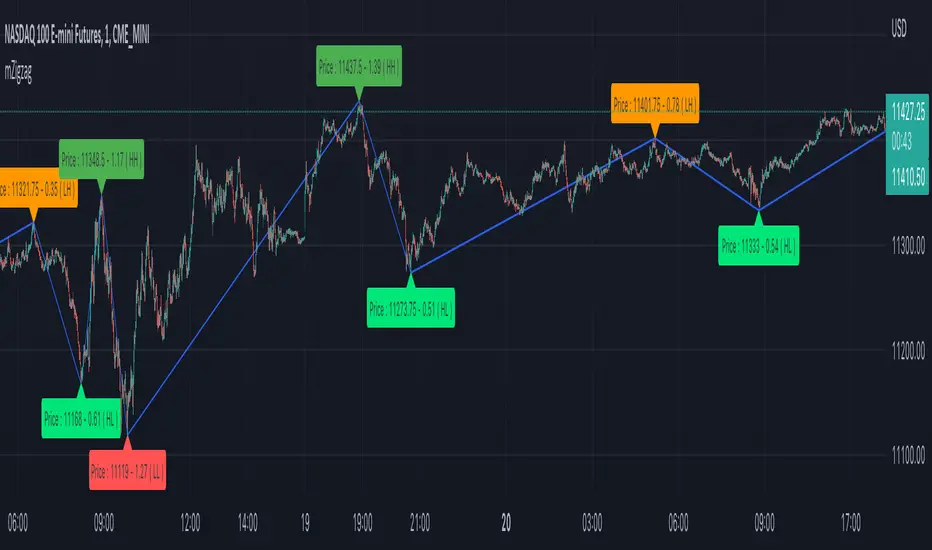
mZigzagLibrary "mZigzag" Matrix implementation of zigzag to allow further possibilities. Main advantage of this library over previous zigzag methods is that you can attach any number of indicator/oscillator information to zigzag calculate(length, ohlc, indicatorHigh, indicatorLow, numberOfPivots) calculates zigzag and related information Parameters: length : is zigzag length ohlc : array of OHLC values to be used for zigzag calculation indicatorHigh : Array of indicator values calculated based on high price of OHLC indicatorLow : Array of indicators values calculated based on low price of OHLC numberOfPivots : Number of pivots to be returned Returns: pivotMatrix Matrix containing zigzag pivots, pivot bars, direction, ratio, and indicators added via indicatorHigh/indicatorLow newZG is true if a new pivot is added to array doubleZG is true if last calculation returned two new pivots (Happens on extreme price change) draw(length, ohlc, indicatorLabels, indicatorHigh, indicatorLow, numberOfPivots, lineColor, lineWidth, lineStyle, showHighLow, showRatios, showIndicators) draws zigzag and related information Parameters: length : is zigzag length ohlc : array of OHLC values to be used for zigzag calculation indicatorLabels : Array of name of indicators passed indicatorHigh : Array of indicator values calculated based on high price of OHLC indicatorLow : Array of indicators values calculated based on low price of OHLC numberOfPivots : Number of pivots to be returned lineColor : zigzag line color. set to blue by default lineWidth : zigzag line width. set to 1 by default lineStyle : zigzag line style. set to line.style_solid by default showHighLow : show HH, HL, LH, LL labels showRatios : show pivot retracement ratios from previous zigzag showIndicators : show indicator values Returns: pivotMatrix Matrix containing zigzag pivots, pivot bars, direction, ratio, and indicators added via indicatorHigh/indicatorLow zigzaglines array of zigzag lines zigzaglabels array of zigzag labelsБиблиотека Pine Script®от TrendoscopeОбновлено 2828216
_matrixLibrary "_matrix" Library helps visualize matrix as array of arrays and enables users to use array methods such as push, pop, shift, unshift etc along with cleanup activities on drawing objects wherever required unshift(mtx, row) unshift array of lines to first row of the matrix Parameters: mtx : matrix of lines row : array of lines to be inserted in row Returns: resulting matrix of lines unshift(mtx, row) unshift array of labels to first row of the matrix Parameters: mtx : matrix of labels row : array of labels to be inserted in row Returns: resulting matrix labels unshift(mtx, row) unshift array of boxes to first row of the matrix Parameters: mtx : matrix of boxes row : array of boxes to be inserted in row Returns: resulting matrix of boxes unshift(mtx, row) unshift array of linefill to first row of the matrix Parameters: mtx : matrix of linefill row : array of linefill to be inserted in row Returns: resulting matrix of linefill unshift(mtx, row) unshift array of tables to first row of the matrix Parameters: mtx : matrix of tables row : array of tables to be inserted in row Returns: resulting matrix of tables unshift(mtx, row) unshift array of int to first row of the matrix Parameters: mtx : matrix of int row : array of int to be inserted in row Returns: resulting matrix of int unshift(mtx, row) unshift array of float to first row of the matrix Parameters: mtx : matrix of float row : array of float to be inserted in row Returns: resulting matrix of float unshift(mtx, row) unshift array of bool to first row of the matrix Parameters: mtx : matrix of bool row : array of bool to be inserted in row Returns: resulting matrix of bool unshift(mtx, row) unshift array of string to first row of the matrix Parameters: mtx : matrix of string row : array of string to be inserted in row Returns: resulting matrix of string unshift(mtx, row) unshift array of color to first row of the matrix Parameters: mtx : matrix of colors row : array of colors to be inserted in row Returns: resulting matrix of colors push(mtx, row) push array of lines to end of the matrix row Parameters: mtx : matrix of lines row : array of lines to be inserted in row Returns: resulting matrix of lines push(mtx, row) push array of labels to end of the matrix row Parameters: mtx : matrix of labels row : array of labels to be inserted in row Returns: resulting matrix of labels push(mtx, row) push array of boxes to end of the matrix row Parameters: mtx : matrix of boxes row : array of boxes to be inserted in row Returns: resulting matrix of boxes push(mtx, row) push array of linefill to end of the matrix row Parameters: mtx : matrix of linefill row : array of linefill to be inserted in row Returns: resulting matrix of linefill push(mtx, row) push array of tables to end of the matrix row Parameters: mtx : matrix of tables row : array of tables to be inserted in row Returns: resulting matrix of tables push(mtx, row) push array of int to end of the matrix row Parameters: mtx : matrix of int row : array of int to be inserted in row Returns: resulting matrix of int push(mtx, row) push array of float to end of the matrix row Parameters: mtx : matrix of float row : array of float to be inserted in row Returns: resulting matrix of float push(mtx, row) push array of bool to end of the matrix row Parameters: mtx : matrix of bool row : array of bool to be inserted in row Returns: resulting matrix of bool push(mtx, row) push array of string to end of the matrix row Parameters: mtx : matrix of string row : array of string to be inserted in row Returns: resulting matrix of string push(mtx, row) push array of colors to end of the matrix row Parameters: mtx : matrix of colors row : array of colors to be inserted in row Returns: resulting matrix of colors shift(mtx) shift removes first row from matrix of lines Parameters: mtx : matrix of lines from which the shift operation need to be performed Returns: void shift(mtx) shift removes first row from matrix of labels Parameters: mtx : matrix of labels from which the shift operation need to be performed Returns: void shift(mtx) shift removes first row from matrix of boxes Parameters: mtx : matrix of boxes from which the shift operation need to be performed Returns: void shift(mtx) shift removes first row from matrix of linefill Parameters: mtx : matrix of linefill from which the shift operation need to be performed Returns: void shift(mtx) shift removes first row from matrix of tables Parameters: mtx : matrix of tables from which the shift operation need to be performed Returns: void shift(mtx) shift removes first row from matrix of int Parameters: mtx : matrix of int from which the shift operation need to be performed Returns: void shift(mtx) shift removes first row from matrix of float Parameters: mtx : matrix of float from which the shift operation need to be performed Returns: void shift(mtx) shift removes first row from matrix of bool Parameters: mtx : matrix of bool from which the shift operation need to be performed Returns: void shift(mtx) shift removes first row from matrix of string Parameters: mtx : matrix of string from which the shift operation need to be performed Returns: void shift(mtx) shift removes first row from matrix of colors Parameters: mtx : matrix of colors from which the shift operation need to be performed Returns: void pop(mtx) pop removes last row from matrix of lines Parameters: mtx : matrix of lines from which the pop operation need to be performed Returns: void pop(mtx) pop removes last row from matrix of labels Parameters: mtx : matrix of labels from which the pop operation need to be performed Returns: void pop(mtx) pop removes last row from matrix of boxes Parameters: mtx : matrix of boxes from which the pop operation need to be performed Returns: void pop(mtx) pop removes last row from matrix of linefill Parameters: mtx : matrix of linefill from which the pop operation need to be performed Returns: void pop(mtx) pop removes last row from matrix of tables Parameters: mtx : matrix of tables from which the pop operation need to be performed Returns: void pop(mtx) pop removes last row from matrix of int Parameters: mtx : matrix of int from which the pop operation need to be performed Returns: void pop(mtx) pop removes last row from matrix of float Parameters: mtx : matrix of float from which the pop operation need to be performed Returns: void pop(mtx) pop removes last row from matrix of bool Parameters: mtx : matrix of bool from which the pop operation need to be performed Returns: void pop(mtx) pop removes last row from matrix of string Parameters: mtx : matrix of string from which the pop operation need to be performed Returns: void pop(mtx) pop removes last row from matrix of colors Parameters: mtx : matrix of colors from which the pop operation need to be performed Returns: void clear(mtx) clear clears the matrix of lines Parameters: mtx : matrix of lines which needs to be cleared Returns: void clear(mtx) clear clears the matrix of labels Parameters: mtx : matrix of labels which needs to be cleared Returns: void clear(mtx) clear clears the matrix of boxes Parameters: mtx : matrix of boxes which needs to be cleared Returns: void clear(mtx) clear clears the matrix of linefill Parameters: mtx : matrix of linefill which needs to be cleared Returns: void clear(mtx) clear clears the matrix of tables Parameters: mtx : matrix of tables which needs to be cleared Returns: void clear(mtx) clear clears the matrix of int Parameters: mtx : matrix of int which needs to be cleared Returns: void clear(mtx) clear clears the matrix of float Parameters: mtx : matrix of float which needs to be cleared Returns: void clear(mtx) clear clears the matrix of bool Parameters: mtx : matrix of bool which needs to be cleared Returns: void clear(mtx) clear clears the matrix of string Parameters: mtx : matrix of string which needs to be cleared Returns: void clear(mtx) clear clears the matrix of colors Parameters: mtx : matrix of colors which needs to be cleared Returns: voidБиблиотека Pine Script®от TrendoscopeОбновлено 8847
FunctionMatrixSolveLibrary "FunctionMatrixSolve" Matrix Equation solution for Ax = B, finds the value of x. solve(A, B) Solves Matrix Equation for Ax = B, finds value for x. Parameters: A : matrix, Square matrix with data values. B : matrix, One column matrix with data values. Returns: matrix with X, x = A^-1 b, assuming A is square and has full rank introcs.cs.princeton.eduБиблиотека Pine Script®от RicardoSantos2237
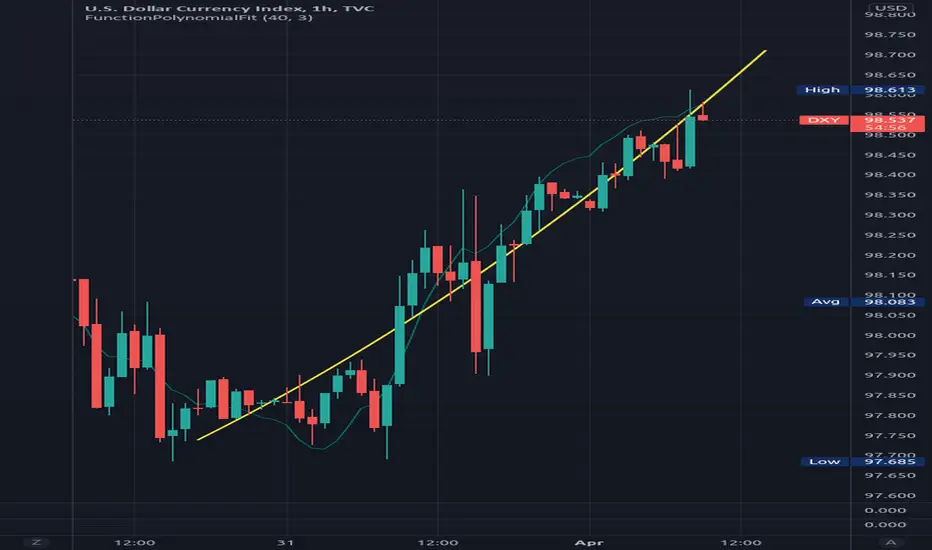
FunctionPolynomialFitLibrary "FunctionPolynomialFit" Performs Polynomial Regression fit to data. In statistics, polynomial regression is a form of regression analysis in which the relationship between the independent variable x and the dependent variable y is modelled as an nth degree polynomial in x. reference: en.wikipedia.org www.bragitoff.com gauss_elimination(A, m, n) Perform Gauss-Elimination and returns the Upper triangular matrix and solution of equations. Parameters: A : float matrix, data samples. m : int, defval=na, number of rows. n : int, defval=na, number of columns. Returns: float array with coefficients. polyfit(X, Y, degree) Fits a polynomial of a degree to (x, y) points. Parameters: X : float array, data sample x point. Y : float array, data sample y point. degree : int, defval=2, degree of the polynomial. Returns: float array with coefficients. note: p(x) = p * x**deg + ... + p interpolate(coeffs, x) interpolate the y position at the provided x. Parameters: coeffs : float array, coefficients of the polynomial. x : float, position x to estimate y. Returns: float.Библиотека Pine Script®от RicardoSantos1010168
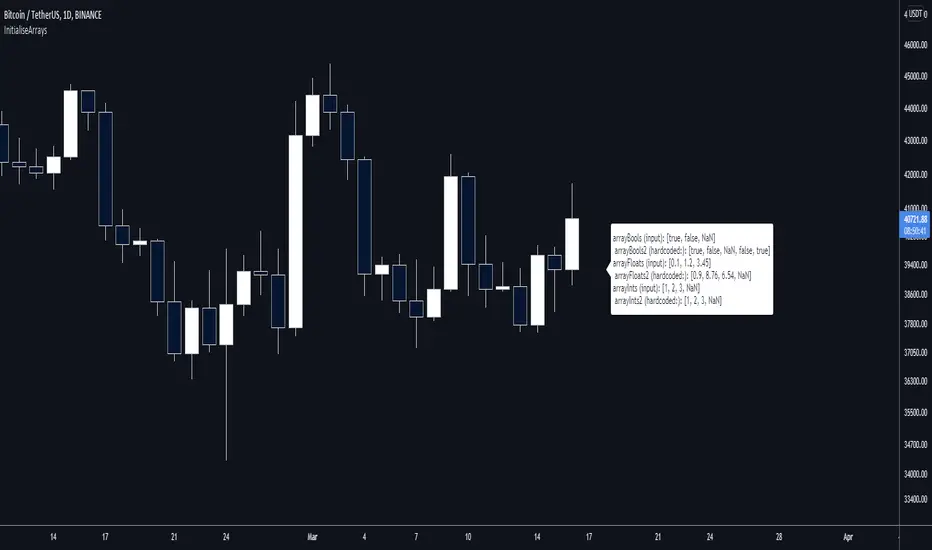
InitialiseArraysLibrary "InitialiseArrays" @description: Efficiently create arrays, populating them with an arbitrary number of elements and setting their starting values. Works with a mix of typed and na values. A limitation of the built-in functions to create arrays is that while you can create and populate arrays with a single command, you can only set all elements to the same value in this way. Or, you can create an array from a set of values or variables, but you can't include any na values. Now, it's easy enough to work around this, but I wanted to make something more efficient (because I want to use lots of arrays), hence this library. Calling a function from here is more efficient because you only do it once (assuming it's a var) and don't evaluate an if condition each run, and don't create unnecessary variables. It's also easier to read and takes less space. f_initialiseBoolArray() @function f_initialiseBoolArray(string _values) Creates a boolean array, populated with the values that you specify in the input string. @param _values is a string that contains a comma-separated list of the values that you want to initialise the boolean array with. Values other than true, false, and na are disregarded. Spaces are disregarded. @returns Returns a boolean array of arbitrary length. f_initialiseFloatArray() @function f_initialiseFloatArray(string _values) Creates a float array, populated with the values that you specify in the input string. @param _values is a string that contains a comma-separated list of the values that you want to initialise the float array with. Non-numerical entries are converted to NaN values. Spaces are disregarded. @returns Returns a float array of arbitrary length. f_initialiseIntArray() @function f_initialiseIntArray(string _values) Creates an int array, populated with the values that you specify in the input string. @param _values is a string that contains a comma-separated list of the values that you want to initialise the int array with. Floating-point numbers are rounded down to the nearest integer. Any na values are preserved. Spaces are disregarded. @returns Returns a float array of arbitrary length. V1 includes functions for bools, floats, and ints. I might extend it if people want. Библиотека Pine Script®от SimpleCryptoLife2214
drawingutilsLibrary "drawingutils" Private methods used in my scripts for some basic and customized drawings. No documentation provided as these are meant for private use only. draw_line() draw_label() draw_linefill() draw_labelled_line() draw_labelled_box() runTimer() Библиотека Pine Script®от TrendoscopeОбновлено 5524
ConditionalAverages█ OVERVIEW This library is a Pine Script™ programmer’s tool containing functions that average values selectively. █ CONCEPTS Averaging can be useful to smooth out unstable readings in the data set, provide a benchmark to see the underlying trend of the data, or to provide a general expectancy of values in establishing a central tendency. Conventional averaging techniques tend to apply indiscriminately to all values in a fixed window, but it can sometimes be useful to average values only when a specific condition is met. As conditional averaging works on specific elements of a dataset, it can help us derive more context-specific conclusions. This library offers a collection of averaging methods that not only accomplish these tasks, but also exploit the efficiencies of the Pine Script™ runtime by foregoing unnecessary and resource-intensive for loops. █ NOTES To Loop or Not to Loop Though for and while loops are essential programming tools, they are often unnecessary in Pine Script™. This is because the Pine Script™ runtime already runs your scripts in a loop where it executes your code on each bar of the dataset. Pine Script™ programmers who understand how their code executes on charts can use this to their advantage by designing loop-less code that will run orders of magnitude faster than functionally identical code using loops. Most of this library's function illustrate how you can achieve loop-less code to process past values. See the User Manual page on loops for more information. If you are looking for ways to measure execution time for you scripts, have a look at our LibraryStopwatch library . Our `avgForTimeWhen()` and `totalForTimeWhen()` are exceptions in the library, as they use a while structure. Only a few iterations of the loop are executed on each bar, however, as its only job is to remove the few elements in the array that are outside the moving window defined by a time boundary. Cumulating and Summing Conditionally The ta.cum() or math.sum() built-in functions can be used with ternaries that select only certain values. In our `avgWhen(src, cond)` function, for example, we use this technique to cumulate only the occurrences of `src` when `cond` is true: float cumTotal = ta.cum(cond ? src : 0) We then use: float cumCount = ta.cum(cond ? 1 : 0) to calculate the number of occurrences where `cond` is true, which corresponds to the quantity of values cumulated in `cumTotal`. Building Custom Series With Arrays The advent of arrays in Pine has enabled us to build our custom data series. Many of this library's functions use arrays for this purpose, saving newer values that come in when a condition is met, and discarding the older ones, implementing a queue . `avgForTimeWhen()` and `totalForTimeWhen()` These two functions warrant a few explanations. They operate on a number of values included in a moving window defined by a timeframe expressed in milliseconds. We use a 1D timeframe in our example code. The number of bars included in the moving window is unknown to the programmer, who only specifies the period of time defining the moving window. You can thus use `avgForTimeWhen()` to calculate a rolling moving average for the last 24 hours, for example, that will work whether the chart is using a 1min or 1H timeframe. A 24-hour moving window will typically contain many more values on a 1min chart that on a 1H chart, but their calculated average will be very close. Problems will arise on non-24x7 markets when large time gaps occur between chart bars, as will be the case across holidays or trading sessions. For example, if you were using a 24H timeframe and there is a two-day gap between two bars, then no chart bars would fit in the moving window after the gap. The `minBars` parameter mitigates this by guaranteeing that a minimum number of bars are always included in the calculation, even if including those bars requires reaching outside the prescribed timeframe. We use a minimum value of 10 bars in the example code. Using var in Constant Declarations In the past, we have been using var when initializing so-called constants in our scripts, which as per the Style Guide 's recommendations, we identify using UPPER_SNAKE_CASE. It turns out that var variables incur slightly superior maintenance overhead in the Pine Script™ runtime, when compared to variables initialized on each bar. We thus no longer use var to declare our "int/float/bool" constants, but still use it when an initialization on each bar would require too much time, such as when initializing a string or with a heavy function call. Look first. Then leap. █ FUNCTIONS avgWhen(src, cond) Gathers values of the source when a condition is true and averages them over the total number of occurrences of the condition. Parameters: src : (series int/float) The source of the values to be averaged. cond : (series bool) The condition determining when a value will be included in the set of values to be averaged. Returns: (float) A cumulative average of values when a condition is met. avgWhenLast(src, cond, cnt) Gathers values of the source when a condition is true and averages them over a defined number of occurrences of the condition. Parameters: src : (series int/float) The source of the values to be averaged. cond : (series bool) The condition determining when a value will be included in the set of values to be averaged. cnt : (simple int) The quantity of last occurrences of the condition for which to average values. Returns: (float) The average of `src` for the last `x` occurrences where `cond` is true. avgWhenInLast(src, cond, cnt) Gathers values of the source when a condition is true and averages them over the total number of occurrences during a defined number of bars back. Parameters: src : (series int/float) The source of the values to be averaged. cond : (series bool) The condition determining when a value will be included in the set of values to be averaged. cnt : (simple int) The quantity of bars back to evaluate. Returns: (float) The average of `src` in last `cnt` bars, but only when `cond` is true. avgSince(src, cond) Averages values of the source since a condition was true. Parameters: src : (series int/float) The source of the values to be averaged. cond : (series bool) The condition determining when the average is reset. Returns: (float) The average of `src` since `cond` was true. avgForTimeWhen(src, ms, cond, minBars) Averages values of `src` when `cond` is true, over a moving window of length `ms` milliseconds. Parameters: src : (series int/float) The source of the values to be averaged. ms : (simple int) The time duration in milliseconds defining the size of the moving window. cond : (series bool) The condition determining which values are included. Optional. minBars : (simple int) The minimum number of values to keep in the moving window. Optional. Returns: (float) The average of `src` when `cond` is true in the moving window. totalForTimeWhen(src, ms, cond, minBars) Sums values of `src` when `cond` is true, over a moving window of length `ms` milliseconds. Parameters: src : (series int/float) The source of the values to be summed. ms : (simple int) The time duration in milliseconds defining the size of the moving window. cond : (series bool) The condition determining which values are included. Optional. minBars : (simple int) The minimum number of values to keep in the moving window. Optional. Returns: (float) The sum of `src` when `cond` is true in the moving window. Библиотека Pine Script®от PineCodersОбновлено 5577
harmonicpatternsarraysLibrary "harmonicpatternsarrays" Library provides an alternative method to scan harmonic patterns and contains utility functions using arrays. These are mostly customized for personal use. Hence, will not add documentation for arrays. All credit to @HeWhoMustNotBeNamed getLabel() delete() delete() delete() delete() delete() pop() pop() pop() pop() pop() shift() shift() shift() shift() shift() unshift() unshift() unshift() unshift() unshift() unshift() unshift() unshift() unshift() unshift() clear() clear() clear() clear() clear() push() push() push() push() push() push() push() push() push() push() get_trend_series() getrange() getSupportedPatterns() scan_xab() scan_abc_axc() scan_bcd() scan_xad_xcd() get_prz_range() isHarmonicPattern() Библиотека Pine Script®от CryptoArch_2215
jsonLibrary "json" Convert JSON strings to tradingview ▦ FEATURES ▦ █ Json to array █ Get json key names █ Get json key values █ Size of json get_json_keys_names(raw_json) Returns string array with all key names Parameters: raw_json : (string) Raw JSON string Returns: (string array) Array with all key names get_values_by_id_name(raw_json, key_name) Returns string array with values of the input key name Parameters: raw_json : (string) Raw JSON string key_name : (string) Name of the key to be fetched Returns: (string array) Array with values of the input key name size_of_json_string(raw_json) Returns size of raw JSON string Parameters: raw_json : (string) Raw JSON string Returns: Size of n_of_values, size of n_of_keys_namesБиблиотека Pine Script®от MA_PT3319
JohnEhlersFourierTransformLibrary "JohnEhlersFourierTransform" Fourier Transform for Traders By John Ehlers, slightly modified to allow to inspect other than the 8-50 frequency spectrum. reference: www.mesasoftware.com high_pass_filter(source) Detrended version of the data by High Pass Filtering with a 40 Period cutoff Parameters: source : float, data source. Returns: float. transformed_dft(source, start_frequency, end_frequency) DFT by John Elhers. Parameters: source : float, data source. start_frequency : int, lower bound of the frequency window, must be a positive number >= 0, window must be less than or 30. end_frequency : int, upper bound of the frequency window, must be a positive number >= 0, window must be less than or 30. Returns: tuple with float, float array. db_to_rgb(db, transparency) converts the frequency decibels to rgb. Parameters: db : float, decibels value. transparency : float, transparency value. Returns: color.Библиотека Pine Script®от RicardoSantosОбновлено 2424157
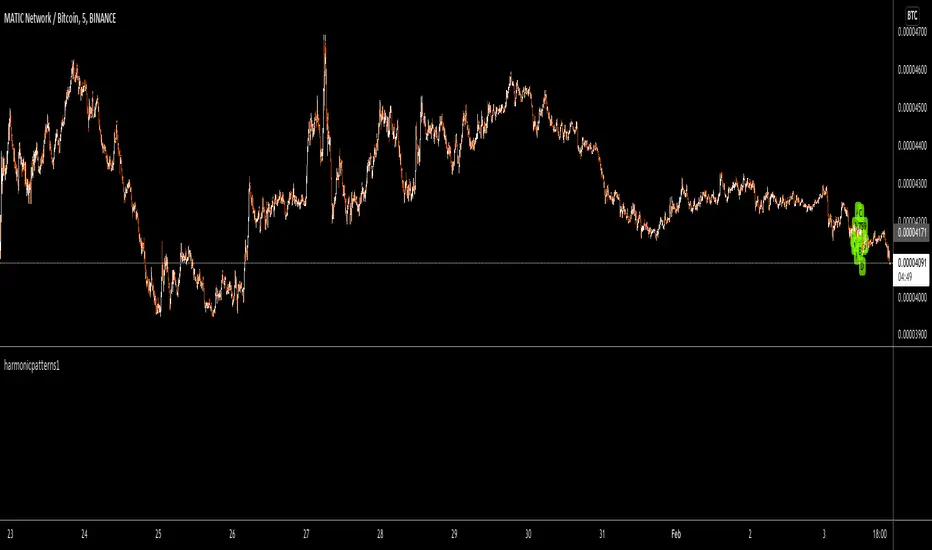
harmonicpatterns1Library "harmonicpatterns1" harmonicpatterns: methods required for calculation of harmonic patterns. Correction for library (missing export in line 303) isGartleyPattern(xabRatio, abcRatio, bcdRatio, xadRatio, err_min, err_max) isGartleyPattern: Checks for harmonic pattern Gartley Parameters: xabRatio : AB/XA abcRatio : BC/AB bcdRatio : CD/BC xadRatio : AD/XA err_min : Minumum error threshold err_max : Maximum error threshold Returns: True if the pattern is Gartley. False otherwise. isBatPattern(xabRatio, abcRatio, bcdRatio, xadRatio, err_min, err_max) isBatPattern: Checks for harmonic pattern Bat Parameters: xabRatio : AB/XA abcRatio : BC/AB bcdRatio : CD/BC xadRatio : AD/XA err_min : Minumum error threshold err_max : Maximum error threshold Returns: True if the pattern is Bat. False otherwise. isButterflyPattern(xabRatio, abcRatio, bcdRatio, xadRatio, err_min, err_max) isButterflyPattern: Checks for harmonic pattern Butterfly Parameters: xabRatio : AB/XA abcRatio : BC/AB bcdRatio : CD/BC xadRatio : AD/XA err_min : Minumum error threshold err_max : Maximum error threshold Returns: True if the pattern is Butterfly. False otherwise. isCrabPattern(xabRatio, abcRatio, bcdRatio, xadRatio, err_min, err_max) isCrabPattern: Checks for harmonic pattern Crab Parameters: xabRatio : AB/XA abcRatio : BC/AB bcdRatio : CD/BC xadRatio : AD/XA err_min : Minumum error threshold err_max : Maximum error threshold Returns: True if the pattern is Crab. False otherwise. isDeepCrabPattern(xabRatio, abcRatio, bcdRatio, xadRatio, err_min, err_max) isDeepCrabPattern: Checks for harmonic pattern DeepCrab Parameters: xabRatio : AB/XA abcRatio : BC/AB bcdRatio : CD/BC xadRatio : AD/XA err_min : Minumum error threshold err_max : Maximum error threshold Returns: True if the pattern is DeepCrab. False otherwise. isCypherPattern(xabRatio, axcRatio, xadRatio, err_min, err_max) isCypherPattern: Checks for harmonic pattern Cypher Parameters: xabRatio : AB/XA axcRatio : XC/AX xadRatio : AD/XA err_min : Minumum error threshold err_max : Maximum error threshold Returns: True if the pattern is Cypher. False otherwise. isSharkPattern(xabRatio, abcRatio, bcdRatio, xadRatio, err_min, err_max) isSharkPattern: Checks for harmonic pattern Shark Parameters: xabRatio : AB/XA abcRatio : BC/AB bcdRatio : CD/BC xadRatio : AD/XA err_min : Minumum error threshold err_max : Maximum error threshold Returns: True if the pattern is Shark. False otherwise. isNenStarPattern(xabRatio, abcRatio, bcdRatio, xadRatio, err_min, err_max) isNenStarPattern: Checks for harmonic pattern Nenstar Parameters: xabRatio : AB/XA abcRatio : BC/AB bcdRatio : CD/BC xadRatio : AD/XA err_min : Minumum error threshold err_max : Maximum error threshold Returns: True if the pattern is Nenstar. False otherwise. isAntiNenStarPattern(xabRatio, abcRatio, bcdRatio, xadRatio, err_min, err_max) isAntiNenStarPattern: Checks for harmonic pattern Anti NenStar Parameters: xabRatio : - AB/XA abcRatio : - BC/AB bcdRatio : - CD/BC xadRatio : - AD/XA err_min : - Minumum error threshold err_max : - Maximum error threshold Returns: True if the pattern is Anti NenStar. False otherwise. isAntiSharkPattern(xabRatio, abcRatio, bcdRatio, xadRatio, err_min, err_max) isAntiSharkPattern: Checks for harmonic pattern Anti Shark Parameters: xabRatio : AB/XA abcRatio : BC/AB bcdRatio : CD/BC xadRatio : AD/XA err_min : Minumum error threshold err_max : Maximum error threshold Returns: True if the pattern is Anti Shark. False otherwise. isAntiCypherPattern(xabRatio, abcRatio, bcdRatio, xadRatio, err_min, err_max) isAntiCypherPattern: Checks for harmonic pattern Anti Cypher Parameters: xabRatio : AB/XA abcRatio : BC/AB bcdRatio : CD/BC xadRatio : AD/XA err_min : Minumum error threshold err_max : Maximum error threshold Returns: True if the pattern is Anti Cypher. False otherwise. isAntiCrabPattern(xabRatio, abcRatio, bcdRatio, xadRatio, err_min, err_max) isAntiCrabPattern: Checks for harmonic pattern Anti Crab Parameters: xabRatio : AB/XA abcRatio : BC/AB bcdRatio : CD/BC xadRatio : AD/XA err_min : Minumum error threshold err_max : Maximum error threshold Returns: True if the pattern is Anti Crab. False otherwise. isAntiButterflyPattern(xabRatio, abcRatio, bcdRatio, xadRatio, err_min, err_max) isAntiButterflyPattern: Checks for harmonic pattern Anti Butterfly Parameters: xabRatio : AB/XA abcRatio : BC/AB bcdRatio : CD/BC xadRatio : AD/XA err_min : Minumum error threshold err_max : Maximum error threshold Returns: True if the pattern is Anti Butterfly. False otherwise. isAntiBatPattern(xabRatio, abcRatio, bcdRatio, xadRatio, err_min, err_max) isAntiBatPattern: Checks for harmonic pattern Anti Bat Parameters: xabRatio : AB/XA abcRatio : BC/AB bcdRatio : CD/BC xadRatio : AD/XA err_min : Minumum error threshold err_max : Maximum error threshold Returns: True if the pattern is Anti Bat. False otherwise. isAntiGartleyPattern(xabRatio, abcRatio, bcdRatio, xadRatio, err_min, err_max) isAntiGartleyPattern: Checks for harmonic pattern Anti Gartley Parameters: xabRatio : AB/XA abcRatio : BC/AB bcdRatio : CD/BC xadRatio : AD/XA err_min : Minumum error threshold err_max : Maximum error threshold Returns: True if the pattern is Anti Gartley. False otherwise. isNavarro200Pattern(xabRatio, abcRatio, bcdRatio, xadRatio, err_min, err_max) isNavarro200Pattern: Checks for harmonic pattern Navarro200 Parameters: xabRatio : AB/XA abcRatio : BC/AB bcdRatio : CD/BC xadRatio : AD/XA err_min : Minumum error threshold err_max : Maximum error threshold Returns: True if the pattern is Navarro200. False otherwise. isHarmonicPattern(x, a, c, c, d, flags, errorPercent) isHarmonicPattern: Checks for harmonic patterns Parameters: x : X coordinate value a : A coordinate value c : B coordinate value c : C coordinate value d : D coordinate value flags : flags to check patterns. Send empty array to enable all errorPercent : Error threshold Returns: Array of boolean values which says whether valid pattern exist and array of corresponding pattern namesБиблиотека Pine Script®от CryptoArch_2220
FunctionCosineSimilarityLibrary "FunctionCosineSimilarity" Cosine Similarity method. function(sample_a, sample_b) Measure the similarity of 2 vectors. Parameters: sample_a : float array, values. sample_b : float array, values. Returns: float. diss(cosim) Dissimilarity helper function. Parameters: cosim : float, cosine similarity value (0 > 1) Returns: floatБиблиотека Pine Script®от RicardoSantosОбновлено 5519
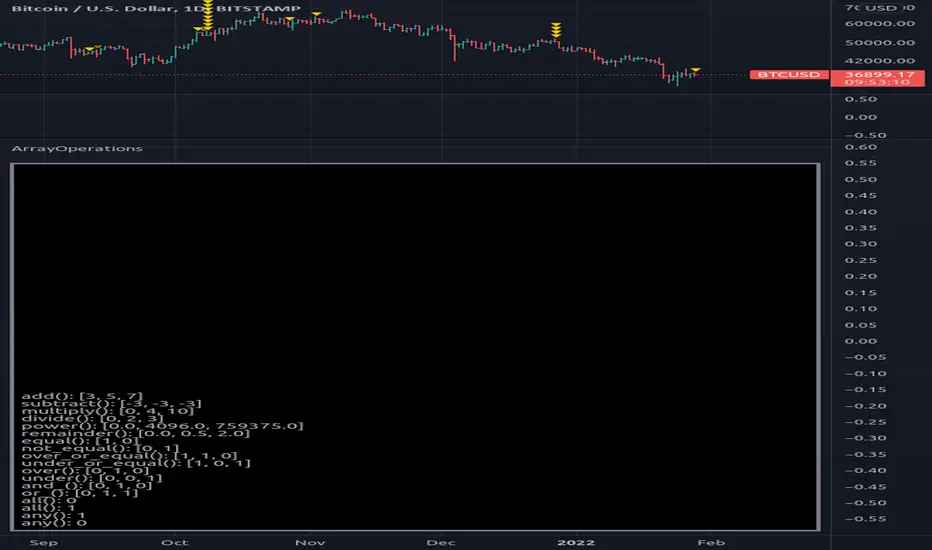
ArrayOperationsLibrary "ArrayOperations" Array element wise basic operations. add(sample_a, sample_b) Adds sample_b to sample_a and returns a new array. Parameters: sample_a : values to be added to. sample_b : values to add. Returns: array with added results. - sample_a provides type format for output. - arrays do not need to be symmetric. - sample_a must have same or more elements than sample_b subtract(sample_a, sample_b) Subtracts sample_b from sample_a and returns a new array. sample_a : values to be subtracted from. sample_b : values to subtract. Returns: array with subtracted results. - sample_a provides type format for output. - arrays do not need to be symmetric. - sample_a must have same or more elements than sample_b multiply(sample_a, sample_b) multiply sample_a by sample_b and returns a new array. sample_a : values to multiply. sample_b : values to multiply with. Returns: array with multiplied results. - sample_a provides type format for output. - arrays do not need to be symmetric. - sample_a must have same or more elements than sample_b divide(sample_a, sample_b) Divide sample_a by sample_b and returns a new array. sample_a : values to divide. sample_b : values to divide with. Returns: array with divided results. - sample_a provides type format for output. - arrays do not need to be symmetric. - sample_a must have same or more elements than sample_b power(sample_a, sample_b) power sample_a by sample_b and returns a new array. sample_a : values to power. sample_b : values to power with. Returns: float array with power results. - sample_a provides type format for output. - arrays do not need to be symmetric. - sample_a must have same or more elements than sample_b remainder(sample_a, sample_b) Remainder sample_a by sample_b and returns a new array. sample_a : values to remainder. sample_b : values to remainder with. Returns: array with remainder results. - sample_a provides type format for output. - arrays do not need to be symmetric. - sample_a must have same or more elements than sample_b equal(sample_a, sample_b) Check element wise sample_a equals sample_b and returns a new array. sample_a : values to check. sample_b : values to check. Returns: int array with results. - sample_a provides type format for output. - arrays do not need to be symmetric. - sample_a must have same or more elements than sample_b not_equal(sample_a, sample_b) Check element wise sample_a not equals sample_b and returns a new array. sample_a : values to check. sample_b : values to check. Returns: int array with results. - sample_a provides type format for output. - arrays do not need to be symmetric. - sample_a must have same or more elements than sample_b over_or_equal(sample_a, sample_b) Check element wise sample_a over or equals sample_b and returns a new array. sample_a : values to check. sample_b : values to check. Returns: int array with results. - sample_a provides type format for output. - arrays do not need to be symmetric. - sample_a must have same or more elements than sample_b under_or_equal(sample_a, sample_b) Check element wise sample_a under or equals sample_b and returns a new array. sample_a : values to check. sample_b : values to check. Returns: int array with results. - sample_a provides type format for output. - arrays do not need to be symmetric. - sample_a must have same or more elements than sample_b over(sample_a, sample_b) Check element wise sample_a over sample_b and returns a new array. sample_a : values to check. sample_b : values to check. Returns: int array with results. - sample_a provides type format for output. - arrays do not need to be symmetric. - sample_a must have same or more elements than sample_b under(sample_a, sample_b) Check element wise sample_a under sample_b and returns a new array. sample_a : values to check. sample_b : values to check. Returns: int array with results. - sample_a provides type format for output. - arrays do not need to be symmetric. - sample_a must have same or more elements than sample_b and_(sample_a, sample_b) Check element wise sample_a and sample_b and returns a new array. sample_a : values to check. sample_b : values to check. Returns: int array with results. - sample_a provides type format for output. - arrays do not need to be symmetric. - sample_a must have same or more elements than sample_b or_(sample_a, sample_b) Check element wise sample_a or sample_b and returns a new array. sample_a : values to check. sample_b : values to check. Returns: int array with results. - sample_a provides type format for output. - arrays do not need to be symmetric. - sample_a must have same or more elements than sample_b all(sample) Check element wise if all numeric samples are true (!= 0). sample : values to check. Returns: int. any(sample) Check element wise if any numeric samples are true (!= 0). sample : values to check. Returns: int. Библиотека Pine Script®от RicardoSantosОбновлено 5543
WIPNNetworkLibrary "WIPNNetwork" this is a work in progress (WIP) and prone to have some errors, so use at your own risk... let me know if you find any issues.. Method for a generalized Neural Network. network(x) Generalized Neural Network Method. Parameters: x : TODO: add parameter x description here Returns: TODO: add what function returnsБиблиотека Pine Script®от RicardoSantosОбновлено 6658
FunctionPatternDecompositionLibrary "FunctionPatternDecomposition" Methods for decomposing price into common grid/matrix patterns. series_to_array(source, length) Helper for converting series to array. Parameters: source : float, data series. length : int, size. Returns: float array. smooth_data_2d(data, rate) Smooth data sample into 2d points. Parameters: data : float array, source data. rate : float, default=0.25, the rate of smoothness to apply. Returns: tuple with 2 float arrays. thin_points(data_x, data_y, rate) Thin the number of points. Parameters: data_x : float array, points x value. data_y : float array, points y value. rate : float, default=2.0, minimum threshold rate of sample stdev to accept points. Returns: tuple with 2 float arrays. extract_point_direction(data_x, data_y) Extract the direction each point faces. Parameters: data_x : float array, points x value. data_y : float array, points y value. Returns: float array. find_corners(data_x, data_y, rate) ... Parameters: data_x : float array, points x value. data_y : float array, points y value. rate : float, minimum threshold rate of data y stdev. Returns: tuple with 2 float arrays. grid_coordinates(data_x, data_y, m_size) transforms points data to a constrained sized matrix format. Parameters: data_x : float array, points x value. data_y : float array, points y value. m_size : int, default=10, size of the matrix. Returns: flat 2d pseudo matrix.Библиотека Pine Script®от RicardoSantos3362