Volume Bars Color by CandleStick Pattern [SnakeTurtle]Choose the Colors and Transparency of Volume Bars and Signals from Indicator Settings for your Better Visibility.
This Indicator ignores the color of the Candle Closed to match color of Volume Bar instead sees the candlestick pattern of the Candle to give Color to Volume Bar.
A Signal that shows Bullish or Bearish Momentum is also added (Change Color & Transparency of Signal from Indicator Settings for Better Visibility)
Comment Below to request new features
🐍🐢
Candlestick analysis

ICT SMT Divergence (Synced + Alerts)This is a professional-grade tool designed for Inner Circle Trader (ICT) students and price action traders to automatically detect Smart Money Tool (SMT) Divergences.
SMT Divergence is "a crack in the correlation" between correlated assets (e.g., NQ vs. ES, or EURUSD vs. DXY). It reveals the footprint of institutional accumulation or distribution by showing when one asset sweeps liquidity while the other fails to do so.
🚀 Why this indicator is different? (The "Synced" Logic)
Most SMT indicators fail because they rigidly expect both assets to form a High/Low on the exact same candle. However, in live markets, correlated assets often lag or lead each other by a few minutes.
This script solves that problem.
It uses a unique "Driver-Based Synchronization" algorithm:
Main Driver: It monitors your current chart (e.g., NQ) for a confirmed Pivot structure.
Smart Scan: Once a pivot is confirmed, it actively scans the comparison symbol (e.g., ES) within a customizable Time Window (e.g., ±3 bars) to find the true price extreme.
Result: It catches valid SMT Divergences even if the comparison asset peaked 5, 10, or 15 minutes before/after your main chart.
Key Features
✅ Automatic Detection: Identifies both Bullish (Accumulation) and Bearish (Distribution) SMTs.
✅ Correlation Flexibility: Works with positive correlations (NQ vs ES) and negative correlations (EU vs DXY) automatically based on structure logic.
✅ Smart Synchronization: Includes a Time Sync Error setting to tolerate timing differences between assets.
✅ Dual Alert System: Supports both alert() for webhooks and alertcondition() for standard TradingView UI alerts.
✅ Visual Clarity: Draws divergence lines only on valid setups, keeping your chart clean.
How to Use
Apply to Chart: Load the indicator on your preferred timeframe (15m, 1H, and 4H recommended).
Select Comparison Symbol:
If trading Nasdaq (NQ), compare with ES (S&P500) or YM (Dow).
If trading EURUSD, compare with GBPUSD or DXY (Inverse logic applies).
Adjust Sensitivity:
Pivot Lookback: Controls how "sharp" a turn must be to register. (Default: 10).
Time Sync Error: How many bars of tolerance allowed. If assets are volatile and desynchronized, increase this value (Default: 3).
Alerts
Never miss a setup. You can set alerts for:
Bullish SMT: Potential bottoming formations.
Bearish SMT: Potential topping formations.
Any SMT: All divergences.

Eloha_low_frequency_v1low frequency strategy for automated systems. Best results use on 15min or 30min candles

[TA] Sessions OHLC# TA Sessions OHLC
TA Sessions OHLC is a session-based market structure indicator that maps Regular Trading Hours (RTH) and Globex / Extended Hours (ETH) levels directly onto your chart.
It provides a clear, consistent framework for understanding where price is trading relative to session structure , so you can make better decisions around context, bias, and execution.
This indicator does not generate signals. It defines the map.
---
## What TA Sessions OHLC Plots
### 🔹 Regular Trading Hours (RTH)
* Session High
* Session Low
* Session Mid
* RTH Open
* Optional Previous RTH High / Low
### 🔹 Globex / Extended Trading Hours (ETH)
* Session High
* Session Low
* Session Mid
* Globex Open
* Globex Close
* Optional Previous Globex High / Low
### 🔹 Additional References
* Previous Open / Previous Close
* Week Open / Previous Week Open
* Optional RTH range extension levels (projected above and below the session range)
### 🔹 Session Table (Optional)
An on-chart table showing:
* Open, High, Low, Mid, Close, Range
For both RTH and ETH , with configurable layout and styling.
---
## How Traders Use This Indicator
TA Sessions OHLC is designed to answer one core question:
“Where are we trading relative to the session?”
Below are common, practical use cases.
---
## 1️⃣ Session Bias & Context
* Price above RTH Mid → bullish session context
* Price below RTH Mid → bearish session context
* Price rotating around mid → balanced / rotational session
Many traders use the session mid as a bias filter , not an entry signal.
---
## 2️⃣ RTH vs Globex Behavior
Globex often sets the range , and RTH decides acceptance or rejection .
Common observations:
* RTH breaking and holding above Globex High → acceptance
* RTH failing at Globex High/Low → rejection / fade opportunity
* RTH trading back into Globex range → balance / chop risk
TA Sessions OHLC makes these relationships explicit.
---
## 3️⃣ Previous Session Levels as Reaction Zones
Previous RTH and Globex highs/lows frequently act as:
* Support / resistance
* Liquidity targets
* Decision points during trend continuation or reversal
Use them to:
* Define areas to take profits
* Avoid chasing trades into known reference levels
* Frame risk (what happens if this level fails?)
---
## 4️⃣ Opens & Closes as Anchors
* RTH Open often defines early bias
* Globex Close often acts as an overnight reference
* Previous Close is frequently defended or tested early in the session
These levels help identify:
* Early trend days
* Failed opens
* Range-bound sessions
---
## 5️⃣ Range Expansion & Extension Levels
Optional extension levels project potential expansion beyond the RTH range.
Typical use:
* Price breaks RTH High → extension levels become contextual upside zones
* Price breaks RTH Low → downside extensions frame potential continuation
These are reference zones , not targets.
---
## How NOT to Use This Indicator
* Do not treat levels as automatic buy/sell signals
* Do not assume every level must hold
* Do not trade every touch
This tool defines structure , not entries.
---
## Best Practices
* Use on intraday charts (1–30 minute recommended)
* Combine with:
* Order flow
* Price action
* Volume / VWAP
* Your existing execution model
* Disable levels you don’t use to keep charts clean
---
## Supported Sessions
Preconfigured for:
* CME
* NYSE
* London
* Tokyo
Higher-timeframe session modes (weekly/monthly) are not included in this version and may be added later.
---
## Who This Indicator Is For
TA Sessions OHLC is built for traders who:
* Care about session behavior
* Trade futures, indices, or liquid intraday markets
* Want objective structure without signals or bias
* Prefer understanding context before execution
---
🎄 Released free as part of a Christmas giveaway.
Invite-only access.
Merry Christmas 🎅

Ingenuity Crazy Strategy BasicThis indicator works — IF you use it correctly.
Wrong settings = bad results.
That’s why we keep:
🔥 The exact settings
🔥 Market-specific presets
🔥 Live trade examples
INSIDE OUR DISCORD ONLY.
🚫 Do not guess
🚫 Do not freestyle settings
👉 Join the Discord and trade it the way it’s meant to be traded.
discord.gg/uRs3DWXu

Ingenuity Crazy Strategy AdvanceThis indicator works — IF you use it correctly.
Wrong settings = bad results.
That’s why we keep:
🔥 The exact settings
🔥 Market-specific presets
🔥 Live trade examples
INSIDE OUR DISCORD ONLY.
🚫 Do not guess
🚫 Do not freestyle settings
👉 Join the Discord and trade it the way it’s meant to be traded.
discord.gg

DMI with ADX Weekly > Daily & Rising AlertWe sincerely apologise, but this script is currently undergoing testing and is unavailable for use.
This script features functionality to notify when both the weekly and daily DMI charts are trending upwards.

Pinnacle ICT Basic (PICT Basic) v1.22.4 (LOCKED)Pinnacle ICT Basic highlights market regime (stand down vs trending), HTF alignment, and two structure-only setup types (Sweep reversal and Continuation first-touch). It then issues binary “Confirm” signals when displacement + volume + HTF + micro alignment are present. This is an educational structure tool—no entries/exits, targets/stops, or trade advice.

ChoCh Pattern with Trading Levels + Candlestick PatternsBuilt for smart money traders and market structure enthusiasts, the ChoCh Pattern indicator identifies powerful Change of Character reversals with precision. Features intelligent swing point detection, automated risk-reward level plotting, and comprehensive performance tracking to optimize your trading edge in any market condition.
Smart Money Structure Detection - Identifies bullish and bearish Change of Character patterns based market structure analysis and Candlestick patterns Detection,Eliot Waves with T levels
Automated Entry & Exit Levels - Generates entry points with 4 customizable take-profit targets (TP1-TP4) and stop-loss placement based
Real-Time Performance Dashboard - Tracks hit rates for all TP levels, stop-loss statistics, and cumulative P&L across all signals
Visual Trade Management - Clear buy/sell arrows, color-coded level lines, and dynamic price labels for effortless trade execution
Traders seeking systematic risk management with multiple profit targets

RBR / DBR / RBD / DBD Pattern IdentifierThis strategy identifies price-action based continuation and reversal structures using the Rally–Base–Rally (RBR), Drop–Base–Rally (DBR), Rally–Base–Drop (RBD), and Drop–Base–Drop (DBD) patterns.
The logic is based on institutional price behavior, where strong impulsive moves are followed by a low-volatility base (consolidation) and then a confirmation move in the direction of continuation or reversal.
Strong candles represent aggressive participation (demand or supply).
Base candles represent absorption, order balancing, and accumulation/distribution.
Breakout candle confirms intent and directional bias.
Pattern Interpretation
RBR: Bullish continuation after consolidation
DBR: Bullish reversal after selling pressure
RBD: Bearish reversal after buying pressure
DBD: Bearish continuation after consolidation
Usage Guidelines
Best used in alignment with higher-timeframe trend and key supply/demand zones.
Suitable for intraday, swing, and positional trading, with timeframe-specific tuning.
Intended as a structure identification tool, not a standalone trading system.
Risk management, trend context, and confluence with other tools are essential before taking trades.

SMC/PA Ultimate V27SMC Ultimate Strategy: Automated Structure & Performance Dashboard
This strategy is designed based on Smart Money Concepts (SMC) principles, utilizing market structure breaks (Zigzag Swings) to identify high-probability reversal setups. It features a fully automated execution engine, dynamic risk management, and a comprehensive real-time performance dashboard.
1. Core Logic & Entry Mechanism
Market Structure: The script uses a Zigzag algorithm (Length = 8 default) to detect significant Swing Highs and Swing Lows.
Entry Trigger:
SHORT: Triggered when the price breaks below the recent Swing Low. The entry order is placed at the 50% Fibonacci retracement of the breakout range.
LONG: Triggered when the price breaks above the recent Swing High. The entry order is placed at the 50% Fibonacci retracement.
Stop Loss (SL): Automatically set at the recent Swing High (for Shorts) or Swing Low (for Longs).
2. Advanced Exit Strategies
Users can choose between two exit modes in the settings:
Fixed Risk:Reward (R:R): Targets a static Reward-to-Risk ratio (e.g., 1:2).
Trailing Stop (%): A dynamic trailing stop that follows price movement (e.g., 3%) to maximize profits during strong trends.
3. Visual Visualization
Red Box: Represents the Risk Zone (Entry to Stop Loss).
Orange/Blue Box: Represents the projected Reward Zone (Entry to TP).
Purple Overlay Box: Appears upon trade closure to show the Realized Profit/Loss Path, giving you a clear visual of how much of the move was captured compared to the theoretical setup.
W/L Labels: Clearly marks trades as W (Win) or L (Loss) on the chart.
4. Professional Risk Management
Integrated position sizing logic inspired by professional capital management:
Position Size: Calculated based on a percentage of Account Equity (Input: Vốn vào lệnh %).
Leverage: Built-in leverage multiplier (Input: Đòn Bẩy x) to simulate futures/margin trading volume.
5. Real-time Monthly Performance Table
A detailed Dashboard located at the bottom-right corner provides instant statistical analysis without needing to open the Strategy Tester panel:
Monthly Breakdown: Displays P/L ($ and %), Winrate, and Win/Loss count for every month in the selected range.
Instant Update: The table updates immediately when a trade closes or on the last bar, ensuring zero lag.
Summary: Shows total Capital used, Leverage, and overall Winrate at the top.
6. Backtest Date Range Filter
Includes a strict date filter (From Year/Month to To Year/Month). The strategy will only execute and calculate statistics within this specific time window, allowing for precise backtesting of specific market conditions.
How to Use
Zigzag Length: Adjust to 5 for scalping or 14+ for swing trading to change sensitivity.
Exit Mode: Select "Trailing Stop %" for trending markets or "Fixed R:R" for ranging markets.
Backtest Range: Ensure the From Year and To Year match the data available on your chart.
Disclaimer: This script is for educational and backtesting purposes only. Past performance does not guarantee future results.

MATRIX AI Trading SystemMATRIX AI Trading System - Complete Trading Guidelines
Core Trading Strategy
Primary Entry Signals (Must Have)
BUY/SELL Arrow Signals - Your main entry trigger
Wait for the green "BUY" arrow (upward triangle) below the candle
Wait for the red "SELL" arrow (downward triangle) above the candle
These are generated by the MATRIX indicator when momentum shifts
AI Score Confirmation
Check the dashboard on the right side
LONG SCORE should be 55+ (preferably 70+) for buy entries
SHORT SCORE should be 55+ (preferably 70+) for sell entries
Green = Strong signal, Yellow/Orange = Moderate, Red = Weak
3-4 Key Confirmations (Use At Least 3)
Confirmation 1: Bollinger Bands (BB) Smooth Area
Best Entry Zones:
For BUY: Price touches or bounces from the lower BB band (blue line at bottom)
For SELL: Price touches or bounces from the upper BB band (blue line at top)
BB Status on Dashboard: Look for "Squeeze" followed by "Expansion" - this indicates volatility breakout
Avoid trading when: Price is in the middle of BB bands with "Normal" status
What to Look For:
Price rejection wicks at BB bands
Candle closes back inside the bands after touching outer band
BB width increasing (expansion phase)
Confirmation 2: RSI Divergence
Check Dashboard Row 9 (RSI):
Bullish Divergence: Look for "Bull Div" label on chart (green label near lows)
Price makes lower low, but RSI makes higher low
Strong reversal signal for BUY trades
Bearish Divergence: Look for "Bear Div" label on chart (red label near highs)
Price makes higher high, but RSI makes lower high
Strong reversal signal for SELL trades
Dashboard Signals:
RSI value shows in green when bullish (<30 zone)
RSI value shows in red when bearish (>70 zone)
"Bull Div" or "Bear Div" text appears in rightmost column
Confirmation 3: Fibonacci Golden Pocket
The Sweet Spot (0.618 - 0.786 retracement):
Yellow shaded zone between two orange lines
Dashboard Row 15 shows: "Inside" or "Outside"
Trading Rules:
BUY Setup: Price pulls back INTO golden pocket, then BUY arrow appears
SELL Setup: Price rallies INTO golden pocket from below, then SELL arrow appears
Best Entries: When price is "Inside" golden pocket + BUY/SELL arrow appears
Trend Continuation: Golden pocket acts as support in uptrends, resistance in downtrends
Confirmation 4: Support & Resistance
Check Dashboard Rows 16-17:
Support Level: Green horizontal line below price
Resistance Level: Red horizontal line above price
Dashboard shows "Near" or "Away"
Trading Rules:
BUY Priority: When dashboard shows "Near" support + BUY arrow
SELL Priority: When dashboard shows "Near" resistance + SELL arrow
Strongest Signals: Multiple touches of S/R level + rejection candles
Wait for confirmation: Don't trade until price clearly respects the level
Additional Power Confirmations
Confirmation 5: Fair Value Gap (FVG)
Visual Identification:
Green semi-transparent boxes = Bullish FVG (price gap up)
Red semi-transparent boxes = Bearish FVG (price gap down)
Small dotted line in the middle of each FVG zone
"FVG" label marks each gap
Trading Strategy:
BUY Setup: Price returns to fill bullish FVG (green box) + BUY arrow
SELL Setup: Price returns to fill bearish FVG (red box) + SELL arrow
Dashboard Row 14: Shows "FVG Up" or "FVG Dn"
FVG zones act as magnets - price often returns to fill them
Confirmation 6: CHoCH (Change of Character)
Structure Break Signals:
Green "CHoCH" label below candle = Bullish structure change
Red "CHoCH" label above candle = Bearish structure change
What It Means:
Market structure has shifted direction
Previous trend is weakening
Potential reversal or new trend beginning
Trading Application:
CHoCH + BUY arrow = Strong bullish reversal setup
CHoCH + SELL arrow = Strong bearish reversal setup
Look for CHoCH near support/resistance for highest probability
Complete Trade Setup Examples
PERFECT BUY SETUP (Use 3-4 Confirmations)
✅ BUY Arrow appears below candle (primary signal)
✅ LONG SCORE 70+ on dashboard (AI confirmation)
✅ Price at lower BB band or bouncing from it (BB confirmation)
✅ "Bull Div" label appears or RSI bullish (divergence confirmation)
✅ "Inside" golden pocket or near 0.618 Fib (Fibonacci confirmation)
✅ "Near" support on dashboard (S/R confirmation)
✅ Bullish FVG zone below or CHoCH green label (SMC confirmation)
Minimum Required: BUY Arrow + 3 of the above confirmations
PERFECT SELL SETUP (Use 3-4 Confirmations)
✅ SELL Arrow appears above candle (primary signal)
✅ SHORT SCORE 70+ on dashboard (AI confirmation)
✅ Price at upper BB band or rejecting from it (BB confirmation)
✅ "Bear Div" label appears or RSI bearish (divergence confirmation)
✅ "Inside" golden pocket or near 0.786 Fib (Fibonacci confirmation)
✅ "Near" resistance on dashboard (S/R confirmation)
✅ Bearish FVG zone above or CHoCH red label (SMC confirmation)
Minimum Required: SELL Arrow + 3 of the above confirmations
Trade Management
Entry Rules:
Wait for confirmation: Arrow + AI Score + minimum 3 confirmations
Best entries: 4+ confirmations aligned = highest probability
Avoid: Trading with only 1-2 confirmations (low probability)
Stop Loss (Automatic on Chart):
Red horizontal line shows your SL level
Based on recent swing high/low (20 periods)
Dashboard shows risk in pips
Take Profit Levels (Automatic on Chart):
TP1 (1:1 R:R): Green dashed line - First profit target
TP2 (2:1 R:R): Green dashed line - Second profit target
TP3 (4:1 R:R): Green solid line - Final profit target
Labels show exact prices, pips, and percentage gains
Position Sizing Strategy:
Close 50% at TP1 (secure profits)
Close 30% at TP2 (let winners run)
Close 20% at TP3 or trail stop (maximum gains)
Dashboard Quick Reference
Top Priority Rows to Check:
Row 1: LONG SCORE (need 55+, prefer 70+)
Row 2: SHORT SCORE (need 55+, prefer 70+)
Row 3-6: TP Hit Rate statistics
Row 8: Trend direction
Row 9: RSI + Divergence status
Row 12: BB status (Squeeze/Expansion/Normal)
Row 14: SMC status (OB/FVG indicators)
Row 15: Fib golden pocket (Inside/Outside)
Row 16-17: S/R proximity (Near/Away)
Row 20: Active trade status
Trading Psychology & Rules
High Probability Setups (Take These):
BUY/SELL arrow + AI Score 70+ + 4 confirmations = STRONG ENTRY
Multiple confluences at same price level = HIGH PROBABILITY
Trend direction + all indicators aligned = BEST TRADES
Low Probability Setups (Skip These):
Arrow appears but AI Score below 45 = WEAK SIGNAL
Only 1-2 confirmations = LOW PROBABILITY
Conflicting signals (bullish and bearish indicators mixed) = STAY OUT
"Sideways" trend + mixed signals = NO TRADE
Golden Rules:
Never trade without the BUY/SELL arrow
Always check AI Score first (must be 55+)
Wait for minimum 3 confirmations
Respect the automatic TP/SL levels
Check TP Hit Rate on dashboard (Row 3-6)
Trade with the trend (Row 8 on dashboard)
Quick Decision Flowchart
STEP 1: Did BUY/SELL arrow appear? → NO = Don't trade / YES = Continue
STEP 2: Is AI Score 55+? → NO = Skip trade / YES = Continue
STEP 3: Count your confirmations:
BB position (at bands?)
RSI Divergence (Bull/Bear Div label?)
Golden Pocket (Inside/Outside?)
S/R Proximity (Near support/resistance?)
FVG zone (price near gap?)
CHoCH label (structure break?)
STEP 4: Do you have 3+ confirmations? → NO = Wait / YES = ENTER TRADE
STEP 5: Set position size and follow automatic TP/SL levels
Success Tips
✅ Patience is key - Wait for all confirmations to align
✅ Quality over quantity - 2-3 high-probability trades better than 10 weak ones
✅ Trust the system - The AI calculates 11 different indicators
✅ Follow TP/SL strictly - They're calculated for optimal risk:reward
✅ Review dashboard - Check TP Hit Rate to see system performance
✅ Trade sessions - Best results during high volume trading hours
✅ Avoid news events - Major economic releases create unpredictable volatility

[EWT] HTF Candle Panel: Advanced Multi-Timeframe ProjectionOverview
The HTF Candle Panel is a high-performance utility designed for serious technical analysts who require real-time higher timeframe (HTF) context without the need to constantly switch tabs. This indicator renders a customizable panel of HTF candlesticks directly in the right margin of your current chart, allowing you to monitor the developing price action of a Daily, Weekly, or Hourly candle while navigating the lower timeframe (LTF) noise.
Key Features
Real-Time HTF Projection: Unlike standard static overlays, this script uses request.security with lookahead logic to ensure the most recent HTF candle updates tick-by-tick in sync with the live market.
Fully Customizable Interface:
Adjustable Timeframes: Switch between any interval (e.g., watching 1D candles on a 5m chart).
Dynamic Positioning: Use the Extra Right Margin Offset and Spacing inputs to perfectly position the panel in your chart's empty space.
Two Visual Styles: Choose between Standard (Wicks + Bodies) for a classic look or Box style for a cleaner, modern interface.
Smart Background Panel: An optional shaded "container" automatically scales to the High/Low of the projected period, providing a clear visual boundary for your HTF analysis.
Price Action Labels: Toggleable labels for the most recent HTF close prices with configurable positioning and colors.
Strategic Use Cases
1. ICT & CRT Trading (The "Internal vs. External" Perspective)
For traders following Inner Circle Trader (ICT) concepts or Core Range Theory (CRT), understanding where the "HTF Objective" lies is critical.
Identify HTF PD Arrays: Easily visualize HTF Order Blocks or Fair Value Gaps (FVGs) as they form on the Daily or 4H level while you look for entries on the 1m or 5m.
Bias Confirmation: Keep the Daily candle bias in your peripheral vision to ensure your LTF trend alignments are high-probability.
2. Multi-Timeframe (MTF) Analysis
MTF analysis is the backbone of professional trading. This indicator solves the "tunnel vision" problem by providing:
The "Micro-to-Macro" Bridge: See if a 15m bullish breakout is actually just a wick-rejection on a 4H candle.
Candle Close Anticipation: Monitor the "Fullness" of an HTF candle to predict potential reversals or continuations before they happen on the lower timeframe.
How to Set Up
Right Margin: For the best experience, go to your Chart Settings > Canvas > Margin > Right and set it to 100 or higher. This provides the "future space" for the panel to reside.
Configuration: Use the Extra Right Margin Offset input to push the candles further right if they overlap with your current price action.
Developer Best Practices
Built on Pine Script v6, this script follows the KISS (Keep It Simple, Stupid) and DRY (Don't Repeat Yourself) principles. It is optimized for performance by executing drawing logic only on the most recent bar (barstate.islast), ensuring your chart remains lag-free even with multiple candles projected.

Stage Analysis & MinerviniScript with Stage Analysis and Minervini set data set ups
Candle stick colors:
Lime - Green candle with volume > 50day moving avg vol - Bullish
Yellow - Red or green candle with wick with volume > 50day moving avg vol - Bearish
Black - indecisive candle with volume
Table has the moving averages, ATR, ADR, minervini set ups.
Swing highs and swing lows are printed to identify the latest stop loss markers for swing traders who follow Stan Weinstein stage analysis method of stop loss management
Volume labels and markers are present in the candle if applicable.

SMC Market Structure Analysis Indicator v1.0SMC Market Structure Analysis Indicator v1.0
OVERVIEW
A Pine Script v6 indicator implementing Smart Money Concepts (SMC) for automated market structure analysis. Designed to identify institutional trading patterns through systematic detection of structure breaks, inducement sweeps, and price imbalances.
CORE FEATURES
Market Structure Detection
- BOS (Break of Structure): Trend continuation signal triggered when close price breaks confirmed structure points
- CHoCH (Change of Character): Trend reversal signal triggered when close price breaks protection levels
- Swing Point Labels: Automatic labeling of HH, HL, LL, LH
Inducement (IDM)
- Detects liquidity sweeps to confirm valid structure points
SMC Structure Lines
- Connects confirmed swing points to visualize market waves
Fair Value Gap (FVG)
- Detects price imbalances with Inside Bar filtering
- Tracks fill status with automatic extension stop
Potential Levels
- Displays pending BOS/CHoCH trigger levels as dashed lines
TECHNICAL SPECIFICATIONS
Pine Script Version: v6
Confirmation Method: Close-based (No Repainting)
Inside Bar Filtering: Global
ADVANTAGES
- No Repainting: All confirmations based on close prices
- Noise Filtering: Inside Bars globally ignored
- Fully Configurable: Every visual element can be customized

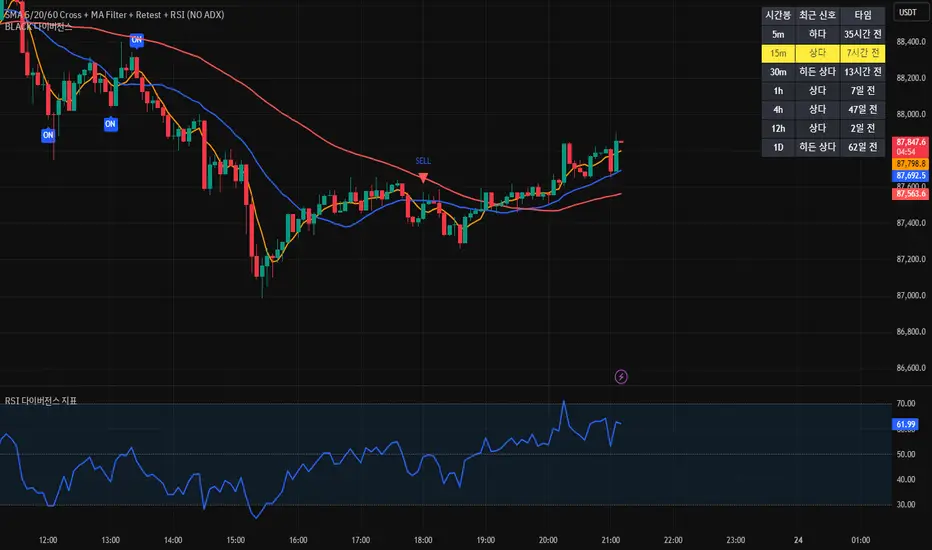
[BLACK] DivergenceDivergence
RSI Filter
EMA Filter
Unconfirmed Divergence Display
Confirmed Unconfirmed Alerts
Boards by Timeframe
다이버전스
RSI필터 EMA필터
미확정 다이버전스 표시
확정 미확정 얼러트
각 시간봉 다이버전스 보드
Volume Flow Bubbles [SunnyAlgo]# Volume Flow Bubbles
## What This Indicator Shows
This indicator visualizes **order flow** by displaying buy and sell volume as colored bubbles directly on your chart. It uses Lower Timeframe (LTF) data to show granular volume activity within each candle.
Perfect for **scalping** and **intraday trading** on any timeframe including Range bars.
---
## How to Read the Bubbles
### Colors
- **Green bubbles** = Buying pressure (bulls absorbing at lows)
- **Red bubbles** = Selling pressure (bears distributing at highs)
### Size
Bubble size reflects volume magnitude:
| Size | Volume Level |
|------|--------------|
| Huge | ≥70% of bar's max volume |
| Large | 40-70% |
| Normal | 20-40% |
| Small | 10-20% |
| Tiny | <10% |
### Position
- Buy bubbles appear **near the low** of each LTF candle (where buyers stepped in)
- Sell bubbles appear **near the high** (where sellers distributed)
---
## Entry Signals
### LONG Signal (▲)
Appears when ALL conditions align:
1. **Imbalance** - Price breaking out of consolidation
2. **Bullish trend** - EMA 9 > EMA 21
3. **Big buy print** - Large green bubble (volume > 3x average)
4. **CVD rising** - Cumulative Volume Delta confirms buying
### SHORT Signal (▼)
Appears when ALL conditions align:
1. **Imbalance** - Price breaking down
2. **Bearish trend** - EMA 9 < EMA 21
3. **Big sell print** - Large red bubble
4. **CVD falling** - Cumulative Volume Delta confirms selling
---
## Order Flow Patterns
| Pattern | What You See | Meaning |
|---------|-------------|---------|
| Absorption | Large green bubbles at lows, price holds | Buyers defending level - look for longs |
| Distribution | Large red bubbles at highs, price stalls | Sellers offloading - look for shorts |
| Breakout | Mostly green bubbles, increasing size | Strong buying momentum |
| Breakdown | Mostly red bubbles, increasing size | Strong selling momentum |
| Balance | Mixed small bubbles, no dominant color | Consolidation - wait for breakout |
---
## Settings Guide
### Lower Timeframe Settings
| Your Chart | Recommended LTF |
|------------|-----------------|
| 5 min | 1 min |
| 15 min | 1-3 min |
| 1 hour | 5-15 min |
| Range bars | 1 min |
### Key Parameters
- **Max Bubbles Per Bar** - Increase for more detail, decrease for cleaner charts
- **History Bars** - How many bars back to display bubbles
- **Big Print Threshold** - Sensitivity for detecting large volume (default 3x)
- **Balance Threshold** - ATR multiplier for detecting consolidation
- **Imbalance Multiplier** - ATR multiplier for detecting breakouts
---
## Alerts
6 built-in alerts available:
- Long Entry Signal
- Short Entry Signal
- Bullish Imbalance
- Bearish Imbalance
- Big Buy Print
- Big Sell Print
---
## Tips for Best Results
1. **Look for size clusters** - Multiple large bubbles at same price = institutional interest
2. **Watch color dominance** - More green = buyers winning, more red = sellers winning
3. **Combine with support/resistance** - Bubbles at key levels are more significant
4. **Use on liquid markets** - Works best on high-volume instruments
5. **Enable "Bring to Front"** - In TradingView visual settings for best bubble visibility
---
## How It Works
The indicator fetches lower timeframe candle data and splits each candle's volume into:
- **Buy Volume** = (Close - Low) / (High - Low) x Volume
- **Sell Volume** = (High - Close) / (High - Low) x Volume
This approximates order flow based on where price closed within the candle range.
---
*Created by SunnyAlgo*

Option ScalperUpdate: A good indicator must be able to detect what type of current market is: trending, range bound, or whipsawing. Based upon market type, signals should be either short living, long lasting or avoided at all. This is what this current updated version does best.

MNQ Reversal Signals (HP/MP) + Traffic Light Regime FilterWhat we’re building
A 1-minute MNQ overlay indicator that does two things:
Generates trade signals (Long/Short) using a structured “reversal + confirmation” logic, plus optional filters.
Decides if we’re allowed to trade at all using a simple Traffic Light regime gate (GREEN / ORANGE / RED).
The goal is to only participate when conditions are favorable, avoid forcing trades, and keep decision-making consistent.
What we want to achieve
A rules-based system that:
Waits for high-quality setups (reversal-style signals, not random chop).
Uses a market regime filter to avoid trading during impulse / chaos.
Produces clear, repeatable entries: HP / MP Long or Short.
Enforces strict discipline: no “coerced” trades, no “I think it’ll work” entries.
Signal logic (V36-style structure)
1) Standard trend signal (EMA crossover)
Fast EMA (9) vs Slow EMA (21):
Long signal = fast crosses above slow
Short signal = fast crosses below slow
Optional RSI filter:
Longs require RSI above threshold
Shorts require RSI below threshold
2) Reversal signals (the ones we actually care about)
These are pattern + location + confirmation signals:
Mid-Probability (MP) Reversal
Long MP: deep pullback below slow EMA + hammer-type candle + EMAs bearish (fast < slow)
Short MP: deep extension above slow EMA + shooting-star-type candle + EMAs bullish (fast > slow)
High-Probability (HP) Reversal
HP is MP plus confirmation:
Long HP: after an MP long, the next 3 candles hold the low
Short HP: after an MP short, the next 3 candles hold the high
So HP = “reversal happened” + “market proved it didn’t immediately fail.”
Traffic Light gate (the trade permission system)
This block measures volatility regime + impulse behavior using:
ATR vs ATR baseline (volatility regime)
True Range vs TR baseline (impulse / expansion)
Count of recent TR expansion events over a rolling window (default 50 bars)
Colors mean:
GREEN (LFG): conditions stable enough to trade
ORANGE (OKISH): tradeable, but not perfect
RED (BAD): impulse / unstable → we do nothing
Our trading rule with the traffic light:
✅ We only take trades when Traffic Light is GREEN or ORANGE.
❌ We do not trade on RED.
❌ We don’t trade the “L” ever. (No “always-on”/baseline entries—only the defined MP/HP signals)
The execution rule-set (how we behave)
We do not chase.
We do not force entries (“coerced trades” are banned).
We wait for the system to print a valid setup:
MP Long / HP Long OR MP Short / HP Short
AND Traffic Light = GREEN or ORANGE
If it’s RED: no trade, even if a signal appears.
That’s it: signal + permission. No improvisation.
Educational Use Only — Not Financial Advice
This script/indicator is provided for educational and informational purposes only. It is not financial, investment, trading, tax, or legal advice, and nothing here should be interpreted as a recommendation to buy, sell, or hold any security, futures contract (including MNQ), options, crypto, or any other instrument.
Risk Warning: Trading involves substantial risk and you may lose some or all of your capital. Past performance is not indicative of future results. Any examples or “signals” are hypothetical and may not reflect real-world execution, slippage, commissions, liquidity, outages, or data-feed differences.
No Guarantees: This script may produce false, delayed, missing, or inaccurate signals due to market conditions, chart settings, timeframe differences, data quality, broker feeds, platform limitations, or coding constraints. It is provided “AS IS” without warranties of any kind.
Your Responsibility: You are solely responsible for all trading decisions, risk management, order placement, and compliance with applicable laws/rules.
Limitation of Liability: To the maximum extent permitted by law, the author/creator disclaims any liability for any losses or damages (including trading losses, lost profits, indirect or consequential damages) arising from the use of or reliance on this script.
By using this script, you acknowledge and accept this disclaimer.

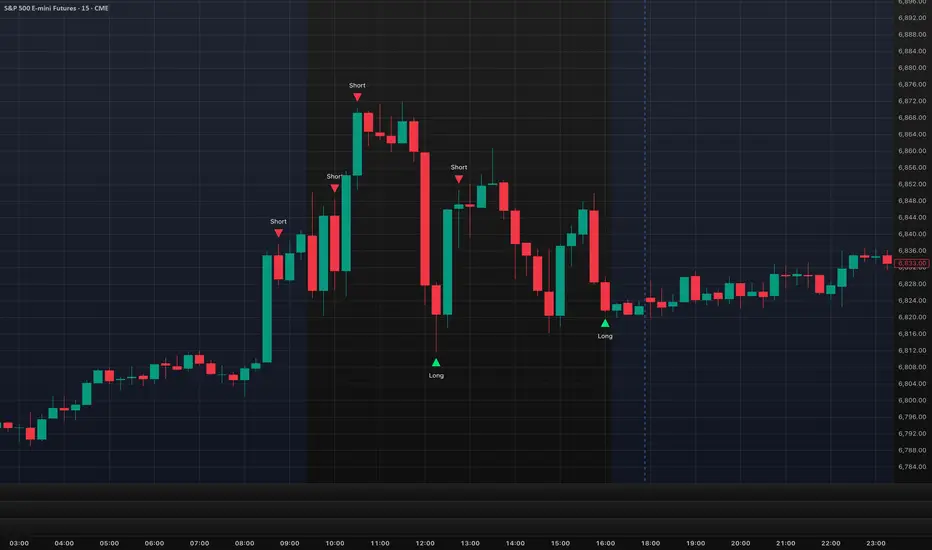
Manipulation Candle 15mManipulation Candle
The Manipulation Candle 15m indicator is designed to highlight potential market manipulation or exhaustion moves on the 15-minute chart by identifying large impulsive candles relative to the Daily ATR and fading them contrarian-style.
This tool is especially useful for index futures, SPX options, and high-liquidity instruments where sharp moves often precede mean reversion.
How It Works -
The script monitors completed 15-minute candles
It measures the candle body size (open → close)
That body is compared to a user-defined percentage of the Daily ATR (set to 20%)
When a candle exceeds the threshold, it is considered an impulse / manipulation candle
Signal Logic (Contrarian Bias) -
Bearish impulse candle → LONG signal
Indicates aggressive selling that may be exhausted
Bullish impulse candle → SHORT signal
Indicates aggressive buying that may be overextended
Signals are only generated once per completed 15-minute candle to avoid repainting.
Inputs -
Daily ATR Length
Controls how volatility is measured
Impulse Threshold (% of ATR)
Defines how large a candle must be (relative to Daily ATR) to trigger a signal
Best Use Cases
Mean-reversion and fade strategies
SPX / ES / NQ / YM indices
Important Notes
This is not a standalone system
Works best with context, confirmation, and risk management
Designed to identify potential turning points, not trend continuation
Created by: @aaronrileycheer
Timeframe: 15-Minute
Style: Contrarian / Mean Reversion
Turtle MTF Donchian plus ATR What you’re looking at
This indicator is a Turtle-style breakout system:
Donchian Channels = breakout levels (entry signals)
ATR = how far to place your Stop Loss and Take Profit (or Donchian exit if you turn that on)
And it can do it on a different timeframe than your chart (MTF).
Step-by-step: how it works
1) You choose your “Signal Timeframe”
In settings:
Signal Timeframe = 1 → signals are based on 1 minute
5 → based on 5 minute
60 → 1 hour
D → daily
✅ You can be on a 1m chart but set signals to D if you want only swing signals.
2) It builds the Donchian breakout levels
It calculates:
Donchian High = the highest high of the last entryLen candles (default 20), excluding the current candle
Donchian Low = the lowest low of the last entryLen candles, excluding current candle
Those two lines are your breakout “walls”.
3) It waits for a REAL breakout (fresh cross)
A long setup triggers only when:
price crosses ABOVE the Donchian High (not just stays above)
A short setup triggers only when:
price crosses BELOW the Donchian Low
✅ This reduces spam signals.
4) It calculates ATR on the same signal timeframe
ATR is volatility. Bigger ATR = bigger stop/target.
Defaults:
ATR length = 20
5) It creates your Entry / SL / TP levels automatically
When a LONG triggers:
Entry = Donchian High
Stop Loss = Entry − (SL mult × ATR)
(default SL mult is 2 → so 2×ATR stop)
Take Profit (if you’re using TP mode) = Entry + (TP mult × ATR)
When a SHORT triggers:
Entry = Donchian Low
Stop Loss = Entry + (SL mult × ATR)
Take Profit = Entry − (TP mult × ATR)
6) It prints it on the chart (easy mode)
When a signal happens it will:
Drop a label that says LONG or SHORT
Show the numbers:
Entry
SL
TP (or Donchian exit level)
Draw horizontal lines for Entry / SL / TP (latest signal only)
7) It can use “true Turtle exit” if you want
If you turn ON:
Use Turtle Exit Rule
Then it does NOT use a fixed TP.
Instead it says:
Long: exit when price breaks below the Donchian exit low (default exitLen = 10)
Short: exit when price breaks above the Donchian exit high
That’s the classic “let winners run” vibe.
8) Alerts (Option A)
You can set alerts for:
Turtle Long
Turtle Short
Those alerts are simple and reliable (no dynamic text).
How YOU would use it (quick examples)
If you trade 1m intraday
Chart: 1m
Signal Timeframe: 1
Try entryLen: 40–60 (less choppy than 20)
ATR: 14–20
SL: 2×ATR
If you want daily swings too
Chart: 1m (for execution)
Signal Timeframe: D (for direction/entries)
That gives you swing breakouts while you watch intraday.

[STRATEGY] Adaptive Multi Factor Trend Trading v1.1Daily Filters
Close vs. short/long daily SMAs (customizable) defines directional priority.
Use the daily Short Long MA spread (or ATR‑normalized) to filter out range‑bound conditions and reduce false breakouts.
30‑Minute Entry Logic
Buy
Daily bullish regime confirmed
High breaks above the trend
Protected by trailing take‑profit and fixed stop‑loss.
Sell #1
Daily bearish regime confirmed
Low breaks below the trend
Long MA slope must be strong (trend‑quality filter).
Sell #2
Day‑session only, limited to high‑probability hours
Triggered by an aggregated bear score (multi‑factor stack) + a downward linear‑regression slope
Friday uses special thresholds/intervals (event‑risk control).
Multi‑Factor Framework
MACD, RSI, Stoch (KD), Ichimoku, CCI, PSAR, Williams %R, Heikin Ashi, Bias, Force Index, plus regression‑slope.
Signals are stacked into bull/bear totals and used as filters or weights—no single indicator dominance.
Risk & Position Management
Fixed TP/SL + trailing TP across entry types
Position size adapts to recent performance (loss‑streak counter) and slope state
Auto pause when the loss streak hits the threshold (configurable duration).
Trading‑Day Controls
Optional pre‑holiday blackout list
Date‑range limiter for backtests or deployment windows.
Design Intent
The goal is to keep net P&L stable while lifting win rate.
In strong‑trend environments, the system leans into trend signals (Sell #1 / Buy).
In short‑term chop, Sell #2 timing and the slope filter reduce noise and avoid low‑quality entries.
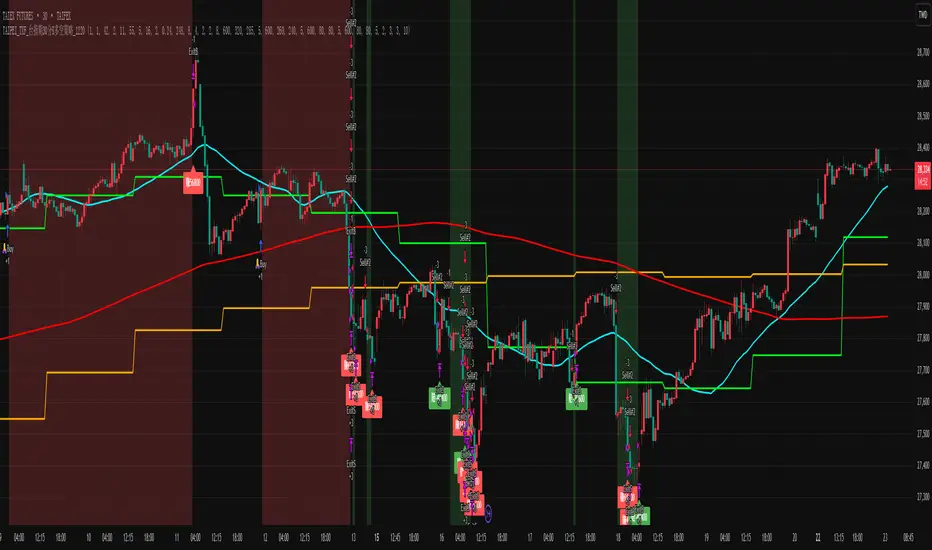
new Relative Strength Index by weidalunThis indicator is a technical analysis tool designed for testing and internal research purposes.
It primarily utilizes price action and momentum shifts to assist in assessing market structure.
This script is intended solely for personal and small-scale internal testing.
