Candlestickpattern

Blockcircle Heikin-Ashi Multi-TimeframeThe BLOCKCIRCLE HEIKIN-ASHI MULTI-TIMEFRAME indicator displays Heikin-Ashi price data across multiple timeframes simultaneously, giving you a clear picture of trend direction from your current chart all the way up to monthly views.
Instead of flipping between charts to check if higher timeframes agree with your trade idea, everything sits right in front of you on a single unified view.
The core concept is simple: when multiple timeframes show the same trend direction, the probability of a successful trade increases. When they disagree, you might want to wait for better alignment or reduce your position size.
WHAT MAKES THIS INDICATOR ORIGINAL AND DIFFERENT
While Heikin-Ashi candles and multi-timeframe analysis are established concepts, this indicator extends beyond simple HA plotting in several ways that justify its protected source status.
First, the summary scoring algorithm calculates a directional score from 0 to 100 that quantifies trend alignment across all enabled timeframes. This is not simply counting bullish versus bearish readings. The score incorporates the current timeframe alongside higher timeframes, weights each contribution, and produces a single metric that represents overall market structure bias.
Second, the indicator includes an intelligent auto-timeframe system that dynamically selects appropriate higher timeframes based on your current chart. Rather than requiring manual configuration, the algorithm maps each chart timeframe to a logical hierarchy of higher timeframes. A 15-minute chart automatically receives 30-minute, 1-hour, 2-hour, 4-hour, and 8-hour references. A daily chart receives 3-day, weekly, 2-week, monthly, and quarterly references. This mapping logic ensures meaningful timeframe relationships regardless of where you trade.
Third, the alignment quality calculation measures how decisive the current trend reading is, regardless of direction. A score where 80 percent of timeframes agree in either direction produces a high alignment quality rating, while a 50/50 split produces low quality. This helps traders distinguish between strong conviction setups and ambiguous market conditions.
Fourth, the stability factor tracks how many timeframes have recently changed direction. Markets where multiple timeframes are actively flipping carry different risk characteristics than markets where all timeframes have maintained their direction for extended periods. The stability calculation converts recent change counts into a percentage that feeds into the overall assessment.
Fifth, the confidence rating system interprets the raw data and translates it into actionable guidance. High confidence requires near-complete alignment across timeframes. Medium confidence requires majority agreement. Low confidence indicates mixed conditions. This interpretation layer helps traders who prefer clear guidance over raw numbers.
These proprietary elements, particularly the auto-timeframe mapping, the multi-factor scoring system, and the stability tracking, represent original development work that extends meaningfully beyond standard Heikin-Ashi MTF implementations available elsewhere.
KEY FEATURES
Multi-Timeframe Heikin-Ashi Display: View up to five higher timeframes plotted directly on your chart alongside the current timeframe
Each timeframe shows both the open and close values as separate lines, with optional fill between them
Heikin-Ashi smoothing filters out market noise better than standard candlesticks, making trend direction easier to identify
All timeframe data updates in real-time as new bars form
Professional Dashboard Panel
Summary score from 0 to 100 that quantifies overall trend alignment at a glance
Individual timeframe breakdown showing exact open and close prices, trend direction, and whether a change just occurred
Statistics section with trend strength percentage, timeframe alignment count, and recent change tracking
Signal status that interprets the data and suggests whether conditions favour buying, selling, or staying neutral
Confidence rating based on how many timeframes agree with each other
Compact mode option for traders who prefer a smaller footprint on their charts
Visual Customisation Options
Three display modes: lines only for a clean look, lines with fill for easier trend visualisation, or cloud style for a more distinct separation between levels
Full colour control for each timeframe so you can match your existing chart theme
Adjustable line widths and optional midline display showing the average of open and close
Background colour shading that changes based on overall trend alignment
Trend change arrows that appear automatically when a timeframe flips direction
Practical Alert System
Individual alerts for each timeframe when it switches from bullish to bearish or vice versa
Combined alert when all enabled timeframes align in the same direction
Single master alert that fires whenever any timeframe changes, useful for staying informed without setting up multiple notifications
Strong trend detection alert when alignment score crosses above key thresholds
HOW TO USE
Setting Up Your Timeframes
Start by choosing timeframes that match your trading style. If you trade the 15-minute chart, enable the 1-hour, 4-hour, and daily timeframes. If you swing trade on the daily, consider the 3-day, weekly, and monthly timeframes.
Give each timeframe a custom label that makes sense to you. The dashboard will display these labels, so use whatever helps you read the information quickly.
You do not need to enable all five timeframes. Many traders find that three or four provide enough context without cluttering the chart.
How to Read the Dashboard
Check the summary row first. A score above 70 with a clear bullish or bearish bias suggests strong alignment. Scores between 40 and 70 indicate mixed conditions where caution is warranted.
Look at the alignment count to see exactly how many timeframes agree. Four out of five being bullish is more convincing than two out of five.
Pay attention to the change indicator, shown as a yellow dot next to any timeframe that just flipped. Recent changes often signal the start of a new move but can also be false signals that reverse quickly.
The confidence rating helps newer traders interpret the data. High confidence means most or all timeframes agree, while low confidence suggests waiting for better conditions.
Identifying Trade Opportunities
The strongest signals occur when all enabled timeframes show the same direction. If you see all green across the board, bullish setups are more likely to succeed. The opposite applies when everything points to bearishness.
When the current timeframe flips to match the higher timeframes, this often marks a good entry point. The lower timeframe is now in agreement with the bigger picture.
Avoid trading against multiple higher timeframes. If the 4-hour, daily, and weekly are all bearish, taking long positions on the 15-minute chart is fighting the overall trend.
Use divergences between timeframes as warning signs. If lower timeframes turn bullish but higher timeframes remain bearish, the rally may be a pullback within a larger downtrend rather than a true reversal.
Managing Risk with Timeframe Analysis
Consider position sizing based on alignment. Full positions when alignment is strong, reduced size when conditions are mixed.
Place stops beyond the higher timeframe structure. If the daily Heikin-Ashi open sits at a certain level, that level often acts as support or resistance.
When higher timeframes start changing direction one by one, this often signals a larger trend shift developing. Take profits or tighten stops on existing positions.
The trend strength percentage gives you a quick read on momentum. Above 80 percent suggests strong conviction in one direction. Below 40 percent suggests the opposite direction dominates.
Combining with Other Analysis
This indicator works well alongside volume analysis. Strong trend alignment with increasing volume adds confidence to the signal.
You can see use the trend change arrows as added confluence towards a trend break as you see below
Support and resistance levels from higher timeframes carry more weight. Use the higher timeframe Heikin-Ashi values as dynamic support and resistance zones.
Combine with momentum oscillators for timing. When the indicator shows alignment and an oscillator shows oversold or overbought conditions, the setup becomes more compelling.
Price action patterns that form in the direction of multi-timeframe alignment have better follow-through than those forming against it.
LIMITATIONS
This indicator uses Heikin-Ashi calculations, which by design lag behind standard price action. Signals confirm trends rather than predict them, and early entries require additional confirmation from other methods.
The auto-timeframe feature selects higher timeframes based on predefined mappings. These mappings work well for most trading styles but may not suit every specific use case. Manual override is available for traders who prefer custom timeframe combinations.
During extended consolidation periods, the summary score may oscillate around 50 percent and produce mixed readings. The indicator performs best when markets exhibit clear directional movement.
Multi-timeframe alignment does not guarantee trade success. Markets can and do reverse even when multiple timeframes agree. Proper risk management and position sizing remain essential regardless of alignment score.
This indicator should be used as part of a complete trading approach. It provides trend context and alignment analysis but does not replace fundamental analysis, risk management, or trading discipline.

Manipulation Candle IndicatorManipulation Candle Indicator
Spot high-probability "manipulation" candles on the 15-minute chart — oversized moves that often signal liquidity grabs, stop hunts, or institutional traps before sharp reversals.
Features:
• "Bull Manip" (green) and "Bear Manip" (red) labels on detected candles
• Range threshold based on % of Daily ATR (default: 20%)
• Adjustable ATR length (default: 14)
• Optional session filters (e.g., NY open / afternoon)
• Compact dashboard: Daily ATR, Manip %, trigger value
How it works:
A 15m candle qualifies if its range (high - low) ≥ Daily ATR × Manipulation %.
Use standalone to spot potential reversals, or combine with your own strategy.
—------------------Want the full automated version?----------------------
Manipulation Candle Strategy PRO adds:
• Automatic reversal entries after manipulation confirmation
• Supertrend + EMA trend filters
• 5m confirmation logic
• ATR or fixed-dollar TP/SL
• Max hold-time exits
• Performance stats table
This strategy is invite-only.
Message me on Trading View for access — it's managed off-platform.
Fade the traps - trade with edge.
Aaron

Custom Long ProjectionDo custom Long Projection
Do custom Long Projection
Do custom Long Projection
Do custom Long Projection
Do custom Long Projection
Do custom Long Projection
Do custom Long Projection
Do custom Long Projection
Do custom Long Projection
Do custom Long Projection
Do custom Long Projection
Do custom Long Projection
Do custom Long Projection
Do custom Long Projection

TrendlinesTrendline S&R
This indicator is an automated technical analysis tool designed to identify the most relevant Support and Resistance (S&R) zones based on market pivots. Unlike standard pivot indicators that clutter the chart with historic lines, this script uses a "Closest-to-Price" algorithm to display only the single most relevant Support (Green) and Resistance (Red) zone currently interacting with price action.
It solves common frustrations with automated trendlines—specifically the issue of lines disappearing immediately upon a breakout—by introducing a Stability Buffer.
Key Features & Importance
The script scans hundreds of potential trendlines but only draws the one geographically closest to the current price.
Importance: This ensures you are looking at the zone that matters right now. It filters out distant or irrelevant historic lines, keeping your chart clean and focused on immediate price action.
🛡️ 5-Bar Stability Buffer (Anti-Flicker)
Feature: A hardcoded 5-bar "memory" prevents the zone from disappearing the moment price touches or breaks it.
Importance: This is critical for trading breakouts. It allows you to see the zone persist while price breaches it, helping you distinguish between a true breakout, a fakeout, or a retest, without the reference level vanishing from your screen.
🔍 Dynamic Pivot Filtering
Feature: Uses a restricted Pivot Strength (5-15) and Minimum Confirmation (2-8 touches).
Importance: By enforcing these limits, the indicator ignores insignificant market noise and micro-swings, ensuring that drawn zones represent structural market levels with genuine liquidity.
🔔 Integrated Alert System
Feature: Built-in alerts for "Zone Breakout" (candle close crossing the zone) and "Zone Touch" (wick entering the zone).
Importance: Allows you to set the indicator and walk away. You will be notified instantly when price interacts with these key levels, removing the need to stare at the chart.
📉 Adaptive Tolerance (Fixed ATR)
Feature: Uses a fixed ATR multiplier internally to determine the width of the zone.
Importance: This automatically adjusts the thickness of the support/resistance zone based on the asset's volatility.
Settings Guide
Bars to Apply: How far back in history the script looks for pivots (Default: 300).
Pivot Source: Choose between calculating from "High/Low" (wicks) or "Close" (bodies).
Pivot Strength: The number of bars required on each side to define a swing point (Range: 5–15).
Min Pivot Confirmation: The minimum number of touches required to validate a trendline (Range: 2–8).
How to Use
Add the indicator to your chart.
Adjust Pivot Strength if you want to catch smaller swings (lower number) or major structures (higher number).
Set an alert in TradingView by clicking the "Clock" icon, selecting this indicator, and choosing "Zone Breakout" or "Zone Touch".

Mkt-Viper ProMkt-Viper Pro
🔶 Overview
Mkt-Viper Pro is a comprehensive market intelligence suite designed to unify trend detection, structural analysis, and price action geometry into a single decision-making framework. Rather than relying on a single lagging calculation, Viper Pro utilizes a "Path Efficiency" model that weighs price movement against the energy (volatility and volume) required to achieve it.
The result is a chart overlay that separates statistically significant trend shifts from market noise. Traders receive adaptive Trend Signals based on volume and volatility thresholds, a background Trend Navigator Cloud for trend context, dynamic Kinetic Ranges for support/resistance, candle pattern detection, an automated Geometric Pattern engine, and much more detailed below. Internally, the system functions as a synaptic network—where momentum, volume, and price structure must align before a signal is validated.
In short, Mkt-Viper Pro is designed for traders who require a trend following and technical roadmap for filtering out low-quality volatility to focus on structural expansions and high-probability reversals.
🔶 What makes Mkt-Viper Pro unique?
Mkt-Viper Pro stands out by combining a volatility-adaptive trend engine with a complete confluence suite. Uniquely, it uses a "Path Efficiency" calculation to separate messy price action from true momentum, automatically filtering out noise during choppy markets. This core logic is then reinforced by multiple layers of environmental context—allowing you to check every move against the background Trend Navigator, Viper Band, Kinetic Ranges, geometric pattern engine and much more. Instead of relying on a single data point, the system provides you with suite of confluences to help you make well informed trading decisions.
Main Features
🔶 Viper Trend Signals
The core of the system is a sophisticated trend detection engine designed to filter out market noise. Instead of reacting to every minor price fluctuation, the algorithm evaluates momentum pressure relative to current volatility. It validates a directional shift only when the market exerts enough "energy" to breach calculated stability thresholds, ensuring that changes in trend are statistically significant rather than random noise.
These mechanics are translated onto the chart through a clean and intuitive visual interface:
Signal Logic:
Trend signals are generated when the price decisively shifts directional momentum. These are marked by clean Triangle Signals at the exact moment of the shift, keeping the chart uncluttered.
Trend Coloring:
To provide instant visual feedback on the market state, the indicator applies Candle Coloring in two distinct modes. Traders can choose a Static mode for clear, binary directional cues, or a Gradient mode that intensifies the color saturation as the trend gains strength and momentum.
Strong vs. Normal:
The system automatically grades every signal. A "Strong" classification is issued when the immediate momentum shift aligns perfectly with the broader, longer-term market context, identifying high-confluence setups with greater weight.
Auto-Tuning & Sensitivity Control
Market conditions are never static; volatility expands and contracts constantly. To address this, Viper Pro is equipped with a dual-mode calibration engine:
Auto-Tuning:
When enabled, the system actively measures "Path Efficiency"—calculating in real-time how choppy or direct price action is. It automatically adjusts its sensitivity, tightening validation criteria during clean trends and loosening them during chop to prevent false signals. Users can select from Fast, Moderate, or Slow profiles to suit their trading style.
Manual Tuning:
For traders who require fixed parameters for backtesting or specific asset classes, the system offers a granular 1–50 sensitivity dial. This allows for precise manual calibration to specific timeframes, giving you total control over how reactive the signals should be.
⚠️ Important:
These signals identify potential momentum shifts and should not be traded blindly. For high-probability outcomes, always validate the signal by ensuring it aligns with other confluences within the suite or other forms of technical analysis.
🔶 Trend Navigator Cloud
The Trend Navigator serves as the indicator’s "Context Awareness" layer, visualizing the broader ambient direction or "weather" of the market. Solving the classic dilemma between "lag" and "noise," this feature utilizes an Adaptive Flow Algorithm that adjusts its internal responsiveness based on real-time RSI and market velocity.
Smart Adaptation:
Instead of using a fixed lookback period that fails when market conditions change, the Navigator automatically detects the speed of price action. It tightens its tracking during impulsive trends to reduce lag, while loosening and smoothing itself during choppy consolidation to prevent false reversals.
Dynamic Structure:
The feature renders as a background cloud that expands and contracts with volatility. This creates a visual "breathing" support and resistance structure that naturally contains price action during healthy trends.
Usage:
Directional Bias:
When the Cloud is bullish color and below the trend, the macro environment is Bullish; look primarily for Long signals. When below the price action and bearish color, the environment is Bearish; focus on Short signals.
Trend Floor:
In established trends, the Cloud acts as a dynamic floor (or ceiling), highlighting high-probability zones for pullbacks and potential continuation entries.
Custom Tuning:
Users retain full control over the Navigator's behavior. You can enable Auto-Tuning to let the engine select the optimal sensitivity (Fast, Medium, or Slow) based on current conditions, or use the Manual Speed Dial (1–50) to fine-tune the cloud's reactivity to your specific timeframe or asset class.
🔶 Viper Band
The Viper Band is engineered as a multi-dimensional market utility, seamlessly consolidating four distinct technical concepts into a single, adaptive overlay. This unified approach provides a complete view of immediate price dynamics:
Trend Following:
It acts as an immediate directional filter. When the price is holding above the band, the short-term structure is Bullish; when below, it is Bearish. The band changes color dynamically to reinforce this state.
Dynamic Support & Resistance:
The outer edges of the band are volatility-adjusted. In a strong trend, the band creates a rising floor (or falling ceiling), acting as a trailing support zone where price often bounces to continue the move.
Market Equilibrium:
The center of the band represents the market's "fair value" or equilibrium point relative to the current timeframe. It filters out tick-by-tick noise to show the true mean price.
Price Magnet:
Because markets cannot stay overextended indefinitely, the Viper Band acts as a gravitational magnet. When price deviates too far from the band, it signals an overextended state, often preceding a "snap-back" or mean reversion event where price returns to the Band.
Usage:
Trend Health:
In a healthy, sustainable trend, the band often acts as a continuous trailing support or resistance zone.
Re-Entry:
For trend-followers, pullbacks that touch or test the Viper Band often present high-probability, low-risk opportunities to rejoin the dominant move.
🔶 Viper Kinetic Ranges (VKR)
Standard pivot points and static support lines often fail because they treat every trading session the same, ignoring the unique volatility profile of the current day. Viper Kinetic Ranges (VKR) solves this by generating dynamic Support and Resistance structures that actively adapt to the market's physical "energy."
Volume-Weighted Expansion:
Unlike standard volatility envelopes that rely solely on price range, VKR incorporates Volume Weighting. When volume flows into the market (e.g., during market opens or news events), the defined range automatically expands. This helps prevent "fake-out" signals by proving that the market needs more energy to validate a true breakout during high-activity periods.
State-Change Logic:
The levels do not drift aimlessly with every tick. Instead, they operate on a State-Change basis. The Support and Resistance levels remain locked and stable until the market exerts enough directional force to force a "state transition." When this happens, the levels "step" up or down to a new equilibrium zone. This stepping behavior helps traders visualize exactly when the market has accepted a new value area versus when it is simply ranging.
Concept:
Think of these levels as the "lungs" of the market. They expand and contract to show where price is statistically likely to find equilibrium or rejection based on the current expenditure of buying and selling energy.
Usage:
Trend Validation:
Use the central Equilibrium Level (Datum) as your directional "Line in the Sand." As long as price holds above this stepped line, the immediate value area is Bullish. A breach below signals a potential regime change.
Precision Targeting:
The outer Major Structures represent statistical exhaustion points extended by volatility. These are ideal, scientifically derived locations to set Take Profit orders or anticipate a mean-reversion bounce.
Support and Resistance:
Each level may produce some type of reaction and can act as support and resistance levels presenting potential opportunities for entries or profit taking.
🔶 Auto-Geometric Chart Patterns
Viper Pro features a "V7" pattern recognition engine that runs a continuous, frame-by-frame structural analysis of price action. Instead of waiting for a pattern to complete before drawing it (hindsight), this engine detects Wedges, Channels, and Triangles as they form in real-time.
Vertex Array Technology:
Unlike basic scripts that simply connect the highest highs and lowest lows, the Viper Engine stores historical pivot points in dynamic arrays. It analyzes the mathematical relationship between these points—calculating slope ratios and width consistency—to determine if a valid geometric structure exists.
⚠️ Technical Disclosure: Pattern Dynamic Regeneration
The Geometric Pattern Engine utilizes a process of "Functional Repainting" (Dynamic Object Regeneration). Because chart patterns such as Wedges and Channels are evolving structures, the indicator continuously re-evaluates the validity of vertices in real-time. As the price expands, trend lines will adjust to new market data to keep information relevant. Additionally, as price data unfolds, old patterns or invalidated patterns will be removed from the chart automatically in order to print a newer more recent pattern to keep your charts clean and up to date on the most recent price data.
🔶 Candle Pattern Recognition
The Candle Pattern Recognition Module utilizes a Context-Aware Engine to scan for high-probability Reversal and Continuation structures (Hammers, Stars, Dojis, and Absorptions).
Trend & Context Filtering:
A pattern is only as good as its location. The engine filters signals based on the broader trend (e.g., looking for Hammer candles only during downtrends and Falling Stars only during uptrends). This ensures you are trading reversals at logical structural points, not random noise.
Quality & Volume Logic:
The system includes an integrated "Quality Filter." It ignores patterns formed on low liquidity. For a signal to be valid, it must demonstrate a "Footprint of Interest"—verified by a relative spike in Volume or an expansion in ATR (Range) relative to the recent lookback period.
The Patterns:
Absorption:
Highlights powerful shifts in control (often called Engulfing) where one side decisively overtakes the other.
Stars & Hammers:
Pinpoints rejection wicks that signal exhaustion.
Dojis:
Identifies moments of indecision and potential equilibrium.
🔶 Swing Failure Pattern (SFP) Detection
Institutional trading often involves seeking liquidity at obvious structural levels. The SFP engine is designed to automatically detect these "Liquidity Sweeps" or "Bull/Bear Traps" where the market hunts for stop-losses before reversing.
The Logic:
The system actively monitors significant Pivot Points. An SFP is validated when the price pierces a key Pivot High or Low—taking out liquidity—but subsequently fails to hold that level and closes back within the previous range.
Visuals:
When a sweep occurs, the indicator plots a discrete dashed line connecting the original pivot to the current "sweep" candle. This visualizes the exact "Trap Zone" where breakout traders were caught offside, signaling a potential high-probability reversal opportunity.
Usage:
Fade the Breakout:
An SFP is a classic "Fade" signal. When a Bearish SFP appears at a high, it implies that buyers have potentially been trapped; traders often look for Short entries here. Conversely, a Bullish SFP at a low suggests sellers are trapped, offering a potential Long opportunity.
🔶 Reversal Cloud
The Reversal Cloud acts as a statistical boundary gauge, designed to visualize when price action has extended significantly beyond its average value. Markets typically spend the majority of their time within a standard distribution; this feature highlights the rare moments when volatility pushes price into statistical extremes.
The Logic:
The engine calculates a dynamic deviation envelope based on recent market volatility. Rather than predicting a specific turning point, it identifies zones where the market is "stretched" relative to its baseline. When price enters this colored "Horizon," it indicates that the current move is statistically extended, which historically correlates with periods of consolidation or mean reversion.
Visuals:
The feature renders as a shaded zone at the upper and lower limits of the chart. It remains passive during normal price action but highlights "Breach" events when price pushes into these outer deviation bands.
Usage:
Context Awareness:
Use the Cloud to gauge the maturity of a move. Entering new impulsive trades while inside the Reversal Cloud carries higher statistical risk, as the price is already far from equilibrium.
Reaction Watch:
For traders already in a position, a breach of the Cloud serves as a cue to tighten risk management or monitor for signs of momentum loss, as the market digests the recent expansion.
⚠️ Important Note:
While these zones represent statistical extremes, they are not hard barriers. In powerfully trending markets or during high-impact news events, price can "ride" or expand these bands for extended periods without reversing immediately. Do not trade these zones blindly; always wait for secondary confirmation of momentum loss (such as a structural break or a rejection candle) before anticipating a reversal.
🔶 Key Levels & Session Structure
Successful trading requires knowing where liquidity resides. Viper Pro automates the analysis of "Market Memory" by mapping significant historical and time-based structures directly onto your chart.
The Logic:
It automatically plots the Previous Day (PDH/PDL), Previous Week (PWH/PWL), and Previous Month (PMH/PML). These levels often act as major "Magnets" where price reverses or accelerates as it seeks liquidity.
Session Profiles:
Intraday price action is heavily influenced by the distinct behaviors of the global trading centers. This module highlights the trading ranges of the Asia, London, and New York sessions.
The Logic:
By visualizing the High and Low of the previous session, traders can spot "Session Sweeps"—a common phenomenon where the market manipulates price to break a prior session's high or low to trap traders before reversing.
Usage:
Confluence:
These levels serve as an excellent filter for Trend Signals. For example, a "Buy" signal generated directly below a Weekly High requires caution, whereas a signal bouncing off a Daily Low carries higher conviction.
Targeting:
Use these static structural levels as scientifically derived potential Take Profit zones, as price often pauses or reacts when testing these historical boundaries.
🔶 Opening Range Breakout (ORB)
The first 15 minutes of the trading session (09:30–09:45 ET) often establish the initial balance and sentiment for the entire trading day. The Viper ORB engine automates the identification of this critical volatility window.
The Logic:
The system defines the "Opening Range" by capturing the highest high and lowest low of the session's first 15 minutes. It waits for the opening time window to fully close before projecting the levels, ensuring you are planning trades against confirmed structure rather than developing noise.
Visuals:
Once the opening window concludes, two distinct levels (High and Low) are projected forward for the remainder of the session.
Usage:
Breakout Plays:
A clean close above the Opening Range High often signals strong buying intent, suggesting a trend day.
Range Fading:
If price breaks the range but fails to hold, price often rotates back to the opposite side of the opening range.
Support/Resistance Flip:
Later in the day, these levels often act as strong support or resistance when retested.
🔶 Visual Intelligence (Color Themes)
Visual clarity is essential for rapid decision-making. A cluttered or poorly contrasted chart can lead to cognitive fatigue. To address this, Mkt-Viper Pro features a global Color Theme Engine that instantly synchronizes every element of the suite—signals, candles, clouds, and text—to a unified palette.
The Presets:
The system comes with five professionally designed profiles to suit different trading environments and lighting conditions:
Viper Original: High-contrast Neon Green & Purple (Optimized for Dark Mode).
Classic: Standard Green/Red configuration for traditionalists.
Cool Blues: A calming Blue/Violet palette designed to reduce emotional reactivity.
Ember & Ash: High-warmth Orange/Slate contrast.
Monochrome: Grayscale/Silver logic for distraction-free structural analysis.
Customization:
Traders with specific branding requirements or accessibility needs (such as color blindness) can select "Custom Theme." This unlocks distinct color inputs, allowing you to define your own specific Bullish, Bearish, and Neutral colors that instantly propagate across the entire indicator suite.
🔶 How to use:
Mkt-Viper Pro is designed to reduce "Analysis Paralysis" by organizing data into a clear decision hierarchy. Rather than chasing every signal, we recommend a workflow based on Confluence:
Trend Continuation (The Pullback)
This is the highest probability approach, trading with the momentum.
1. Identify Trend:
Ensure the Viper Trend Signal is Bullish and the Navigator Cloud is bullish.
2. Wait for Value:
Do not chase pumps. Wait for price to pull back into the Navigator Cloud or the center of the Viper Band .
3. Trigger:
Look for a specific confirmation candle (e.g., a Hammer or Bullish Absorption ) to form within that support zone.
4. Target:
Target the next Kinetic Range (VKR) resistance level above.
Structural Reversal (The Fade)
1. Identify Exhaustion:
Wait for price to push into the Reversal Cloud (Statistical Extreme) or hit a major HTF Level (e.g., Previous Week High).
2. Spot the Trap:
Watch for an SFP (Swing Failure Pattern) or a Geometric Wedge pattern to form, indicating momentum loss.
3. Confirmation:
Wait for a counter-trend Candle Pattern (e.g., Falling Star) or a flip in the Viper Trend Signal before entering. Trying to catch a falling knife without this confirmation is not recommended.
The Breakout
Trading expansion from consolidation.
Context: Identify a tightening Geometric Pattern (Triangle) or a clearly defined
Opening Range (ORB) .
Expansion: Wait for a clean candle close outside of the pattern/range.
Validation: Ensure the breakout moves through the Kinetic Range Equilibrium , proving that real volume is backing the move.
Note:
Mkt-Viper Pro is engineered as a complete standalone system for Trend and Structural analysis. However, it also functions as the core "Chart Overlay" module within the wider Mkt-Viper 3-part ecosystem. It is calibrated to synchronize visually and mathematically with its sister scripts, ensuring a unified data view without conflicting signals.
🔶 Realistic Expectations & Risk Management
It is vital to understand that Mkt-Viper Pro is a technical analysis instrument, not a crystal ball. No algorithm can predict the future with 100% certainty. The goal of this system is not to eliminate losses, but to provide a statistical edge by aligning multiple factors of confluence.
Win Rate vs. Risk/Reward:
High-probability trading is not just about "Win Rate"; it is about the relationship between Risk and Reward.
The Edge:
By using the SFP wicks or Viper Band extremes for tight stop-loss placement, and targeting the Kinetic Ranges for exits, the system is designed to identify setups with favorable Risk-to-Reward ratios (e.g., 1:2 or 1:3).
The Reality:
Even a system with a modest win rate can be highly profitable if the winning trades are larger than the losing trades. This suite is built to help you identify those skewed opportunities.
Market Conditions & Drawdown:
Like all trend-following systems, the greatest risk occurs during undefined, choppy range-bound markets where price whipsaws without momentum.
While the "Path Efficiency" filter is designed to minimize this, false signals can and will occur during periods of low liquidity.
Mitigation:
We strongly recommend avoiding entries when the Navigator Cloud is flat/contracted (indicating zero momentum) or when price is stuck between two tight Kinetic Range levels.
---------------------
Disclaimer
The content provided in my scripts, indicators, ideas, algorithms, and systems is for educational and informational purposes only. It does not constitute financial advice, investment recommendations, or a solicitation to buy or sell any financial instruments. I will not accept liability for any loss or damage, including without limitation any loss of profit, which may arise directly or indirectly from the use of or reliance on such information.
All investments involve risk, and the past performance of a security, industry, sector, market, financial product, trading strategy, back test, or individual's trading does not guarantee future results or returns. Investors are fully responsible for any investment decisions they make. Such decisions should be based solely on an evaluation of their financial circumstances, investment objectives, risk tolerance, and liquidity needs.

MTF Probability Predictor v1 (Directional + Market State)This indicator is designed to generate high-confidence market bias by combining price action, chart structure, momentum, divergence analysis, ATR, and VWAP-based volatility assessment.
Instead of providing binary signals, the indicator presents a probability-based decision framework, displaying BUY / SELL confidence percentages in real time. This allows traders to assess signal quality, market strength, and trade suitability before taking a position.

JRockets MACDThis is my favorite indicator, that I use as one of my conformations before entering a trade in the 15M timeframe This MACD is tailor made by me to work efficient, consistent, and effectively. I back tested tons of times, it helps if you're entering too early, late and even get faked out. The MACD is by far my favorite and one and only indicator, and here's why. The MACD contains 2 EMA lines where it gives me a signal on when to buy or sell. If the Blue line crosses the red line on the bottom of the indicator its giving buy signals as long as the blue line stays on top, and when the red line crosses the blue line on top of the indicator its giving sell signals as long as the redline stay on top. Be sure to pay attention to the candle stick patterns as well and has to be around key levels. What makes this a better signal as well, the MACD has a built-in momentum hologram, some see it as overbought/undersold, or volume indicator. By combining the momentum hologram with your buy/sell ema will prevent you from entering a trade in the wrong area. The momentum hologram is almost self-explanatory, when there is buying pressure, the hologram turns blue, the darker the blue the stronger the momentum as well as the length of the hologram, once is start losing momentum it starts to turn to a lighter blue. Eventually a light red to a solid red showing momentum for a strong sell, this works vice versa. Combing all that at once and built instincts it becomes very effective. You can also use the EMA signals as divergence, but I don't really trade with divergence but could possibly give you conformation. Using the MACD is like having 3-4 indicators in one with all of them working fluent together. I have the MACD locked on the 15M timeframe because that's where it works more accurately. You can make the EMA lines a bit thicker to be easier to see. I would change the MACD visible for the 15M timeframe only or 1M to 1H timeframe. I hope this indicator helps you, as it did for me. You can simply click add on your charts on the top left to get this free indicator. Peace out and enjoy! Be sure to share, this indicator with your friends as it may help someone out.

FVG InversionThis indicator identifies Fair Value Gaps (FVG), providing entry and exit parameters upon FVG inversions. SL is based on a previous, relevant swing high or low and TPs are set in accordance to Risk-Reward ratios.
Any members of the Primeverse trading community can use this indicator for free. You can learn more about joining our free community from here: primeverselaunch.base44.app
If you have any further questions, you can connect with my team via email or message me on Instagram. Find contact details below.
Email: inquiry@tradersparadise.33mail.com
Instagram: www.instagram.com

Smart Candlestick Pattern Filter [MarkitTick]💡 This Script is a sophisticated technical analysis tool designed to identify, grade, and display over 40 distinct candlestick formations based on a proprietary strength and context filtering system. Unlike standard pattern finders that often clutter charts with conflicting signals, this script utilizes a hierarchy logic to display only the most significant pattern detected on any given candle, ensuring chart clarity and actionable data.
● Originality and Utility
The primary utility of this script lies in its filtering engine. Standard indicators often flag every minor Doji or Spinning Top, creating noise. This indicator categorizes patterns into five distinct levels of strength, ranging from simple indecision to very strong reversal or continuation signals.
Furthermore, it incorporates a Trend Context filter, which checks the relationship between price and a Simple Moving Average (SMA). This ensures that reversal patterns (like Hammers) are prioritized during downtrends, while continuation patterns are highlighted during established moves, reducing false positives.
● Methodology
The indicator evaluates price action using specific ratios between the Open, High, Low, and Close, alongside the body size relative to the total range. It assigns a strength score to each detected pattern.
• Pattern Strength Grading
Strength 1 (Indecision): Includes patterns like Doji, Spinning Tops, Dragonfly, and Gravestone Dojis. These signal a pause in momentum.
Strength 2 (Weak): Includes patterns like Hanging Man, Inverted Hammer, Belt Holds, and In-Neck lines. These suggest potential movement but often require confirmation.
Strength 3 (Moderate): Includes classic reversals like Hammers, Shooting Stars, Haramis, Dark Cloud Cover, and Piercing Lines.
Strength 4 (Strong): Includes major signals like Engulfing patterns, Morning/Evening Stars, and Marubozu candles.
Strength 5 (Very Strong): Reserved for rare, high-probability multi-candle formations like Three White Soldiers, Three Black Crows, Rising/Falling Three Methods, and Breakaway gaps.
The script calculates all potential patterns for the current bar and then compares their strength scores. Only the pattern with the highest strength is displayed. If the Show Trend Context option is enabled, the script further validates the pattern against the current market direction (determined by the SMA and slope) before plotting.
● How to Use
Traders can use this tool to identify potential entry and exit points based on the strength of the signal.
• Visual Signals
Patterns are labeled directly on the chart:
Green Labels/Text: Indicate Bullish patterns.
Red Labels/Text: Indicate Bearish patterns.
Gray/White Labels: Indicate Indecision or Weak patterns.
Hovering over any label provides the full name of the pattern and its strength rating (e.g., "Bullish Engulfing - Strength: Strong").
• Trading Logic
High Strength Signals (Levels 4-5): These can be used as primary triggers for trend reversals or strong continuations.
Moderate Signals (Level 3): Useful for adding confluence to existing analysis or anticipating a setup.
Indecision (Level 1): Often useful for taking profits or tightening stop-losses, as they indicate the current trend may be stalling.
● Settings
Show Only Strong Patterns: When enabled, filters out Strength 1, 2, and 3, showing only the most significant signals (Strength >= 4).
Max Patterns to Display: Limits the number of historical labels to prevent chart clutter.
Max Candles to Check Engulfing: Adjusts how far back the script looks to validate the size of an engulfing candle.
Trend Detection Period: Sets the length of the SMA used to determine the background trend context.
Show Only Trend-Appropriate Patterns: If checked, bullish reversals are only shown in downtrends, and bearish reversals in uptrends.
● Disclaimer
All provided scripts and indicators are strictly for educational exploration and must not be interpreted as financial advice or a recommendation to execute trades. I expressly disclaim all liability for any financial losses or damages that may result, directly or indirectly, from the reliance on or application of these tools. Market participation carries inherent risk where past performance never guarantees future returns, leaving all investment decisions and due diligence solely at your own discretion.

Reversal Candlestick PatternsReversal Candlestick Patterns
Reversal Candlestick Patterns is an indicator designed to detect classic candlestick reversal patterns with additional market context filtering.
The indicator identifies ten well-known reversal candlestick patterns and displays them directly on the chart as visual blocks. Each pattern is detected using its own logic, based on candle structure, position relative to local extremes, and the direction of the current trend.
Bullish patterns:
> Bullish Engulfing
> Morning Star
> Hammer
> Inverted Hammer
> Three White Soldiers
Bearish patterns:
> Bearish Engulfing
> Evening Star
> Hanging Man
> Shooting Star
> Three Black Crows
Pattern configuration
Detection of each individual pattern, its short name displayed on the chart, and the color of the highlighting block can be configured separately in the first two settings groups:
Bullish Patterns and Bearish Patterns .
This allows you to fully customize which patterns are used, how they are labeled, and how they are visually represented.
Trend filtering
The indicator includes an optional trend filter based on two Simple Moving Averages.
It is enabled using the Check Trend setting. The Trend Detection Length parameter is used simultaneously for several calculations:
> Length of the fast moving average
> Half of the slow moving average length
> Number of consecutive bars required to confirm trend direction
This approach helps filter out reversal patterns that form against a well-established trend.
External filters
The indicator supports external confirmation filters for bullish and bearish patterns. External filter settings are located in the External Filters group. For each filter, you can specify the value of an external indicator that must be met for a pattern to be confirmed. This allows flexible integration with oscillators, volume-based indicators, or custom scripts.
Visualization settings
Visualization settings control:
> Pattern name display
> Text size
> Block fill transparency
These settings affect only the visual presentation and do not influence the detection logic.
Alerts
The indicator provides two types of alerts:
1. Global alert for any detected pattern. Created by selecting “Any alert() function call” when setting up an alert.
2. Dedicated alert conditions for:
> Each individual pattern
> Any bullish pattern
> Any bearish pattern
Please note: if detection of a specific pattern is disabled in the settings, alerts for that pattern will not trigger.
Important note
Candlestick patterns should not be used as standalone trading signals. This indicator is intended to be used as part of a broader analysis, together with trend structure, key levels, volume, and other analytical tools.

TCR by AMAGADON TCR - THREE CANDLE RULES
The Methodology
TCR (Three Candle Rules) is a systematic confirmation indicator developed to solve the problem of "False Breakouts." Many traders lose capital by entering as soon as price touches a level; TCR eliminates this by enforcing a Two-Candle Validation rule.
The algorithm identifies a session-based range and requires price to "prove" its strength by holding outside that range for two consecutive candles before a signal is issued.
How the TCR Logic Works:
Zone Identification: The script anchors to the high and low of the session start (Asia, London, or NY).
Validation (The Rule):
For a BUY: Two consecutive M15 candles must both Open and Close entirely above the session high.
For a SELL: Two consecutive M15 candles must both Open and Close entirely below the session low.
The Trigger Box: Once validated, a Blue (Buy) or Red (Sell) box is drawn. The 50% (Midpoint) of the trigger candle becomes the high-probability entry zone.
STRICT FOREX RISK DISCLOSURE
⚠️ HIGH-RISK WARNING: Trading Foreign Exchange (Forex) involves a high level of risk and may not be suitable for all investors. The high degree of leverage can lead to the loss of your entire investment. Only trade with money you can afford to lose.
NO FINANCIAL ADVICE: TCR - THREE CANDLE RULES is a technical analysis tool for educational and informational purposes only. It does not constitute financial or investment advice.
LIMITATION OF LIABILITY:
No Accuracy Guarantees: Mathematical patterns do not guarantee future results.
Execution Risks: The author is not responsible for losses due to market volatility, news spikes, or broker slippage.
User Responsibility: By using this script, you acknowledge that all trading decisions are yours alone. The author is not liable for any financial damages

MA Candle Color [TheScalpingAnt]MA Candle Color
OVERVIEW
MA Candle Color is a visual indicator that transforms your trading experience by providing instant, real-time feedback on price position relative to your chosen Moving Average.
What makes it unique?
• Real-time visual clarity: The current forming candle changes color dynamically based on its position relative to the MA
• Zero lag: Instant visual feedback as price moves
• Clean charts: Only the active candle is colored - no chart clutter
• Professional design: Sleek, minimalist approach that enhances decision-making
Perfect for:
• Day traders seeking instant trend confirmation
• Scalpers who need split-second decision support
• Swing traders monitoring trend alignment
• Any trader who values visual clarity and speed
CONCEPTS
The Power of Visual Trading
Traditional indicators require constant interpretation. MA Candle Color eliminates this cognitive load by providing instant visual feedback through intelligent candle coloring.
Core Principle
The indicator operates on a simple but powerful concept:
• Green Candle = Price is above the Moving Average (bullish territory)
• Red Candle = Price is below the Moving Average (bearish territory)
Why Only the Current Candle?
-Unlike other indicators that color all candles, MA Candle Color focuses exclusively on the NOW:
-Eliminates visual noise
-Keeps your focus on current market conditions
-Prevents analysis paralysis
-Maintains clean chart aesthetics
-The Moving Average Foundation
-Moving Averages are one of the most trusted tools in technical analysis. This indicator leverages reliability while adding a modern, intuitive visual layer.
FEATURES
Real-Time Dynamic Coloring
• Current candle changes color instantly as it forms
• Green when price crosses above MA
• Red when price crosses below MA
• Automatic color reset when candle closes
Precision Engineering
• Zero repainting - what you see is what you get
• Lightweight code - no performance impact
• Compatible with all timeframes and instruments
Full Color Customization
-Choose your own bullish color (default: vibrant green)
-Choose your own bearish color (default: professional red)
-Match your chart theme perfectly
-High visibility options for all screen types
-Clean Visual Design
-MA plotted as subtle gray line
-Works seamlessly with other indicators
CUSTOMIZATION
Complete Control Over Your Trading Experience
MA Length (Default: 8)
Adjust from 1 to any value
Shorter periods (5-20): Responsive, ideal for scalping/day trading
Medium periods (20-50): Balanced for swing trading
Longer periods (50-200): Trend following and position trading
MA Type (Default: EMA)
• SMA: Best for identifying major support/resistance levels, classic, smooth trend identification
• EMA: Ideal for fast-moving markets and quick trend changes, responsive to recent price action
• WMA: Great for balanced trend analysis, balanced approach with recent price emphasis
• VWMA: Perfect when volume analysis is crucial, incorporates volume for institutional insight
• HMA: Excellent for reducing noise in volatile markets, incorporates volume for institutional insight
Recommended Configurations
For Day Trading:
• MA Length: 8-13
• MA Type: EMA or HMA
• High contrast colors
For Swing Trading:
• MA Length: 21-50
• MA Type: EMA or SMA
• Professional, subtle colors
For Scalping:
• MA Length: 5-8
• MA Type: EMA or HMA
• Bright, high-visibility colors
USAGE
Getting Started (3 Simple Steps)
Step 1: Add to Chart
• Search "MA Candle Color" in TradingView indicators
• Click to add to your chart
• Indicator loads with optimized default settings
Step 2: Customize (Optional)
• Click the settings gear icon
• Adjust MA length to match your trading timeframe
• Select your preferred MA type
• Choose your custom colors
Step 3: Trade with Confidence
• Watch the current candle color in real-time
• Green = Bullish momentum (price above MA)
• Red = Bearish momentum (price below MA)
• Use as confirmation with your existing strategy
Trading Applications
Trend Confirmation
• Green candle confirms uptrend continuation
• Red candle confirms downtrend continuation
• Color changes signal potential trend shifts
Entry Timing
• Enter long when candle turns green with other confirmations
• Enter short when candle turns red with other confirmations
• Use as a filter to avoid counter-trend trades
Exit Signals
• Exit longs when candle turns red
• Exit shorts when candle turns green
• Protect profits by respecting color changes
Multi-Timeframe Analysis
• Use on higher timeframe for trend direction
• Use on lower timeframe for precise entries
• Align colors across timeframes for high-probability setups
Pro Tips
Combine with Support/Resistance: Use color changes at key levels for powerful signals
Volume Confirmation: Look for color changes with volume spikes for stronger moves
Multiple MAs: Add multiple instances with different lengths (e.g., 8 EMA, 21 EMA, 50 SMA)
Risk Management: Never trade on color alone - use proper stop losses and position sizing
CONCLUSION
Why MA Candle Color is Essential for Modern Traders?
In today's fast-paced markets, speed and clarity are everything. MA Candle Color delivers both by transforming complex Moving Average analysis into instant visual feedback.
Key Benefits Recap
-Faster Decision Making - No more mental calculations
-Reduced Errors - Visual clarity prevents mistakes
-Professional Appearance - Clean, distraction-free charts
-Universal Application - Works with any strategy or market
-Fully Customizable - Adapts to your exact needs
-Zero Repainting - Reliable, honest signals
-Lightweight - No performance impact
Who Benefits Most?
-Day Traders: Instant trend confirmation for quick entries/exits
-Scalpers: Split-second visual feedback for rapid trading
-Swing Traders: Clear trend alignment across timeframes
-Beginners: Simplified MA analysis without complexity
-Professionals: Clean visual layer for existing strategies
The Competitive Edge
While others are calculating price vs MA in their heads, you'll have instant visual confirmation. While they're second-guessing crossovers, you'll be executing with confidence. While their charts are cluttered with colored history, yours will be clean and focused on NOW.

3SPC Three Candle Price Action Setup3SPC (Three Candle Price Action Setup) is an open-source indicator designed to detect
a simple and clearly defined three-candle price action pattern.
The logic is based on the following structure:
• The first two candles move in the same direction (bullish or bearish).
• The third candle interacts with the real bodies of both previous candles,
which may indicate a short-term liquidity sweep or price reaction.
• A bullish setup is confirmed when price holds above the open of the first candle.
• A bearish setup is confirmed when price holds below the open of the first candle.
This script does not use oscillators or lagging indicators.
It is intended as a visual aid for discretionary traders and should be used
together with market context, risk management and higher timeframe analysis.
The script is published as open-source for educational and transparency purposes.
UI Labels Translation:
- نمایش ستاپ صعودی: Show bullish setups
- نمایش ستاپ نزولی: Show bearish setups

C3 Pattern Trigger-DhirenFawxThis indicator is a highly streamlined and immediate signal generator based on a specific 3-Candle (3C) pattern used to quickly identify potential demand and supply exhaustion points.
Unlike traditional zone-based indicators that wait for a price breakout after the pattern forms, the 3C Pattern Trigger signals the moment the pattern completes, offering an early entry/alert opportunity.
Connect - DhirenFawx

Moving Average + Count Candles Number - DiLeViThis indicator can add Moving Averages and candles number within same indicator and can be personalised.

SNP420/TRCS_MASTERMicro Body Candle Highlighter is a visual tool for TradingView that continuously scans the active timeframe and highlights all candles with an extremely small body.
For every bar (including the currently forming one), the indicator compares the absolute distance between Open and Close to a user-defined threshold in ticks (default: 1 tick, based on syminfo.mintick).
If the candle’s body size is less than or equal to this threshold, the indicator draws a red frame around the candle – either around the body only or the full high-to-low range, depending on user settings.
Optionally, the indicator can also trigger alerts whenever such a “micro body” candle is detected, allowing traders to react immediately to potential indecision, pauses, or micro-reversals in price action.
author: SNP_420
project: FNXS
ps: Piece and love

Engulfing Detector by RWBTradeLabEngulfing Detector by RWBTradeLab
A clean, non-repainting engulfing pattern detector designed for traders who rely on price action and candle confirmation.
What this indicator does
This script automatically identifies and highlights two types of engulfing patterns on closed candles only:
1. Regular Engulfing (R EG)
* Regular Buy EG: A bullish candle fully engulfs the previous bearish candle’s high.
* Regular Sell EG: A bearish candle fully engulfs the previous bullish candle’s low.
2. E-Regular Engulfing (ER EG)
* Detects “extended” engulfing setups where a strong base candle is followed by 2 or more opposite-color candles and then a confirming engulf close.
* Useful for spotting delayed but powerful reversals.
Visuals on chart
* A rectangle (box) is drawn from the base candle to the confirmation candle.
* Optional text labels appear above/below the box (offset adjustable).
* Separate color controls for:
- Regular Buy / Regular Sell
- E-Regular Buy / E-Regular Sell
Alerts
Built-in alerts trigger only at candle close:
* R Buy EG
* R Sell EG
* ER Buy EG
* ER Sell EG
Each alert includes price and time in the message.
Key settings
* Candle Length: Scans last N closed candles (running candle excluded).
* On/Off toggles: Enable/disable each engulfing type and labels individually.
* Text Offset (%): Controls label distance from the box.
Non-repainting confirmation
All signals and alerts are calculated using confirmed bars only.
No running-bar signals → no repainting.
Best use
Works on any market and timeframe. For higher reliability, combine with:
* Key S/R zones
* Trend direction
* Volume or structure confirmation
Disclaimer:
This indicator is a pattern-detection tool, not financial advice. Trading involves risk; always use proper risk management and confirm signals with your own analysis.
Creator: RWBTradeLab
If you find this useful, please leave a like ⭐ and share your feedback.

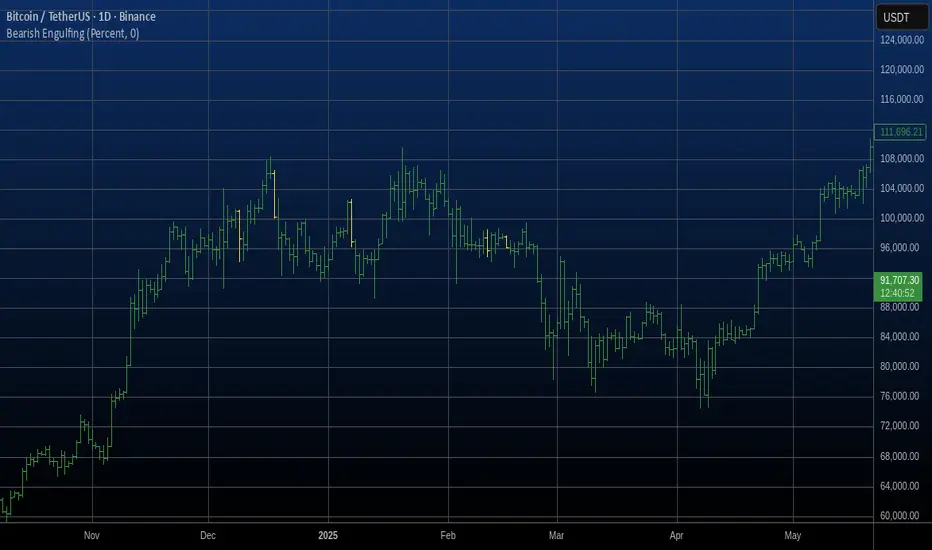
Bearish Engulfing Automatic Finding Script This is a bearish pattern formed by three candlesticks.
The pattern is based on the fact that the last candlestick must
completely engulf the previous two and be downward. The two preceding
candlesticks must also be upward. Candlestick wicks are not taken
into account.
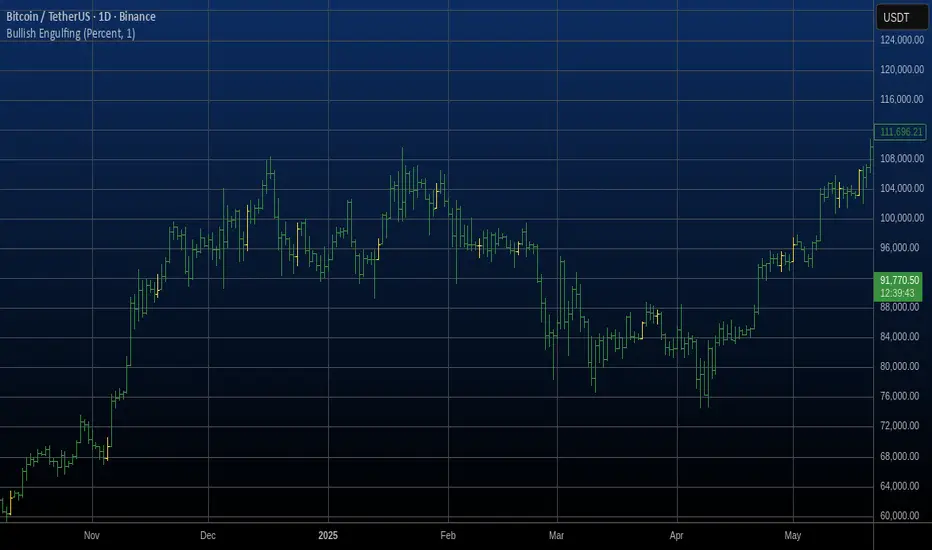
Bullish Engulfing Automatic Finding Script This is a bullish pattern formed by three candlesticks.
The pattern is based on the fact that the last candlestick must
completely engulf the previous two and be upward. The two preceding
candlesticks must also be downward. Candlestick wicks are not taken
into account.
Bullish Candlestick Pattern Tracker (21 Patterns)Script Title: Bullish Candlestick Pattern Tracker (21 Patterns)
Overview
This script is a comprehensive tool designed to automatically detect and track the lifecycle of 21 distinct bullish candlestick patterns.
It identifies a pattern upon the close of a bar and then monitors its status over a user-defined period. The primary goal is to provide traders with clear, automated signals for potential bullish reversals, complete with pre-calculated confirmation and stop-loss levels based on established technical analysis definitions.
This indicator is built in Pine Script v6 and uses a stateful tracking system to manage each detected pattern.
Key Features
21 Bullish Patterns: Detects a wide array of patterns, from single-bar formations (e.g., Bullish Hammer) to complex three-bar formations (e.g., Bullish Morning Star, Bullish Three White Soldiers).
Stateful Lifecycle Tracking: This is not just a pattern detector. It monitors each pattern's status in real-time after detection:
Not Confirmed: The pattern has formed, but the price has not yet closed above the confirmation level.
Confirmed: The price has successfully closed above the confirmation level.
Failed: The price has closed below the stop-loss level (either before or after confirmation).
Customizable Confirmation Period: Users can define how many bars the script should wait for a pattern to be confirmed or to fail (via the confBarCount input).
Clear Visual Labels: Displays a detailed label under each unconfirmed pattern, showing:
Pattern Name (e.g., "Bullish Engulfing")
Status: "Not Confirmed"
Confirmation Level (Teyit): The price that must be breached (on close) for the pattern to be considered valid.
Stop-Loss Level (S/L): The price level that invalidates the pattern.
Modular Inputs: Each of the 21 patterns can be individually toggled on or off from the settings menu, allowing you to focus only on the patterns you trust.
Methodology & Logic
The logic for pattern detection, as well as the specific rules for each pattern's Confirmation Level and Stop-Loss Level, is strictly based on the definitions provided in the "Mum Formasyonları (Kasım 2015 Versiyon 7.1.4)" guide by Matriks Bilgi Dağıtım Hizmetleri A.Ş.
This script serves as a Pine Script v6 implementation of those specific rules, designed for stock market analysis (Bullish signals only).
How to Use (Parameters Explained)
Teyit Bar Sayısı (Conf. Bar Count): This is the most important input. It defines the "expiration" for a pattern. For example, if set to 3, the script will monitor a new pattern for 3 bars. If it is not confirmed or failed within those 3 bars, the label will disappear.
Status Toggles (e.g., showNotConfirmed): Allows you to filter which pattern statuses are visible on the chart. It is recommended to keep all three active.
Pattern Toggles (e.g., 1. Bullish Hammer Göster): Use these 21 checkboxes to activate or deactivate the detection for specific patterns.
Disclaimer
This indicator is provided for educational and informational purposes only. It does not constitute financial advice or a recommendation to buy or sell any asset. All trading involves significant risk, and past performance is not indicative of future results. Please conduct your own research and backtesting before making any trading decisions.

Actionable Signals: Hammers, Shooters, and Inside Bars#TheStrat Actionable Signals
This indicator automatically detects hammers, shooters, and inside bars, which are key reversal and continuation patterns that can signal actionable trading opportunities. These 'Actionable Signals' are based on #TheStrat methodology developed by Rob Smith.
This indicator allows you to use a 'Classic' hammer/shooter definition as well as to customize hammer/shooter candle proportions to your liking.
Pattern Types
Classic Hammer/Shooter - Traditional pin bar pattern featuring a small body (≤30% of range) positioned at the extreme with a long dominant wick (3x+ body ratio). The most widely recognized reversal signal.
Custom Hammer/Shooter - Fully adjustable pattern parameters allowing you to fine-tune detection criteria for your specific trading strategy and timeframe preferences.
Paddle - Strong momentum bar with a large body (up to 85%) closing within 5% of the extreme. Identifies continuation moves with conviction. Color-validated (green hammers, red shooters).
Rejection - Wick-dominant pattern showing price rejection at extremes. Features moderate body (≤60%) with strong rejection wick (≥40%). Color-agnostic for flexibility.
Inside Bar - Bar contained entirely within the previous bar's range, signaling consolidation and potential breakout setups.
Key Features
Multi-Pattern Detection: Enable multiple pattern types simultaneously to capture different market structures
Pivot Validation: Optional swing high/low requirement ensures patterns occur at meaningful inflection points
Session Filtering: Restrict signals to specific trading sessions across multiple timezones
Visual Clarity: Color-coded markers distinguish between pattern types (customize via Style settings)
Testing Panel: Built-in debugging tool displays detailed bar analysis for fine-tuning detection parameters
How to Use
Default Settings: Start with Classic, Paddle, and Rejection patterns enabled for balanced signal generation
Pivot Filter: Keep "Require Swing High/Low" enabled to focus on patterns at key support/resistance levels
Customization: Adjust pattern strictness parameters based on your timeframe and trading style
Colors: Modify marker colors and styles through the Style tab for optimal chart visibility
Testing Panel: Enable to see why patterns are or aren't triggering on specific bars
Please share any issues you encounter, it will help improve the script for everyone!
Note: This indicator displays historical patterns and should be used as part of a comprehensive trading strategy. Past performance does not guarantee future results.

GainzAlgo Suite⭐ GainzAlgo Suite — Multi-Model Analytical Framework
GainzAlgo Suite consolidates five independently developed analytical methodologies into a single, unified framework.
Each configuration represents a distinct internal calculation model created at different stages of the project’s evolution.
The Suite provides traders with a structured way to explore multiple evaluation styles without requiring separate script publications, while ensuring legacy configurations remain intact.
All configurations share the same visual interface and non-repainting, bar-close confirmation behavior.
Their differences lie entirely in how they process market information—through sequencing, weighting, structural evaluation, volatility context modeling, and multi-layer confirmation logic.
Access instructions are available in the Author’s Notes panel.
A License Key field is included to enable the configuration assigned to each user; configurations not assigned will display a neutral “Configuration Locked” message.
📘 Why the Suite Exists (Versioning & Originality Justification)
Over the course of GainzAlgo’s development, several internal analytical frameworks were created—each using its own rule-set, evaluation sequence, and structural logic.
Publishing each model as a separate script would conflict with TradingView’s versioning guidelines.
Instead, the Suite consolidates all methodologies into one script while preserving the integrity of earlier, widely-used configurations.
This design allows traders to access multiple conceptual approaches in a single workspace and ensures each model remains available without overwriting existing tools.
The Suite is closed-source because the internal calculation logic—sequencing, weighting interactions, volatility normalization behavior, and structural confirmation processes—constitutes proprietary research developed specifically for this project.
🧠 How GainzAlgo Suite Works (General Logic)
While each configuration uses its own methodology, they all follow a structured, multi-stage evaluation pipeline:
1. Structural Pattern Evaluation
The system identifies relevant structural signals such as directional shifts, exhaustion patterns, pressure asymmetries, or micro-cycle transitions.
2. Volatility Context Modeling
Each model interprets volatility differently—through dynamic ranges, percentile comparisons, or contextual thresholds—to validate whether conditions meet its internal criteria.
3. Momentum Alignment
Momentum behavior is interpreted through slope, acceleration, mid-range transitions, and structural momentum flow depending on the configuration.
4. Directional Bias Compatibility
Trend context, structural flow, or cycle alignment is evaluated to ensure the potential signal is compatible with the broader directional environment.
5. Multi-Layer Confirmation or Threshold Evaluation
Depending on the configuration, signals appear only when the internal rule-sets or dynamic thresholds indicate a cohesive shift.
Signals are evaluated on bar close, which avoids mid-bar repainting behavior.
🔷 Standard — Structured Multi-Filter Logic
Standard uses a four-layer sequential confirmation model:
• candlestick-based reversal structure
• volatility & range validation
• momentum confirmation
• short-term trend context filtering
Each layer must agree before a signal is plotted, forming a strict conditional progression designed to reduce noise and isolate meaningful shifts.
Its design is lightweight, visually clear, and optimized for traders who prefer structured reversal confirmation.
🔷 Pro — Multi-Layer Confidence-Scoring Engine
Pro implements a confidence-scoring architecture that transforms pattern strength, volatility conditions, momentum behavior, and trend modeling into weighted numeric scores.
Key conceptual elements include:
• percentile-ranked volatility normalization
• dynamic scoring dependencies
• cycle-slope trend analysis (CSTA)
• momentum acceleration modeling (SAMSM)
• candle-structure micro-reversal evaluation (CSMRM)
A signal appears only when the combined confidence score exceeds an adaptive threshold derived from recent market conditions.
This framework represents a separate analytical category from Standard, focusing on scoring-based evaluation rather than binary confirmation.
🔷 V2 Essential — Expanded Structural Evaluation Model
V2 Essential applies a broadened structural-evaluation methodology designed to interpret slower, higher-timeframe behavioral shifts.
It uses extended condition windows, macro-level directional context, and wider structural transitions, making it suitable for traders who prefer multi-bar trend flows and broader analytical horizons.
Its sequencing prioritizes structural stability over rapid fluctuation, providing a high-level contextual interpretation of market transitions.
🔷 V2 Proficient — Balanced Adaptive Filtering Framework
V2 Proficient uses a mid-range analytical approach combining:
• adaptive structural alignment
• momentum-shift modeling
• conditional layering
• moderate-pace validation sequences
This configuration is designed to respond to medium-duration transitions by balancing reactivity with contextual filtering.
Its methodology provides versatile analytical behavior across typical intraday and multi-hour environments.
🔷 V2 Alpha — Multi-Phase Micro-Cycle Evaluation Model
V2 Alpha contains the widest internal rule-set of all configurations.
Its multi-phase evaluation process interprets:
• rapid structural shifts
• micro-cycle variations
• localized momentum surges
• high-resolution transition behavior
• dynamic condition interactions
This configuration is designed for traders who prefer detailed, fast-reacting analytical logic while maintaining bar-close confirmation and non-repainting behavior.
It does not signify superiority; it simply represents the most intricate internal methodology developed in the project.
🔒 Vendor Justification
GainzAlgo Suite’s value lies in the originality of its internal architectures:
• state-based evaluation sequences
• volatility-normalized thresholds
• multi-layer structural filtering
• dynamic scoring systems
• proprietary sequencing & weighting interactions
• conceptual models not reproducible using public indicators
Although the components (trend, volatility, momentum, structural analysis) are familiar concepts in trading literature,
the way they interact through custom decision flows, rule-sets, and evaluation phases is unique to this project and cannot be replicated through standard mashups or built-ins.
This originality justifies its invite-only nature.
📘 How to Use
1. Apply the Suite to any chart.
2. Choose the configuration you want to evaluate.
3. When enabled, signals will appear automatically at bar close.
4. Combine signals with independent analysis and risk management.
5. Use Author’s Notes to learn how to request configuration access.
⚠️ Disclaimer
GainzAlgo Suite is an analytical tool for educational purposes.
It does not guarantee accuracy or trading performance.
Users are responsible for their own trading decisions.
