XAU Power Meter + HTF FVG SystemWhat is this?
XAU Power Meter + HTF FVG System is an execution-support tool for XAUUSD that combines:
Local trend & momentum on your entry timeframe (e.g. 5m)
Volatility regime (ATR)
Higher-timeframe FVG bias (e.g. 1H)
The goal is simple: filter out low-quality trades and size up only when the market actually moves.
Core Components
1. LTF Trend (MA Stack 20 / 50 / 200)
The indicator builds a “stacked trend” using three MAs:
Bullish trend → price > MA20 > MA50 > MA200
Bearish trend → price < MA20 < MA50 < MA200
Anything else → RANGE
This gives a clean directional bias for intraday execution.
2. CCI Impulse (“Power”)
The CCI block measures the strength of the current move via |CCI| and classifies it into 4 bands:
LOW – weak momentum, usually not worth it
MEDIUM – acceptable impulse
HIGH – strong impulse
EXTREME – very strong, potential blow-off / late entry zone
These bands are used both for signal quality (Grade) and for position size guidance.
3. ATR Volatility Regime
ATR(14) is compared against its own SMA(100) to classify volatility:
QUIET – ATR < K * ATR_slow
NORMAL
ACTIVE – ATR > K * ATR_slow
You don’t want to size up in a dead market. ATR regime is used inside the Grade calculation.
4. Grade System (A / B / C / X)
The indicator compresses Trend + CCI + ATR into a single Grade:
A – In trend, strong impulse (HIGH/EXTREME), active volatility → top setups
B – In trend, at least MEDIUM impulse, acceptable volatility → good setups
C – In trend, but weaker conditions → borderline, be selective
X – Out of trend or no momentum → avoid
Internally, execution signals require Grade ≥ B for two bars in a row, to avoid one-bar “fake” spikes.
5. HTF FVG Bias (e.g. 1H)
On a higher timeframe (default: 1H), the script runs a Fair Value Gap engine with:
EMA 50/200 trend filter
ATR-based body filter (minimum candle strength)
Wilder ADX filter (trend strength)
Deep retest requirement inside the FVG zone
Optional zone auto-expiry and delete-on-use
It returns:
BUY (bullish HTF FVG confirmed)
SELL (bearish HTF FVG confirmed)
NONE (no valid zone active)
You can control how strict this bias is used via a “Strict: require active HTF FVG for entry” checkbox:
Strict OFF (default) → HTF bias can block trades against a strong HTF signal, but allows trades when HTF is neutral.
Strict ON → LTF entries are allowed only when HTF has an active FVG in the same direction (very selective).
HTF events are shown on the chart as HTF BUY / HTF SELL markers.
Execution Signals (LTF LONG / SHORT)
On your entry timeframe (e.g. 5m), the script generates LONG / SHORT arrows when:
Trend is clearly bullish or bearish (MA stack aligned),
Grade ≥ B for two consecutive bars,
HTF bias conditions are satisfied (depending on the strict mode).
These arrows are not a full auto-strategy, but a high-quality execution cue:
“Trend OK + Momentum OK + Volatility OK + HTF not against you.”
Dashboard
A compact dashboard in the corner shows, in real time:
Trend – UP / DOWN / RANGE (20/50/200 stack)
Impulse (CCI) – LOW / MEDIUM / HIGH / EXTREME
Volatility (ATR) – QUIET / NORMAL / ACTIVE
Size Multiplier – suggested risk sizing factor based on impulse
Grade – A / B / C / X
HTF FVG – BUY / SELL / NONE
This lets you sanity-check the context before pressing the button, not after the loss.
Recommended Use
Instrument: XAUUSD
Timeframe: 5m (scalping / intraday), but can be tested on 15m/1H as well
HTF: 1H by default (can experiment with 4H)
Focus on:
Grade A/B only
Strict mode ON for more institutional, fewer but higher-quality trades
Size up only when both impulse and volatility are supportive
Disclaimer
This script is a decision-support tool, not financial advice and not a guarantee of profit.
Always forward-test, understand the logic, and use your own risk management.
M-oscillator

SignalSquad Lite: SMC Structure Mapper © 2025Free Lite: Map SMC Structure (Pivots + BOS).
Teaser for Premium SignalSquad (Signals + 75% Wins).
Trial: in.tradingview.com

🔹 Williams %R x2🔹 Williams %R x2 — Dual Williams %R Oscillator (MTF)
Williams %R x2 is an enhanced version of the classic Williams Percent Range indicator, allowing you to display two independent %R lines with separate parameters and multi-timeframe (MTF) support.
This tool is ideal for precise entry timing, spotting reversals, identifying extreme zones, and confirming momentum shifts.
✨ Indicator Features
1. Two Independent Williams %R Inputs
Separate period settings
Individual price sources
Custom line colors
Configurable overbought/oversold levels
Ability to enable or disable each oscillator independently
2. Multi-Timeframe (MTF) Mode
Each %R can be calculated on:
the current chart timeframe
or any higher/lower timeframe selected by the user (from M1 to MN)
This allows flexible combinations such as:
local %R for entries
higher-timeframe %R for trend filtering
3. Built-in Levels
OB/OS levels for each oscillator
Central midpoint level at −50
Fully customizable level colors
🎯 Use Cases
Detecting short-term reversals
Assessing momentum and timing entries
Applying SMC/ICT confirmation models
Filtering signals with higher-timeframe structure
Identifying extreme price conditions
🛠️ Technical Details
Fully compatible with Pine Script® v6
No repainting
Clean and minimal oscillator without unnecessary elements

[iQ]PRO Dealing Range Cycle & Spectral Regression Histogram+🌟 PRO Dealing Range Cycle & Spectral Regression Histogram+ (DRC/SRH+)
Category: Advanced Market Cycle, Momentum, and Trend Analysis
The PRO Dealing Range Cycle & Spectral Regression Histogram+ is a meticulously engineered analytical tool, designed to provide our members with a superior, proprietary view of market structure, momentum, and mean reversion dynamics. This professional-grade indicator operates on a non-overlay panel, offering a clean and powerful interpretation layer distinct from the main price action.
🔬 Core Mechanism: Dual-Layered Analysis
This indicator combines two distinct, yet complementary, proprietary mathematical frameworks to deliver a holistic market picture:
The Dealing Range Cycle (DRC):
Utilizes a sophisticated, custom-displaced detrending oscillator built upon specialized percentage mathematics, rather than simple raw price differences.
The DRC identifies the latent cyclical forces within the price action, separating short-term noise from dominant swings.
It defines a "Dealing Range" through dynamically calculated High and Low Anchors, which represent the proprietary extremes of the current cycle. This framework provides invaluable context for understanding current price compression and expansion potentials.
The Quant Trend Signal is an integral component of the DRC, employing an adaptive logic to color-code the underlying direction of the core cyclical momentum, offering a robust directional confirmation.
The Spectral Regression Histogram (SRH+):
This component serves as the "Underpin Momentum" layer, a sensitive reading of current market velocity and pressure.
It employs a customized Spectral Regression Model to calculate deviations from an idealized price path. This is then passed through an advanced filtering and smoothing pipeline to extract high-frequency momentum components.
The SRH+ is visually presented as a Heatmap Histogram, dynamically color-graded to reflect the intensity of bullish (Gold/Yellow) or bearish (Bright Fuchsia) pressure. This gives users an immediate, spectral sense of the market's internal kinetic energy.
✨ Distinctive Features & Advantages
Proprietary Math Functions: The indicator relies on internalized custom mathematical functions (including specialized averages and high-precision linear regression) to generate unique, non-standard outputs that cannot be replicated with conventional indicators.
Decoupled Visualization: By operating on a separate panel, the DRC and SRH+ provide a noise-free environment for analysis, allowing for unambiguous interpretation of cyclical turning points and momentum shifts.
Intuitive Configuration: All core parameters, including Cycle Length, Regression Lookback, and Spectral Scale Factor, are meticulously organized into logical groups, allowing advanced users to fine-tune the engine without disrupting its proprietary internal logic.
The PRO DRC/SRH+ is not just an indicator; it is a diagnostic tool for the serious market participant, providing a powerful, proprietary lens to anticipate structural shifts and capitalize on the true rhythm of the market. Access is restricted to our most dedicated members, ensuring its edge remains sharp and exclusive.

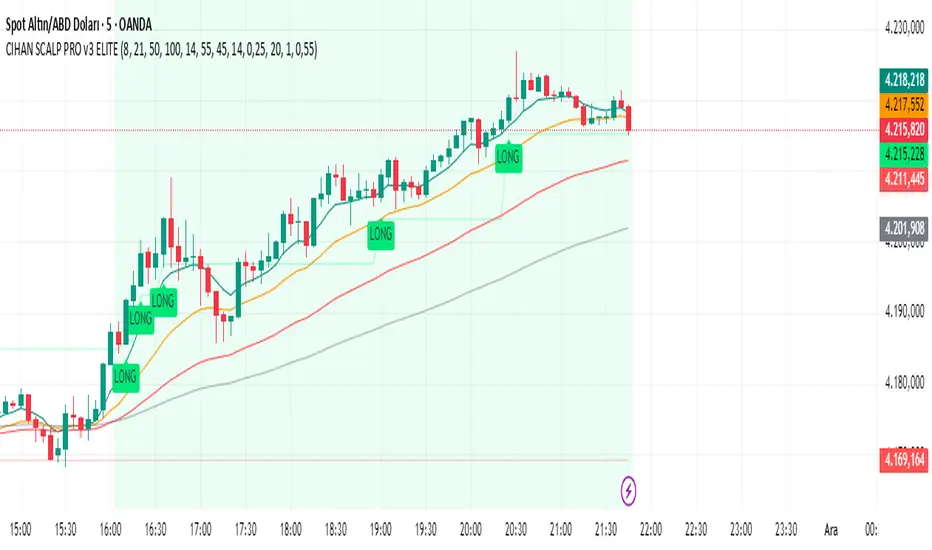
CIHAN SCALP PRO v3 ELITEI’m sharing a testable scalping strategy:
When you see a Long or Short signal, you can open a position without waiting for the candle to close and take quick profits with a short TP.
But the real game-changer is coming soon!
The Professional Scalping System I’ve been working on, with 85%+ accuracy, is almost ready.
This system is fully mechanical — no analysis needed, it instantly catches momentum and trend shifts.
It will be available soon with a small monthly subscription fee.
Stay tuned!
Ehlers Cyber Cycle⭐ Ehlers Cyber Cycle
Description (Copy/Paste for Publishing)
The Ehlers Cyber Cycle is a classic digital signal–processing (DSP) oscillator developed by John F. Ehlers, designed to extract the true cyclic component from price while minimizing lag.
This simplified implementation uses the Cyber Cycle formula (price minus smoothing) along with a fast trigger line to generate clean, low-lag reversal signals.
How It Works
• Price is smoothed using a 6-period EMA
• Cyber Cycle = raw cycle component = price – smooth
• A 3-period EMA trigger line acts as a confirmation filter
• Signals are generated on Cyber/Trigger crossovers
• Zero line helps identify positive/negative cycle states
Features
✔ Low-lag cycle oscillator
✔ Automatic buy/sell crossover signals
✔ Zero-line state shift detection
✔ Extremely lightweight and responsive
✔ Works on all assets and timeframes
✔ Perfect for mean-reversion or cycle-based timing
Use Cases
• Reversal timing
• Cycle confirmation
• Early trend detection
• Filtering noise in choppy markets
• Combining with Ehlers-based indicators (Fisher Transform, Roofing Filter, MESA, etc.)
A clean, fast, and accurate cycle tool for traders who want a simple Ehlers oscillator with strong signal clarity.

Beast Mode Adaptive Oscillator V6⭐ Beast Mode Adaptive Oscillator V6
Description (Copy/Paste for Publishing)
Beast Mode Adaptive Oscillator V6 is a high-precision, regime-aware momentum engine that adapts dynamically to market conditions.
It blends ADX-based market regime filtering, StochRSI adaptive oscillation, and ATR-driven signal validation to deliver a powerful, low-noise, context-smart oscillator.
Instead of giving the same overbought/oversold signals in every environment, this oscillator changes its behavior depending on market regime:
Market Regime Filter (MRF)
Automatically detects:
✔ Strong Bull Trend
✔ Strong Bear Trend
✔ Ranging Bull
✔ Ranging Bear
✔ Noise / Low-Volatility Environment
ADX + DI structure determines how aggressive or conservative the oscillator becomes.
Adaptive Regime Oscillator (ARO)
A smart StochRSI core whose OB/OS levels shift depending on trend regime:
• In strong trends → wider OB/OS bands (10–90)
• In ranges → tighter, mean-reverting bands (20–80)
• Higher accuracy and fewer false reversals
Price/Volatility Control (PVC)
Built-in ATR risk modules:
• ATR-based stop zones
• ATR-based target zones
• Internal validation to confirm signal strength
Optional Visual Aids
• Entry signal markers
• Regime bar at the bottom of the chart
• ADX line display
• Custom colors for trend strength
What This Indicator Is Best At
• Avoiding bad signals during chop
• Catching trend continuation entries
• Identifying exhaustion points in strong moves
• Adapting OB/OS logic to match volatility
• Confirming strength with ADX + DI structure
Perfect For
• Intraday traders
• Swing traders
• Trend traders
• Mean-reversion setups
• Volatility-based strategies
This is a complete adaptive oscillator system designed to stay accurate across every market condition.

Elliott Wave — HYBRID BEAST MODE⭐ Elliott Wave — HYBRID BEAST MODE
Description (Copy/Paste for Publishing)
Elliott Wave — HYBRID BEAST MODE is an advanced, automated Elliott Wave detection engine that blends classical wave theory with modern algorithmic logic. This tool identifies impulsive waves, corrective structures, wave-strength conditions, and volume-enhanced Wave 3 confirmations — all while automatically adapting to any timeframe.
This script uses a hybrid approach:
• Elliott Oscillator (5/35 MA difference)
• Pivot-based wave structure detection
• Automated wave spacing (dynamic by timeframe)
• Fibonacci projection mapping
• Wave channels & structure geometry
• Dashboard for quick-read market conditions
• Automatic alerts for Wave 3, Wave 5, and corrective waves
Key Features
✔ Auto Wave Detection using pivot geometry and spacing logic
✔ Elliott Oscillator histogram for momentum confirmation
✔ Wave Labels (1–5, A–B–C) with intelligent spacing
✔ Adaptive Timeframe System that recalculates wave spacing automatically
✔ Wave 3 Strength Logic using your custom volume multiplier
✔ Fibonacci Levels for projection and confirmation
✔ Wave Channels for structure alignment
✔ Built-In Alerts for key high-probability moments
✔ Designed for 4H / Daily, but optimized for all timeframes
Use Cases
• Identifying impulsive wave cycles
• Confirming corrections & retracements
• Determining trend exhaustion
• Timing Wave 3 and Wave 5 extensions
• Integrating wave theory with oscillator momentum
This is a full Elliott Wave toolbox packed into one script — ideal for traders who want automatic structure detection without the subjectivity of manual wave counting.

Tesla 3-6-9 Vortex OscillatorTesla 3-6-9 Vortex Oscillator — Description
The Tesla 3-6-9 Vortex Oscillator is a unique market-structure indicator inspired by Nikola Tesla’s 3-6-9 theory, vortex mathematics, and digital-root numerical cycles.
This tool analyzes price and volume through digit-reduction patterns to track the frequency of “sacred” 3-6-9 values versus traditional 1-2-4-5-7-8 “material world” values.
Core Concept
In vortex math, all numbers reduce to a single digit (1–9).
However, 3, 6, and 9 form a special control triad, representing cyclical creation, harmony, and completion.
This indicator measures how often market data resolves into these higher-cycle digits — creating a real-time “vortex energy ratio” for trend bias and momentum shifts.
What the Indicator Measures
✔ Digital Root of Price / Volume / Range
✔ 3-6-9 Frequency vs. Counter Digit Frequency
✔ Vortex Ratio (%) – percentage dominance of 3/6/9 activity
✔ Smoothed Vortex Oscillator – trend-ready version
✔ Tesla Wave – a cyclical sine-wave based on vortex length & chosen (3, 6, or 9) multiplier
✔ Optional Visual Layers:
• Digital-root analysis
• Vortex spiral visualization
• Harmonic 3-6-9 levels
How to Use It
High Vortex Values (above 60%)
→ Market dominated by 3-6-9 cycles
→ Often aligns with expansion, breakouts, or trend strengthening
Low Vortex Values (below 40%)
→ Counter-digit dominance
→ Consolidation, weakening trend, or potential mean-reversion
Tesla Wave Crosses
→ Can signal timing windows and rhythm shifts within the cycle.
Who This Indicator Is For
• Traders who like numerical cycle analysis
• Users of vortex math, digital-root, or harmonic structures
• People who want a non-lagging sentiment oscillator
• Anyone blending TA + number theory for timing large moves

MYPYBITE.com – Oscillators PackWe got Stoch and RSI and MARSI packed together. You can switch all on or just use the ones that meaningful to your tracking.
Thanks you for looking. I hope to update

Money Flow Matrix This comprehensive indicator is a multi-faceted momentum and volume oscillator designed to identify trend strength, potential reversals, and market confluence. It combines a volume-weighted RSI (Money Flow) with a double-smoothed momentum oscillator (Hyper Wave) to filter out noise and provide high-probability signals.
Core Components
1. Money Flow (The Columns) This is the backbone of the indicator. It calculates a normalized RSI and weights it by relative volume.
Green Columns: Positive money flow (Buying pressure).
Red Columns: Negative money flow (Selling pressure).
Neon Colors (Overflow): When the columns turn bright Neon Green or Neon Red, the Money Flow has breached the dynamic Bollinger Band thresholds. This indicates an extreme overbought or oversold condition, suggesting a potential climax in the current move.
2. Hyper Wave (The Line) This is a double-smoothed Exponential Moving Average (EMA) derived from price changes. It acts as the "signal line" for the system. It is smoother than standard RSI or MACD, reducing false signals during choppy markets.
Green Line: Momentum is increasing.
Red Line: Momentum is decreasing.
3. Confluence Zones (Background) The background color changes based on the agreement between Money Flow and Hyper Wave.
Green Background: Both Money Flow and Hyper Wave are bullish. This represents a high-probability long environment.
Red Background: Both Money Flow and Hyper Wave are bearish. This represents a high-probability short environment.
Signal Guide
The Matrix provides three tiers of signals, ranging from early warnings to confirmation entries.
1. Warning Dots (Circles) These appear when the Hyper Wave crosses specific internal levels (-30/30).
Green Dot: Early warning of a bullish rotation.
Red Dot: Early warning of a bearish rotation.
Usage: These are not immediate entry signals but warnings to tighten stop-losses or prepare for a reversal.
2. Major Crosses (Triangles) These occur when Money Flow crosses the zero line, confirmed by momentum direction.
Green Triangle Up: Major Buy Signal (Money Flow crosses above 0).
Red Triangle Down: Major Sell Signal (Money Flow crosses below 0).
Usage: These are the primary trend-following entry signals.
3. Divergences (Labels "R" and "H") The script automatically detects discrepancies between Price action and the Hyper Wave oscillator.
"R" (Regular Divergence): Indicates a potential Reversal.
Bullish R: Price makes a lower low, but Oscillator makes a higher low.
Bearish R: Price makes a higher high, but Oscillator makes a lower high.
"H" (Hidden Divergence): Indicates a potential Trend Continuation.
Bullish H: Price makes a higher low, but Oscillator makes a lower low.
Bearish H: Price makes a lower high, but Oscillator makes a higher high.
Dashboard (Confluence Meter)
Located in the bottom right of the chart, the dashboard provides a snapshot of the current candle's status. It calculates a score based on three factors:
Is Money Flow positive?
Is Hyper Wave positive?
Is Hyper Wave trending up?
Readings:
STRONG BUY: All metrics are bullish.
WEAK BUY: Mixed metrics, but leaning bullish.
NEUTRAL: Metrics are conflicting.
WEAK/STRONG SELL: Bearish equivalents of the buy signals.
Trading Strategies
Strategy A: The Trend Rider
Entry: Wait for a Green Triangle (Major Buy).
Confirmation: Ensure the Background is highlighted Green (Confluence).
Exit: Exit when the background turns off or a Red Warning Dot appears.
Strategy B: The Reversal Catch
Setup: Look for a Neon Red Column (Overflow/Oversold).
Trigger: Wait for a Green "R" Label (Regular Bullish Divergence) or a Green Warning Dot.
Confirmation: Wait for the Hyper Wave line to turn green.
Strategy C: The Pullback (Continuation)
Context: The market is in a strong trend (Green Background).
Trigger: Price pulls back, but a Green "H" Label (Hidden Bullish Divergence) appears.
Action: Enter in the direction of the original trend.
Settings Configuration
The code includes tooltips for all inputs to assist with configuration.
Money Flow Length: Adjusts the sensitivity of the volume calculation. Lower numbers are faster but noisier; higher numbers are smoother.
Threshold Multiplier: Controls the "Neon" overflow bars. Increasing this (e.g., to 2.5 or 3.0) will result in fewer, more extreme signals.
Divergence Lookback: Determines how many candles back the script looks to identify pivots. Increase this number to find larger, macro divergences.
Disclaimer
This source code and the accompanying documentation are for educational and informational purposes only. They do not constitute financial, investment, or trading advice.

SGK - Trend Score [Protected]Stop guessing the strength of the trend. The SGK Trend Score is a proprietary oscillator designed to cut through market noise and tell you exactly who is in control: the Bulls or the Bears.
How It Works: Instead of a simple "Buy" or "Sell" signal, the SGK Trend Score evaluates the quality of the trend. It aggregates data from multiple timeframe analyses and volatility channels to produce a composite score:
Green Zone (> 0): Uptrend. Scores above +50 indicate a high-conviction bullish trend.
Red Zone (< 0): Downtrend. Scores below -50 indicate a high-conviction bearish trend.
Why Use This?
Objective Analysis: Removes emotional bias by converting complex price action into a single value between -100 and +100.
Customizable Sensitivity: You can tweak the weightings of the signal components in the settings menu to adapt the indicator for Scalping (faster reaction) or Swing Trading (smoother signals).
Access: This is a protected, professional-grade indicator. It is currently free to use while I gather community feedback. Please leave your thoughts in the comments below!
Best wishes, sgkalluri

3-in-1 Oscillator Pro3-IN-1 OSCILLATOR PRO: PMO + MACD + OBV
═══════════════════════════════════════════════════════════════════════════════
🎯 WHAT THIS INDICATOR DOES
The 3-in-1 Oscillator Pro combines three powerful momentum indicators into ONE clean, normalized oscillator panel. No more cluttered charts with multiple indicator windows - this combines Price Momentum Oscillator (PMO), MACD, and On-Balance Volume (OBV) into a single, actionable view.
**The Secret Sauce:** Advanced normalization technology puts all three indicators on the SAME SCALE, allowing you to compare momentum, trend, and volume flow side-by-side for the first time ever.
**Bonus Feature:** Automatic pattern detection for divergences, double tops/bottoms, and head & shoulders patterns across ALL THREE indicators simultaneously!
═══════════════════════════════════════════════════════════════════════════════
🔥 WHY THIS IS A GAME CHANGER
═══════════════════════════════════════════════════════════════════════════════
**Traditional Problem:**
- PMO ranges from -10 to +10
- MACD ranges from -2 to +2
- OBV ranges in millions
→ You CAN'T plot them together or compare them directly!
**Our Solution:**
Advanced normalization (Z-Score, Min-Max, or Percentage) puts ALL indicators on the same -3 to +3 scale, allowing you to:
✅ See when all 3 indicators AGREE (high conviction setups)
✅ Spot DIVERGENCES between momentum, trend, and volume
✅ Identify which indicator is leading vs lagging
✅ Make faster, more confident trading decisions
═══════════════════════════════════════════════════════════════════════════════
📊 THE THREE INDICATORS EXPLAINED
═══════════════════════════════════════════════════════════════════════════════
**1️⃣ PMO (Price Momentum Oscillator)** - BLUE LINE
- Advanced momentum indicator based on Rate of Change
- Smoother than RSI, more responsive than MACD
- Double EMA smoothing eliminates false signals
- Best for: Identifying momentum shifts EARLY
**How to Use:**
- PMO crossing above signal = Bullish momentum
- PMO crossing below signal = Bearish momentum
- PMO above 0 = Bullish zone
- PMO below 0 = Bearish zone
**2️⃣ MACD (Moving Average Convergence Divergence)** - ORANGE LINE
- The industry standard trend-following indicator
- Shows relationship between two moving averages
- Histogram shows momentum strength
- Best for: Confirming trend direction
**How to Use:**
- MACD above signal = Uptrend
- MACD below signal = Downtrend
- Histogram growing = Momentum increasing
- Histogram shrinking = Momentum decreasing
**3️⃣ OBV (On-Balance Volume)** - GREEN LINE
- Measures buying vs selling pressure
- Uses volume to confirm price moves
- Leading indicator (moves before price)
- Best for: Validating breakouts and reversals
**How to Use:**
- OBV rising = Accumulation (smart money buying)
- OBV falling = Distribution (smart money selling)
- OBV divergence = Possible reversal ahead
- OBV confirms price = Strong trend
═══════════════════════════════════════════════════════════════════════════════
🎨 NORMALIZATION METHODS
═══════════════════════════════════════════════════════════════════════════════
Choose the normalization method that fits your trading style:
**Z-SCORE (DEFAULT - RECOMMENDED)**
- Statistical method measuring standard deviations from mean
- Values typically range from -3 to +3
- Best for: Identifying extreme readings and mean reversion
- Reading: -2 or below = Oversold | +2 or above = Overbought
**MIN-MAX SCALING**
- Scales to -1 to +1 range based on recent high/low
- Best for: Range-bound markets
- Reading: Shows position within recent range
**PERCENTAGE**
- Shows deviation from average as percentage
- Best for: Relative strength comparison
- Reading: Direct percentage above/below mean
**Normalization Period:** Adjustable from 20-500 bars (default 100)
- Shorter period = More reactive, more signals
- Longer period = Smoother, fewer false signals
═══════════════════════════════════════════════════════════════════════════════
🎯 AUTOMATIC PATTERN DETECTION
═══════════════════════════════════════════════════════════════════════════════
The indicator automatically detects 6 powerful patterns across ALL THREE oscillators:
**BULLISH PATTERNS** 🟢
1. **Bullish Divergence** - Price makes lower low, indicator makes higher low
→ Signals: Downtrend losing momentum, reversal likely
2. **Double Bottom** - Two similar lows with bounce in between
→ Signals: Strong support level, upward reversal setup
3. **Inverse Head & Shoulders** - Three troughs with middle one lowest
→ Signals: Major reversal pattern, strong bullish signal
**BEARISH PATTERNS** 🔴
4. **Bearish Divergence** - Price makes higher high, indicator makes lower high
→ Signals: Uptrend losing momentum, reversal likely
5. **Double Top** - Two similar highs with dip in between
→ Signals: Strong resistance level, downward reversal setup
6. **Head & Shoulders** - Three peaks with middle one highest
→ Signals: Major reversal pattern, strong bearish signal
**Pattern Table Display:**
- Shows current pattern for each indicator
- 🟢 BULL / 🔴 BEAR / ⚪ None signal
- Updates in real-time as patterns develop
- Positioned at bottom right (non-intrusive)
═══════════════════════════════════════════════════════════════════════════════
💡 HOW TO TRADE WITH THIS INDICATOR
═══════════════════════════════════════════════════════════════════════════════
**STRATEGY 1: TRIPLE CONFIRMATION**
Wait for all 3 indicators to agree:
- All pointing up = Strong BUY signal
- All pointing down = Strong SELL signal
- Mixed signals = Stay out or reduce position size
**STRATEGY 2: DIVERGENCE HUNTER**
Watch for divergences between price and indicators:
1. Price makes new high but PMO/MACD/OBV doesn't = Bearish divergence (SHORT setup)
2. Price makes new low but PMO/MACD/OBV doesn't = Bullish divergence (LONG setup)
3. When 2 or 3 indicators show same divergence = HIGHEST probability
**STRATEGY 3: VOLUME CONFIRMATION**
Use OBV to confirm price moves:
- Price breaking out + OBV rising = Valid breakout (BUY)
- Price breaking out + OBV falling = False breakout (AVOID)
- Price dropping + OBV rising = Bullish accumulation (BUY DIP)
- Price rising + OBV falling = Distribution (PREPARE TO SHORT)
**STRATEGY 4: MOMENTUM SHIFTS**
Use PMO for early entries:
- PMO crosses signal line + MACD confirms = Early entry
- PMO extreme reading (>+2 or <-2) = Possible reversal zone
- PMO divergence + Pattern detection = High probability setup
**STRATEGY 5: PATTERN POWER PLAYS**
When pattern table shows same pattern on 2+ indicators:
- 2 indicators show Bull Divergence = Strong LONG setup
- 2 indicators show Double Bottom = Strong BUY signal
- 3 indicators show bearish pattern = MAXIMUM conviction SHORT
═══════════════════════════════════════════════════════════════════════════════
⚙️ CUSTOMIZATION OPTIONS
═══════════════════════════════════════════════════════════════════════════════
**DISPLAY CONTROLS**
- Toggle each indicator on/off independently
- Hide/show MACD histogram
- Hide/show pattern detection table
- Mix and match based on your strategy
**PMO SETTINGS**
- ROC Length (default 35)
- Smoothing periods (20 and 10)
- Custom colors and line width
- Signal line color and width
**MACD SETTINGS**
- Fast length (default 12)
- Slow length (default 26)
- Signal length (default 9)
- Custom colors for lines and histogram
- Bull/bear histogram colors
- Histogram transparency control
**OBV SETTINGS**
- Moving average length (default 20)
- Custom color and line width
- Percentage calculation based on MA
**NORMALIZATION**
- Method selection (Z-Score, Min-Max, Percentage)
- Lookback period (20-500 bars)
- Affects ALL indicators simultaneously
**PATTERN DETECTION**
- Lookback period (5-50 bars)
- Controls sensitivity of pattern recognition
- Shorter = More patterns (more signals)
- Longer = Stronger patterns (fewer signals)
═══════════════════════════════════════════════════════════════════════════════
📈 BEST PRACTICES
═══════════════════════════════════════════════════════════════════════════════
✅ **DO:**
- Wait for multiple indicators to confirm
- Use pattern detection as confluence
- Combine with price action and support/resistance
- Adjust normalization period based on timeframe
- Use divergences as early warning signals
❌ **DON'T:**
- Trade based on single indicator alone
- Ignore volume confirmation (OBV)
- Use in ranging markets without adjusting settings
- Chase signals without proper risk management
- Overtrade - quality over quantity
**TIMEFRAME RECOMMENDATIONS:**
- Scalping: 1m-5m charts, shorter normalization (50 bars)
- Day Trading: 5m-15m charts, default settings (100 bars)
- Swing Trading: 1H-4H charts, longer normalization (200 bars)
- Position Trading: Daily charts, longest normalization (500 bars)
═══════════════════════════════════════════════════════════════════════════════
🔍 WHAT MAKES THIS DIFFERENT
═══════════════════════════════════════════════════════════════════════════════
**vs. Traditional PMO:**
✅ Combined with MACD and OBV for multi-dimensional analysis
✅ Normalized scale allows direct comparison
✅ Automatic pattern detection
✅ Single panel instead of 3 separate windows
**vs. Standard MACD:**
✅ Enhanced with momentum (PMO) and volume (OBV)
✅ Earlier signals from PMO
✅ Volume confirmation from OBV
✅ Pattern recognition across all components
**vs. Regular OBV:**
✅ Normalized to match other indicators
✅ Combined with trend and momentum for context
✅ Pattern detection adds analytical power
✅ Cleaner visual presentation
═══════════════════════════════════════════════════════════════════════════════
⚡ QUICK START GUIDE
═══════════════════════════════════════════════════════════════════════════════
**FOR BEGINNERS:**
1. Start with default settings
2. Focus on triple confirmation (all 3 agree)
3. Watch the pattern table for signals
4. Wait for clear divergences
**FOR INTERMEDIATE TRADERS:**
1. Experiment with normalization methods
2. Adjust periods based on your timeframe
3. Combine pattern signals with price action
4. Use OBV to filter false breakouts
**FOR ADVANCED TRADERS:**
1. Fine-tune each indicator independently
2. Build strategies around specific patterns
3. Use shorter lookbacks for scalping
4. Combine with your existing edge for confluence
═══════════════════════════════════════════════════════════════════════════════
📊 TECHNICAL SPECIFICATIONS
═══════════════════════════════════════════════════════════════════════════════
**Pine Script Version:** v6 (Latest)
**Indicator Type:** Oscillator (Overlay = false)
**Calculation:** Real-time on every bar
**Repainting:** No - all calculations are finalized
**Data Required:** Minimum 100 bars recommended
**Max Lookback:** Configurable up to 500 bars
**Performance:** Optimized for all timeframes
**Pattern Detection Algorithm:**
- Pivot point identification
- Divergence calculation
- Double top/bottom recognition
- Head & shoulders complex pattern detection
- Minimum threshold filtering to reduce noise
═══════════════════════════════════════════════════════════════════════════════
🎁 WHAT YOU GET
═══════════════════════════════════════════════════════════════════════════════
✅ 3 indicators in 1 clean panel
✅ Advanced normalization technology
✅ 6 automatic pattern detection systems
✅ Real-time pattern table
✅ Fully customizable colors and settings
✅ Works on ALL timeframes
✅ Works on ALL markets (stocks, crypto, forex, futures)
✅ No repainting
✅ Clean, professional visual design
✅ Low CPU usage (optimized code)
═══════════════════════════════════════════════════════════════════════════════
💬 FINAL THOUGHTS
═══════════════════════════════════════════════════════════════════════════════
The 3-in-1 Oscillator Pro isn't just three indicators slapped together - it's a carefully engineered trading system that gives you a complete view of market momentum, trend, and volume flow in a single glance.
By normalizing these different indicators to the same scale, you can finally see the relationships between momentum, trend, and volume that were previously hidden. Combined with automatic pattern detection, you get high-probability setups served to you on a silver platter.
Whether you're scalping, day trading, swing trading, or position trading - this indicator adapts to your style and gives you the edge you need in today's markets.
**Stop cluttering your chart with multiple indicators. Get the 3-in-1 Oscillator Pro and trade with confidence.**
═══════════════════════════════════════════════════════════════════════════════
📌 **TAGS:** PMO, MACD, OBV, Momentum, Volume, Oscillator, Divergence, Pattern Detection, Multi-Indicator, Normalized, Trading System, Technical Analysis
🔗 **CATEGORY:** Oscillators, Volume
💡 **USE CASE:** Day Trading, Swing Trading, Scalping, All Markets
⚡ **TRADEHAWK PRO** - Professional Trading Tools for Serious Traders
═══════════════════════════════════════════════════════════════════════════════
---
**DISCLAIMER:** This indicator is for educational and informational purposes only. Past performance does not guarantee future results. Always practice proper risk management and never risk more than you can afford to lose. Trading involves substantial risk of loss.
---
**VERSION:** 1.0
**RELEASE DATE:** November 2025 **PINE SCRIPT:** v6
**DEVELOPER:** Timmy741
---
If you find this indicator helpful, please give it a 👍 and share your experience in the comments!
For questions, suggestions, or custom indicator requests, feel free to reach out.
Happy Trading! 🚀📈

DarkPool's Squeeze Momentum @author LazyBearDarkPool's Squeeze Momentum Pro is a comprehensive overhaul of the classic volatility indicator, designed for the modern trader who requires deeper market insight. While staying true to the core logic of the original TTM Squeeze, this version introduces advanced features like automatic divergence detection, dynamic moving average selection, and main-chart integration to help you time entries and exits with precision.
Credit: This script is built upon the foundational "Squeeze Momentum Indicator" originally developed by LazyBear. This version expands on that legacy with enhanced visualization, alert systems, and divergence logic.
Key Features
1. Advanced Divergence Detection
The indicator automatically scans for Regular Bullish and Regular Bearish divergences between price action and momentum.
Bullish Divergence (Green "BULL" Label): Occurs when Price makes a Lower Low, but Momentum makes a Higher Low. This often precedes a bullish reversal.
Bearish Divergence (Red "BEAR" Label): Occurs when Price makes a Higher High, but Momentum makes a Lower High. This often precedes a bearish reversal.
2. Multi-Mode Squeeze Detection
The central dots on the zero line tell you the state of market volatility:
Red Dot (Squeeze ON): Volatility is compressed. The Bollinger Bands are inside the Keltner Channels. The market is "coiling" and preparing for an explosive move. Do not trade yet—wait for the fire.
Grey Dot (Squeeze OFF): The squeeze has "fired." Volatility is expanding, and price is moving.
Blue Dot (Wide Bands): Volatility is extremely high. The bands are exceptionally wide, often indicating the end of a trend or a period of high risk.
3. "Ghost" Histogram & Visual Depth
The momentum histogram features a "Ghost" fill (transparent background) to help visualize the volume of momentum without cluttering the screen.
Bright Green: Strong Bullish Momentum (Rising).
Dark Green: Weakening Bullish Momentum (Fading).
Bright Red: Strong Bearish Momentum (Falling).
Dark Red: Weakening Bearish Momentum (Recovering).
4. Dynamic Candle Coloring
Enabled by default, this feature colors the candles on your main chart to match the momentum histogram. This allows you to instantly gauge the trend strength without looking down at the oscillator pane.
5. Adaptive Calculation Engines
Unlike standard versions fixed to SMA, you can now select the moving average algorithm that drives the Bollinger Bands and Keltner Channels:
SMA: Standard, stable signals.
EMA: More reactive to recent price action.
WMA/RMA: Weighted options for specific strategies.
🛠 How to Operate
The "Squeeze & Fire" Strategy
Identify the Squeeze: Look for a series of Red Dots on the zero line. This indicates the market is resting and building energy.
The Trigger: Wait for the dot to turn Gray AND for the histogram to expand clearly in one direction.
Long Signal: Squeeze fires (Red -> Gray) + Histogram turns Green.
Short Signal: Squeeze fires (Red -> Gray) + Histogram turns Red.
The "Divergence Reversal" Strategy
Watch for "BULL" or "BEAR" labels appearing near the peaks or valleys of the histogram.
Confirmation: A divergence is a warning. Wait for the histogram color to change (e.g., from Bright Red to Dark Red) before entering a reversal trade.
⚙️ Settings Guide
Basis MA Type: Choose between SMA, EMA, WMA, or RMA to tune the sensitivity of the squeeze.
BB/KC Settings: Fully customizable Length and Multipliers to adapt to different assets (Crypto, Forex, or Stocks).
Pivot Lookback: Controls how strict the divergence detection is. Higher numbers = fewer, more significant signals.
Colour Main Chart Candles: Toggle this OFF if you prefer your standard candle colours.
Disclaimer
Trading involves a high level of risk and is not suitable for all investors. This indicator is a tool for technical analysis and does not constitute financial advice. Past performance is not indicative of future results. Always use proper risk management and do not trade based solely on a single indicator.

Third eye • StrategyThird eye • Strategy – User Guide
1. Idea & Concept
Third eye • Strategy combines three things into one system:
Ichimoku Cloud – to define market regime and support/resistance.
Moving Average (trend filter) – to trade only in the dominant direction.
CCI (Commodity Channel Index) – to generate precise entry signals on momentum breakouts.
The script is a strategy, not an indicator: it can backtest entries, exits, SL, TP and BreakEven logic automatically.
2. Indicators Used
2.1 Ichimoku
Standard Ichimoku settings (by default 9/26/52/26) are used:
Conversion Line (Tenkan-sen)
Base Line (Kijun-sen)
Leading Span A & B (Kumo Cloud)
Lagging Span is calculated but hidden from the chart (for visual simplicity).
From the cloud we derive:
kumoTop – top of the cloud under current price.
kumoBottom – bottom of the cloud under current price.
Flags:
is_above_kumo – price above the cloud.
is_below_kumo – price below the cloud.
is_in_kumo – price inside the cloud.
These conditions are used as trend / regime filters and for stop-loss & trailing stops.
2.2 Moving Average
You can optionally display and use a trend MA:
Types: SMA, EMA, DEMA, WMA
Length: configurable (default 200)
Source: default close
Filter idea:
If MA Direction Filter is ON:
When Close > MA → strategy allows only Long signals.
When Close < MA → strategy allows only Short signals.
The MA is plotted on the chart (if enabled).
2.3 CCI & Panel
The CCI (Commodity Channel Index) is used for entry timing:
CCI length and source are configurable (default length 20, source hlc3).
Two thresholds:
CCI Upper Threshold (Long) – default +100
CCI Lower Threshold (Short) – default –100
Signals:
Long signal:
CCI crosses up through the upper threshold
cci_val < upper_threshold and cci_val > upper_threshold
Short signal:
CCI crosses down through the lower threshold
cci_val > lower_threshold and cci_val < lower_threshold
There is a panel (table) in the bottom-right corner:
Shows current CCI value.
Shows filter status as colored dots:
Green = filter enabled and passed.
Red = filter enabled and blocking trades.
Gray = filter is disabled.
Filters shown in the panel:
Ichimoku Cloud filter (Long/Short)
Ichimoku Lines filter (Conversion/Base vs Cloud)
MA Direction filter
3. Filters & Trade Direction
All filters can be turned ON/OFF independently.
3.1 Ichimoku Cloud Filter
Purpose: trade only when price is clearly above or below the Kumo.
Long Cloud Filter (Use Ichimoku Cloud Filter) – when enabled:
Long trades only if close > cloud top.
Short Cloud Filter – when enabled:
Short trades only if close < cloud bottom.
If the cloud filter is disabled, this condition is ignored.
3.2 Ichimoku Lines Above/Below Cloud
Purpose: stronger trend confirmation: Ichimoku lines should also be on the “correct” side of the cloud.
Long Lines Filter:
Long allowed only if Conversion Line and Base Line are both above the cloud.
Short Lines Filter:
Short allowed only if both lines are below the cloud.
If this filter is OFF, the conditions are not checked.
3.3 MA Direction Filter
As described above:
When ON:
Close > MA → only Longs.
Close < MA → only Shorts.
4. Anti-Re-Entry Logic (Cloud Touch Reset)
The strategy uses internal flags to avoid continuous re-entries in the same direction without a reset.
Two flags:
allowLong
allowShort
After a Long entry, allowLong is set to false, allowShort to true.
After a Short entry, allowShort is set to false, allowLong to true.
Flags are reset when price touches the Kumo:
If Low goes into the cloud → allowLong = true
If High goes into the cloud → allowShort = true
If Close is inside the cloud → both allowLong and allowShort are set to true
There is a key option:
Wait Position Close Before Flag Reset
If ON: cloud touch will reset flags only when there is no open position.
If OFF: flags can be reset even while a trade is open.
This gives a kind of regime-based re-entry control: after a trend leg, you wait for a “cloud interaction” to allow new signals.
5. Risk Management
All risk management is handled inside the strategy.
5.1 Position Sizing
Order Size % of Equity – default 10%
The strategy calculates:
position_value = equity * (Order Size % / 100)
position_qty = position_value / close
So position size automatically adapts to your current equity.
5.2 Take Profit Modes
You can choose one of two TP modes:
Percent
Fibonacci
5.2.1 Percent Mode
Single Take Profit at X% from entry (default 2%).
For Long:
TP = entry_price * (1 + tp_pct / 100)
For Short:
TP = entry_price * (1 - tp_pct / 100)
One strategy.exit per side is used: "Long TP/SL" and "Short TP/SL".
5.2.2 Fibonacci Mode (2 partial TPs)
In this mode, TP levels are based on a virtual Fib-style extension between entry and stop-loss.
Inputs:
Fib TP1 Level (default 1.618)
Fib TP2 Level (default 2.5)
TP1 Share % (Fib) (default 50%)
TP2 share is automatically 100% - TP1 share.
Process for Long:
Compute a reference Stop (see SL section below) → sl_for_fib.
Compute distance: dist = entry_price - sl_for_fib.
TP levels:
TP1 = entry_price + dist * (Fib TP1 Level - 1)
TP2 = entry_price + dist * (Fib TP2 Level - 1)
For Short, the logic is mirrored.
Two exits are used:
TP1 – closes TP1 share % of position.
TP2 – closes remaining TP2 share %.
Same stop is used for both partial exits.
5.3 Stop-Loss Modes
You can choose one of three Stop Loss modes:
Stable – fixed % from entry.
Ichimoku – fixed level derived from the Kumo.
Ichimoku Trailing – dynamic SL following the cloud.
5.3.1 Stable SL
For Long:
SL = entry_price * (1 - Stable SL % / 100)
For Short:
SL = entry_price * (1 + Stable SL % / 100)
Used both for Percent TP mode and as reference for Fib TP if Kumo is not available.
5.3.2 Ichimoku SL (fixed, non-trailing)
At the time of a new trade:
For Long:
Base SL = cloud bottom minus small offset (%)
For Short:
Base SL = cloud top plus small offset (%)
The offset is configurable: Ichimoku SL Offset %.
Once computed, that SL level is fixed for this trade.
5.3.3 Ichimoku Trailing SL
Similar to Ichimoku SL, but recomputed each bar:
For Long:
SL = cloud bottom – offset
For Short:
SL = cloud top + offset
A red trailing SL line is drawn on the chart to visualize current stop level.
This trailing SL is also used as reference for BreakEven and for Fib TP distance.
6. BreakEven Logic (with BE Lines)
BreakEven is optional and supports two modes:
Percent
Fibonacci
Inputs:
Percent mode:
BE Trigger % (from entry) – move SL to BE when price goes this % in profit.
BE Offset % from entry – SL will be set to entry ± this offset.
Fibonacci mode:
BE Fib Level – Fib level at which BE will be activated (default 1.618, same style as TP).
BE Offset % from entry – how far from entry to place BE stop.
The logic:
Before BE is triggered, SL follows its normal mode (Stable/Ichimoku/Ichimoku Trailing).
When BE triggers:
For Long:
New SL = max(current SL, BE SL).
For Short:
New SL = min(current SL, BE SL).
This means BE will never loosen the stop – only tighten it.
When BE is activated, the strategy draws a violet horizontal line at the BreakEven level (once per trade).
BE state is cleared when the position is closed or when a new position is opened.
7. Entry & Exit Logic (Summary)
7.1 Long Entry
Conditions for a Long:
CCI signal:
CCI crosses up through the upper threshold.
Ichimoku Cloud Filter (optional):
If enabled → price must be above the Kumo.
Ichimoku Lines Filter (optional):
If enabled → Conversion Line and Base Line must be above the Kumo.
MA Direction Filter (optional):
If enabled → Close must be above the chosen MA.
Anti-re-entry flag:
allowLong must be true (cloud-based reset).
Position check:
Long entries are allowed when current position size ≤ 0 (so it can also reverse from short to long).
If all these conditions are true, the strategy sends:
strategy.entry("Long", strategy.long, qty = calculated_qty)
After entry:
allowLong = false
allowShort = true
7.2 Short Entry
Same structure, mirrored:
CCI signal:
CCI crosses down through the lower threshold.
Cloud filter: price must be below cloud (if enabled).
Lines filter: conversion & base must be below cloud (if enabled).
MA filter: Close must be below MA (if enabled).
allowShort must be true.
Position check: position size ≥ 0 (allows reversal from long to short).
Then:
strategy.entry("Short", strategy.short, qty = calculated_qty)
Flags update:
allowShort = false
allowLong = true
7.3 Exits
While in a position:
The strategy continuously recalculates SL (depending on chosen mode) and, in Percent mode, TP.
In Fib mode, fixed TP levels are computed at entry.
BreakEven may raise/tighten the SL if its conditions are met.
Exits are executed via strategy.exit:
Percent mode: one TP+SL exit per side.
Fib mode: two partial exits (TP1 and TP2) sharing the same SL.
At position open, the script also draws visual lines:
White line — entry price.
Green line(s) — TP level(s).
Red line — SL (if not using Ichimoku Trailing; with trailing, the red line is updated dynamically).
Maximum of 30 lines are kept to avoid clutter.
8. How to Use the Strategy
Choose market & timeframe
Works well on trending instruments. Try crypto, FX or indices on H1–H4, or intraday if you prefer more trades.
Adjust Ichimoku settings
Keep defaults (9/26/52/26) or adapt to your timeframe.
Configure Moving Average
Typical: EMA 200 as a trend filter.
Turn MA Direction Filter ON if you want to trade only with the main trend.
Set CCI thresholds
Default ±100 is classic.
Lower thresholds → more signals, higher noise.
Higher thresholds → fewer but stronger signals.
Enable/disable filters
Turn on Ichimoku Cloud and Ichimoku Lines if you want only “clean” trend trades.
Use Wait Position Close Before Flag Reset to control how often re-entries are allowed.
Choose TP & SL mode
Percent mode is simpler and easier to understand.
Fibonacci mode is more advanced: it aligns TP levels with the distance to stop, giving asymmetric RR setups (two partial TPs).
Choose Stable SL for fixed-risk trades, or Ichimoku / Ichimoku Trailing to tie stops to the cloud structure.
Set BreakEven
Enable BE if you want to lock in risk-free trades after a certain move.
Percent mode is straightforward; Fib mode keeps BreakEven in harmony with your Fib TP setup.
Run Backtest & Optimize
Press “Add to chart” → go to Strategy Tester.
Adjust parameters to your market and timeframe.
Look at equity curve, PF, drawdown, average trade, etc.
Live / Paper Trading
After you’re satisfied with backtest results, use the strategy to generate signals.
You can mirror entries/exits manually or connect them to alerts (if you build an alert-based execution layer).

Signal Vision - Divergence vs ES1!Signal Vision – Divergence vs ES1!
This TradingView indicator tracks the divergence between a chart’s RSI and the ES1 RSI. It plots an oscillator showing the difference between the two RSIs, helping identify when the asset is overperforming or underperforming the S&P 500 futures.

Multi Indicator Strategy with RSI Divergence - Voting SystemThe indicator works on any timeframe. It has a built-in trailing stop. It shows trend movements well. Adjustments are required for each asset. I recommend setting the trailing stop to 0.003, 0.002, and 0.1 for proper operation.

Divergence Scanner
Scanner and Indication (Divergence Scanner & Signal)An advanced experimental indicator designed to detect instances of Divergence between price action and key oscillator metrics (e.g., RSI or MACD).The primary function of this script is for Screener use. It plots a numerical value (a value greater than zero) on the chart when a confirmed bullish or bearish divergence signal appears."

ORION Trend Engine by Ali_KamberogluORION Trend Engine by Ali_Kamberoglu | Decode the DNA of a Trend: Adaptive Strength & Direction
Developer: Ali Kamberoğlu
Overview: Go Beyond the Limits of Standard ADX
The ORION Trend Engine (TE) is a complete command center designed to analyze not just the existence of a market trend, but also its strength, direction, acceleration, and potential within a single, integrated system. It was developed to solve the chronic problems of the classic ADX indicator, such as lag, noise, and difficulty in interpretation.
This tool combines two separate panels into one intelligent engine:
Trend Strength Panel: Shows when the market is entering a strong trend or moving sideways.
Directional Bias Oscillator Panel: Clearly visualizes which direction (Buy/Sell) is dominating the trend.
ORION TE provides an analytical framework not just to know if there is a trend, but to decide whether to enter it, when to stay in it, and when to exit.
The ORION Advantage: Why It's Different
1. The Smart Trend Engine (Adaptive KAMA Integration):
The standard ADX uses a slow-reacting average. ORION TE revolutionizes this by offering the option to use the Adaptive KAMA engine in the ADX calculation, which adapts to market conditions. What does this mean?
Faster Response: When a strong trend begins, KAMA speeds up, notifying you of the trend's start much earlier.
Noise Filter: When the market is choppy and indecisive, KAMA slows down, protecting you from countless false "trend start" signals.
2. The Directional Compass (Normalized DI Oscillator):
Interpreting DI+ and DI- lines can be complex. ORION TE solves this problem with the DI Oscillator:
Clear Signals: This oscillator shows the net dominance between Buyers (positive values) and Sellers (negative values).
ADX Filter: The oscillator only generates signals when there is significant trend strength in the market (when ADX is above a certain threshold). This completely eliminates meaningless crossovers in sideways markets.
Strength Indicator: The histogram bars change color based on the trend's strength. Bright colors (Lime/Red) indicate a strong trend, while dark colors (Green/Maroon) signify a weakening trend.
3. Multi-Stage Trend Analysis (Dynamic Levels):
Saying "there is a trend" is not enough. ORION TE analyzes the trend's strength across four different levels:
No Trend (Gray): No direction in the market.
Trend Potential (Yellow): A trend is starting to form, pay attention.
Strategic Trend (Blue): The main trend with sufficient strength for trading.
Strong & Peak Trends: Zones where the trend is at its strongest, but may also show signs of exhaustion.
High-Probability Trading Strategies:
Strongest BUY Signal (Trend Ignition):
The ADX line turns from Yellow to Blue (Strategic Trend Begins).
Simultaneously, the DI Oscillator histogram is in positive territory and crosses above its white signal line.
This is an A+ grade entry opportunity, confirming both trend strength and buyer momentum.
Strongest SELL Signal (Trend Ignition):
The ADX line turns Blue.
Simultaneously, the DI Oscillator histogram is in negative territory and crosses below its white signal line.
This is a strong downtrend initiation signal, as sellers take control.
Important Visual Notice
The Signal line (white) and some level lines in the indicator are designed for optimal visibility on dark-themed charts.
If you are using a light-themed (white) chart background, these white elements may not be visible. For the best experience, you have two options:
Recommended: Set your chart background to a dark color in TradingView's settings.
Alternative: Go into the indicator settings, and under "5. Visual Settings," change the color of the DI Oscillator (Signal) line and other white levels to a darker color that contrasts with your chart.
Disclaimer
This indicator is a professional analysis tool developed to assist in your trading decisions. No signal or analysis constitutes investment advice. Trading in financial markets involves high risk, and past performance is not a guarantee of future results. Please always apply your own risk management strategies.

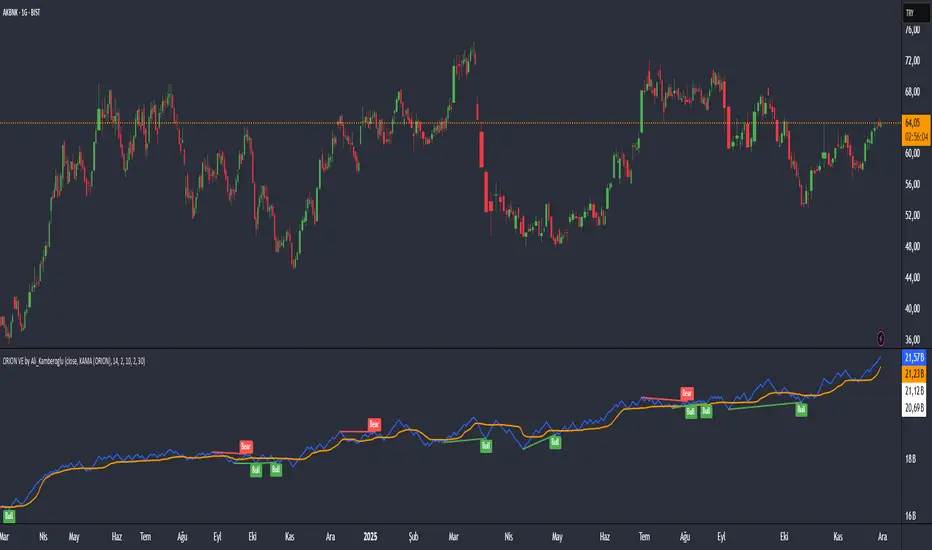
ORION Volume Engine by Ali_KamberogluORION Volume Engine by Ali_Kamberoglu | Look Beyond Volume, Track the "Smart Money"
Developer: Ali Kamberoğlu
Overview: What Price Doesn't Say, Volume Reveals
The ORION Volume Engine (VE) is a sophisticated market force analysis center that steps in where standard volume indicators fall short. This tool takes the classic On-Balance Volume (OBV) indicator and transforms it into an intelligent analysis engine that filters market noise, detects "explosions" in volume, and, most importantly, automatically uncovers the critical divergences between price and volume.
ORION VE tells you not just where the volume is flowing, but also when that flow might be signaling an impending trend reversal.
The ORION Advantage: Why It's Different
The power of ORION VE comes from three intelligent layers that turn the standard OBV into an information hub:
Layer 1 - The Adaptive Signal Line (Smart KAMA Integration):
The raw data of OBV can be choppy and misleading. ORION VE uses the Adaptive KAMA engine to clean this noise, adapting to market conditions. When the market is flowing in a strong trend, KAMA speeds up to keep you in the trend. When the market is indecisive and sideways, it slows down, protecting you from early or false signals. This provides a revolutionary level of clarity in OBV analysis.
Layer 2 - Volume Volatility (Bollinger Bands on OBV):
This unique feature offers the option to draw Bollinger Bands not on the price, but directly on the OBV itself. What does this mean? You can now see when not just the price, but the volume flow itself is "squeezing" and when it's ready to "explode." A breakout of the OBV line from its own Bollinger Band is a powerful signal of an extraordinary increase in volume flow in that direction, confirming the current trend.
Layer 3 - The Game-Changing Feature: Fully Automatic Volume Divergence Engine
One of the most powerful signals heralding the end of a trend is a volume divergence. ORION VE finds these priceless signals for you, automatically:
Bullish Divergence 🐂: Is the price falling to new lows while the OBV (volume) refuses to fall, making higher lows? This is the clearest sign that selling pressure is exhausted and "smart money" is quietly accumulating. You are instantly alerted with a "Bull" label on your chart.
Bearish Divergence 🐻: Is the price hitting record highs, but the OBV is not supporting this rise with sufficient volume and is making lower highs? This is a signal that the power behind the trend is fading and a sharp decline may be imminent. The "Bear" label prepares you to protect your position or take profits.
High-Probability Trading Strategies:
Strongest BUY Signal:
A Bullish Divergence appears on the chart with a "Bull" label.
The OBV line crosses above its orange Adaptive KAMA signal line.
This is an A+ grade buying opportunity, indicating that smart money is stepping in and momentum is starting.
Strongest SELL Signal:
A Bearish Divergence appears on the chart with a "Bear" label.
The OBV line crosses below its orange Adaptive KAMA signal line.
This is a high-probability shorting opportunity, indicating that the uptrend is not supported by volume and momentum is shifting to the sellers.
Disclaimer
This indicator is a professional analysis tool developed to assist in your trading decisions. No signal or analysis constitutes investment advice. Trading in financial markets involves high risk, and past performance is not a guarantee of future results. Please always apply your own risk management strategies.
MA Crossover Scalper [4H]//@version=5
indicator("MA Crossover Scalper ", overlay=false)
// Market Cap Filter (Volume as proxy)
volumeValid = volume >= 500000 and volume <= 4000000
// MA Crossover System
ma9 = ta.sma(close, 9)
ma21 = ta.sma(close, 21)
bullishCross = ta.crossover(ma9, ma21) and close > ma21
bearishCross = ta.crossunder(ma9, ma21) and close < ma21
// Volume Confirmation
volumeSpike = volume > ta.sma(volume, 20) * 1.3
// Final Signals
bullSignal = bullishCross and volumeSpike and volumeValid
bearSignal = bearishCross and volumeSpike and volumeValid
// Output for Screener
plot(bullSignal ? 1 : 0, "Bull MA Cross", color=color.green)
plot(bearSignal ? 1 : 0, "Bear MA Cross", color=color.red)

DarkPool's RSi DarkPool's RSi is an enhanced momentum oscillator designed to automatically detect structural discrepancies between price action and the Relative Strength Index. While retaining the standard RSI visualization, this script overlays advanced divergence recognition logic to identify potential trend reversals.
The tool identifies pivot points in real-time and compares recent peaks and valleys against historical data. When the momentum of the RSI contradicts the direction of price action, the indicator highlights these events using dynamic trendlines, shape markers, and background coloring. A built-in dashboard table provides an immediate status check of active divergence signals.
Key Features
Automated Divergence Detection: Automatically spots both Regular Bullish and Regular Bearish divergences based on pivot lookback settings.
Dynamic Visuals: Draws physical lines connecting RSI peaks or troughs to visualize the divergence angle, alongside triangle markers indicating the signal direction.
Active Status Dashboard: A data table located on the chart monitors the current state of the market, flagging signals as "Active" when detected.
Standard RSI Overlay: Includes standard Overbought (70) and Oversold (30) reference lines for traditional momentum trading.
How to Use
1. Reading the Standard RSI The black line represents the Relative Strength Index.
Overbought (Above 70): Suggests the asset may be overvalued and due for a pullback.
Oversold (Below 30): Suggests the asset may be undervalued and due for a bounce.
Midline (50): Acts as a trend filter; values above 50 indicate bullish momentum, while values below 50 indicate bearish momentum.
2. Trading Divergences The primary function of this tool is to identify reversal setups.
Bullish Divergence (Green Triangle/Line): Occurs when Price makes a Lower Low, but the RSI makes a Higher Low. This indicates that selling momentum is exhausting and a price increase may follow.
Bearish Divergence (Red Triangle/Line): Occurs when Price makes a Higher High, but the RSI makes a Lower High. This indicates that buying momentum is fading and a price decrease may follow.
3. Visual Aids
Lines: The script draws solid lines directly on the RSI pane connecting the relevant pivot points to confirm the divergence slope.
Background Color: When a divergence is detected, the background of the indicator pane will highlight briefly (Green for Bullish, Red for Bearish) to draw attention to the new signal.
4. The Dashboard A small table in the bottom right corner tracks the status of the signals.
Status: ACTIVE: A divergence has been detected within the last 10 bars.
Status: None: No recent divergence patterns have been identified.
Disclaimer This indicator is provided for educational and informational purposes only. It does not constitute financial advice, investment recommendations, or a guarantee of future results. Trading cryptocurrencies and financial markets involves a high level of risk. Always perform your own due diligence before making any trading decisions.

ORION Fast Momentum Engine by Ali_KamberogluORION Fast Momentum Engine by Ali_Kamberoglu | Reinventing RSI: Adaptive Signals & Auto Divergences
Developer: Ali Kamberoğlu
Overview: Escape the Noise of Standard RSI
The ORION Fast Momentum Engine (FME) is an all-in-one analytical powerhouse that takes the classic RSI indicator and redesigns it for 21st-century market conditions. It is engineered to eliminate the biggest problems of the standard RSI: false signals, lag, and noise. This tool not only shows you the momentum but also automatically reveals its character, its volatility, and, most importantly, when it's diverging from the price.
ORION FME is not just another oscillator; it's an intelligent analysis engine built into the RSI.
The ORION Advantage: Why It's Different
The power of ORION FME comes from three revolutionary layers it adds to the standard RSI:
Layer 1 - The Smart Signal Line (Adaptive KAMA Integration):
Fixed-period moving averages are a thing of the past. ORION FME uses the Adaptive KAMA engine as its signal line, which adjusts to market conditions. When the market is trending, it speeds up to give you early signals. When the market is choppy and sideways, it slows down, protecting you from countless false trades (whipsaws). No more "blind" signal lines that behave the same way in every condition.
Layer 2 - Momentum Volatility (Bollinger Bands on RSI):
This is a feature you won't find anywhere else. ORION FME offers the option to draw Bollinger Bands not on the price, but directly on the RSI itself. What does this mean? You can now see when not just the price, but the momentum itself is "squeezing" and ready for a breakout. When the RSI breaks out of its own Bollinger Bands, it's a sign of an extraordinary surge in momentum.
Layer 3 - The Game-Changing Feature: Fully Automatic Divergence Engine
Put an end to the tedious task of hunting for divergences! ORION FME includes the powerful divergence engine that has become a signature of the ORION series.
Bullish Divergence 🐂: Is the price making lower lows while the RSI is making higher lows? ORION FME detects this instantly and marks it with a "Bull" label on your chart, signaling a potential bottom and a rally.
Bearish Divergence 🐻: Is the price renewing its highs while the RSI's momentum is fading? This is the clearest sign that the rally is losing its strength. The "Bear" label warns you in advance of a potential top and decline.
High-Probability Trading Strategies:
Strongest BUY Signal:
A Bullish Divergence appears on the chart with a "Bull" label.
The RSI turns up from the oversold zone (below 30) and crosses above its adaptive KAMA signal line.
This is an A+ grade, multi-confirmation buying opportunity.
Strongest SELL Signal:
A Bearish Divergence appears on the chart with a "Bear" label.
The RSI turns down from the overbought zone (above 70) and crosses below its adaptive KAMA signal line.
This is a high-probability shorting opportunity.
Disclaimer
This indicator is a professional analysis tool developed to assist in your trading decisions. No signal or analysis constitutes investment advice. Trading in financial markets involves high risk, and past performance is not a guarantee of future results. Please always apply your own risk management strategies.
